> ## Documentation Index
> Fetch the complete documentation index at: https://docs.cloudthinker.io/llms.txt
> Use this file to discover all available pages before exploring further.
# Customize Agents
> Edit how default agents talk, choose what they can reach, and create your own agents
The five default agents work out of the box. Customization lets you change **how they talk** (tone, rules, language) and **what they can reach** (connections). When the defaults aren't enough, you can build your own agent.
Open [Agents](https://app.cloudthinker.io/agents) to start. The left panel groups agents into **Core Team** (the five defaults) and **Custom** (your own). Click any agent to open its settings dialog — two tabs (**Identity**, **Connections**). Personality (Instructions, Language, Learning mode) lives at the bottom of the **Identity** tab.
Customizing agents requires **workspace admin** permissions. Members can chat with agents but can't edit them.
***
## What you can change
| Field | Default agents (Alex, Oliver, Tony, Kai, Anna) | Custom agents |
| ------------------------------------- | -------------------------------------------------------------- | ---------------------------------------- |
| @mention | Locked | Set once on creation, can't change later |
| Name, Role, Goal | Locked | Editable |
| Instructions, Language, Learning mode | Editable | Editable |
| Connections | Attach / detach (Anna is read-only — inherits from the others) | Attach / detach |
| Active state | Auto — off when no connections (Anna is always on) | Manual |
Default agents come pre-optimized for specialized tasks (cloud, security, database, Kubernetes, and Anna for coordination). Their identity stays locked so the tuning isn't lost — you can still adjust **Instructions**, **Language**, **Learning mode**, and **Connections** to fit your workflow.
***
## Plan tiers
Editing default agents works on **every plan**. Only the number of custom agents changes.
| Plan | Custom agents |
| ---------- | ------------- |
| Free | 1 |
| Team | 5 |
| Scale | 10 |
| Scale + | 10 |
| Enterprise | Unlimited |
Hit the limit? Delete an unused agent or [upgrade your plan](/guide/billing/pricing).
***
## Create a custom agent
Need an agent for something the defaults don't cover — a billing analyst, an on-call summarizer, a documentation specialist? Build your own.
Click the **+** next to **Custom** on the [Agents](https://app.cloudthinker.io/agents) page, then pick how to create it.
Best when you know **what the agent should do** but don't want to fill every field yourself.
Describe what you want in one sentence — Anna takes it from there. She typically confirms:
* **Name and @mention** — suggests options based on your description.
* **Role and Goal** — drafts both for you to approve or tweak.
* **Model Tier** — recommends Light / Pro / Ultra based on task complexity.
* **Instructions** — generates a first draft you can refine.
* **Connections** — asks which to attach (cloud, database, K8s, MCP).
* **Learning mode** — Auto or Offer.
Example prompt: *"I need an agent that watches AWS spend and pings me when daily cost jumps more than 20%."*
You can edit any field afterward from the agent's settings dialog.
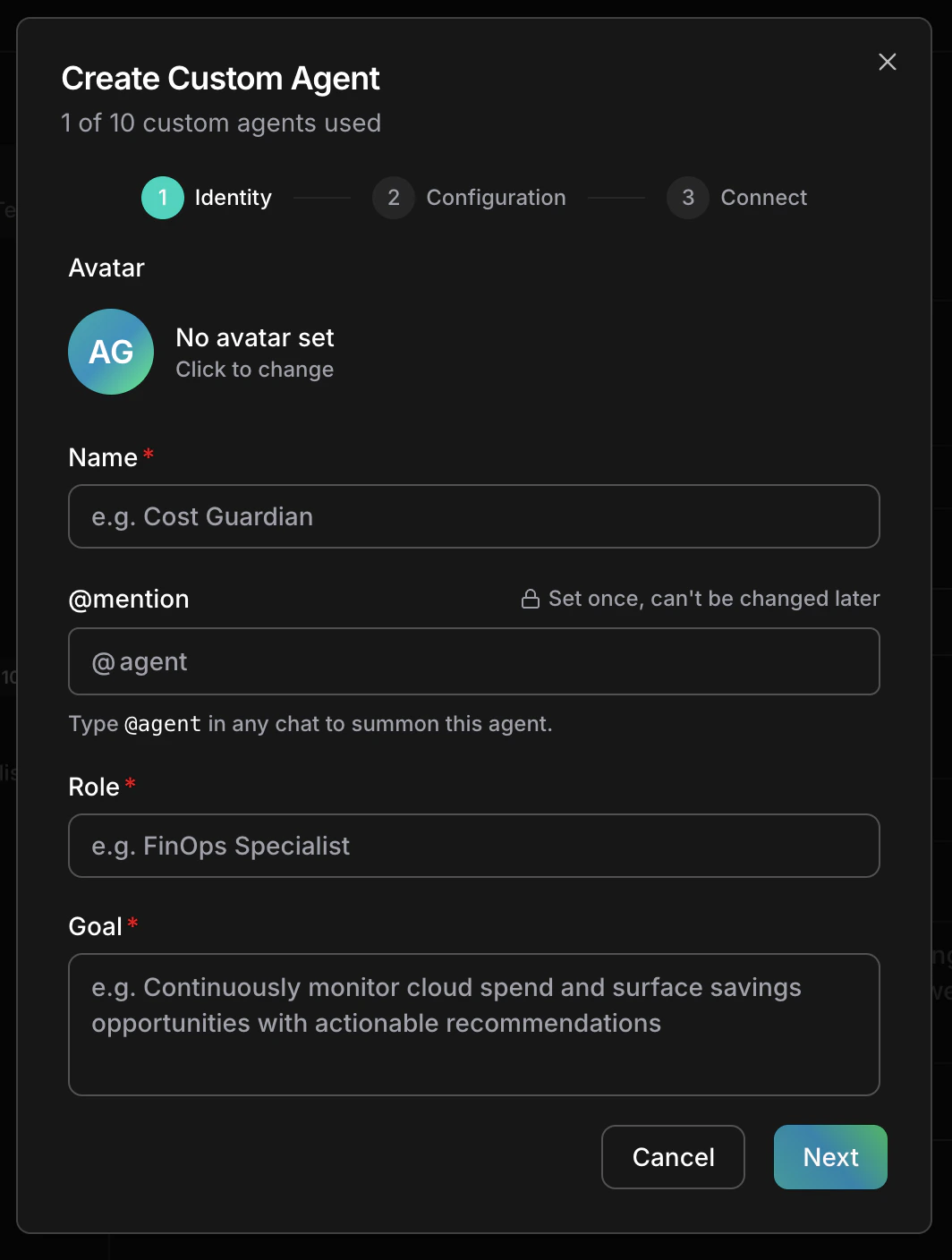
Best when you want full control over every field upfront. The dialog walks you through three steps. The header shows your custom-agent quota for the current plan (e.g. "1 of 10 custom agents used" on Scale).
* **Avatar** — click the tile to change it (defaults to your initials on a gradient).
* **Name** — e.g. "Cost Guardian".
* **@mention** — chat handle (e.g. `@cost-guardian`). Must be unique and can't reuse `@alex`, `@oliver`, `@tony`, `@kai`, `@anna`. **Set once — can't change later.**
* **Role** — short title (e.g. "FinOps Specialist").
* **Goal** — one sentence on what this agent does.
Click **Next**.
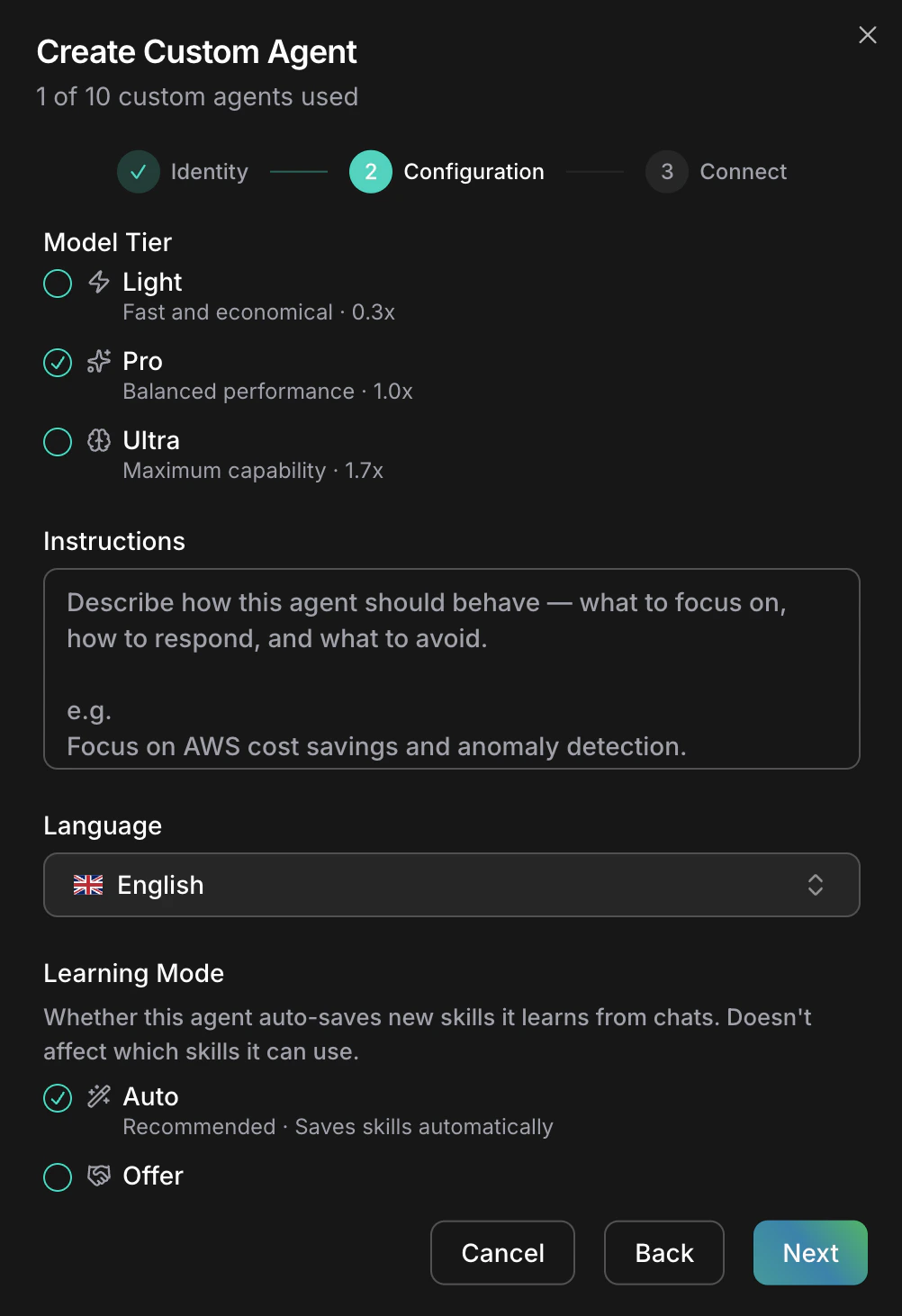
 * **Model Tier** — pick **Light** (fast, lowest credit cost), **Pro** (balanced), or **Ultra** (max capability, highest credit cost). See [Pricing](/guide/billing/pricing) for current credit multipliers.
* **Instructions** — one textarea describing how the agent should behave: what to focus on, how to respond, what to avoid. Write as plain sentences — guidelines, constraints, tone, and response format all live here.
* **Language** — reply language.
* **Learning mode** — **Auto** saves new skills automatically; **Offer** asks before saving.
Click **Next**.
* **Model Tier** — pick **Light** (fast, lowest credit cost), **Pro** (balanced), or **Ultra** (max capability, highest credit cost). See [Pricing](/guide/billing/pricing) for current credit multipliers.
* **Instructions** — one textarea describing how the agent should behave: what to focus on, how to respond, what to avoid. Write as plain sentences — guidelines, constraints, tone, and response format all live here.
* **Language** — reply language.
* **Learning mode** — **Auto** saves new skills automatically; **Offer** asks before saving.
Click **Next**.
 Optional. Use the **Builtin** and **MCP** tabs to pick which connections this agent can reach. You can attach more later from Agent Settings.
Click **Skip and Create** to finish.
Optional. Use the **Builtin** and **MCP** tabs to pick which connections this agent can reach. You can attach more later from Agent Settings.
Click **Skip and Create** to finish.
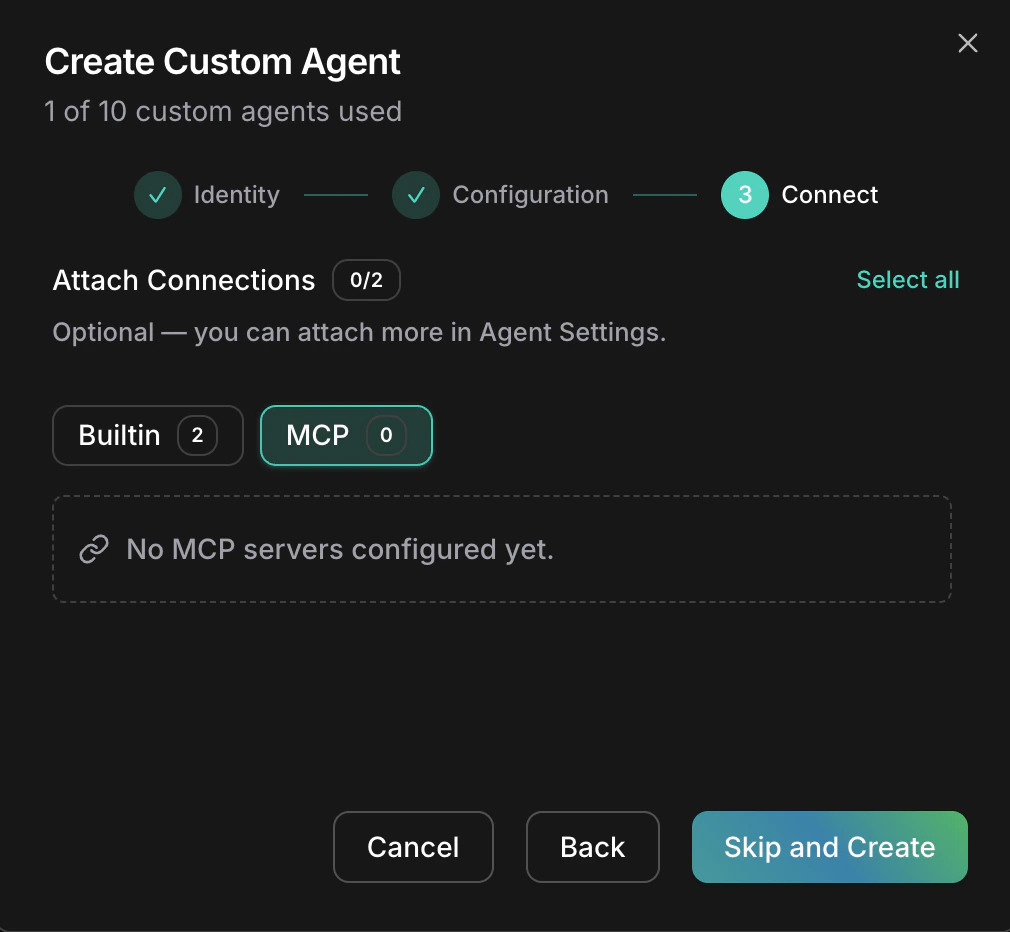 The agent appears under **Custom** and is reachable via its @mention handle in chat.
***
## Edit a default agent
Change tone, rules, language, and more. The agent's identity (name, @mention, role, goal) stays the same — only how it speaks and behaves changes.
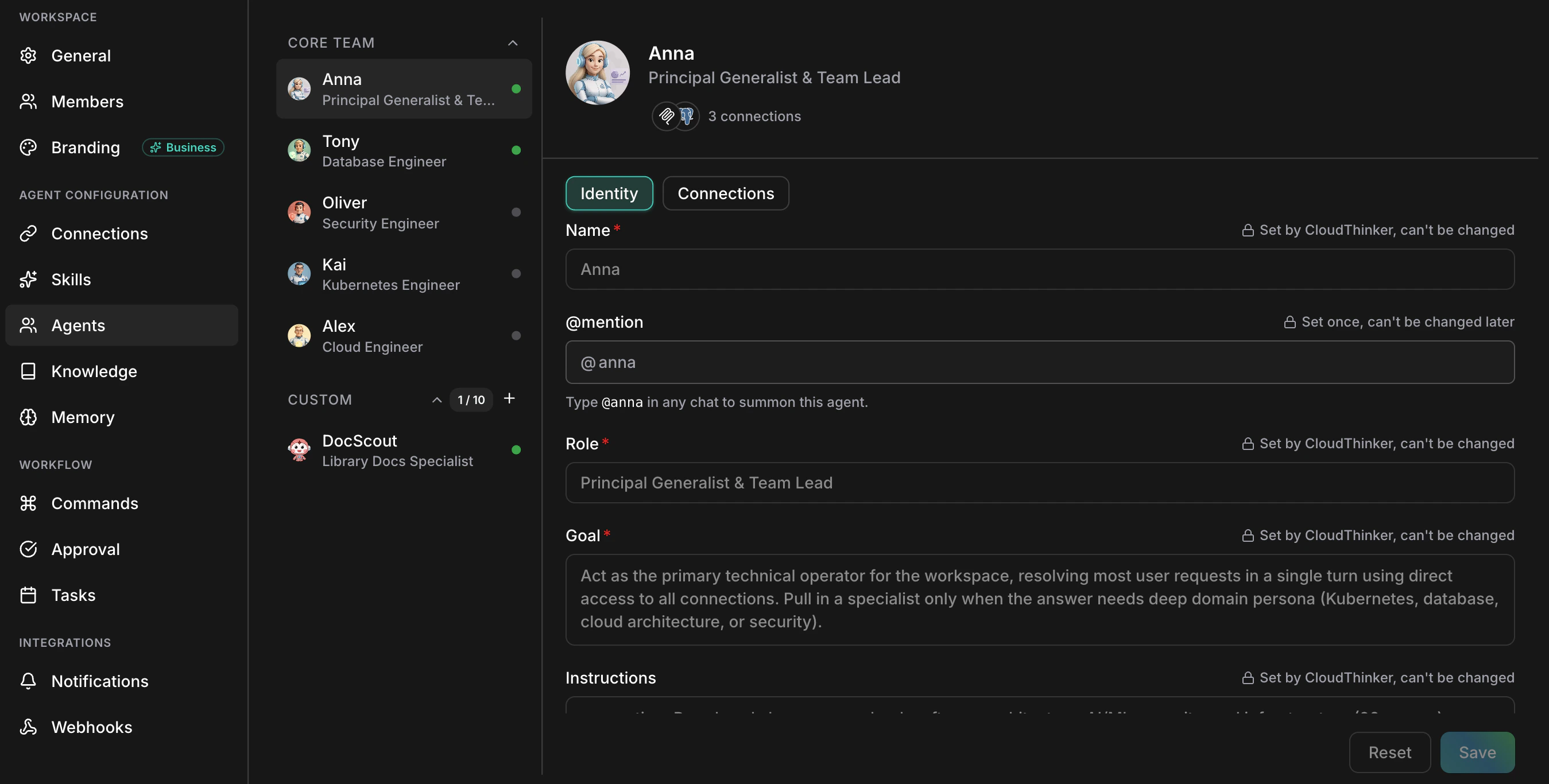
Go to [Agents](https://app.cloudthinker.io/agents) and click an agent in **Core Team**. The dialog opens on the **Identity** tab.
On the **Identity** tab, Name, Role, and Goal are locked with a "Set by CloudThinker, can't be changed" hint; @mention shows "Set once, can't be changed later". Scroll down on the same tab to edit:
* **Instructions** — one textarea for house rules, hard limits, tone, and response format. Write them as plain sentences (e.g. *"Reply in terse bullet points. Never propose changes that need write access. Escalate anomalies over \$500."*).
* **Language** — reply language.
* **Learning mode** — **Auto** saves new skills automatically; **Offer** asks before saving.
Click **Save** in the bottom-right. Your changes apply on the next message.
The agent appears under **Custom** and is reachable via its @mention handle in chat.
***
## Edit a default agent
Change tone, rules, language, and more. The agent's identity (name, @mention, role, goal) stays the same — only how it speaks and behaves changes.
Go to [Agents](https://app.cloudthinker.io/agents) and click an agent in **Core Team**. The dialog opens on the **Identity** tab.
On the **Identity** tab, Name, Role, and Goal are locked with a "Set by CloudThinker, can't be changed" hint; @mention shows "Set once, can't be changed later". Scroll down on the same tab to edit:
* **Instructions** — one textarea for house rules, hard limits, tone, and response format. Write them as plain sentences (e.g. *"Reply in terse bullet points. Never propose changes that need write access. Escalate anomalies over \$500."*).
* **Language** — reply language.
* **Learning mode** — **Auto** saves new skills automatically; **Offer** asks before saving.
Click **Save** in the bottom-right. Your changes apply on the next message.
 ***
## Attach connections
Connections are how an agent reaches your cloud, databases, Kubernetes, or MCP servers. Alex, Oliver, Tony, and Kai start with no connections — you decide what each can touch.
From the agent dialog, click **Connections**. The header shows the count (e.g. "3 connections").
Use the sub-tabs to switch between **Builtin** (cloud, database, Kubernetes) and **MCP**.
Click **Add** to attach, **Remove** to detach. Save to apply.
A default agent with **no connections is automatically off**. Attach at least one to turn it back on.
**Anna's connections are managed for you.** Anna coordinates the other agents and inherits their reach, so her Connections tab is read-only. Attach connections to Alex, Oliver, Tony, or Kai instead.
***
## Examples
| What you want | What to do |
| ----------------------------------------------------- | --------------------------------------------------------------------------------------------------------------------------- |
| Tony replies in Vietnamese with strict SQL formatting | Set **Language** to Vietnamese; add a line in Instructions: *"Format SQL with uppercase keywords and one clause per line."* |
| Oliver only recommends, never changes | Add to Instructions: *"Recommend only — never propose changes that need write access."* |
| Alex reports cost in EUR with weekly digests | Add to Instructions: *"Report cost in EUR. Summarize spend weekly."* Attach a cloud connection. |
***
## Things to know
* Edits apply on the **next** message — in-flight chats finish under the old settings.
* Pick a custom agent's @mention carefully — it's set once and you'll be living with it.
***
## Next steps
Wire up cloud, database, Kubernetes, and MCP connections
Profiles for Alex, Oliver, Tony, Kai, and Anna
Add domain knowledge to any agent
`@agent #tool` mention syntax
***
## Attach connections
Connections are how an agent reaches your cloud, databases, Kubernetes, or MCP servers. Alex, Oliver, Tony, and Kai start with no connections — you decide what each can touch.
From the agent dialog, click **Connections**. The header shows the count (e.g. "3 connections").
Use the sub-tabs to switch between **Builtin** (cloud, database, Kubernetes) and **MCP**.
Click **Add** to attach, **Remove** to detach. Save to apply.
A default agent with **no connections is automatically off**. Attach at least one to turn it back on.
**Anna's connections are managed for you.** Anna coordinates the other agents and inherits their reach, so her Connections tab is read-only. Attach connections to Alex, Oliver, Tony, or Kai instead.
***
## Examples
| What you want | What to do |
| ----------------------------------------------------- | --------------------------------------------------------------------------------------------------------------------------- |
| Tony replies in Vietnamese with strict SQL formatting | Set **Language** to Vietnamese; add a line in Instructions: *"Format SQL with uppercase keywords and one clause per line."* |
| Oliver only recommends, never changes | Add to Instructions: *"Recommend only — never propose changes that need write access."* |
| Alex reports cost in EUR with weekly digests | Add to Instructions: *"Report cost in EUR. Summarize spend weekly."* Attach a cloud connection. |
***
## Things to know
* Edits apply on the **next** message — in-flight chats finish under the old settings.
* Pick a custom agent's @mention carefully — it's set once and you'll be living with it.
***
## Next steps
Wire up cloud, database, Kubernetes, and MCP connections
Profiles for Alex, Oliver, Tony, Kai, and Anna
Add domain knowledge to any agent
`@agent #tool` mention syntax