> ## Documentation Index
> Fetch the complete documentation index at: https://docs.cloudthinker.io/llms.txt
> Use this file to discover all available pages before exploring further.
# Approval
> Control when agents pause for approval by setting each tool to auto-approve, require approval, or disabled
Approval settings control when an agent must pause and ask you before running a tool. You set each tool to auto-approve, require approval, or disabled — balancing automation speed against safety.
***
## Why approval
* **Trust builds incrementally.** Start with write tools set to require approval, then auto-approve routine operations once you've verified agent behavior.
* **Reads stay fast, writes stay safe.** Read-only tools run without prompts; anything that changes infrastructure can be gated.
* **You see the exact command first.** Every approval prompt shows the command or script before it runs, so nothing executes sight unseen.
* **Every decision is logged.** Approvals create an audit trail that answers "who approved what change and why" for compliance reviews.
* **High-risk operations stay gated.** Keep IAM changes and database schema modifications permanently approval-required.
***
## Configure tool permissions
Set the approval mode per tool, per connection.
Navigate to [Connections](https://app.cloudthinker.io/connectors?tab=builtin-connections) and select the **Built-in Connections** tab.
Find the connection you want to configure, such as Amazon Web Services.
Click **Tool Settings** to open the configuration modal.
For each tool, set:
* **Enabled** — allow or disallow agents from using this tool
* **Requires User Approval** — require manual approval before execution
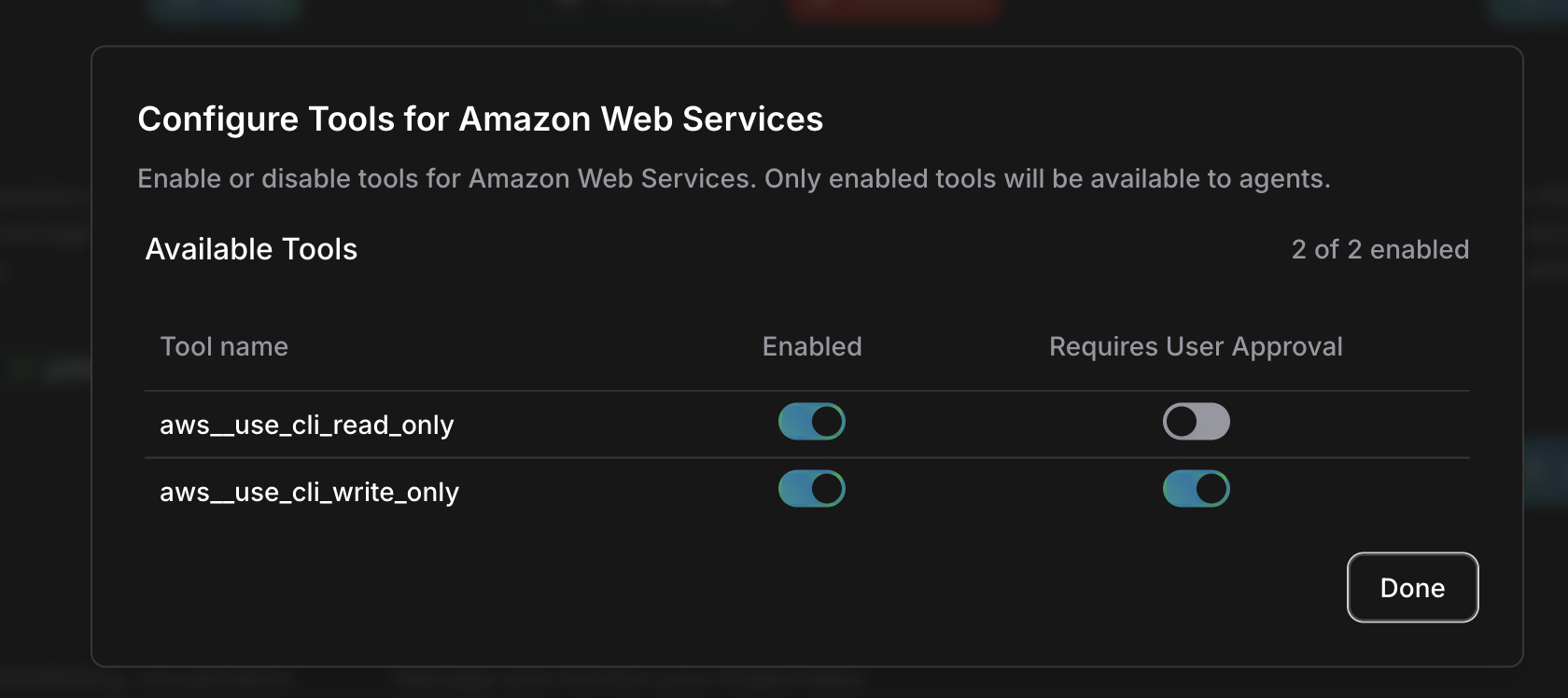 The same per-tool flags also appear under **Approval** in workspace settings, on the **Tool Permissions** tab.
***
## Approval modes
Each tool runs in one of three modes:
| Mode | What happens | Use for |
| --------------------- | ------------------------------------------------ | ------------------------------------------ |
| **Auto-approved** | The agent executes without asking | Read-only analysis, safe operations |
| **Requires approval** | The agent pauses and waits for your confirmation | Write operations, infrastructure changes |
| **Disabled** | The agent cannot use this tool at all | Sensitive capabilities you want off-limits |
A safe starting configuration separates reads from writes:
| Tool type | Recommended setting | Examples |
| --------- | ------------------- | ------------------------------------------------------------------------------ |
| Read-only | Auto-approved | `aws_use_cli_read_only`, `gcp_use_cli_read_only`, `azure_use_cli_read_only` |
| Write | Requires approval | `aws_use_cli_write_only`, `gcp_use_cli_write_only`, `azure_use_cli_write_only` |
***
## The approval prompt
When an agent attempts an operation that requires approval, it pauses and presents a prompt.
The same per-tool flags also appear under **Approval** in workspace settings, on the **Tool Permissions** tab.
***
## Approval modes
Each tool runs in one of three modes:
| Mode | What happens | Use for |
| --------------------- | ------------------------------------------------ | ------------------------------------------ |
| **Auto-approved** | The agent executes without asking | Read-only analysis, safe operations |
| **Requires approval** | The agent pauses and waits for your confirmation | Write operations, infrastructure changes |
| **Disabled** | The agent cannot use this tool at all | Sensitive capabilities you want off-limits |
A safe starting configuration separates reads from writes:
| Tool type | Recommended setting | Examples |
| --------- | ------------------- | ------------------------------------------------------------------------------ |
| Read-only | Auto-approved | `aws_use_cli_read_only`, `gcp_use_cli_read_only`, `azure_use_cli_read_only` |
| Write | Requires approval | `aws_use_cli_write_only`, `gcp_use_cli_write_only`, `azure_use_cli_write_only` |
***
## The approval prompt
When an agent attempts an operation that requires approval, it pauses and presents a prompt.
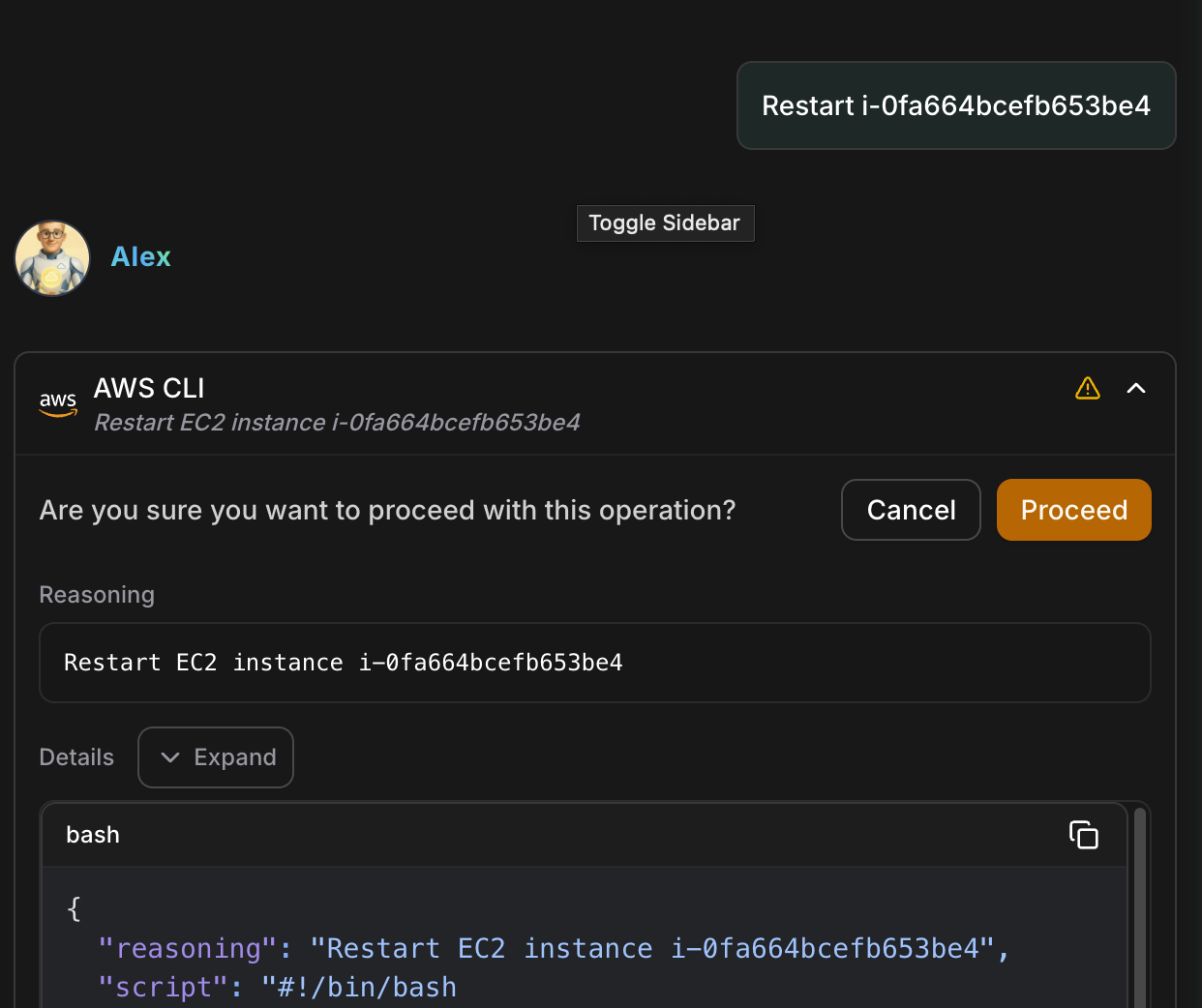 | Element | Description |
| ------------- | ---------------------------------------------------------- |
| **Operation** | What the agent wants to do, such as "Restart EC2 instance" |
| **Reasoning** | Why the agent is taking this action |
| **Details** | The exact command or script to be executed |
| **Proceed** | Approve the operation and let the agent continue |
| **Cancel** | Stop the operation and notify the agent |
Expand **Details** before deciding. Verify the exact command matches your expectations — approve the command, not just the summary.
***
## When agents ask for approval
Tools set to require approval pause the agent for operations like these:
| Category | Examples |
| -------------------------- | ---------------------------------------------------------- |
| **Infrastructure changes** | Restart instances, resize resources, modify configurations |
| **Write operations** | Create, update, or delete cloud resources |
| **Security actions** | IAM changes, security group modifications |
| **Database operations** | Schema changes, data modifications |
| **Kubernetes changes** | Scale deployments, modify configurations |
***
## Approval, Auto Mode, and agent autonomy
Per-tool approval is a static rule: the same tool always asks, always runs, or is always blocked. Two other settings interact with it.
**[Auto Mode](/guide/auto-mode)** replaces the static **Requires approval** flag with a classifier that reviews each write against what you asked for:
| Tool setting | Auto Mode off | Auto Mode on |
| ----------------- | ------------------- | ---------------------------------------------------- |
| Auto-approved | Runs without asking | Runs without asking |
| Requires approval | Always asks | Classifier decides case-by-case |
| Disabled | Never runs | Never runs — Auto Mode never enables a disabled tool |
Turn Auto Mode off and your per-tool rules resume unchanged.
**Agent autonomy** applies when agents run on their own, outside a live chat:
| Mode | What happens |
| ---------- | ---------------------------------------------------------------------------------- |
| **Manual** | The agent proposes the action and waits for a person to approve it before running. |
| **Auto** | The agent runs the action on its own and reports the result. |
Per-tool approval governs individual tool calls; autonomy mode governs whether an agent's proposed actions wait for a person at all.
***
## FAQ
When first connecting a new service, set all write tools to require approval. As you build confidence in agent behavior, selectively auto-approve routine operations.
Yes. Every approval is logged, showing who approved which change and why — a change-management record without the overhead of a full ITSM workflow.
You can cancel an operation from the approval prompt before it runs. Once approved, the command executes as shown in Details.
The **Requires approval** flags are paused while the classifier decides case-by-case. Disabled tools stay disabled. Turning Auto Mode off restores your rules exactly as configured.
***
## Related
Let a classifier auto-approve safe agent actions so chats flow without stopping
Learn how agents work and collaborate
Set up cloud and service connections
| Element | Description |
| ------------- | ---------------------------------------------------------- |
| **Operation** | What the agent wants to do, such as "Restart EC2 instance" |
| **Reasoning** | Why the agent is taking this action |
| **Details** | The exact command or script to be executed |
| **Proceed** | Approve the operation and let the agent continue |
| **Cancel** | Stop the operation and notify the agent |
Expand **Details** before deciding. Verify the exact command matches your expectations — approve the command, not just the summary.
***
## When agents ask for approval
Tools set to require approval pause the agent for operations like these:
| Category | Examples |
| -------------------------- | ---------------------------------------------------------- |
| **Infrastructure changes** | Restart instances, resize resources, modify configurations |
| **Write operations** | Create, update, or delete cloud resources |
| **Security actions** | IAM changes, security group modifications |
| **Database operations** | Schema changes, data modifications |
| **Kubernetes changes** | Scale deployments, modify configurations |
***
## Approval, Auto Mode, and agent autonomy
Per-tool approval is a static rule: the same tool always asks, always runs, or is always blocked. Two other settings interact with it.
**[Auto Mode](/guide/auto-mode)** replaces the static **Requires approval** flag with a classifier that reviews each write against what you asked for:
| Tool setting | Auto Mode off | Auto Mode on |
| ----------------- | ------------------- | ---------------------------------------------------- |
| Auto-approved | Runs without asking | Runs without asking |
| Requires approval | Always asks | Classifier decides case-by-case |
| Disabled | Never runs | Never runs — Auto Mode never enables a disabled tool |
Turn Auto Mode off and your per-tool rules resume unchanged.
**Agent autonomy** applies when agents run on their own, outside a live chat:
| Mode | What happens |
| ---------- | ---------------------------------------------------------------------------------- |
| **Manual** | The agent proposes the action and waits for a person to approve it before running. |
| **Auto** | The agent runs the action on its own and reports the result. |
Per-tool approval governs individual tool calls; autonomy mode governs whether an agent's proposed actions wait for a person at all.
***
## FAQ
When first connecting a new service, set all write tools to require approval. As you build confidence in agent behavior, selectively auto-approve routine operations.
Yes. Every approval is logged, showing who approved which change and why — a change-management record without the overhead of a full ITSM workflow.
You can cancel an operation from the approval prompt before it runs. Once approved, the command executes as shown in Details.
The **Requires approval** flags are paused while the classifier decides case-by-case. Disabled tools stay disabled. Turning Auto Mode off restores your rules exactly as configured.
***
## Related
Let a classifier auto-approve safe agent actions so chats flow without stopping
Learn how agents work and collaborate
Set up cloud and service connections