> ## Documentation Index
> Fetch the complete documentation index at: https://docs.cloudthinker.io/llms.txt
> Use this file to discover all available pages before exploring further.
# Approvals
> Decide which agent writes run alone, which wait for a person, and which never run, from one Approvals page
Approvals decides what happens each time an agent wants to change something through a [connection](/guide/connections/overview). A write runs, waits for a person, or is refused; reads always run.
## Why Approvals
* **Rules decide first.** A Rule names one kind of write and lets it run, asks a person first, or refuses it.
* **A mode covers the rest.** The Approval mode decides each write that no Rule covers.
* **The right people answer.** Default approvers answer every ask, unless a Rule names another group.
* **Agents propose, people accept.** An agent can draft a Rule, but a Rule does nothing until a person accepts it.
* **Every decision is on record.** Activity shows what each Rule decided and who approved.
## How a write is decided
Each write goes through these steps. The first step that gives an answer decides.
| Step | What decides | Result |
| - | - | - |
| 1. Always blocked | A built-in list of calls that never run | Refused. No person and no Rule can change this. |
| 2. [Rules](/guide/approvals/rules) | The Rules you accepted | **Allow** runs the write, **Ask first** waits for a person, **Deny** refuses it |
| 3. [Approval mode](/guide/approvals/approval-mode) | **Manual** or **Auto** for this run | Manual asks a person. Auto can let AI judgment allow a safe write, then asks you or refuses. |
| 4. [Who approves](/guide/approvals/approvers) | Default approvers or the group a Rule names | A person approves or declines the write |
When several Rules match one write, **Deny** wins over **Ask first**, and **Ask first** wins over **Allow**. In **Manual** mode, every write asks a person, also a write that an Allow Rule covers.
A read never asks. Approvals checks only calls that reach your connections; a local file change in the agent's own sandbox is not a write to your systems.
## The Approvals page
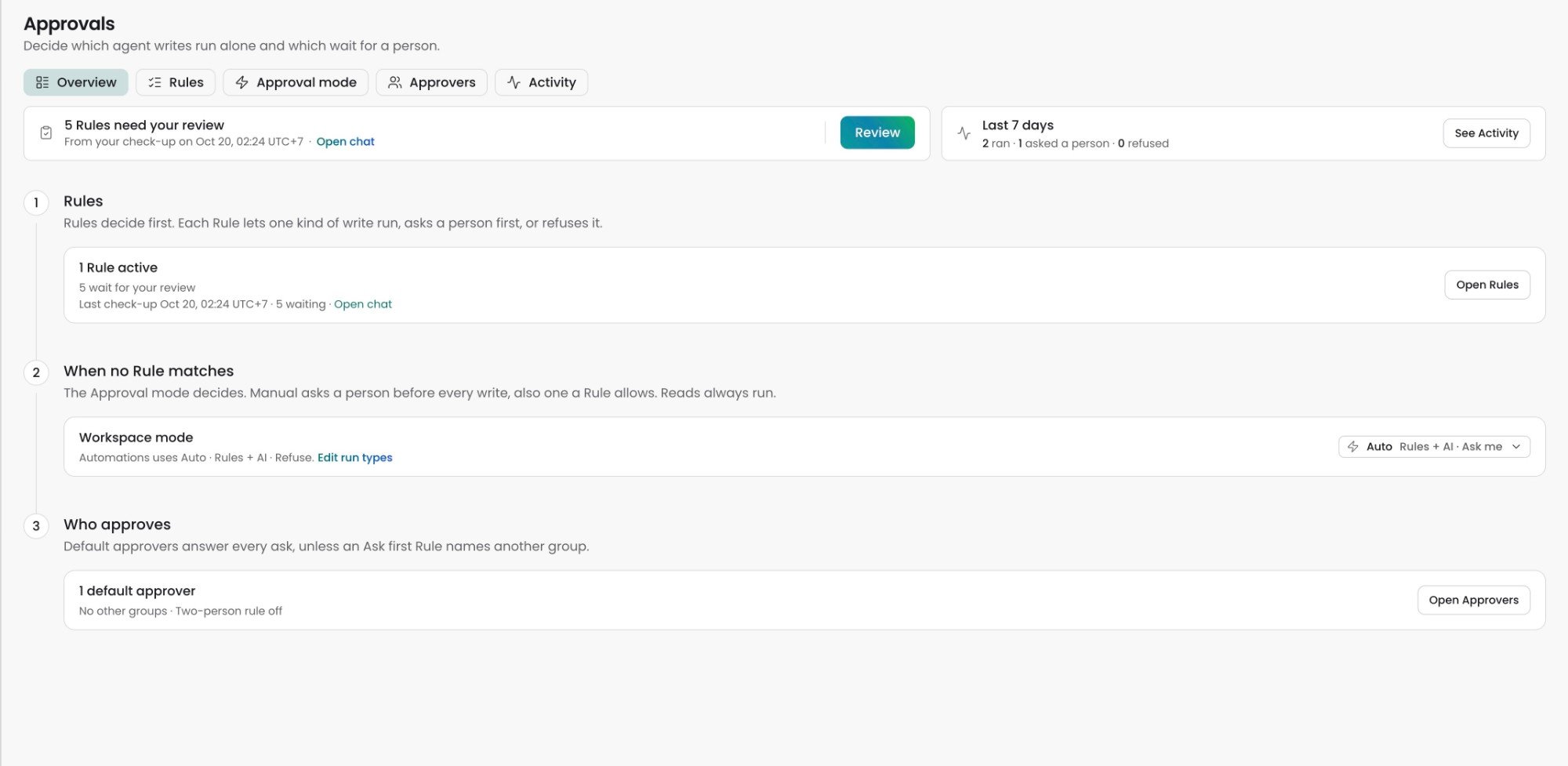
Open **Approvals** in the sidebar. The page has five tabs.
 | Tab | What you do there |
| - | - |
| **Overview** | See what needs you and the last 7 days, then follow the three steps: Rules, When no Rule matches, Who approves |
| **Rules** | Find, review, accept, edit, and turn off Rules. Import or export your policy as a file. |
| **Approval mode** | Set the mode for the workspace, for each run type, and for what people can pick in one chat |
| **Approvers** | Set Default approvers, approver groups, the two-person rule, and break-glass |
| **Activity** | See what each Rule decided in a period, and export it as CSV |
The **Overview** tab opens first. **Needs you** shows the Rules that wait for your review, with a **Review** button. **Last 7 days** counts the calls that ran, asked a person, or were refused.
## Answer an approval card
When a write must wait for a person, the agent pauses and the chat shows an approval card. The card names the action and the Connection it touches.
| Button | What it does |
| - | - |
| **Approve** | Runs this one call |
| **Approve for…** | Runs this call and lets the next calls like it run without asking for **1 hour**, **This incident**, or **30 days**. This makes a time-limited Rule called a Window. |
| **Approve and draft rule** | Runs this call now. A side chat drafts a Rule for you to accept, and the first chat keeps running. |
| **Decline** | Refuses the call. You can tell the agent why, so it can pick another route. |
| **Break glass…** | Runs one refused call once. Only an owner or admin sees it, and only when [break-glass](/guide/approvals/approvers#break-glass) is on. |
The server decides who sees **Approve** each time someone clicks. When you cannot approve, the card says who can, for example "Only On-call SRE can approve this." Anyone who can chat can **Decline**.
**Approve for…** shows only for a plain write on one Connection in an Auto mode, and only to a workspace admin. A delete, a Rule's ask, or a call in Manual mode never offers a Window. The same approve and decline buttons also show in [Google Chat](/guide/google-chat-integration).
## Who can change Approvals
| Workspace role | View the page | Change Rules, modes, and approvers | Approve a write |
| - | - | - | - |
| Admin | Yes | Yes | Yes |
| Developer | Yes | No | Yes, when no group limits it |
| Viewer | Yes | No | No |
Org Owners and Admins are workspace Admins in every workspace. A control you cannot use stays visible and says "Ask a workspace admin".
## FAQ
Rules replace them. Old runbook and Trust grants became Rule proposals with the source **Imported**. They wait under **Needs review** on the Rules tab, and they do nothing until you accept them.
No. An agent can propose a Rule, change its own proposal, or propose to turn a Rule off. A workspace admin must accept each one.
No. Always blocked calls never run. Break-glass cannot override them either.
The run uses **Manual** mode, which asks before every write. Check the chat, the Automation, the run type, and the workspace mode on the Approval mode tab.
## Related
Find, review, and accept the Rules that decide each write
Choose Manual or Auto for the workspace, a run type, or one chat
Choose who approves and check what each Rule decided
Run agent instructions on schedules, webhooks, and repository events
This documentation is built and hosted on [Mintlify](https://mintlify.com), a developer documentation platform.
| Tab | What you do there |
| - | - |
| **Overview** | See what needs you and the last 7 days, then follow the three steps: Rules, When no Rule matches, Who approves |
| **Rules** | Find, review, accept, edit, and turn off Rules. Import or export your policy as a file. |
| **Approval mode** | Set the mode for the workspace, for each run type, and for what people can pick in one chat |
| **Approvers** | Set Default approvers, approver groups, the two-person rule, and break-glass |
| **Activity** | See what each Rule decided in a period, and export it as CSV |
The **Overview** tab opens first. **Needs you** shows the Rules that wait for your review, with a **Review** button. **Last 7 days** counts the calls that ran, asked a person, or were refused.
## Answer an approval card
When a write must wait for a person, the agent pauses and the chat shows an approval card. The card names the action and the Connection it touches.
| Button | What it does |
| - | - |
| **Approve** | Runs this one call |
| **Approve for…** | Runs this call and lets the next calls like it run without asking for **1 hour**, **This incident**, or **30 days**. This makes a time-limited Rule called a Window. |
| **Approve and draft rule** | Runs this call now. A side chat drafts a Rule for you to accept, and the first chat keeps running. |
| **Decline** | Refuses the call. You can tell the agent why, so it can pick another route. |
| **Break glass…** | Runs one refused call once. Only an owner or admin sees it, and only when [break-glass](/guide/approvals/approvers#break-glass) is on. |
The server decides who sees **Approve** each time someone clicks. When you cannot approve, the card says who can, for example "Only On-call SRE can approve this." Anyone who can chat can **Decline**.
**Approve for…** shows only for a plain write on one Connection in an Auto mode, and only to a workspace admin. A delete, a Rule's ask, or a call in Manual mode never offers a Window. The same approve and decline buttons also show in [Google Chat](/guide/google-chat-integration).
## Who can change Approvals
| Workspace role | View the page | Change Rules, modes, and approvers | Approve a write |
| - | - | - | - |
| Admin | Yes | Yes | Yes |
| Developer | Yes | No | Yes, when no group limits it |
| Viewer | Yes | No | No |
Org Owners and Admins are workspace Admins in every workspace. A control you cannot use stays visible and says "Ask a workspace admin".
## FAQ
Rules replace them. Old runbook and Trust grants became Rule proposals with the source **Imported**. They wait under **Needs review** on the Rules tab, and they do nothing until you accept them.
No. An agent can propose a Rule, change its own proposal, or propose to turn a Rule off. A workspace admin must accept each one.
No. Always blocked calls never run. Break-glass cannot override them either.
The run uses **Manual** mode, which asks before every write. Check the chat, the Automation, the run type, and the workspace mode on the Approval mode tab.
## Related
Find, review, and accept the Rules that decide each write
Choose Manual or Auto for the workspace, a run type, or one chat
Choose who approves and check what each Rule decided
Run agent instructions on schedules, webhooks, and repository events
This documentation is built and hosted on [Mintlify](https://mintlify.com), a developer documentation platform.