> ## Documentation Index
> Fetch the complete documentation index at: https://docs.cloudthinker.io/llms.txt
> Use this file to discover all available pages before exploring further.
# Capabilities
> Look up every tool tag agents accept and the output each one produces — dashboards, reports, recommendations, and alerts.
Tool tags tell an agent what kind of output to produce — a dashboard, a report, an alert, and more. Add the tag directly after the agent mention, then write your instruction.
## Syntax
```text theme={null}
@agent #tool instruction
```
| Part | What it does |
| ------------- | --------------------------------------------------------------------------------------- |
| `@agent` | Routes the request to a specific agent: `@alex`, `@oliver`, `@tony`, `@kai`, or `@anna` |
| `#tool` | Sets the output format, placed immediately after the mention |
| `instruction` | Describes what you want, including scope and constraints |
For the full syntax, including combining tags, see [CloudThinker Language](/guide/language).
## Tool tags
| Tag | Output |
| ------------ | ------------------------------------------------------------------------------------------------ |
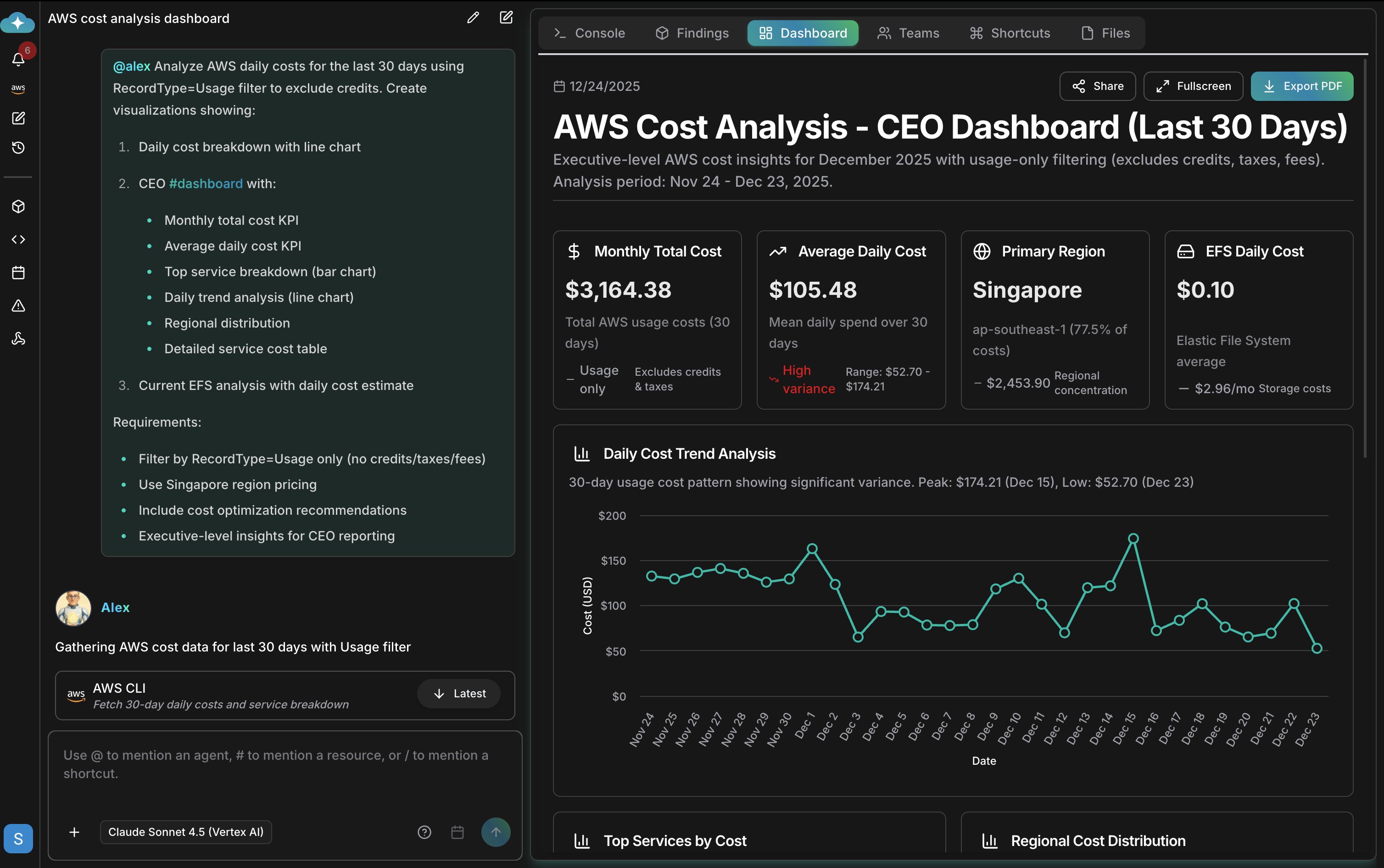
| `#dashboard` | Interactive dashboard with real-time metrics, filterable views, fullscreen mode, and PDF export |
| `#report` | Analysis document with executive summary, detailed findings, and prioritized recommendations |
| `#recommend` | Actionable recommendations prioritized by impact, with effort estimates and implementation steps |
| `#alert` | Monitoring notification triggered on the condition you define |
| `#chart` | Standalone data visualization |
| `#kb` | Search results from your organization's knowledge base |
## Dashboards
`#dashboard` produces an interactive artifact with live metrics that you can filter, view fullscreen, and export to PDF. See [Artifacts](/guide/artifacts/overview) for how dashboards are stored, shared, and managed.
 ## Examples
Generate analysis documents with `#report`:
```text theme={null}
@oliver #report SOC 2 compliance assessment
@anna #report quarterly infrastructure review
```
Get prioritized actions with `#recommend`:
```text theme={null}
@tony #recommend index optimizations for the orders table
@alex #recommend cost savings opportunities prioritized by impact
```
Set up monitoring and visualizations with `#alert` and `#chart`:
```text theme={null}
@kai #alert when node CPU exceeds 80% for 5 minutes
@alex #chart spending by service over the last 6 months
```
Add detailed instructions to shape the output:
```text theme={null}
@alex #dashboard AWS costs for the last 30 days
- Filter by production accounts only
- Show daily cost breakdown
- Include cost optimization recommendations
```
## Related
The complete `@agent #tool instruction` syntax reference and prompt patterns
Run pre-built operations that use these tool tags
Schedule outputs to run automatically — daily reports, weekly audits
See which outputs each agent specializes in
## Examples
Generate analysis documents with `#report`:
```text theme={null}
@oliver #report SOC 2 compliance assessment
@anna #report quarterly infrastructure review
```
Get prioritized actions with `#recommend`:
```text theme={null}
@tony #recommend index optimizations for the orders table
@alex #recommend cost savings opportunities prioritized by impact
```
Set up monitoring and visualizations with `#alert` and `#chart`:
```text theme={null}
@kai #alert when node CPU exceeds 80% for 5 minutes
@alex #chart spending by service over the last 6 months
```
Add detailed instructions to shape the output:
```text theme={null}
@alex #dashboard AWS costs for the last 30 days
- Filter by production accounts only
- Show daily cost breakdown
- Include cost optimization recommendations
```
## Related
The complete `@agent #tool instruction` syntax reference and prompt patterns
Run pre-built operations that use these tool tags
Schedule outputs to run automatically — daily reports, weekly audits
See which outputs each agent specializes in