> ## Documentation Index
> Fetch the complete documentation index at: https://docs.cloudthinker.io/llms.txt
> Use this file to discover all available pages before exploring further.
# Headless Chat
> Send one prompt to Anna from a script, wait for the answer on stdout, and collect long runs later or in CI
`cloudthinker chat -p` submits a prompt to Anna and waits for the answer. Anna's answer is the only thing on stdout, so the command drops straight into a pipe.
## Send a prompt
```bash theme={null}
cloudthinker chat -p "Name the three biggest cost drivers in a typical AWS account, one line each."
```
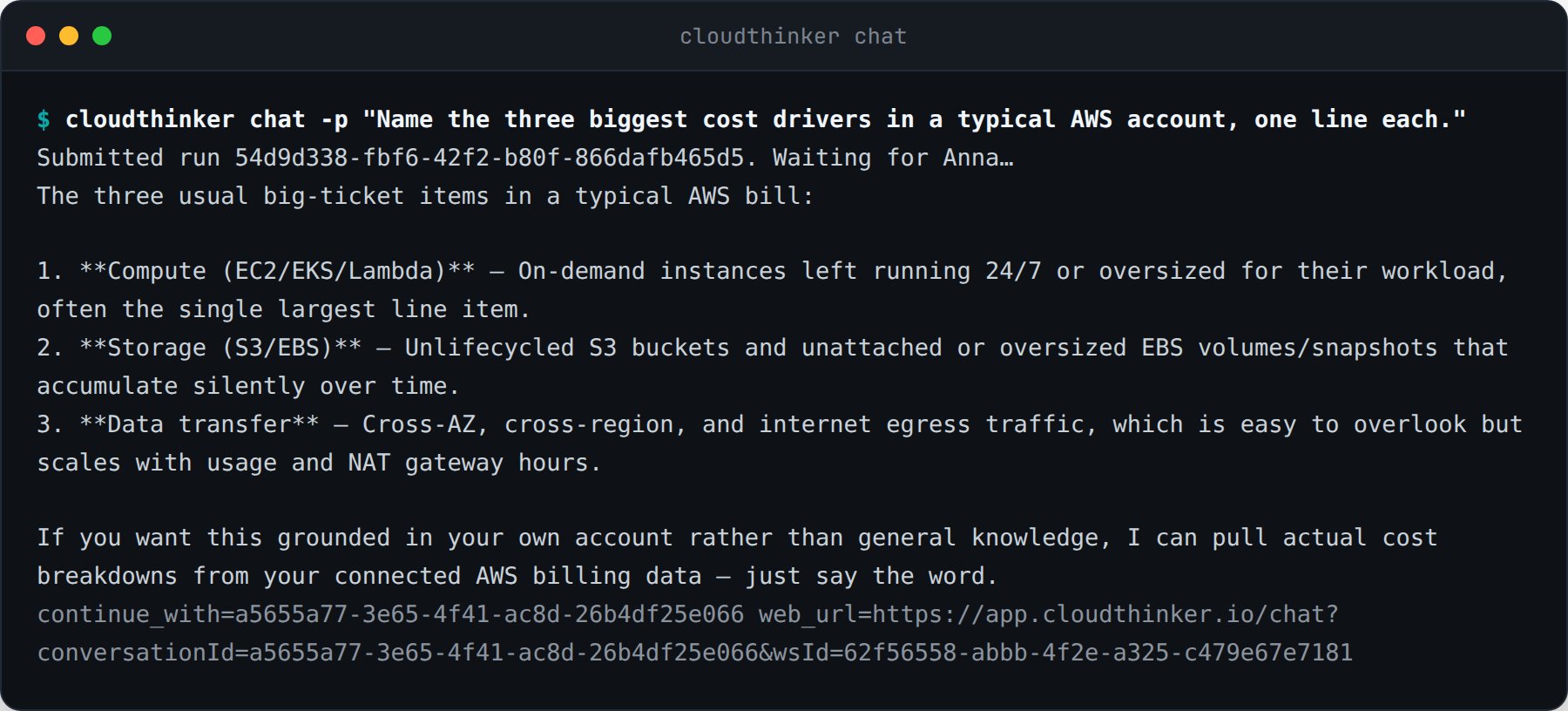 Progress, the run ID, and the continuation hint go to stderr. That split is what keeps the command pipeable:
```bash theme={null}
cloudthinker chat -p "Summarize yesterday's incidents" > summary.md
cloudthinker chat -p "List unused EBS volumes" | grep vol-
```
## Continue a conversation
Every terminal run prints `continue_with=` on stderr. Pass that ID, or the run ID, to keep the thread:
```bash theme={null}
cloudthinker chat -p "Draft the rollout plan"
cloudthinker chat -p "Remove the risky step" --continue 0f9e364e-9c34-406e-be7d-52a143fede85
```
The same conversation is visible in the web app through the `web_url` printed beside the hint.
## Submit now, collect later
A long investigation does not need to hold your terminal. `--no-wait` returns as soon as the run is queued:
```bash theme={null}
cloudthinker chat -p "Which S3 buckets have no lifecycle policy?" --no-wait --json
```
Progress, the run ID, and the continuation hint go to stderr. That split is what keeps the command pipeable:
```bash theme={null}
cloudthinker chat -p "Summarize yesterday's incidents" > summary.md
cloudthinker chat -p "List unused EBS volumes" | grep vol-
```
## Continue a conversation
Every terminal run prints `continue_with=` on stderr. Pass that ID, or the run ID, to keep the thread:
```bash theme={null}
cloudthinker chat -p "Draft the rollout plan"
cloudthinker chat -p "Remove the risky step" --continue 0f9e364e-9c34-406e-be7d-52a143fede85
```
The same conversation is visible in the web app through the `web_url` printed beside the hint.
## Submit now, collect later
A long investigation does not need to hold your terminal. `--no-wait` returns as soon as the run is queued:
```bash theme={null}
cloudthinker chat -p "Which S3 buckets have no lifecycle policy?" --no-wait --json
```
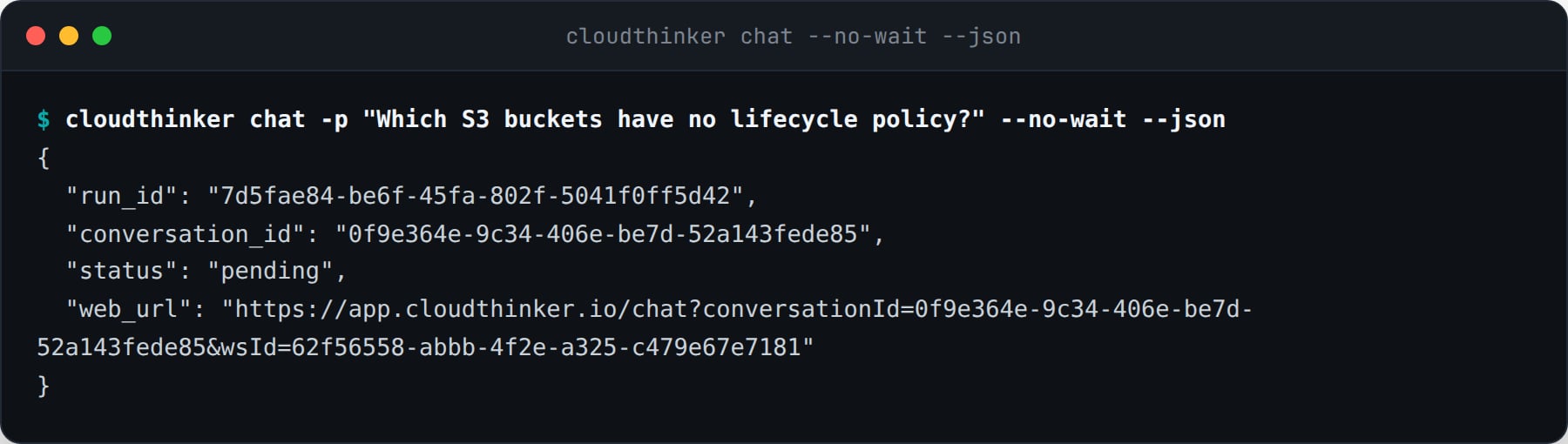 Collect the answer from any machine later:
```bash theme={null}
cloudthinker chat status 7d5fae84-be6f-45fa-802f-5041f0ff5d42 --wait
cloudthinker chat ls --limit 10
cloudthinker chat ls --conversation 0f9e364e-9c34-406e-be7d-52a143fede85 --json
```
A client-side timeout never cancels the run. `--timeout` bounds only how long the CLI waits; the run keeps going server-side and the CLI prints the `chat status` command that resumes it.
## Machine-readable output
`--json` writes one envelope to stdout instead of the plain answer.
| Field | Meaning |
| ----------------- | ------------------------------------------------------------------- |
| `run_id` | The run to poll with `chat status` |
| `conversation_id` | The thread to pass to `--continue` |
| `status` | `pending`, `running`, `succeeded`, `failed`, or `approval required` |
| `answer` | Anna's final answer, or `null` while the run is unfinished |
| `web_url` | The same conversation in the web app |
```bash theme={null}
cloudthinker chat -p "Check the error budget" --json | jq -r '.answer'
```
## Exit codes
A pipeline can branch on the outcome without parsing text.
| Code | Meaning |
| ---- | ------------------------------------------------------------ |
| 0 | The run finished and the answer was printed |
| 1 | The run failed, or the run ID is unknown |
| 2 | Bad usage, or the request was rejected by a workspace policy |
| 3 | Not logged in, or the credential expired |
| 4 | The CLI stopped waiting. The run continues server-side |
| 5 | The run paused for an approval in the browser |
`chat status` and `chat ls` are reads: they exit 0 whenever the fetch succeeds, whatever state the run itself is in.
## Use it in CI
Give the job a token, keep stdout for the answer, and let the exit code decide the outcome:
```bash theme={null}
export CLOUDTHINKER_TOKEN="$CLOUDTHINKER_CI_TOKEN"
if cloudthinker chat -p "Review last night's failed deployments" --timeout 900 > report.md; then
echo "report ready"
else
case $? in
4) echo "still running, collect it in the next job" ;;
5) echo "waiting for an approval in the browser" ;;
*) exit 1 ;;
esac
fi
```
## Related
Give a pipeline a credential of its own
Every command, flag, variable, and exit code
Collect the answer from any machine later:
```bash theme={null}
cloudthinker chat status 7d5fae84-be6f-45fa-802f-5041f0ff5d42 --wait
cloudthinker chat ls --limit 10
cloudthinker chat ls --conversation 0f9e364e-9c34-406e-be7d-52a143fede85 --json
```
A client-side timeout never cancels the run. `--timeout` bounds only how long the CLI waits; the run keeps going server-side and the CLI prints the `chat status` command that resumes it.
## Machine-readable output
`--json` writes one envelope to stdout instead of the plain answer.
| Field | Meaning |
| ----------------- | ------------------------------------------------------------------- |
| `run_id` | The run to poll with `chat status` |
| `conversation_id` | The thread to pass to `--continue` |
| `status` | `pending`, `running`, `succeeded`, `failed`, or `approval required` |
| `answer` | Anna's final answer, or `null` while the run is unfinished |
| `web_url` | The same conversation in the web app |
```bash theme={null}
cloudthinker chat -p "Check the error budget" --json | jq -r '.answer'
```
## Exit codes
A pipeline can branch on the outcome without parsing text.
| Code | Meaning |
| ---- | ------------------------------------------------------------ |
| 0 | The run finished and the answer was printed |
| 1 | The run failed, or the run ID is unknown |
| 2 | Bad usage, or the request was rejected by a workspace policy |
| 3 | Not logged in, or the credential expired |
| 4 | The CLI stopped waiting. The run continues server-side |
| 5 | The run paused for an approval in the browser |
`chat status` and `chat ls` are reads: they exit 0 whenever the fetch succeeds, whatever state the run itself is in.
## Use it in CI
Give the job a token, keep stdout for the answer, and let the exit code decide the outcome:
```bash theme={null}
export CLOUDTHINKER_TOKEN="$CLOUDTHINKER_CI_TOKEN"
if cloudthinker chat -p "Review last night's failed deployments" --timeout 900 > report.md; then
echo "report ready"
else
case $? in
4) echo "still running, collect it in the next job" ;;
5) echo "waiting for an approval in the browser" ;;
*) exit 1 ;;
esac
fi
```
## Related
Give a pipeline a credential of its own
Every command, flag, variable, and exit code