> ## Documentation Index
> Fetch the complete documentation index at: https://docs.cloudthinker.io/llms.txt
> Use this file to discover all available pages before exploring further.
# Agent Configuration
> Scope each agent's builtin tools, connections, and custom instructions from the Agents page
Configure what each agent can use and how it behaves from [Agents](https://app.cloudthinker.io/agents) in the CloudThinker console. Click an agent to open the **Agent Settings** dialog.
## Prerequisites
* Workspace admin permissions — [members](/guide/workspace-users) can chat with agents but can't edit them
* At least one [connection](/guide/connections/overview) in your workspace
## Settings tabs
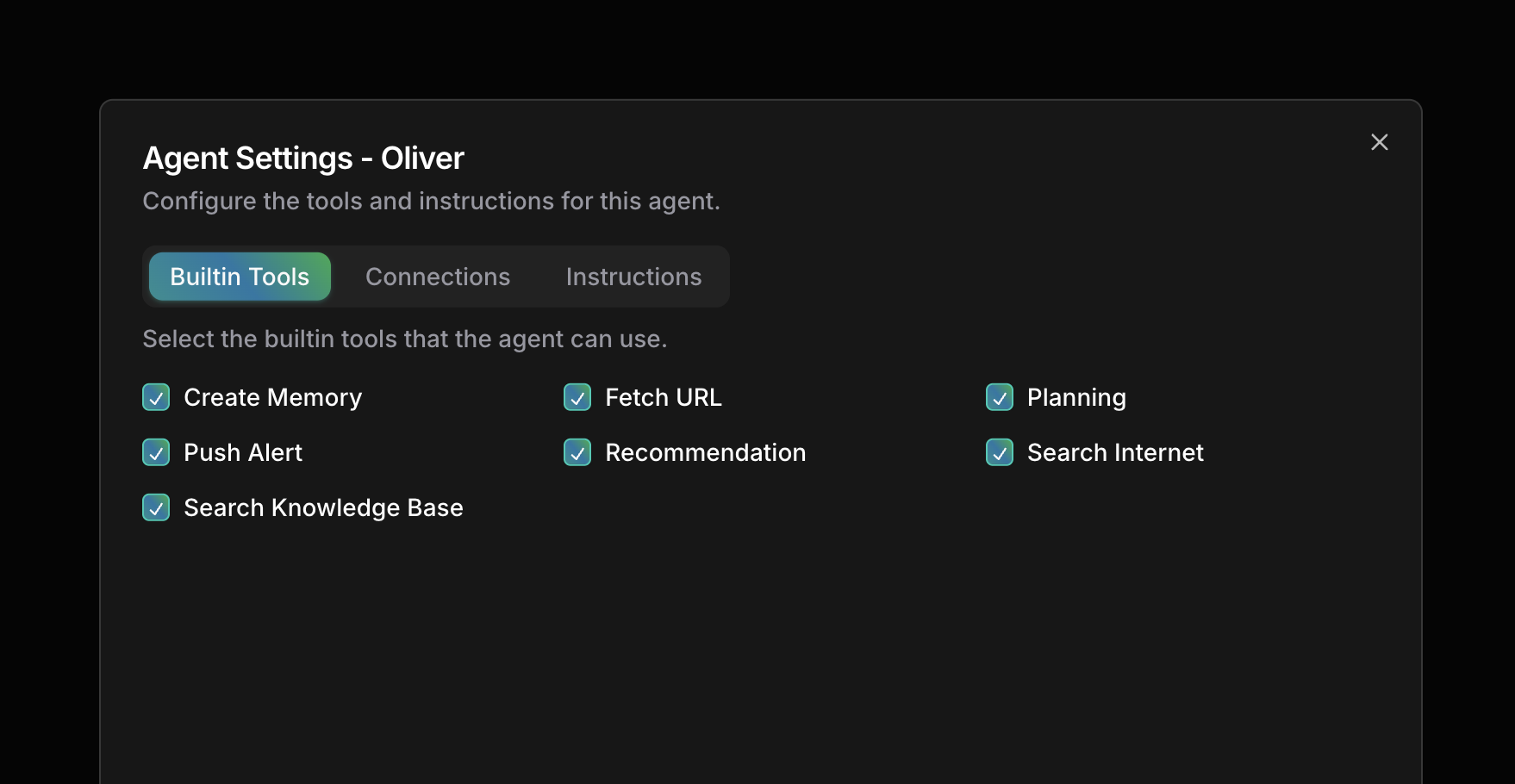 The **Agent Settings** dialog has three tabs:
| Tab | What it controls |
| ----------------- | -------------------------------------------------- |
| **Builtin Tools** | Which builtin tools the agent can use |
| **Connections** | Which connections the agent can access |
| **Instructions** | Custom behavior, context, and operating guidelines |
## Enable or disable an agent
Go to [Agents](https://app.cloudthinker.io/agents) in the CloudThinker console.
Use the **Enable/Disable** toggle to activate or deactivate the agent.
Disable an agent to limit your workspace to specific domains, reduce noise during focused work, or restrict access during maintenance.
## Configure builtin tools
Go to [Agents](https://app.cloudthinker.io/agents) and click the agent.
Select **Builtin Tools** in the Agent Settings dialog.
Enable only the tools this agent needs.
| Tool | Description |
| ------------------------- | ------------------------------------------------------------ |
| **Create Memory** | Store information for future reference |
| **Fetch URL** | Retrieve content from web URLs |
| **Planning** | Create and manage action plans |
| **Push Alert** | Send alert notifications |
| **Recommendation** | Generate actionable recommendations |
| **Search Internet** | Search the web for information |
| **Search Knowledge Base** | Query your organization's [knowledge base](/guide/knowledge) |
## Assign connections
Go to [Agents](https://app.cloudthinker.io/agents) and click the agent.
Select **Connections** in the Agent Settings dialog.
Choose which connections this agent can use, then save.
Assign each agent only the connections its role requires. [Tony](/guide/agents/tony) doesn't need production IAM access to tune databases.
| Agent | Recommended connections |
| ------------------------------ | --------------------------------------------- |
| [Alex](/guide/agents/alex) | All cloud provider accounts |
| [Oliver](/guide/agents/oliver) | Cloud accounts + security monitoring services |
| [Tony](/guide/agents/tony) | Database connections + monitoring tools |
| [Kai](/guide/agents/kai) | Kubernetes clusters + observability platforms |
| [Anna](/guide/agents/anna) | All connections (for coordination) |
## Set custom instructions
Go to [Agents](https://app.cloudthinker.io/agents) and click the agent.
Select **Instructions** in the Agent Settings dialog.
Cover three areas: role context (expertise for your environment), scope limits (what the agent should and shouldn't access), and operational guidelines (procedures and escalation paths).
Example:
```text theme={null}
You are Alex, the Cloud Engineer for Acme Corp.
Environment:
- Primary cloud: AWS (us-east-1, us-west-2)
- Secondary cloud: GCP (for ML workloads)
- Cost target: Reduce by 20% this quarter
Guidelines:
- Always check with @oliver before recommending security group changes
- Prioritize production stability over cost savings
- Flag any resource costing >$1000/month for review
```
## Next steps
Edit identity, language, and learning mode, or build your own agent
Configure tool approval workflows
The **Agent Settings** dialog has three tabs:
| Tab | What it controls |
| ----------------- | -------------------------------------------------- |
| **Builtin Tools** | Which builtin tools the agent can use |
| **Connections** | Which connections the agent can access |
| **Instructions** | Custom behavior, context, and operating guidelines |
## Enable or disable an agent
Go to [Agents](https://app.cloudthinker.io/agents) in the CloudThinker console.
Use the **Enable/Disable** toggle to activate or deactivate the agent.
Disable an agent to limit your workspace to specific domains, reduce noise during focused work, or restrict access during maintenance.
## Configure builtin tools
Go to [Agents](https://app.cloudthinker.io/agents) and click the agent.
Select **Builtin Tools** in the Agent Settings dialog.
Enable only the tools this agent needs.
| Tool | Description |
| ------------------------- | ------------------------------------------------------------ |
| **Create Memory** | Store information for future reference |
| **Fetch URL** | Retrieve content from web URLs |
| **Planning** | Create and manage action plans |
| **Push Alert** | Send alert notifications |
| **Recommendation** | Generate actionable recommendations |
| **Search Internet** | Search the web for information |
| **Search Knowledge Base** | Query your organization's [knowledge base](/guide/knowledge) |
## Assign connections
Go to [Agents](https://app.cloudthinker.io/agents) and click the agent.
Select **Connections** in the Agent Settings dialog.
Choose which connections this agent can use, then save.
Assign each agent only the connections its role requires. [Tony](/guide/agents/tony) doesn't need production IAM access to tune databases.
| Agent | Recommended connections |
| ------------------------------ | --------------------------------------------- |
| [Alex](/guide/agents/alex) | All cloud provider accounts |
| [Oliver](/guide/agents/oliver) | Cloud accounts + security monitoring services |
| [Tony](/guide/agents/tony) | Database connections + monitoring tools |
| [Kai](/guide/agents/kai) | Kubernetes clusters + observability platforms |
| [Anna](/guide/agents/anna) | All connections (for coordination) |
## Set custom instructions
Go to [Agents](https://app.cloudthinker.io/agents) and click the agent.
Select **Instructions** in the Agent Settings dialog.
Cover three areas: role context (expertise for your environment), scope limits (what the agent should and shouldn't access), and operational guidelines (procedures and escalation paths).
Example:
```text theme={null}
You are Alex, the Cloud Engineer for Acme Corp.
Environment:
- Primary cloud: AWS (us-east-1, us-west-2)
- Secondary cloud: GCP (for ML workloads)
- Cost target: Reduce by 20% this quarter
Guidelines:
- Always check with @oliver before recommending security group changes
- Prioritize production stability over cost savings
- Flag any resource costing >$1000/month for review
```
## Next steps
Edit identity, language, and learning mode, or build your own agent
Configure tool approval workflows