> ## Documentation Index
> Fetch the complete documentation index at: https://docs.cloudthinker.io/llms.txt
> Use this file to discover all available pages before exploring further.
# The Harness
> Learn why CloudThinker can reason across a complex system, and how every module makes it smarter about your environment over time.
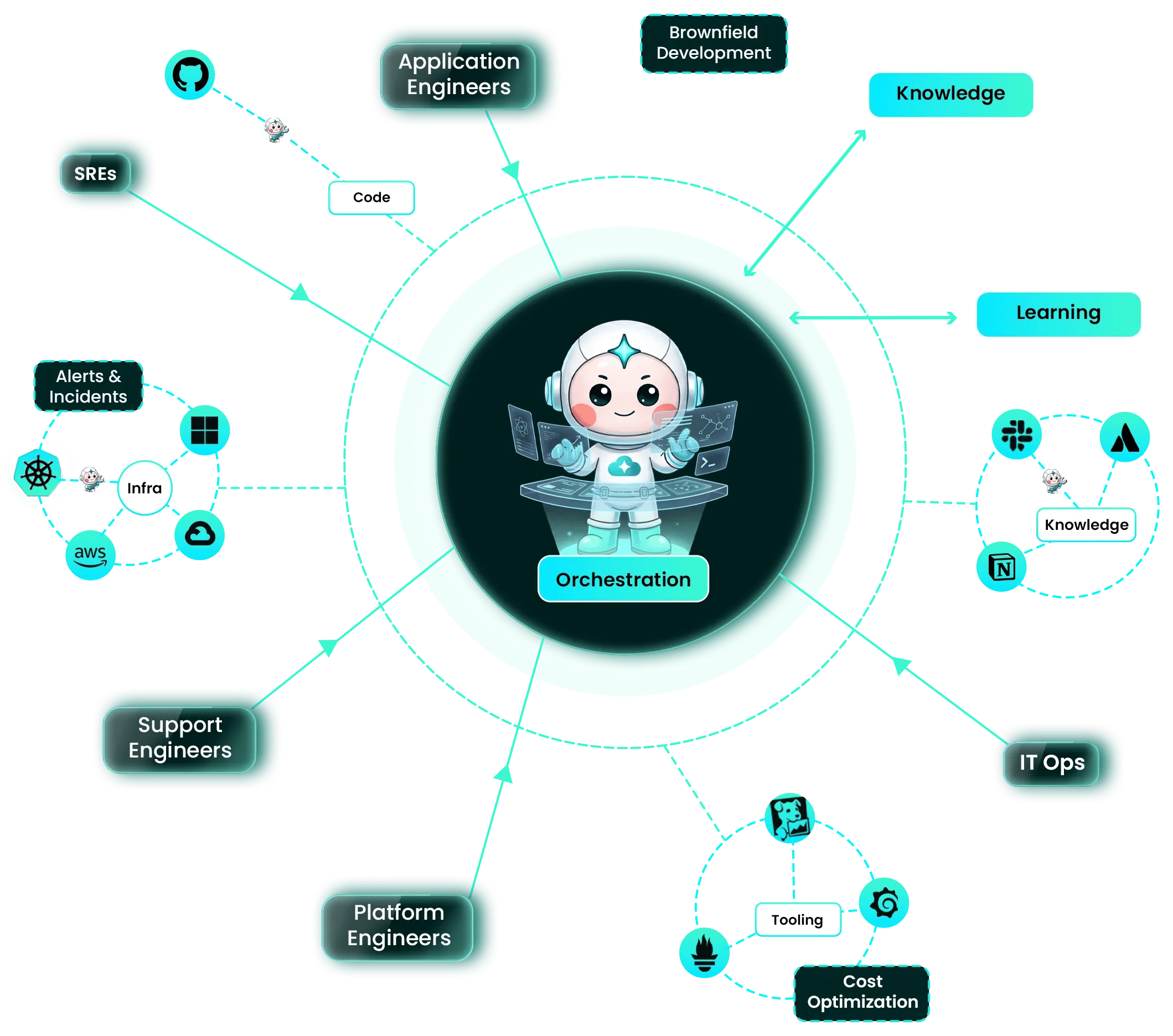
The harness is everything around the AI model that lets CloudThinker work on your real system: orchestration that plans and splits the work, context from your code, infrastructure, alerts, tools, and team knowledge, and a learning loop that keeps what each run discovers. A frontier model on its own knows the internet; the harness is what makes it know *your* system.
## Why a harness
* **Hard problems cross boundaries.** A slow checkout can trace through a code change, a Kubernetes rollout, a database limit, and a noisy alert at once. Solving it means seeing all of them together.
* **Evidence beats best practices.** CloudThinker queries your actual systems, so its answer names your services and your resources — not generic advice.
* **Parallel investigation.** Several hypotheses get checked at the same time instead of one after another.
* **Guardrails stay on.** Everything the harness does runs inside your workspace's [Manual or Auto](/guide/auto-mode) setting.
* **It compounds.** Every module leaves something behind that the next run starts with.
## Orchestration
[CloudThinker](/guide/agents/overview), the built-in assistant, plans each task. For a hard problem it spawns temporary subagents, each checking one focused hypothesis — read-only during an investigation — and then combines what they found into one verdict with its evidence. See how this runs in [Investigation and RCA](/guide/incident/root-cause-analysis).
## Context from every surface
The harness can only reason about what it can reach. Each [connection](/guide/connections/overview) adds one surface:
| Surface | Example connections | What it tells CloudThinker |
| - | - | - |
| Code | GitHub, GitLab, Bitbucket | What changed, where, and when |
| Infrastructure | AWS, Azure, Google Cloud, Kubernetes | Current state, configuration, and topology |
| Alerts and incidents | Datadog, PagerDuty, Grafana, through [Pulse](/guide/pulse/overview) | What is breaking right now |
| Tooling | Prometheus, Grafana, Datadog | Metrics, logs, and traces to use as evidence |
| Team knowledge | [Knowledge bases](/guide/knowledge), Atlassian, Notion | Your runbooks, policies, and how your team works |
The more surfaces a workspace connects, the more of a problem CloudThinker can see in one pass.
## Every module makes it smarter
Each module keeps something from its work and feeds it back, so CloudThinker knows your environment a little better every day.
| Module | What it keeps | When it's used again |
| - | - | - |
| [Resolve](/guide/incident/overview) | [Incident memory](/guide/incident/incident-memory) — lessons written during root-cause analysis | At the start of a later investigation |
| [Review](/guide/code-review/overview) | [Learnings](/guide/code-review/convention-rules) — rules derived from findings your team fixed | On future pull-request reviews |
| [Cyber](/guide/security/cyber-overview) | Each app's attack surface and findings | On the next scan, which re-checks old findings and verifies fixes |
| [Optimize](/guide/cost-optimization/overview) | A daily-refreshed picture of your spend | Whenever you or an investigation asks about cost |
| Every chat | [Workspace memory](/guide/memory) and [skills](/guide/skills/overview) agents save | In the next conversation, without you re-explaining |
You stay in control of what it keeps: you can correct or remove a memory, and turn skill learning off per custom agent.
## A hard problem, end to end
1. **An alert arrives.** Pulse strips the noise and routes the real problem into an Incident.
2. **CloudThinker plans.** It reads incident memory for similar past problems and splits the work into hypotheses — a recent deploy, a pod rollout, a database limit.
3. **Subagents gather evidence in parallel** from code, infrastructure, and tooling connections.
4. **You get one answer:** the root cause, the evidence behind it, and a proposed fix to approve.
5. **The harness keeps the lesson,** so the next similar incident starts further ahead.
## Related
See where the harness sits among workspaces, guardrails, and modules
Learn how CloudThinker and its subagents share the work
Follow a real investigation from hypothesis to verdict
See and correct what agents remember
This documentation is built and hosted on [Mintlify](https://mintlify.com), a developer documentation platform.