> ## Documentation Index
> Fetch the complete documentation index at: https://docs.cloudthinker.io/llms.txt
> Use this file to discover all available pages before exploring further.

# Incident Webhook Integrations

> Connect your alerting platforms to automatically create incidents with AI-powered investigation

CloudThinker integrates with **15+ alerting and monitoring platforms** including PagerDuty, Datadog, Grafana, Prometheus, AWS CloudWatch, Azure Monitor, GCP Monitoring, and more. Each integration includes platform-specific field mapping, flexible authentication, and automatic AI investigation triggers.

***

## Supported Platforms

### Incident Management

<CardGroup cols={2}>
  <Card title="PagerDuty" icon="https://mintcdn.com/cloudthinker/NZTEnySYVy068g6u/images/icons/integrations/pagerduty-icon.svg?fit=max&auto=format&n=NZTEnySYVy068g6u&q=85&s=7e1bb7c9ae2e6aa13608c8d4d48811cf" width="64" height="64" data-path="images/icons/integrations/pagerduty-icon.svg">
    Authentication: HMAC-SHA256

    On-call management and incident response with native event mapping for triggered, acknowledged, and resolved events.
  </Card>

  <Card title="Opsgenie" icon="https://mintcdn.com/cloudthinker/NZTEnySYVy068g6u/images/icons/integrations/opsgenie-icon.svg?fit=max&auto=format&n=NZTEnySYVy068g6u&q=85&s=3d1eba78a1a7252aee45c08b7538d020" width="800" height="800" data-path="images/icons/integrations/opsgenie-icon.svg">
    Authentication: API Key

    Atlassian's alert management with priority mapping and team assignment data.
  </Card>

  <Card title="ServiceNow" icon="https://mintcdn.com/cloudthinker/NZTEnySYVy068g6u/images/icons/integrations/service-now.svg?fit=max&auto=format&n=NZTEnySYVy068g6u&q=85&s=0732f3ddc9a9af6f7c3325a74c7aa30a" width="71" height="64" data-path="images/icons/integrations/service-now.svg">
    Authentication: API Key

    Enterprise IT service management with CMDB CI mapping for infrastructure context.
  </Card>

  <Card title="BigPanda" icon="pager">
    Authentication: Bearer Token

    AIOps event correlation and alert management with intelligent alert grouping.
  </Card>
</CardGroup>

### Monitoring & Observability

<CardGroup cols={2}>
  <Card title="Datadog" icon="https://mintcdn.com/cloudthinker/ezLyBgfIZEMSknyR/images/icons/integrations/datadog-icon.svg?fit=max&auto=format&n=ezLyBgfIZEMSknyR&q=85&s=3548a1b2e3bc616d2d37d439eba151c6" width="64" height="64" data-path="images/icons/integrations/datadog-icon.svg">
    Authentication: Bearer Token

    Full-stack monitoring with metrics, alerts, and tag-based service correlation.
  </Card>

  <Card title="Grafana" icon="https://mintcdn.com/cloudthinker/NZTEnySYVy068g6u/images/icons/integrations/grafana-logo.svg?fit=max&auto=format&n=NZTEnySYVy068g6u&q=85&s=e0a907966b1ad4ff181ef93cb411e373" width="800" height="800" data-path="images/icons/integrations/grafana-logo.svg">
    Authentication: Bearer Token

    Alert notifications with dashboard links, panel context, and common labels extraction.
  </Card>

  <Card title="Prometheus / Alertmanager" icon="https://mintcdn.com/cloudthinker/NZTEnySYVy068g6u/images/icons/integrations/prometheus-logo.svg?fit=max&auto=format&n=NZTEnySYVy068g6u&q=85&s=116d0e24c961b3e19e141d98a61ae3b8" width="64" height="64" data-path="images/icons/integrations/prometheus-logo.svg">
    Authentication: Bearer Token

    Native Alertmanager webhook receiver with label extraction, grouping support, and Kubernetes metadata.
  </Card>

  <Card title="Splunk" icon="https://mintcdn.com/cloudthinker/NZTEnySYVy068g6u/images/icons/integrations/splunk-logo.svg?fit=max&auto=format&n=NZTEnySYVy068g6u&q=85&s=51fa124f58603c02e7cb344825795746" width="33" height="32" data-path="images/icons/integrations/splunk-logo.svg">
    Authentication: Bearer Token

    Saved search alerts with result context and search links.
  </Card>
</CardGroup>

### Cloud Provider Alerting

<CardGroup cols={2}>
  <Card title="AWS CloudWatch" icon="https://mintcdn.com/cloudthinker/ezLyBgfIZEMSknyR/images/icons/integrations/aws-cloudwatch.svg?fit=max&auto=format&n=ezLyBgfIZEMSknyR&q=85&s=9539b73889491ac68c768dc601c6276d" href="/guide/incident/webhook-integrations/cloudwatch" width="16" height="16" data-path="images/icons/integrations/aws-cloudwatch.svg">
    Authentication: API Key

    EventBridge-based alerting with alarm state, metric data, and namespace context.
  </Card>

  <Card title="Azure Monitor" icon="https://mintcdn.com/cloudthinker/ezLyBgfIZEMSknyR/images/icons/integrations/azure-monitor.svg?fit=max&auto=format&n=ezLyBgfIZEMSknyR&q=85&s=b0b37194fd8282e599655adc7b172104" width="18" height="18" data-path="images/icons/integrations/azure-monitor.svg">
    Authentication: None

    Common Alert Schema support with resource context and severity mapping.
  </Card>

  <Card title="GCP Monitoring" icon="https://mintcdn.com/cloudthinker/ezLyBgfIZEMSknyR/images/icons/integrations/gcp-monitoring.svg?fit=max&auto=format&n=ezLyBgfIZEMSknyR&q=85&s=d1316eb20b417d6afd7814699236ebcf" width="24" height="24" data-path="images/icons/integrations/gcp-monitoring.svg">
    Authentication: Bearer Token

    Incident notifications with policy details and resource display names.
  </Card>
</CardGroup>

### APM & Error Tracking

<CardGroup cols={2}>
  <Card title="New Relic" icon="https://mintcdn.com/cloudthinker/NZTEnySYVy068g6u/images/icons/integrations/new-relic.svg?fit=max&auto=format&n=NZTEnySYVy068g6u&q=85&s=f302e6dc3976df413a0ebe8fa92da32d" width="2500" height="2031" data-path="images/icons/integrations/new-relic.svg">
    Authentication: API Key

    Full-stack observability with issue priorities and entity context.
  </Card>

  <Card title="Dynatrace" icon="https://mintcdn.com/cloudthinker/ezLyBgfIZEMSknyR/images/icons/integrations/dynatrace.svg?fit=max&auto=format&n=ezLyBgfIZEMSknyR&q=85&s=d1c94ab707135fdc0bd47de611b56760" width="64" height="64" data-path="images/icons/integrations/dynatrace.svg">
    Authentication: API Key

    Software intelligence with problem impact analysis and AI-detected root causes.
  </Card>

  <Card title="Sentry" icon="https://mintcdn.com/cloudthinker/NZTEnySYVy068g6u/images/icons/integrations/sentry-logo.svg?fit=max&auto=format&n=NZTEnySYVy068g6u&q=85&s=b7af115d7baa85cf43f93e80cb319cd4" width="24" height="24" data-path="images/icons/integrations/sentry-logo.svg">
    Authentication: HMAC-SHA256

    Application error tracking with issue details, stack traces, and project context.
  </Card>
</CardGroup>

### Custom Integration

<CardGroup cols={2}>
  <Card title="Generic Webhook" icon="webhook">
    Authentication: Bearer Token (configurable)

    Fully customizable webhook for any platform. Define your own field mappings using JSONPath expressions.
  </Card>
</CardGroup>

> **Platform Roadmap:** Don't see your platform listed? Use the Generic Webhook for immediate integration, or contact support to request a native connector for your monitoring tool.

***

## Setting Up a Webhook Integration

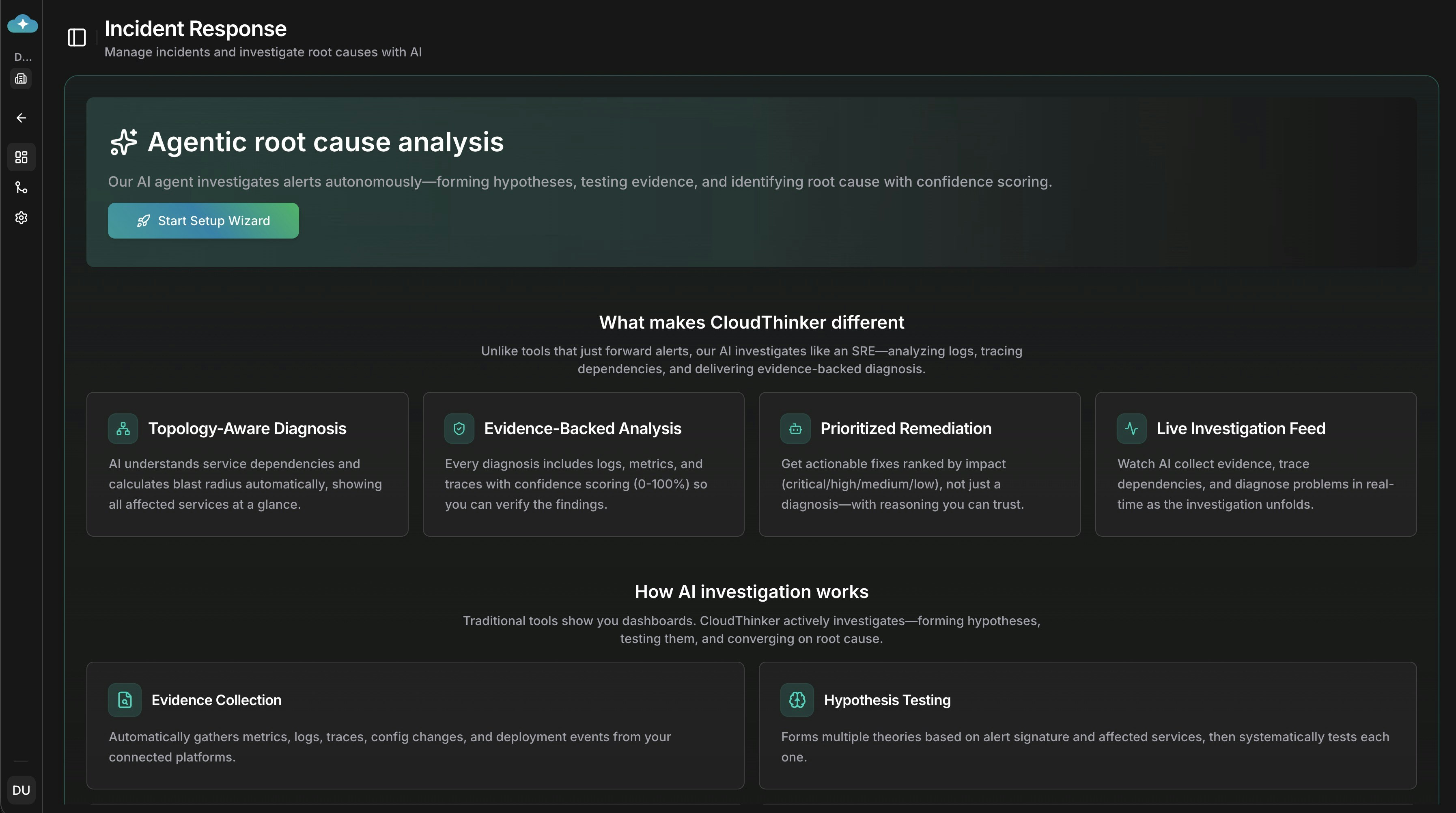
The setup wizard guides you through platform selection, webhook configuration, and automatic root cause analysis settings.
<Frame>
  <img src="https://mintcdn.com/cloudthinker/EgdXomufF-sGaM1E/images/incidents/setup/01-setup-wizard-home.jpg?fit=max&auto=format&n=EgdXomufF-sGaM1E&q=85&s=f0a672ba2519f4bba831fe3a6f6846cc" alt="Deep Response Engine setup wizard home page with AI-powered root cause analysis overview" width="3588" height="2004" data-path="images/incidents/setup/01-setup-wizard-home.jpg" />
</Frame>

<p style={{textAlign: 'center', fontSize: '0.9em', color: '#666', marginTop: '8px'}}>Deep Response Engine dashboard with setup wizard entry point</p>

<Steps>
  <Step title="Navigate to Integrations">
    Go to **Deep Response Engine** → **Settings** → **Integrations** tab to access webhook management.
  </Step>

  <Step title="Create Webhook">
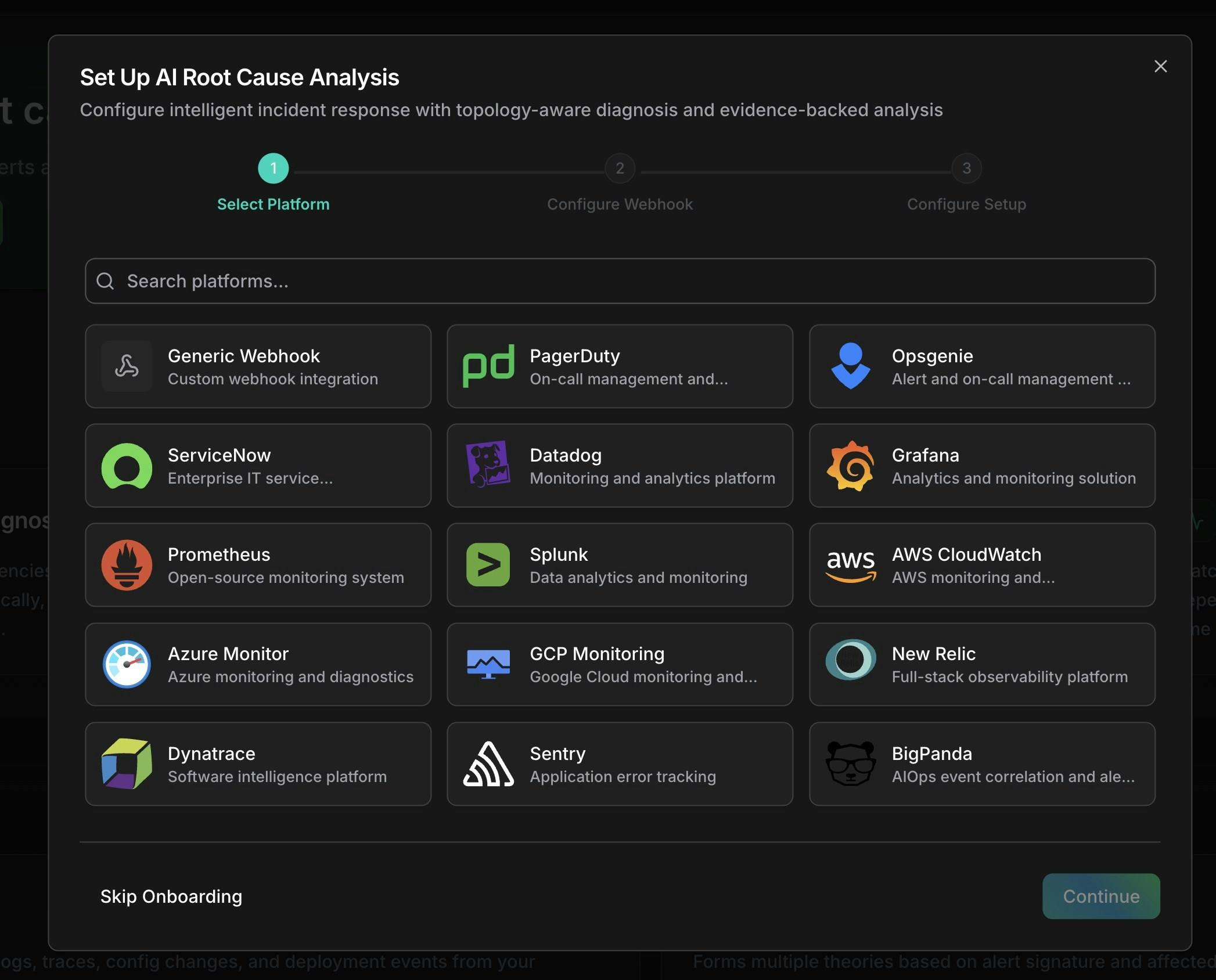
    Click **Connect** on your platform card. The creation wizard opens with platform-specific defaults pre-configured.
    <Frame>
      <img src="https://mintcdn.com/cloudthinker/EgdXomufF-sGaM1E/images/incidents/setup/02-select-platform-modal.jpg?fit=max&auto=format&n=EgdXomufF-sGaM1E&q=85&s=813d162c00c7cadd5c302b37323070d4" alt="Platform selection modal showing monitoring and alerting platform options including PagerDuty, Datadog, Grafana, and AWS CloudWatch" width="2094" height="1688" data-path="images/incidents/setup/02-select-platform-modal.jpg" />
    </Frame>

    <p style={{textAlign: 'center', fontSize: '0.9em', color: '#666', marginTop: '8px'}}>Select your monitoring platform from the available options</p>
  </Step>

  <Step title="Configure Basic Info">
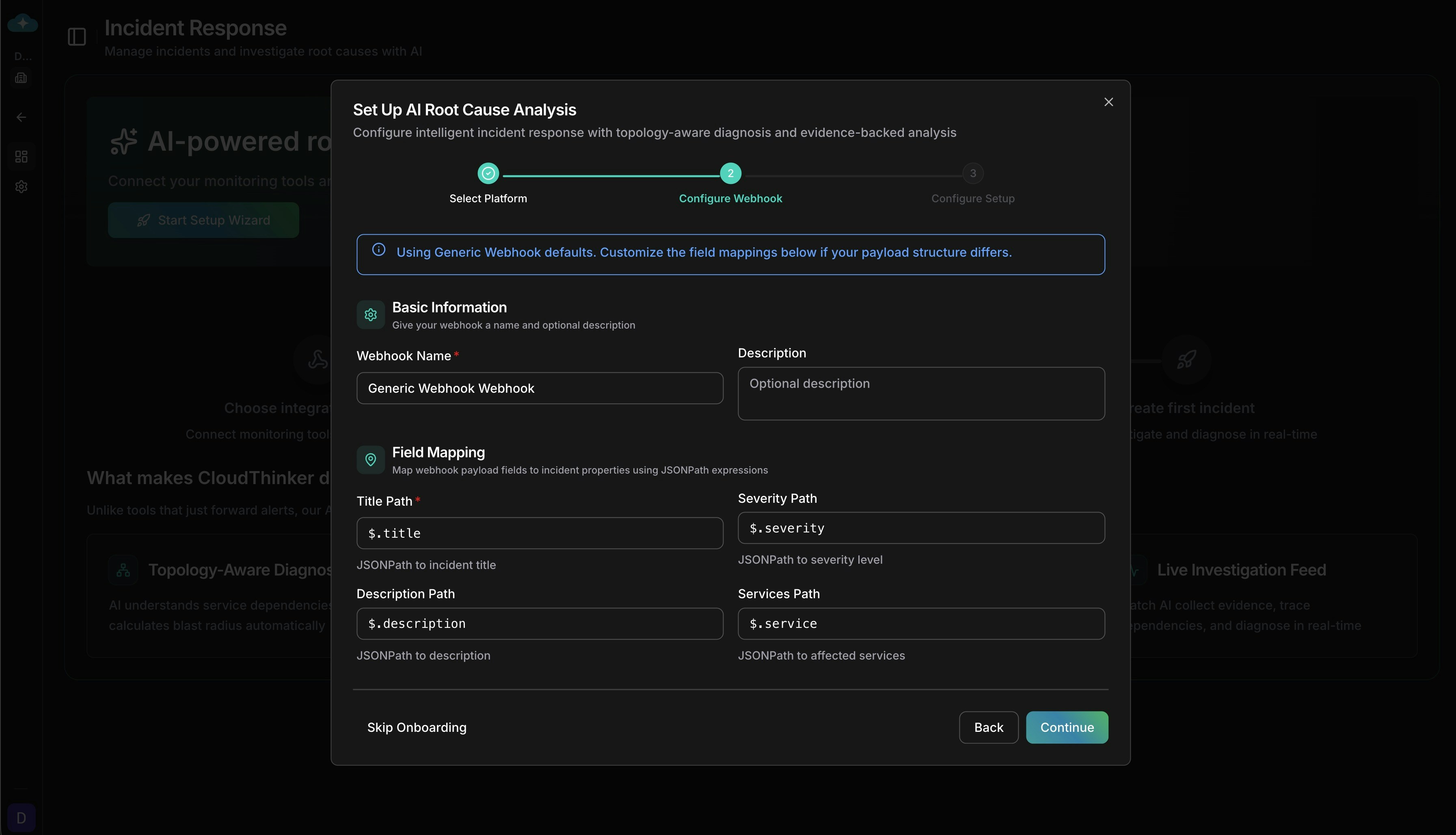
    Enter a name and optional description for your webhook. Set a rate limit if needed (default: 100 requests per hour).
  </Step>

  <Step title="Review Field Mapping">
    Each platform has pre-configured JSONPath mappings that extract incident fields from your webhook payload. Customize if needed:

    | Incident Field | Example JSONPath            | Description                       |
    | -------------- | --------------------------- | --------------------------------- |
    | Title          | `$.event.data.title`        | Incident headline                 |
    | Description    | `$.event.data.description`  | Detailed information              |
    | Severity       | `$.event.data.priority`     | Critical, High, Medium, Low, Info |
    | Services       | `$.event.data.service.name` | Affected service names            |

    You can also configure **severity mapping** to translate your platform's severity values (e.g., `warning` → `medium`, `P1` → `critical`) to CloudThinker's severity levels.
    <Frame>
      <img src="https://mintcdn.com/cloudthinker/mbO-yJISTs683mos/images/incidents/setup/03-configure-webhook-fields.jpg?fit=max&auto=format&n=mbO-yJISTs683mos&q=85&s=3e2e78c9906b973c08090898d794a9ed" alt="Webhook configuration form showing field mapping with Title Path, Severity Path, Description Path, and Services Path JSONPath expressions" width="3586" height="2056" data-path="images/incidents/setup/03-configure-webhook-fields.jpg" />
    </Frame>

    <p style={{textAlign: 'center', fontSize: '0.9em', color: '#666', marginTop: '8px'}}>Configure JSONPath field mappings for your webhook payload</p>
  </Step>

  <Step title="Configure Auto-Trigger Settings">
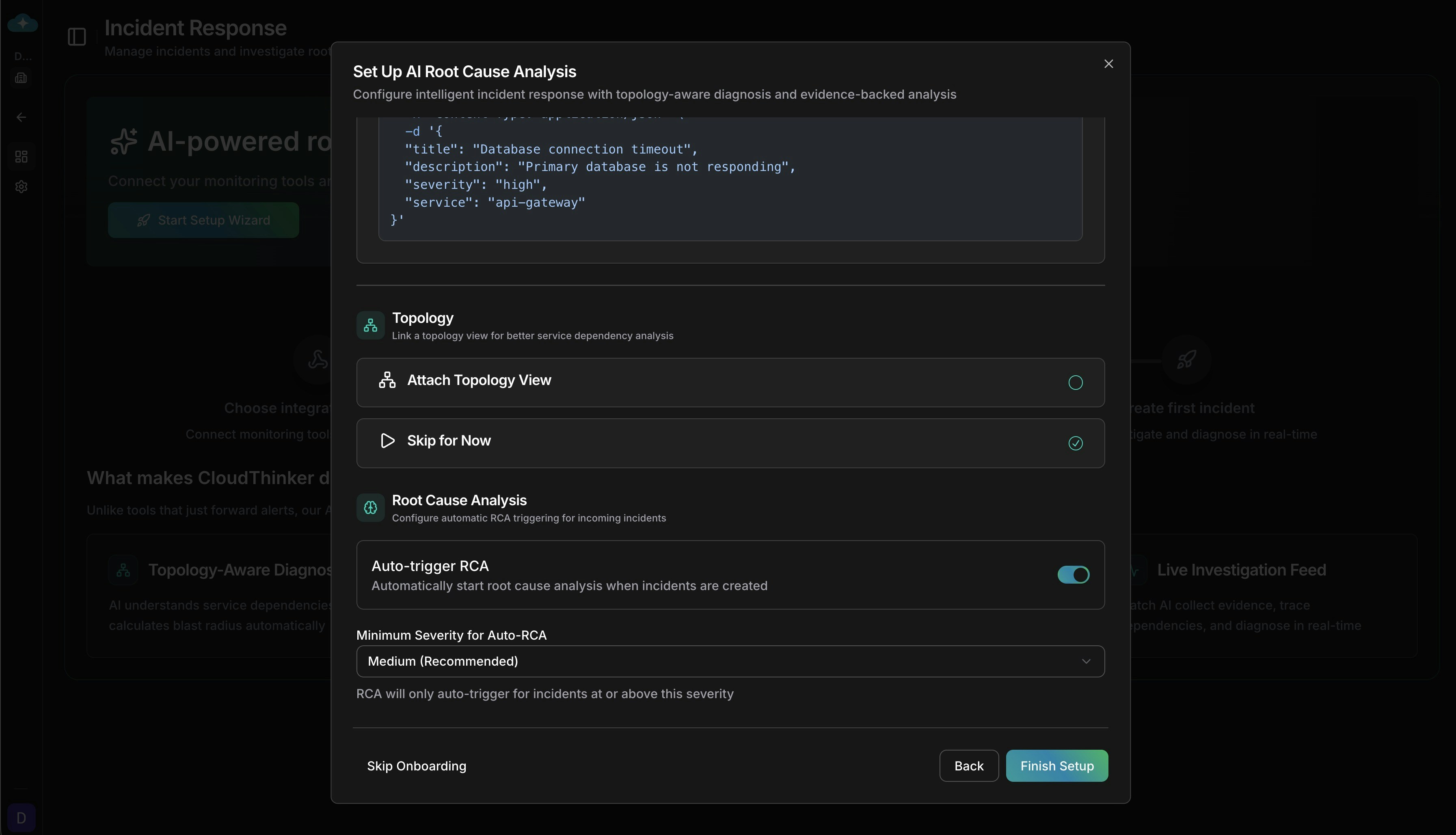
    Control how incidents trigger [Root Cause Analysis](/guide/incident/root-cause-analysis):

    * **Auto-trigger RCA:** Automatically start AI investigation when an incident is created
    * **Minimum severity:** Only trigger RCA for incidents at this severity level or higher (default: Medium)
    * **Send all fields to agent:** Forward the complete webhook payload to the RCA agent for richer analysis
    <Frame>
      <img src="https://mintcdn.com/cloudthinker/mbO-yJISTs683mos/images/incidents/setup/05-configure-rca-settings.jpg?fit=max&auto=format&n=mbO-yJISTs683mos&q=85&s=48fa14186831df2d79a32729005df187" alt="Root Cause Analysis configuration panel with Auto-trigger RCA toggle, Minimum Severity dropdown set to Medium" width="3586" height="2056" data-path="images/incidents/setup/05-configure-rca-settings.jpg" />
    </Frame>

    <p style={{textAlign: 'center', fontSize: '0.9em', color: '#666', marginTop: '8px'}}>Configure automatic RCA triggering and severity thresholds</p>
  </Step>

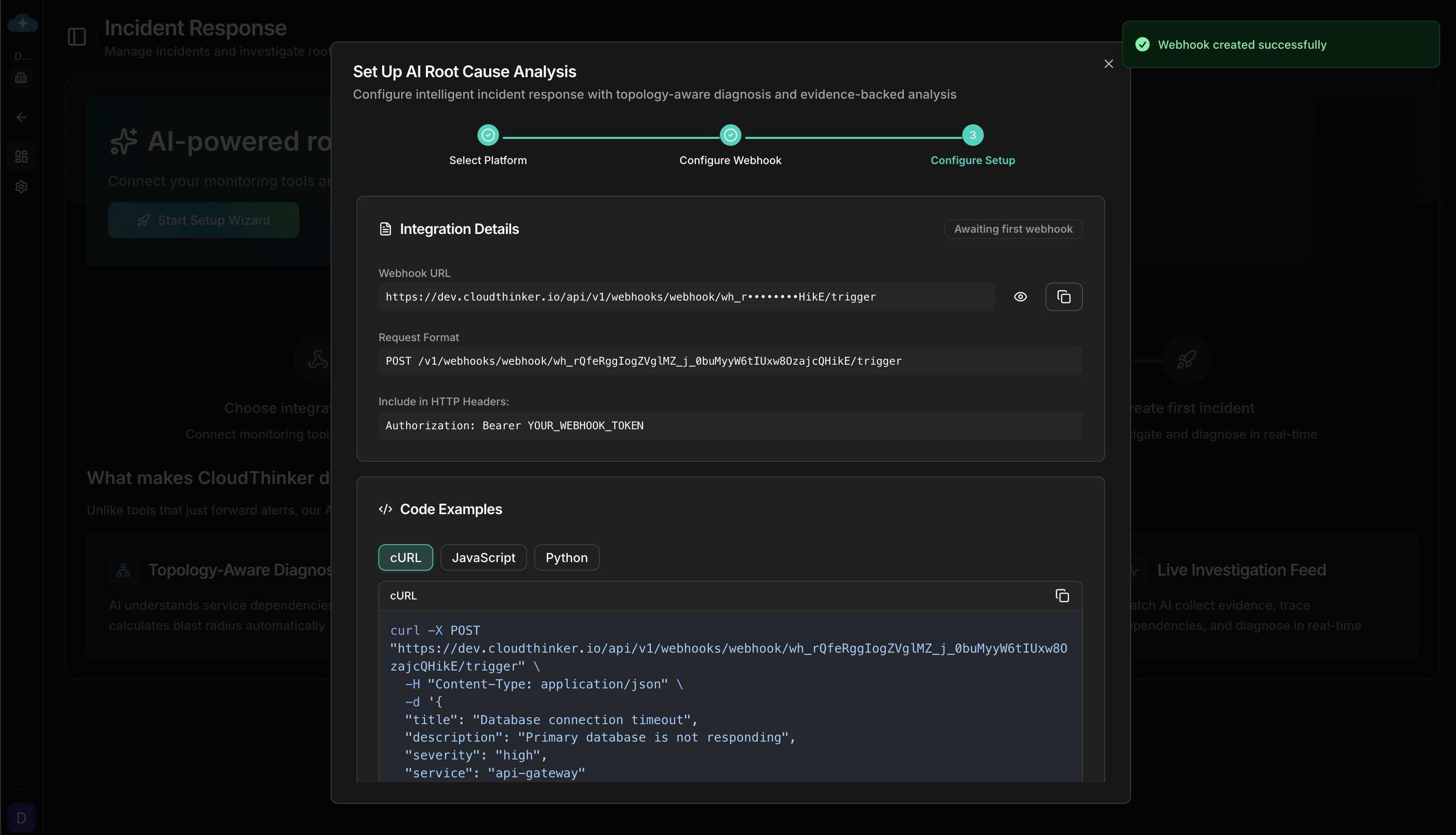
  <Step title="Copy Webhook URL & Authentication">
    The **Setup** tab displays your webhook URL and authentication details. Copy these credentials and configure them in your alerting platform.
    <Frame>
      <img src="https://mintcdn.com/cloudthinker/mbO-yJISTs683mos/images/incidents/setup/04-webhook-url-code-examples.jpg?fit=max&auto=format&n=mbO-yJISTs683mos&q=85&s=7bfb126e216a2bddff0c6de499e3fdda" alt="Setup tab showing webhook URL, request format, HTTP headers, and code examples for webhook integration" width="3586" height="2056" data-path="images/incidents/setup/04-webhook-url-code-examples.jpg" />
    </Frame>

    <p style={{textAlign: 'center', fontSize: '0.9em', color: '#666', marginTop: '8px'}}>Copy your webhook URL and authentication headers to configure in your alerting platform</p>
  </Step>
</Steps>

***

## Authentication Methods

CloudThinker supports four authentication methods to match your platform's requirements. The correct method is pre-selected when you choose a platform, but you can change it for custom integrations.

| Method                | How It Works                                                                                                   | Used By                                                        |
| --------------------- | -------------------------------------------------------------------------------------------------------------- | -------------------------------------------------------------- |
| **Bearer Token**      | Standard token-based authentication via `Authorization` header                                                 | Datadog, Grafana, Prometheus, Splunk, GCP Monitoring, BigPanda |
| **HMAC-SHA256**       | Cryptographic signature verification — CloudThinker validates the request body signature using a shared secret | PagerDuty, Sentry                                              |
| **API Key**           | Custom header with optional prefix (e.g., `GenieKey`, `Api-Token`)                                             | Opsgenie, New Relic, Dynatrace, ServiceNow, AWS CloudWatch     |
| **No Authentication** | For platforms that verify identity through other mechanisms                                                    | Azure Monitor                                                  |

<Note>
  When you change the authentication method on an existing webhook, existing integrations using the previous method will immediately stop working. Regenerate credentials after changing auth methods.
</Note>

***

## Alert Correlation

When multiple alerts arrive within a short time window, CloudThinker can automatically correlate them into a single incident instead of creating duplicates. This reduces alert fatigue from cascading failures.

### Time Window Correlation

Groups alerts received within a configurable window (default: 5 minutes). When a new alert matches an existing open incident, it's attached as a correlated alert rather than creating a new incident.

### Rule-Based Correlation

Define custom rules to match incoming alerts against existing incidents based on shared attributes. Rules are configured from the webhook card menu under **Correlation Rules**.

Each rule specifies:

* **Conditions** with AND/OR logic for matching
* **Priority** (0-1000) to control evaluation order
* **Weight** (0.0-1.0) to indicate match confidence
* **Minimum match weight** threshold to accept a correlation

**Available Operators:**

| Operator                    | Description                       |
| --------------------------- | --------------------------------- |
| `equals` / `not_equals`     | Exact match or mismatch           |
| `contains` / `not_contains` | Substring match                   |
| `starts_with` / `ends_with` | Prefix or suffix match            |
| `regex`                     | Regular expression match          |
| `in` / `not_in`             | Value in or not in a list         |
| `intersects`                | Array overlap (e.g., shared tags) |
| `exists`                    | Field is present                  |

***

## Security & Limits

### Payload Limits

| Limit                   | Value             |
| ----------------------- | ----------------- |
| Max HTTP body size      | 1 MB              |
| Max stored payload size | 100 KB            |
| Max field length        | 10,000 characters |
| Max array items         | 100 elements      |
| Max nesting depth       | 10 levels         |

### Rate Limiting

| Limit              | Value                             |
| ------------------ | --------------------------------- |
| Default rate limit | 100 requests per hour per webhook |
| Auth failure limit | 10 failures per 15-minute window  |
| Exceeded response  | HTTP 429                          |

Rate limits are configurable per webhook. Set to 0 for unlimited.

### Security Features

* **Timing-safe signature verification** prevents timing attacks on HMAC validation
* **Encrypted secret storage** — webhook secrets are encrypted at rest
* **Credential rotation** — regenerate webhook tokens and secrets without recreating the webhook
* **Payload sanitization** — oversized fields are automatically truncated
* **Sensitive header filtering** — authentication headers are excluded from audit logs
