> ## Documentation Index
> Fetch the complete documentation index at: https://docs.cloudthinker.io/llms.txt
> Use this file to discover all available pages before exploring further.
# Keepers
> Enable autonomous keepers that catch cost, security, and performance drift and turn findings into tracked recommendations.
CloudKeepers are autonomous monitors that enforce cost, security, and performance guardrails across every connected cloud account and Kubernetes cluster. The app sidebar shows them as **Keepers** under **Infrastructure**.
## How keepers are organized
Keepers form a **3 × 3 matrix** of providers and pillars:
| Provider | Cost | Security | Performance |
| -------------- | -------- | -------- | ----------- |
| **AWS** | AWS-COST | AWS-SEC | AWS-PERF |
| **GCP** | GCP-COST | GCP-SEC | GCP-PERF |
| **Kubernetes** | K8S-COST | K8S-SEC | K8S-PERF |
Each keeper monitors one provider–pillar combination. Enable only the keepers you need — for example, AWS-COST and K8S-SEC — or all nine for full coverage.
Each keeper contains multiple **detection rules** (40+ rules total) that you toggle and tune individually:
* **Cost rules**: idle compute instances, unattached storage, old snapshots, unused static IPs, oversized databases, idle load balancers, over-requested pod resources, and more
* **Security rules**: public S3 buckets, unused IAM roles, MFA disabled on root, open security groups, secrets in parameter store, and more
* **Performance rules**: RDS connection limits, missing health probes, CrashLooping pods, throttled resources, and more
## Autonomy
Every detection rule runs in one of two modes:
| Mode | What happens |
| ---------- | ---------------------------------------------------------------------------------- |
| **Manual** | The agent proposes the action and waits for a person to approve it before running. |
| **Auto** | The agent runs the action on its own and reports the result. |
Autonomy is set per rule, so most rules can stay in Manual while well-understood cost rules — like cleaning up unattached volumes — run in [Auto](/guide/auto-mode).
## Prerequisites
* At least one cloud account or Kubernetes cluster connected with read/monitoring permissions and, optionally, remediation permissions.
* [Slack](/guide/slack-integration), Microsoft Teams, or email destinations configured if you want alerts beyond in-app [notifications](/guide/notifications).
* Optional: tags or filters ready if you plan to scope findings to specific environments.
## Set up your first keepers
Go to **Infrastructure → Keepers** to see the onboarding view. It walks you through three steps: connect a cloud account, enable keepers, and run your first detection scan. Click **Enable Your First Keepers** to begin.
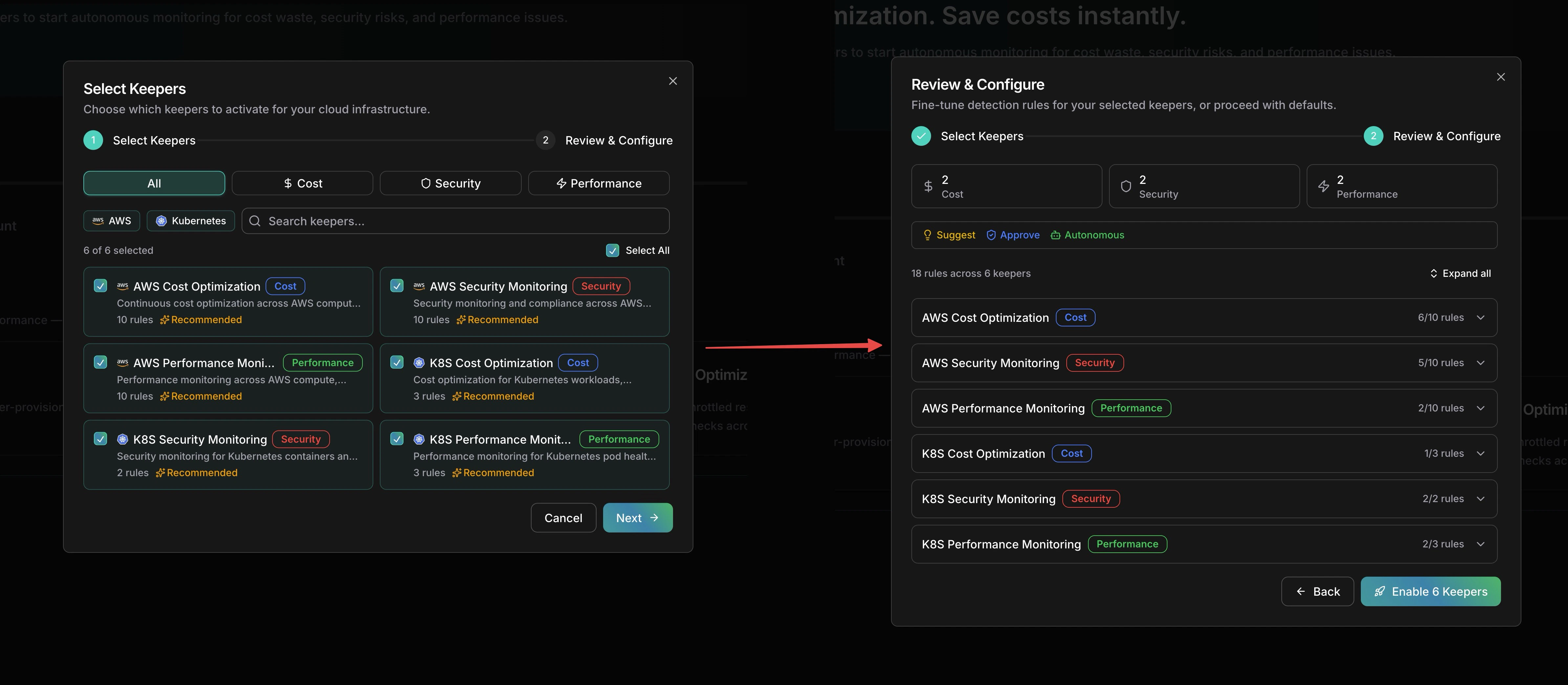
 The setup wizard has two steps. In **Select Keepers**, choose which keepers to activate — filter by provider (AWS, Kubernetes) or pillar (Cost, Security, Performance). In **Review & Configure**, fine-tune detection rules per keeper, set each rule to Manual or Auto, and adjust which rules are enabled.
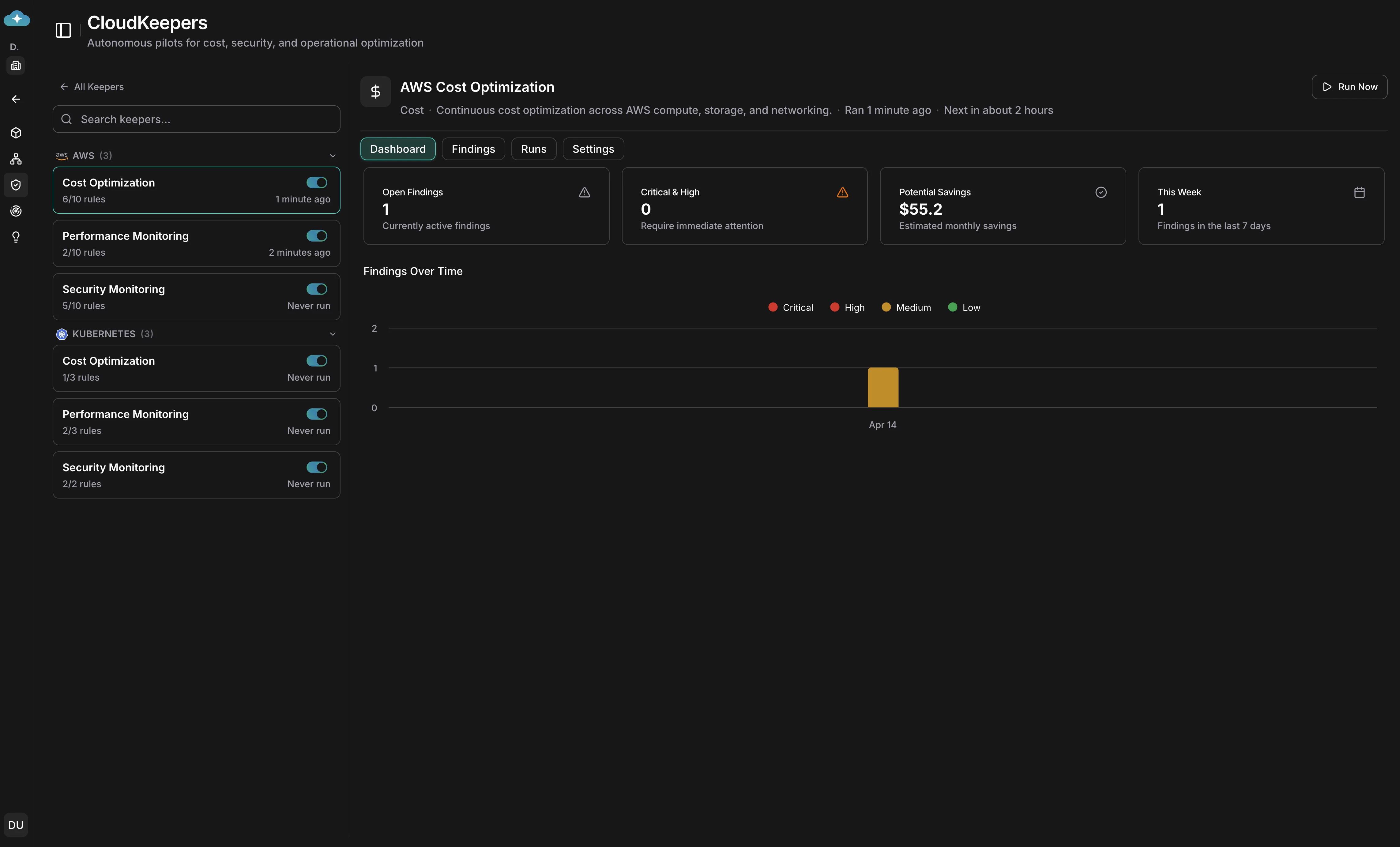
 Once keepers are enabled, select one from the sidebar to see its **Dashboard** tab. Four stat cards — **Open Findings**, **Critical & High**, **Potential Savings**, and **This Week** — give you a quick pulse. The **Findings Over Time** chart breaks down trends by severity.
 Switch to the **Findings** tab to see a board with a column for each finding status. Each finding card shows the title, estimated savings, effort level, and risk severity. Click a card to drill into details, or drag it between columns to update its status.
 The **Runs** tab shows every detection run with its status, summary, duration, and how many findings were created or updated. Use this as an audit trail to verify keepers are running on schedule.
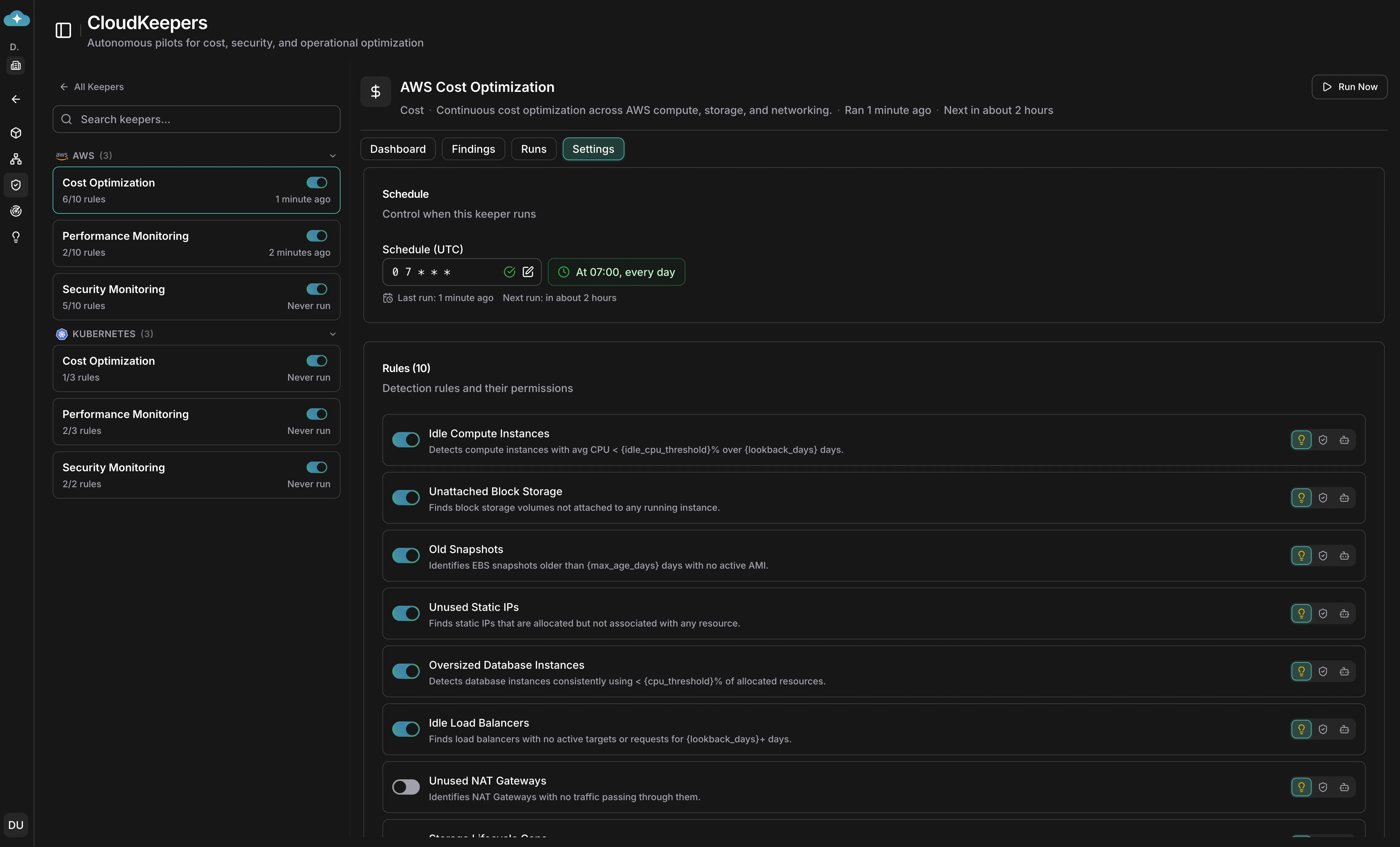
 In the **Settings** tab, set the cron schedule (default: daily at 07:00 UTC), and toggle individual detection rules on or off. Each rule shows a description of what it detects and supports per-rule autonomy and threshold configuration.
 ## From finding to recommendation
Keepers turn raw detections into tracked, governed work:
1. **Detect** — each keeper runs on its cron schedule (default: daily at 07:00 UTC) or on demand, scanning all permitted resources — not just the ones you previously discovered. Every run leaves an audit trail in the **Runs** tab.
2. **Triage** — each finding is tagged with pillar, severity, effort, and estimated savings so you can prioritize the highest-value fixes. Move findings through their statuses as you work:
| Status | Meaning |
| ---------------- | ---------------------------------------------------------- |
| **New** | Just detected; nobody has looked at it yet. |
| **Acknowledged** | A team member has seen the finding and owns the follow-up. |
| **Active** | Work on the finding is underway. |
| **Resolved** | The underlying issue is fixed and verified. |
| **Dismissed** | Reviewed and intentionally not acted on. |
3. **Promote** — findings start as drafts; promote the ones worth acting on into active recommendations. Every recommendation includes an impact analysis with before/after estimates and a step-by-step playbook. From the detail view, use **Impact Analytics** for deeper analysis, **Generate Guidelines** for shareable runbooks, **Custom Prompt** to explore edge cases, or **Implement** to execute the change.
4. **Track** — save recommendations to [Plan](/guide/infrastructure/plan) for approvals, scheduling, and execution tracking, so governance, FinOps, and security teams share the same source of truth.
Keepers are your daily operational guardrail. [Assessment](/guide/infrastructure/assessment) is a deeper, periodic evaluation and is not meant for day-to-day runs.
## Keeper settings
Each keeper has a dedicated **Settings** tab where you can configure:
* **Schedule**: a cron expression for automated runs (minimum 1-hour interval).
* **Detection rules**: toggle individual rules, set each rule to Manual or Auto, and adjust per-rule thresholds (idle CPU %, lookback days, snapshot max age).
* **Commands & permissions**: manage which cloud commands each rule is allowed to execute, with per-command effects (Allow / Require Approval / Deny).
* **Notifications**: Email, Slack, and Teams channels with per-channel minimum severity thresholds. In-app [notifications](/guide/notifications) are always delivered regardless of channel settings.
## Examples
### Cost guardrails
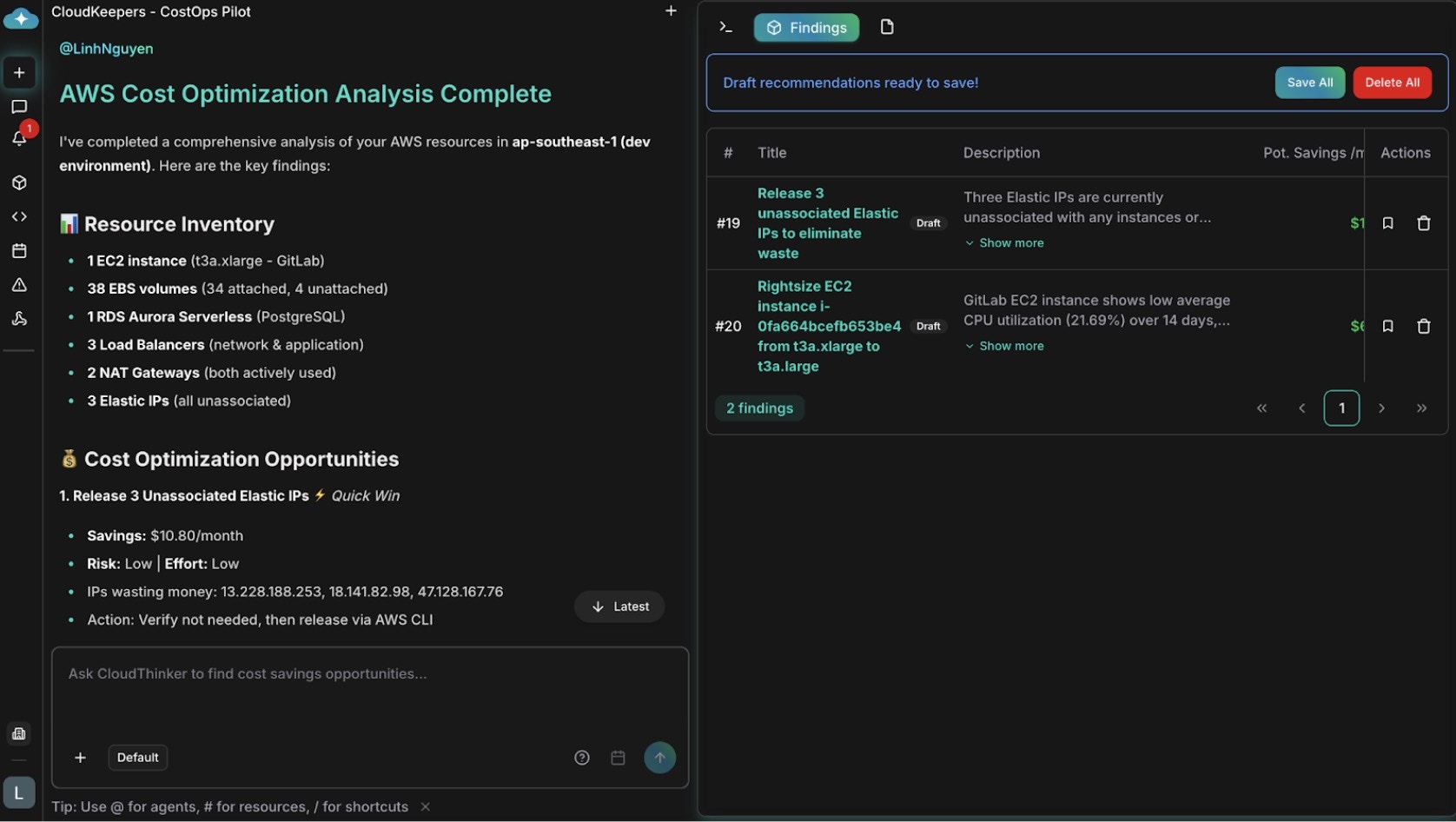
Infrastructure that grew organically hides waste that manual audits rarely catch. AWS-COST flags idle EC2 instances, unattached EBS volumes, aging snapshots, and underused NAT gateways — and it reads context: a volume tagged for daily backups serves a purpose, while an untagged test volume from last year is genuinely orphaned. Review findings on the dashboard, promote the high-confidence ones, and save them to [Plan](/guide/infrastructure/plan) for approval and execution.
## From finding to recommendation
Keepers turn raw detections into tracked, governed work:
1. **Detect** — each keeper runs on its cron schedule (default: daily at 07:00 UTC) or on demand, scanning all permitted resources — not just the ones you previously discovered. Every run leaves an audit trail in the **Runs** tab.
2. **Triage** — each finding is tagged with pillar, severity, effort, and estimated savings so you can prioritize the highest-value fixes. Move findings through their statuses as you work:
| Status | Meaning |
| ---------------- | ---------------------------------------------------------- |
| **New** | Just detected; nobody has looked at it yet. |
| **Acknowledged** | A team member has seen the finding and owns the follow-up. |
| **Active** | Work on the finding is underway. |
| **Resolved** | The underlying issue is fixed and verified. |
| **Dismissed** | Reviewed and intentionally not acted on. |
3. **Promote** — findings start as drafts; promote the ones worth acting on into active recommendations. Every recommendation includes an impact analysis with before/after estimates and a step-by-step playbook. From the detail view, use **Impact Analytics** for deeper analysis, **Generate Guidelines** for shareable runbooks, **Custom Prompt** to explore edge cases, or **Implement** to execute the change.
4. **Track** — save recommendations to [Plan](/guide/infrastructure/plan) for approvals, scheduling, and execution tracking, so governance, FinOps, and security teams share the same source of truth.
Keepers are your daily operational guardrail. [Assessment](/guide/infrastructure/assessment) is a deeper, periodic evaluation and is not meant for day-to-day runs.
## Keeper settings
Each keeper has a dedicated **Settings** tab where you can configure:
* **Schedule**: a cron expression for automated runs (minimum 1-hour interval).
* **Detection rules**: toggle individual rules, set each rule to Manual or Auto, and adjust per-rule thresholds (idle CPU %, lookback days, snapshot max age).
* **Commands & permissions**: manage which cloud commands each rule is allowed to execute, with per-command effects (Allow / Require Approval / Deny).
* **Notifications**: Email, Slack, and Teams channels with per-channel minimum severity thresholds. In-app [notifications](/guide/notifications) are always delivered regardless of channel settings.
## Examples
### Cost guardrails
Infrastructure that grew organically hides waste that manual audits rarely catch. AWS-COST flags idle EC2 instances, unattached EBS volumes, aging snapshots, and underused NAT gateways — and it reads context: a volume tagged for daily backups serves a purpose, while an untagged test volume from last year is genuinely orphaned. Review findings on the dashboard, promote the high-confidence ones, and save them to [Plan](/guide/infrastructure/plan) for approval and execution.
 ### Security guardrails
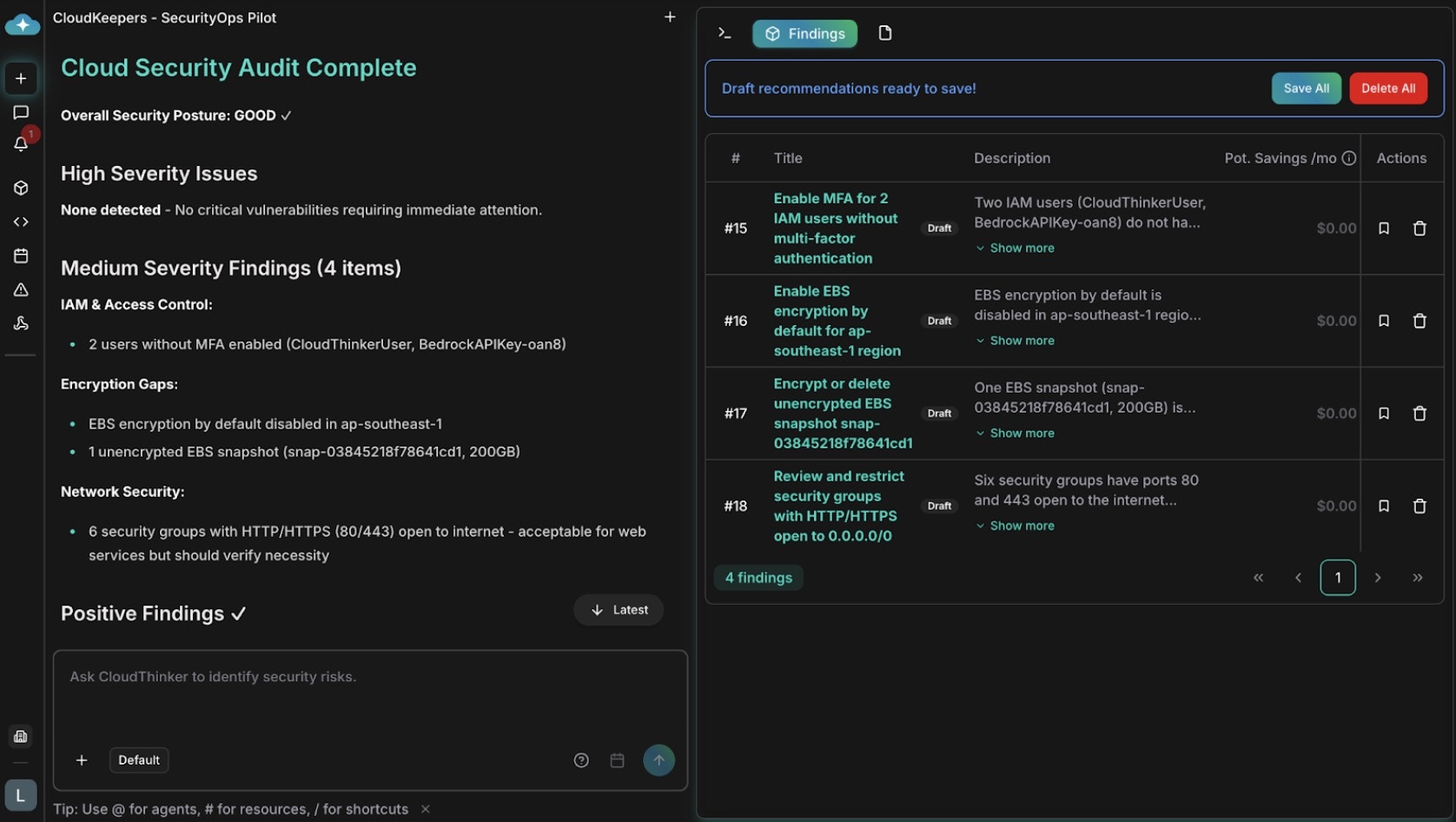
Security drift accumulates between audits: overly broad IAM roles, public S3 buckets, unencrypted volumes, and security groups open to 0.0.0.0/0. AWS-SEC scans continuously and weighs operational context — HTTP from anywhere is normal for a load balancer but dangerous for a database, and a root account access key outranks an unused read-only role. Route critical findings to Slack for immediate triage and track multi-team fixes in Plan.
### Security guardrails
Security drift accumulates between audits: overly broad IAM roles, public S3 buckets, unencrypted volumes, and security groups open to 0.0.0.0/0. AWS-SEC scans continuously and weighs operational context — HTTP from anywhere is normal for a load balancer but dangerous for a database, and a root account access key outranks an unused read-only role. Route critical findings to Slack for immediate triage and track multi-team fixes in Plan.
 ## Related
Save findings to Plan for approvals, scheduling, and execution tracking
Run deeper periodic Well-Architected assessments alongside daily keeper runs
Route keeper alerts to Slack channels for real-time triage
Schedule additional recurring analysis to complement keepers
## Related
Save findings to Plan for approvals, scheduling, and execution tracking
Run deeper periodic Well-Architected assessments alongside daily keeper runs
Route keeper alerts to Slack channels for real-time triage
Schedule additional recurring analysis to complement keepers