> ## Documentation Index
> Fetch the complete documentation index at: https://docs.cloudthinker.io/llms.txt
> Use this file to discover all available pages before exploring further.

# Kubernetes Health Monitoring

> Automated Kubernetes Health Monitoring on Amazon EKS with CloudThinker

## **The role of monitoring in Kubernetes**

Kubernetes is the standard for container orchestration, but its complexity creates reliability challenges. Production monitoring requires: comprehensive observability across all stack layers, proactive detection and root cause analysis, and automated analysis that scales with cluster growth. Traditional monitoring tools fail by focusing on individual metrics without cross-layer correlation, forcing manual data assembly and slowing problem resolution.

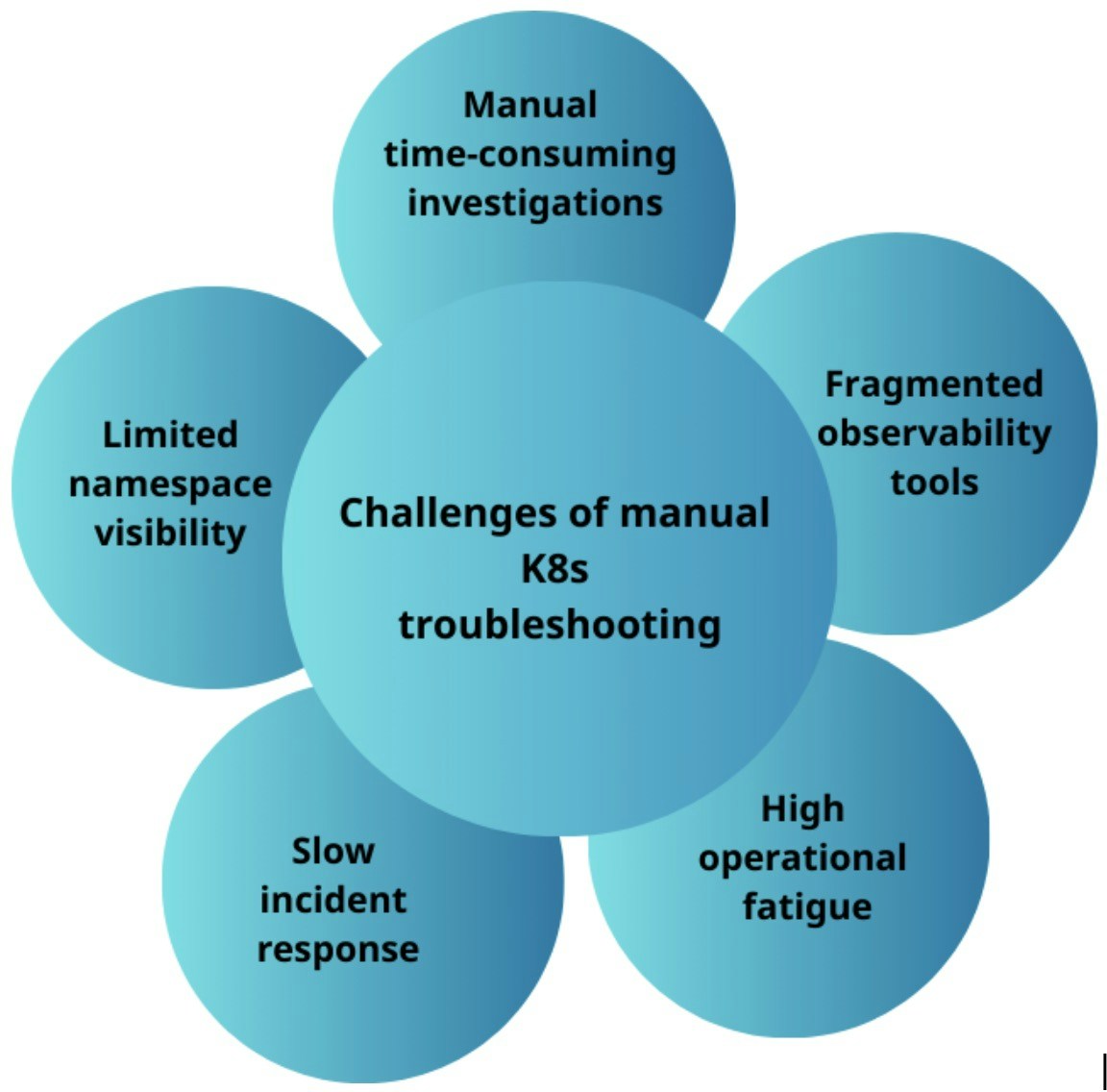
## **Challenges of manual Kubernetes troubleshooting**

<Frame>
  <img src="https://mintcdn.com/cloudthinker/0IKJjKZJEIROke98/images/use-cases/kubernetes-health-monitoring/01-manual-troubleshooting-challenges.jpg?fit=max&auto=format&n=0IKJjKZJEIROke98&q=85&s=b0ee7de46d34538911ac646b3c1356e2" alt="Manual Kubernetes troubleshooting challenges across namespaces and resources" width="1152" height="1136" data-path="images/use-cases/kubernetes-health-monitoring/01-manual-troubleshooting-challenges.jpg" />
</Frame>

<p style={{textAlign: 'center', fontSize: '0.9em', color: '#666', marginTop: '8px'}}>Manual Kubernetes troubleshooting challenges</p>

* **Limited visibility**: Blind spots across namespaces require switching between logs, metrics, and events
* **Time-consuming investigations**: Manual kubectl commands across hundreds/thousands of pods to check status, logs, resources, and events
* **Storage complexity**: Identifying unused PVCs and orphaned resources requires manual examination
* **Security assessment**: Evaluating network policies, pod security, RBAC, and admission controls across the entire cluster
* **Slow incident response**: Manual diagnosis takes hours, increasing MTTR
* **Operational fatigue**: Frequent escalations cause burnout, creating a cycle of reactive troubleshooting

## **Solution: CloudThinker for Amazon EKS**

CloudThinker transforms Kubernetes operations from reactive to proactive through:

* **Continuous health assessments**: Detects issues in minutes across pods, nodes, network, storage, and security
* **Root cause analysis**: Identifies patterns across layers instead of just alerting on symptoms
* **Automated pod investigation**: Eliminates manual kubectl commands, detects CrashLoopBackOff patterns automatically
* **Real-time node validation**: Monitors compute capacity, resource contention, and degraded states
* **Centralized reporting**: Structured reports with findings and remediation recommendations, no manual inspection needed

## **Comparison: CloudThinker versus manual Kubernetes debugging**

The difference between manual Kubernetes operations and CloudThinker's automated analysis becomes clear when examining the complete troubleshooting workflow. Manual Kubernetes operations require engineers to collect, correlate, and interpret data across many tools and layers, an approach that is slow, error-prone, and does not scale with growing system complexity. CloudThinker replaces this manual process with continuous automated analysis and structured insights that transform how teams operate Kubernetes environments.

| Aspect                   | Without CloudThinker                                                                                                                             | With CloudThinker                                                                                                                |
| ------------------------ | ------------------------------------------------------------------------------------------------------------------------------------------------ | -------------------------------------------------------------------------------------------------------------------------------- |
| **Tool Integration**     | Manual inspection across many tools, requiring constant context switching between kubectl, logging systems, metric dashboards, and event streams | One place for correlated insight, providing comprehensive analysis that automatically considers all layers together              |
| **Issue Detection**      | Issues found after impact, with alerts triggered only after problems affect users                                                                | Risks detected early through continuous scanning for architectural risks and potential issues before outages occur               |
| **Analysis Depth**       | Symptoms investigated, focusing on what is happening rather than why                                                                             | Root causes highlighted, automatically identifying underlying issues and explaining why problems occur                           |
| **Knowledge Dependency** | Depends on individual expertise, with effectiveness varying significantly based on engineer experience                                           | Consistent analysis for everyone, democratizing Kubernetes expertise across all team members                                     |
| **Documentation**        | Manual documentation requiring engineers to record findings, create incident reports, and update runbooks                                        | Automatic, shareable reports generated for every analysis with comprehensive records of checks performed and findings discovered |

## **Getting started with CloudThinker**

CloudThinker operates through AI agents that connect directly to your Kubernetes cluster and AWS infrastructure to perform automated health monitoring and analysis. The platform requires only connection credentials to begin monitoring your Amazon EKS environment, with agents coordinating to provide comprehensive cluster visibility.

### **Connecting CloudThinker agents to Kubernetes**

To enable CloudThinker's Kubernetes monitoring capabilities, you provide the agent named [Kai](/guide/agents/kai) with access to your cluster.

Follow the [Kubernetes connection setup guide](../connections/kubernetes)

Once connected, you can interact with Kai using prompts that include your cluster configuration details.

```
@kai analyze pod resource utilization in production namespace
```
<Frame>
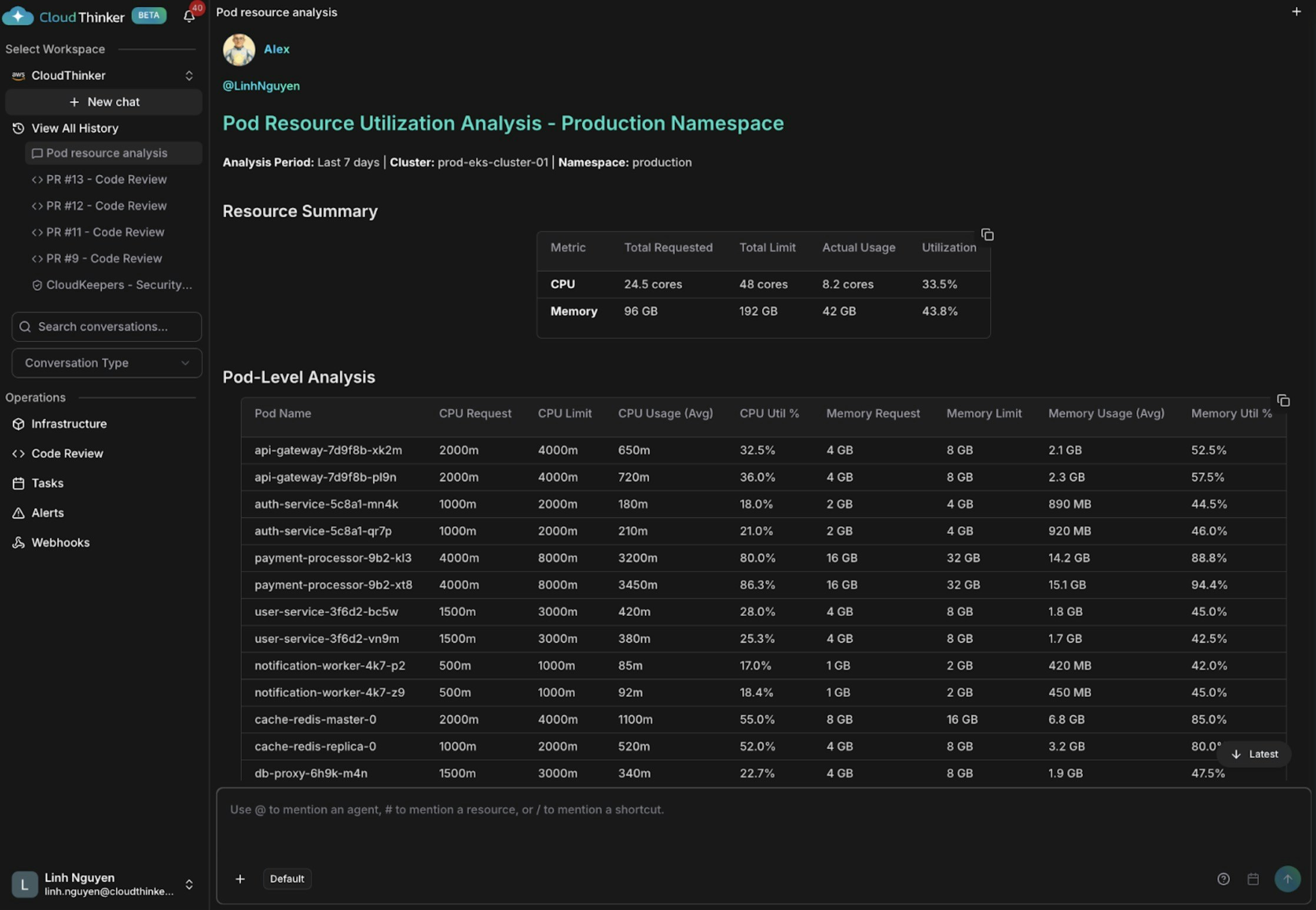
  <img src="https://mintcdn.com/cloudthinker/0IKJjKZJEIROke98/images/use-cases/kubernetes-health-monitoring/02-pod-resource-utilization.jpg?fit=max&auto=format&n=0IKJjKZJEIROke98&q=85&s=e222d8a917b6ed474e862b78092b45bb" alt="Pod resource utilization analysis showing CPU and memory usage patterns" width="2236" height="1546" data-path="images/use-cases/kubernetes-health-monitoring/02-pod-resource-utilization.jpg" />
</Frame>

<p style={{textAlign: 'center', fontSize: '0.9em', color: '#666', marginTop: '8px'}}>Pod resource utilization analysis</p>

<Frame>
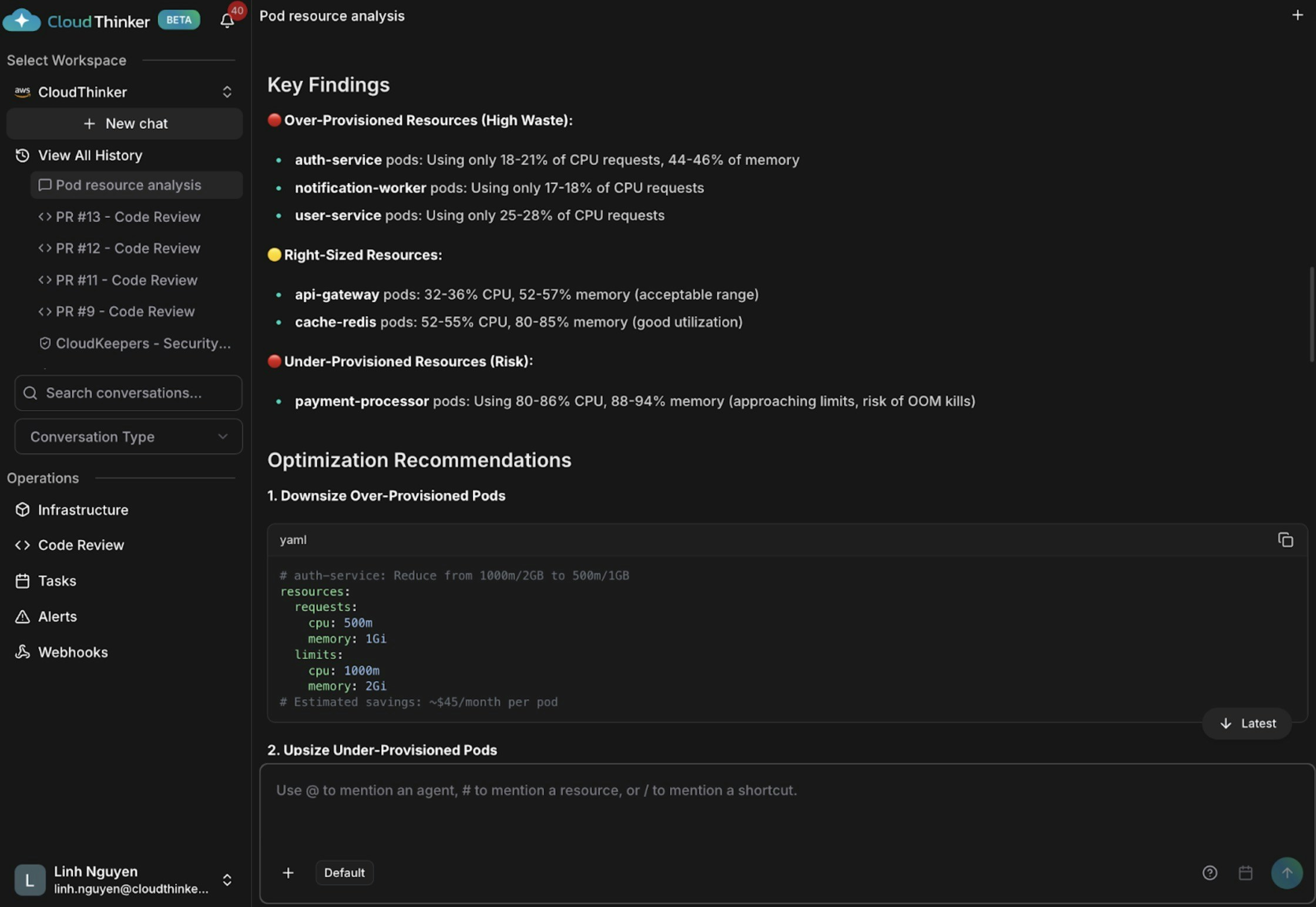
  <img src="https://mintcdn.com/cloudthinker/0IKJjKZJEIROke98/images/use-cases/kubernetes-health-monitoring/03-pod-analysis-visualization.jpg?fit=max&auto=format&n=0IKJjKZJEIROke98&q=85&s=3ab99f44bf3d440f29c803b422a48010" alt="Pod analysis visualization with performance recommendations" width="2240" height="1544" data-path="images/use-cases/kubernetes-health-monitoring/03-pod-analysis-visualization.jpg" />
</Frame>

<p style={{textAlign: 'center', fontSize: '0.9em', color: '#666', marginTop: '8px'}}>Pod analysis visualization with performance recommendations</p>

The analysis reveals **three critical findings**: several pods are significantly over-provisioned (auth-service using only 18-21% CPU, notification-worker at 17-18% CPU), indicating substantial resource waste. Some pods like api-gateway and cache-redis are appropriately sized with 32-55% CPU and 52-85% memory utilization. Most critically, the **payment-processor pods are dangerously under-provisioned** at 80-86% CPU and 88-94% memory usage, putting them at high risk of OutOfMemory kills and service disruptions.

```
@kai identify nodes with <30% CPU utilization
```
<Frame>
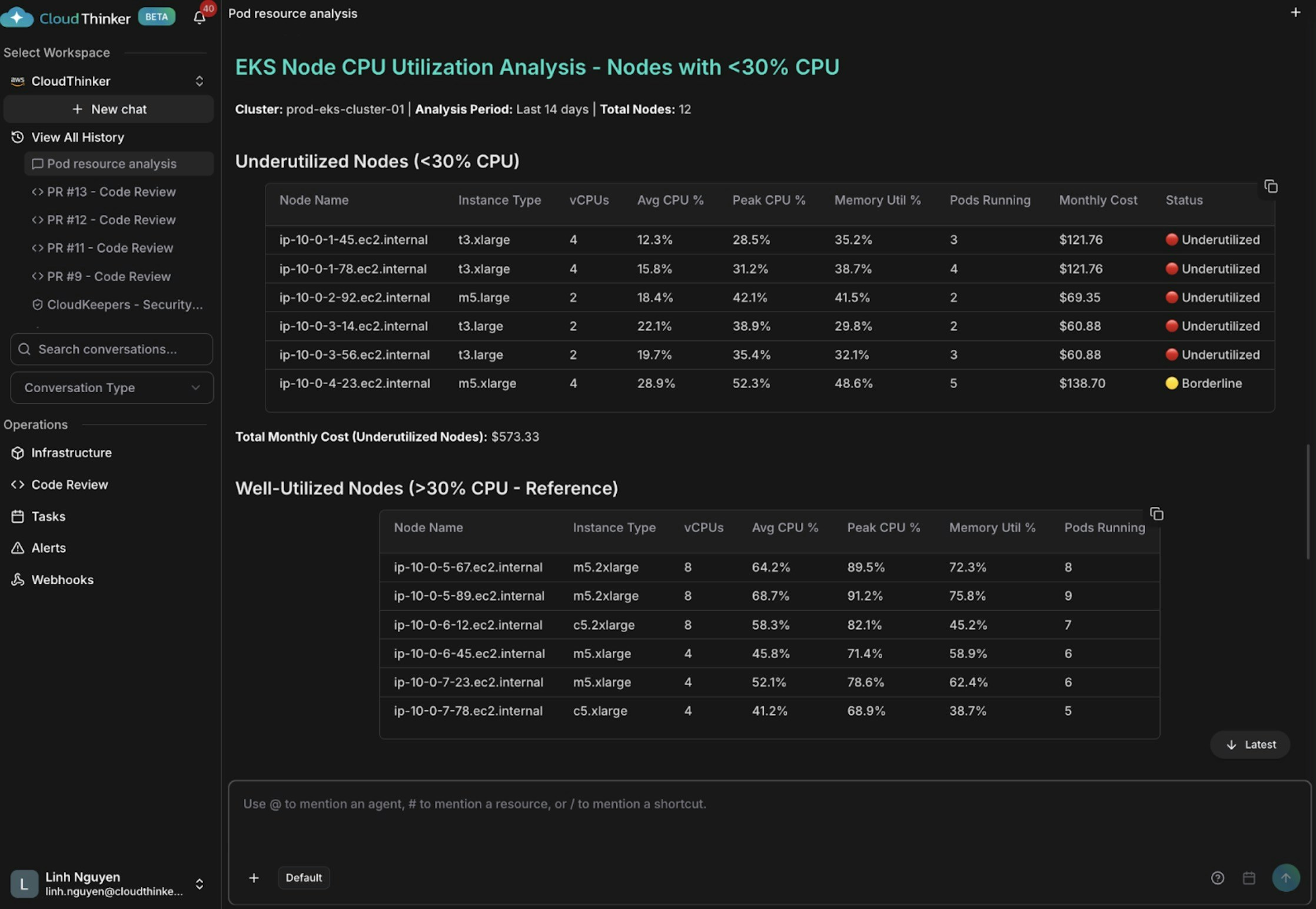
  <img src="https://mintcdn.com/cloudthinker/0IKJjKZJEIROke98/images/use-cases/kubernetes-health-monitoring/04-node-cpu-utilization.jpg?fit=max&auto=format&n=0IKJjKZJEIROke98&q=85&s=6faab9bb595868b7077bc4e287558a51" alt="Node CPU utilization analysis showing underutilized instances and cost waste" width="2236" height="1544" data-path="images/use-cases/kubernetes-health-monitoring/04-node-cpu-utilization.jpg" />
</Frame>

<p style={{textAlign: 'center', fontSize: '0.9em', color: '#666', marginTop: '8px'}}>Node CPU utilization analysis showing underutilized instances</p>

The analysis reveals **5 nodes critically underutilized** with average CPU below 30% (some as low as 12-15%), wasting approximately \$573 monthly on unused capacity. There's a **severe pod distribution imbalance** across the cluster—some nodes run only 2-3 pods while others handle 8-9 pods, indicating poor scheduling and bin-packing. The root cause stems from **oversized instance types** (t3.xlarge nodes running lightweight workloads) combined with the absence of cluster autoscaling and proper pod affinity rules to optimize resource placement.

```
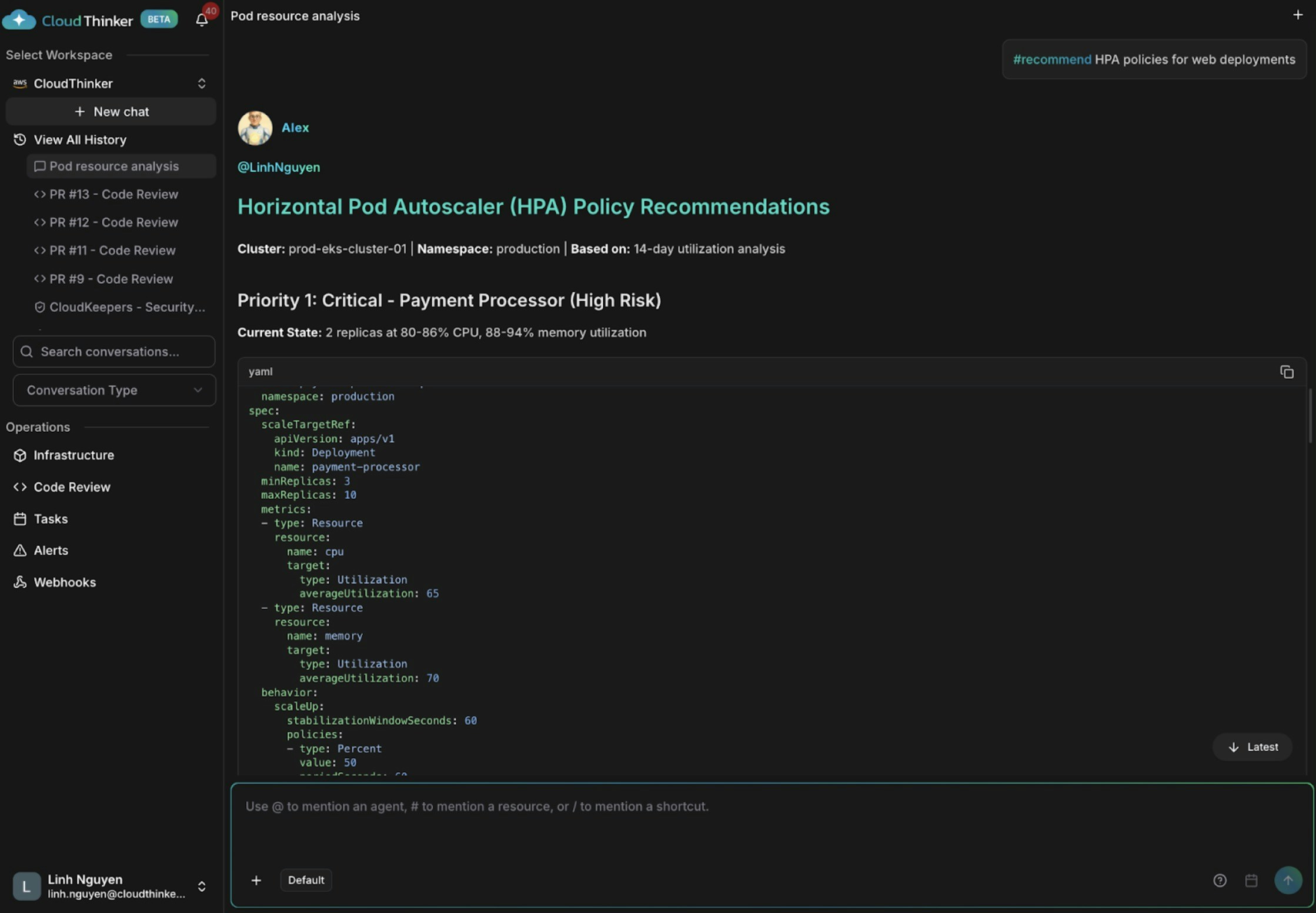
@kai #recommend HPA policies for web deployments
```
<Frame>
  <img src="https://mintcdn.com/cloudthinker/0IKJjKZJEIROke98/images/use-cases/kubernetes-health-monitoring/05-hpa-policy-recommendations.jpg?fit=max&auto=format&n=0IKJjKZJEIROke98&q=85&s=c017e66acc6cba7ad980435e31c99a83" alt="HPA policy recommendations for web deployment auto-scaling configuration" width="2238" height="1552" data-path="images/use-cases/kubernetes-health-monitoring/05-hpa-policy-recommendations.jpg" />
</Frame>

<p style={{textAlign: 'center', fontSize: '0.9em', color: '#666', marginTop: '8px'}}>HPA policy recommendations for auto-scaling</p>

The analysis identifies **payment-processor as critically at-risk** with only 2 replicas running at 80-86% CPU and 88-94% memory utilization, indicating imminent danger of outages and OOM kills. The **API gateway shows moderate utilization** (32-36% CPU, 52-57% memory) but lacks autoscaling to handle traffic variability and spikes. Meanwhile, **user-service and auth-service are severely over-provisioned** at just 18-28% CPU utilization, wasting resources without any HPA policies in place to dynamically adjust capacity based on actual demand.

## What's Next

<CardGroup cols={2}>
  <Card title="Kai Agent Reference" icon="robot" href="/guide/agents/kai">
    Full capabilities of Kai — the Kubernetes administrator agent
  </Card>

  <Card title="Kubernetes Connection" icon="https://mintcdn.com/cloudthinker/aLd-ttc-SCW-aFky/images/icons/kubernetes.svg?fit=max&auto=format&n=aLd-ttc-SCW-aFky&q=85&s=7c03292954ff635a1994623a5c39971b" href="/guide/connections/kubernetes" width="24" height="24" data-path="images/icons/kubernetes.svg">
    Step-by-step guide to connecting CloudThinker to your EKS cluster
  </Card>

  <Card title="Topology Explorer" icon="diagram-project" href="/guide/infrastructure/topology">
    Map Kubernetes service dependencies for faster incident root cause analysis
  </Card>

  <Card title="CloudKeepers" icon="radar" href="/guide/infrastructure/cloudkeepers">
    Run continuous SecurityOps and CostOps pilots across your Kubernetes workloads
  </Card>
</CardGroup>