> ## Documentation Index
> Fetch the complete documentation index at: https://docs.cloudthinker.io/llms.txt
> Use this file to discover all available pages before exploring further.
# Headless Chat
> スクリプトから Anna にプロンプトを 1 つ送り、回答を stdout で受け取り、長時間の実行は後から CI でも回収します
`cloudthinker chat -p` はプロンプトを Anna に送り、回答を待ちます。stdout には Anna の回答だけが出るため、そのままパイプに流し込めます。
## プロンプトを送る
```bash theme={null}
cloudthinker chat -p "Name the three biggest cost drivers in a typical AWS account, one line each."
```
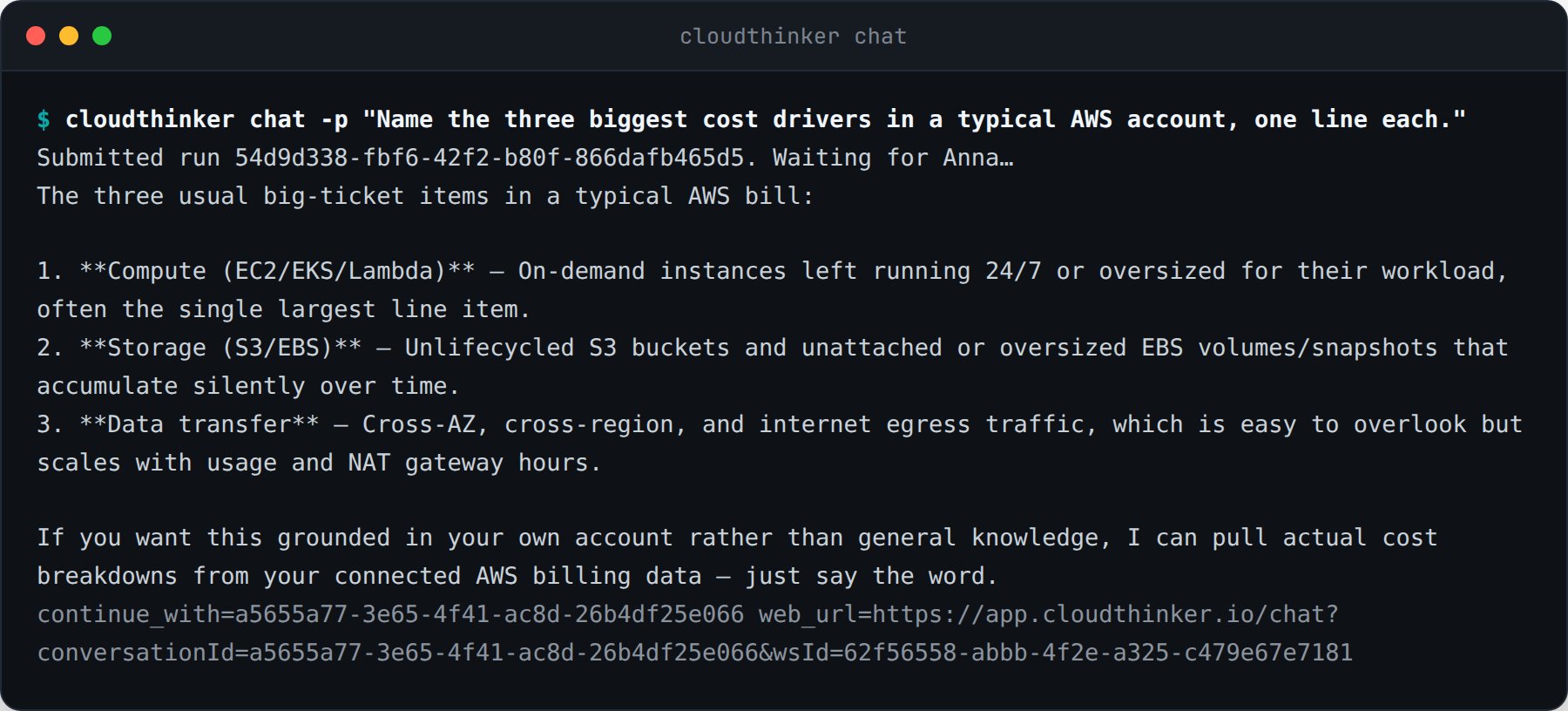 進捗、実行 ID、継続用のヒントは stderr に出ます。この分離があるからこそ、コマンドをパイプできます。
```bash theme={null}
cloudthinker chat -p "Summarize yesterday's incidents" > summary.md
cloudthinker chat -p "List unused EBS volumes" | grep vol-
```
## 会話を継続する
終了した実行はいずれも `continue_with=` を stderr に出力します。その ID か実行 ID を渡すと、同じスレッドを続けられます。
```bash theme={null}
cloudthinker chat -p "Draft the rollout plan"
cloudthinker chat -p "Remove the risky step" --continue 0f9e364e-9c34-406e-be7d-52a143fede85
```
同じ会話は、ヒントと並んで出力される `web_url` から Web アプリでも開けます。
## 送信だけして後で回収する
長い調査のためにターミナルを占有する必要はありません。`--no-wait` は実行がキューに入った時点で戻ります。
```bash theme={null}
cloudthinker chat -p "Which S3 buckets have no lifecycle policy?" --no-wait --json
```
進捗、実行 ID、継続用のヒントは stderr に出ます。この分離があるからこそ、コマンドをパイプできます。
```bash theme={null}
cloudthinker chat -p "Summarize yesterday's incidents" > summary.md
cloudthinker chat -p "List unused EBS volumes" | grep vol-
```
## 会話を継続する
終了した実行はいずれも `continue_with=` を stderr に出力します。その ID か実行 ID を渡すと、同じスレッドを続けられます。
```bash theme={null}
cloudthinker chat -p "Draft the rollout plan"
cloudthinker chat -p "Remove the risky step" --continue 0f9e364e-9c34-406e-be7d-52a143fede85
```
同じ会話は、ヒントと並んで出力される `web_url` から Web アプリでも開けます。
## 送信だけして後で回収する
長い調査のためにターミナルを占有する必要はありません。`--no-wait` は実行がキューに入った時点で戻ります。
```bash theme={null}
cloudthinker chat -p "Which S3 buckets have no lifecycle policy?" --no-wait --json
```
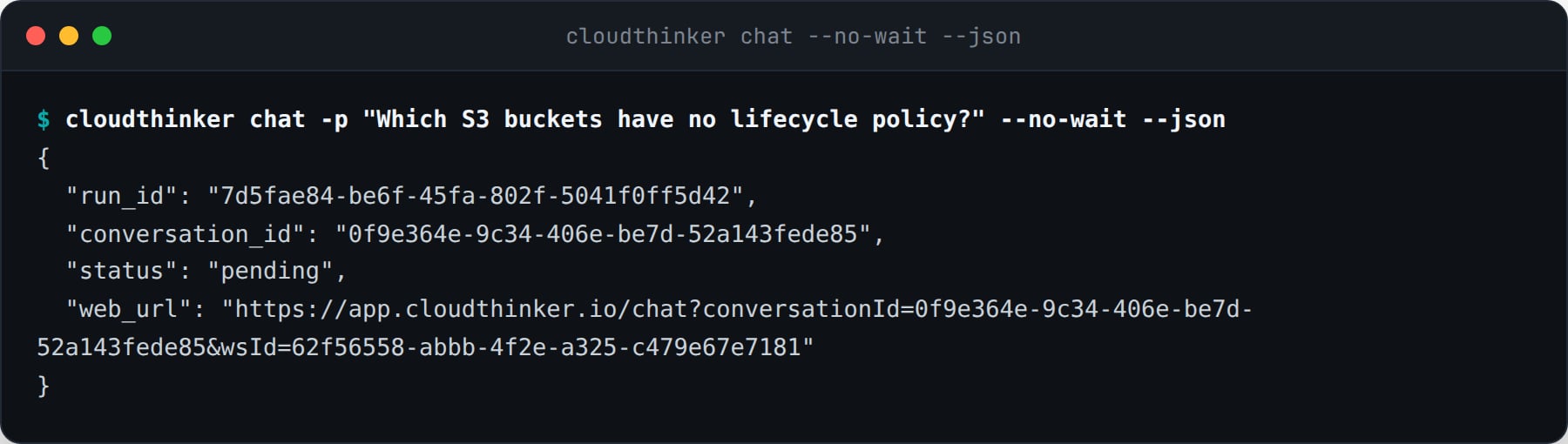 回答は後から、どのマシンからでも回収できます。
```bash theme={null}
cloudthinker chat status 7d5fae84-be6f-45fa-802f-5041f0ff5d42 --wait
cloudthinker chat ls --limit 10
cloudthinker chat ls --conversation 0f9e364e-9c34-406e-be7d-52a143fede85 --json
```
クライアント側のタイムアウトで実行が取り消されることはありません。`--timeout` は CLI が待つ時間だけを区切り、実行はサーバー側で続きます。CLI は再開用の `chat status` コマンドを表示します。
## 機械可読な出力
`--json` は、平文の回答の代わりにエンベロープを 1 つ stdout に書き出します。
| フィールド | 意味 |
| ----------------- | ------------------------------------------------------------ |
| `run_id` | `chat status` で確認する実行 |
| `conversation_id` | `--continue` に渡すスレッド |
| `status` | `pending`、`running`、`succeeded`、`failed`、`approval required` |
| `answer` | Anna の最終回答。未完了の間は `null` |
| `web_url` | Web アプリ上の同じ会話 |
```bash theme={null}
cloudthinker chat -p "Check the error budget" --json | jq -r '.answer'
```
## 終了コード
パイプラインはテキストを解析せずに結果で分岐できます。
| コード | 意味 |
| --- | ---------------------------- |
| 0 | 実行が完了し、回答を出力した |
| 1 | 実行が失敗した、または実行 ID が存在しない |
| 2 | 使用方法の誤り、またはワークスペースのポリシーによる拒否 |
| 3 | 未ログイン、または認証情報の期限切れ |
| 4 | CLI が待機をやめた。実行はサーバー側で継続中 |
| 5 | ブラウザーでの承認待ちで実行が一時停止した |
`chat status` と `chat ls` は読み取り操作です。実行自体の状態にかかわらず、取得に成功すれば終了コードは 0 です。
## CI で使う
ジョブにトークンを渡し、stdout は回答のために空けておき、結果は終了コードで判断します。
```bash theme={null}
export CLOUDTHINKER_TOKEN="$CLOUDTHINKER_CI_TOKEN"
if cloudthinker chat -p "Review last night's failed deployments" --timeout 900 > report.md; then
echo "report ready"
else
case $? in
4) echo "still running, collect it in the next job" ;;
5) echo "waiting for an approval in the browser" ;;
*) exit 1 ;;
esac
fi
```
## 関連
パイプラインに専用の認証情報を渡す
すべてのコマンド、フラグ、変数、終了コード
回答は後から、どのマシンからでも回収できます。
```bash theme={null}
cloudthinker chat status 7d5fae84-be6f-45fa-802f-5041f0ff5d42 --wait
cloudthinker chat ls --limit 10
cloudthinker chat ls --conversation 0f9e364e-9c34-406e-be7d-52a143fede85 --json
```
クライアント側のタイムアウトで実行が取り消されることはありません。`--timeout` は CLI が待つ時間だけを区切り、実行はサーバー側で続きます。CLI は再開用の `chat status` コマンドを表示します。
## 機械可読な出力
`--json` は、平文の回答の代わりにエンベロープを 1 つ stdout に書き出します。
| フィールド | 意味 |
| ----------------- | ------------------------------------------------------------ |
| `run_id` | `chat status` で確認する実行 |
| `conversation_id` | `--continue` に渡すスレッド |
| `status` | `pending`、`running`、`succeeded`、`failed`、`approval required` |
| `answer` | Anna の最終回答。未完了の間は `null` |
| `web_url` | Web アプリ上の同じ会話 |
```bash theme={null}
cloudthinker chat -p "Check the error budget" --json | jq -r '.answer'
```
## 終了コード
パイプラインはテキストを解析せずに結果で分岐できます。
| コード | 意味 |
| --- | ---------------------------- |
| 0 | 実行が完了し、回答を出力した |
| 1 | 実行が失敗した、または実行 ID が存在しない |
| 2 | 使用方法の誤り、またはワークスペースのポリシーによる拒否 |
| 3 | 未ログイン、または認証情報の期限切れ |
| 4 | CLI が待機をやめた。実行はサーバー側で継続中 |
| 5 | ブラウザーでの承認待ちで実行が一時停止した |
`chat status` と `chat ls` は読み取り操作です。実行自体の状態にかかわらず、取得に成功すれば終了コードは 0 です。
## CI で使う
ジョブにトークンを渡し、stdout は回答のために空けておき、結果は終了コードで判断します。
```bash theme={null}
export CLOUDTHINKER_TOKEN="$CLOUDTHINKER_CI_TOKEN"
if cloudthinker chat -p "Review last night's failed deployments" --timeout 900 > report.md; then
echo "report ready"
else
case $? in
4) echo "still running, collect it in the next job" ;;
5) echo "waiting for an approval in the browser" ;;
*) exit 1 ;;
esac
fi
```
## 関連
パイプラインに専用の認証情報を渡す
すべてのコマンド、フラグ、変数、終了コード