> ## Documentation Index
> Fetch the complete documentation index at: https://docs.cloudthinker.io/llms.txt
> Use this file to discover all available pages before exploring further.

# Artifacts

> 종합적인 리포트 생성, 커스텀 대시보드 구축, 분석을 위한 데이터 내보내기

Artifacts는 CloudThinker 에이전트가 연결된 클라우드 데이터로부터 생성하는 대시보드, 리포트, 차트입니다. 필요한 인사이트를 자연어로 설명하면, 에이전트가 몇 분 안에 데이터 기반 시각화를 만들어냅니다.

클라우드 리포트를 수작업으로 만들려면 비용, 보안, 모니터링 도구에서 데이터를 가져와 형식을 맞추고 요약해야 합니다 — 빠르게 낡아지는 전문가 작업에 수 시간이 걸립니다. CloudThinker의 `#dashboard`, `#report`, `#chart` 도구는 단일 프롬프트로 동일한 결과물을 만들어내며, 모든 [연결](/ko/guide/connections/overview)에서 데이터를 통합합니다.

## 작동 방식

1. **요청** — [CloudThinker Language](/ko/guide/language) 구문으로 프롬프트를 보냅니다: `@agent #tool instruction`.
2. **수집** — 에이전트가 연결된 곳 전반에서 실시간 데이터를 조회합니다: Cost Explorer, CloudWatch, 데이터베이스 등.
3. **생성** — 에이전트가 차트, 테이블, 작성된 요약이 포함된 인터랙티브 artifact를 조립합니다.
4. **공유 또는 자동화** — artifact를 내보내거나, 원하는 주기로 재생성되도록 [반복 작업](/ko/guide/automation/tasks)으로 예약합니다.

<Frame>
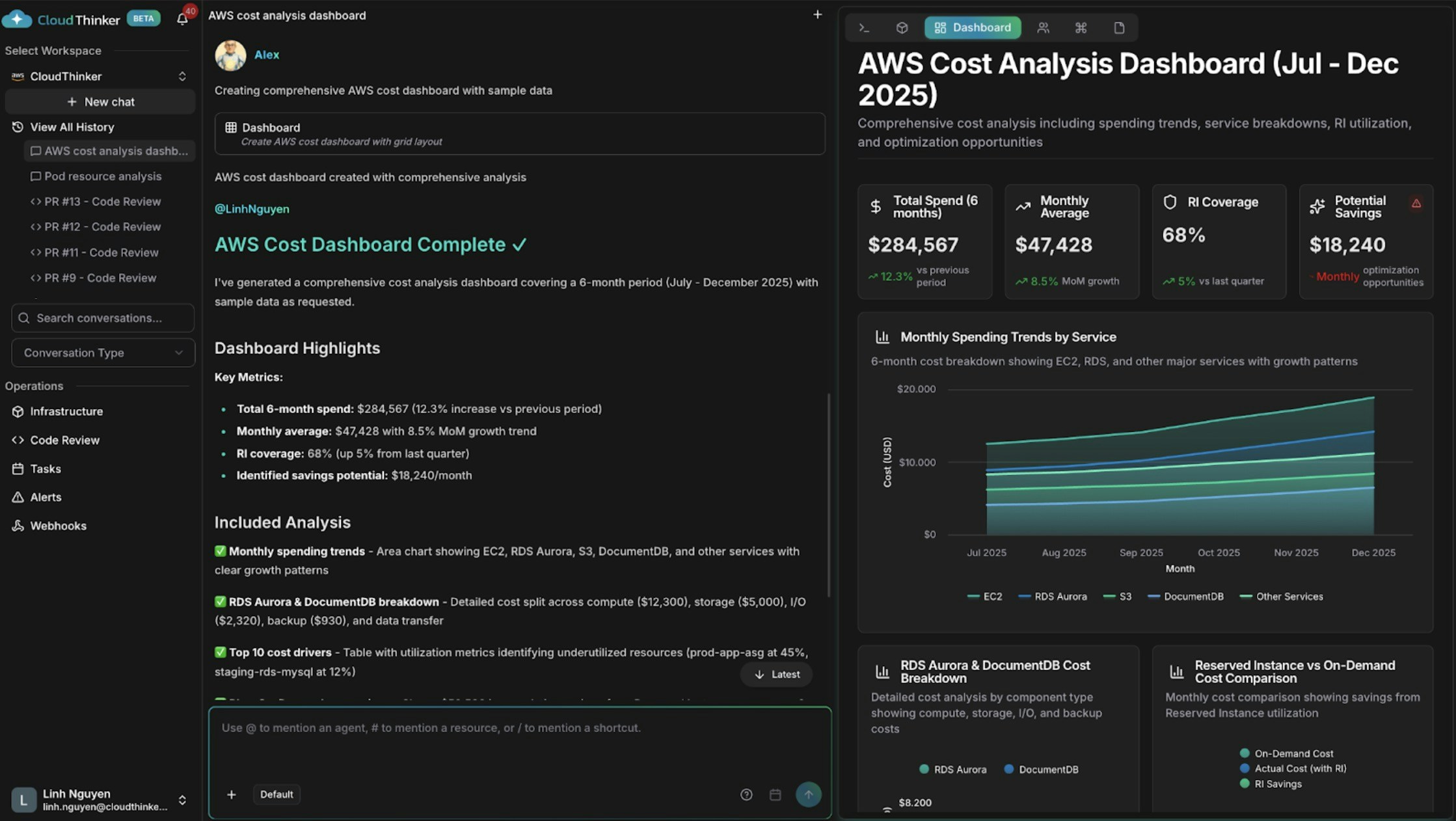
  <img src="https://mintcdn.com/cloudthinker/0IKJjKZJEIROke98/images/use-cases/actionable-dashboards/01-aws-cost-dashboard.jpg?fit=max&auto=format&n=0IKJjKZJEIROke98&q=85&s=4ac5b1a42bb6b60a8095714d3da51b39" alt="지출 추세와 비용 동인이 있는 AWS 비용 대시보드" width="2238" height="1262" data-path="images/use-cases/actionable-dashboards/01-aws-cost-dashboard.jpg" />
</Frame>

<p style={{textAlign: 'center', fontSize: '0.9em', color: '#666', marginTop: '8px'}}>지출 추세와 비용 동인이 있는 AWS 비용 대시보드</p>

## 무엇을 할 수 있나요

| 기능              | 설명                                        | 자세히 보기                                         |
| --------------- | ----------------------------------------- | ---------------------------------------------- |
| 비용 대시보드 구축      | Alex가 지출 추세, 서비스 분류, 이상 징후, 예측을 차트로 표시    | [비용 분석](/ko/guide/cost-optimization/analytics) |
| 인프라 신호 연관 분석    | Anna가 하나의 뷰에서 여러 클라우드의 상태, 성능, 비용 데이터를 결합 | [인프라 분석](/ko/guide/infrastructure/analytics)   |
| 보안 상태 리포트       | Oliver가 컴플라이언스 상태, 미해결 발견 사항, 개선 진행 상황 요약 | [Oliver](/ko/guide/agents/oliver)              |
| 종속성 시각화         | 실시간 맵에서 리소스 관계와 영향 범위 탐색                  | [Topology](/ko/guide/infrastructure/topology)  |
| 반복 리포트 예약       | 대시보드 또는 리포트를 자동으로 재생성하고 전달                | [Tasks](/ko/guide/automation/tasks)            |
| 결과를 다른 시스템으로 전송 | artifact 이벤트를 외부 도구로 전송                   | [Webhooks](/ko/guide/webhooks/overview)        |

## 핵심 개념

| 도구 태그        | 생성 결과                         | 최적 사용처                  |
| ------------ | ----------------------------- | ----------------------- |
| `#dashboard` | 멀티 위젯 인터랙티브 대시보드              | 여러 관련 지표에 대한 지속적인 가시성   |
| `#report`    | 데이터, 발견 사항, 권장 사항이 있는 서술형 리포트 | 이해관계자 업데이트, 감사, 리뷰      |
| `#chart`     | 단일 집중 시각화                     | 하나의 지표 또는 추세를 시간에 따라 추적 |

## 예제 프롬프트

한 줄 요청으로 시작하세요 — 에이전트가 범위와 시간 범위에 대한 합리적인 기본값을 선택합니다:

```text theme={null}
@alex #dashboard AWS spending by service for the last 30 days
@oliver #report quarterly security assessment across all accounts
@kai #dashboard cluster resource utilization
```

### 비용 분석 대시보드

특정 분류가 필요할 때 지시에 구조를 추가하세요:

```text theme={null}
@alex #dashboard Generate a comprehensive AWS cost dashboard for [start_date] to [end_date].

Include:
- Monthly spending trends by service with month-over-month growth rates
- Top 10 cost drivers and their utilization patterns
- Reserved Instance vs On-Demand cost comparison
- Cost anomalies and optimization opportunities with estimated savings

Segment by: [cost allocation tags such as environment, team, or application]
```

### 크로스 도메인 대시보드

Anna에게 서로 다른 시스템에 있는 데이터를 연관 분석하도록 요청하세요:

```text theme={null}
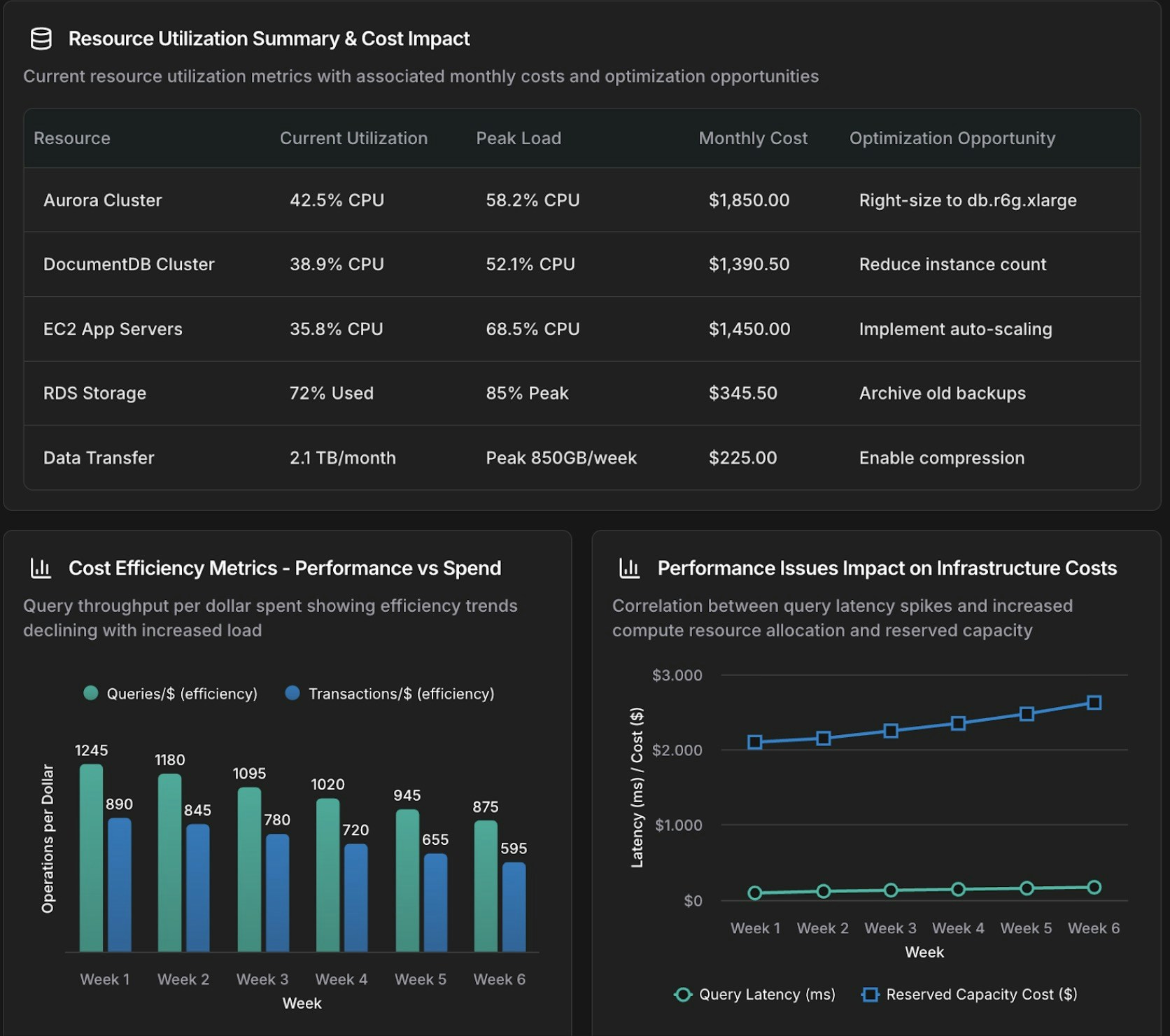
@anna #dashboard Create an operational dashboard correlating database performance with infrastructure costs for [time_period].

Analyze:
- Aurora and DocumentDB query performance metrics
- Resource utilization and spending patterns
- Correlation between database load and compute and storage costs

Context: [recent changes, migrations, or specific concerns]
```
<Frame>
  <img src="https://mintcdn.com/cloudthinker/0IKJjKZJEIROke98/images/use-cases/actionable-dashboards/02-database-infrastructure-dashboard.jpg?fit=max&auto=format&n=0IKJjKZJEIROke98&q=85&s=948166dc5e93d68dce7ae76ce7ab9061" alt="성능 및 비용 지표를 보여주는 데이터베이스 및 인프라 연관 분석 대시보드" width="1672" height="1480" data-path="images/use-cases/actionable-dashboards/02-database-infrastructure-dashboard.jpg" />
</Frame>

<p style={{textAlign: 'center', fontSize: '0.9em', color: '#666', marginTop: '8px'}}>데이터베이스 및 인프라 연관 분석 대시보드</p>

### 집중 차트

전체 대시보드 대신 단일 시각화에는 `#chart`를 사용하세요:

```text theme={null}
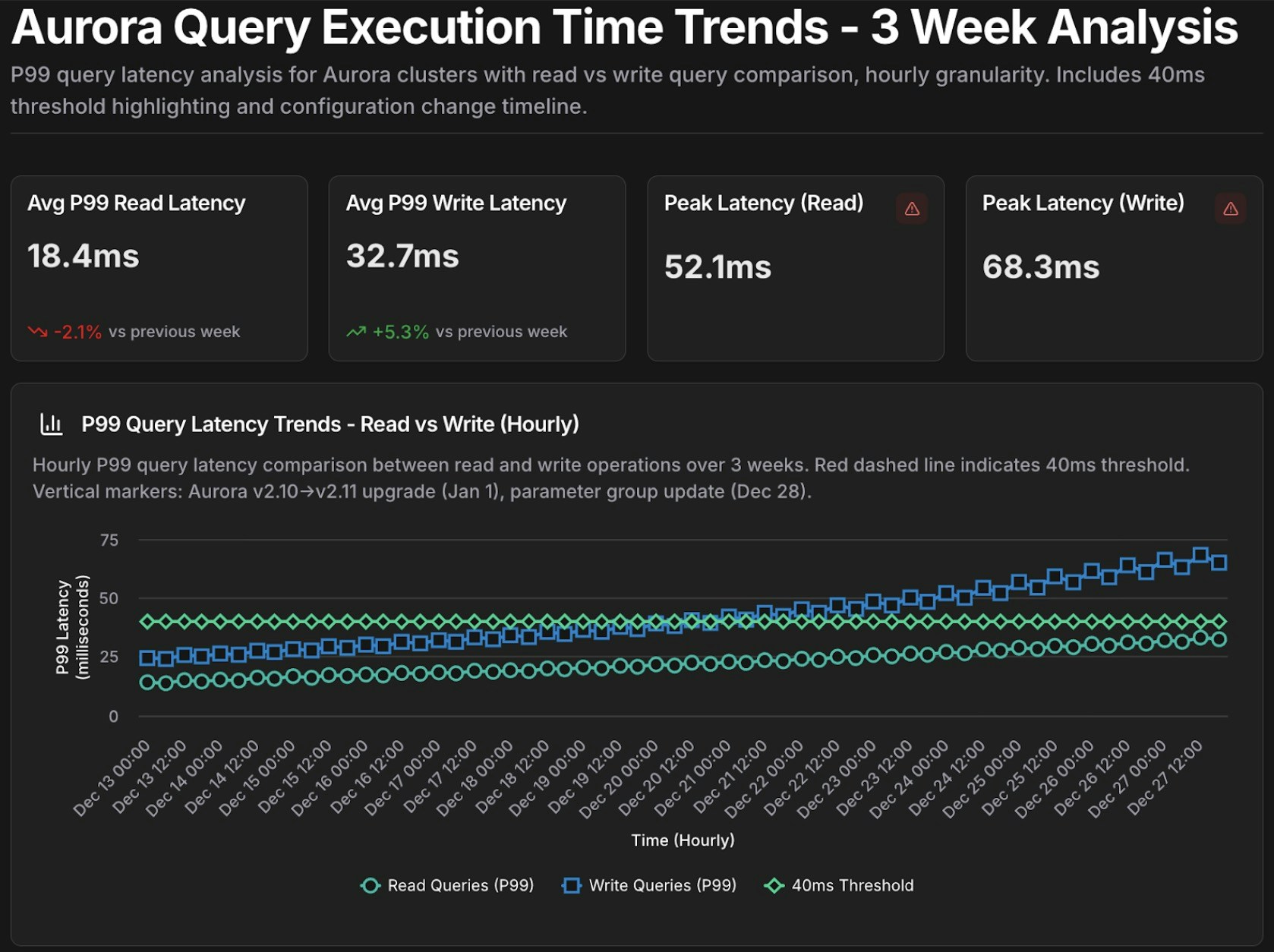
@tony #chart Show query execution time trends for Aurora cluster [cluster-identifier] over the past [time_period].

- Metrics: p50, p95, p99 query latency
- Separate lines for read queries vs write queries
- Highlight queries exceeding [threshold] ms
```
<Frame>
  <img src="https://mintcdn.com/cloudthinker/0IKJjKZJEIROke98/images/use-cases/actionable-dashboards/03-aurora-query-performance-chart.jpg?fit=max&auto=format&n=0IKJjKZJEIROke98&q=85&s=7eda15a3292201adb072763cae9f3997" alt="p50, p95, p99 지연 시간 지표가 있는 Aurora 쿼리 성능 시계열 차트" width="1678" height="1254" data-path="images/use-cases/actionable-dashboards/03-aurora-query-performance-chart.jpg" />
</Frame>

<p style={{textAlign: 'center', fontSize: '0.9em', color: '#666', marginTop: '8px'}}>Aurora 쿼리 성능 시계열 차트</p>

## 재사용 가능한 템플릿

매개변수화된 프롬프트를 반복 조사를 위한 템플릿으로 저장하고, 매번 `{변수}`를 채워 실행하세요:

```text theme={null}
Template: database_performance_review
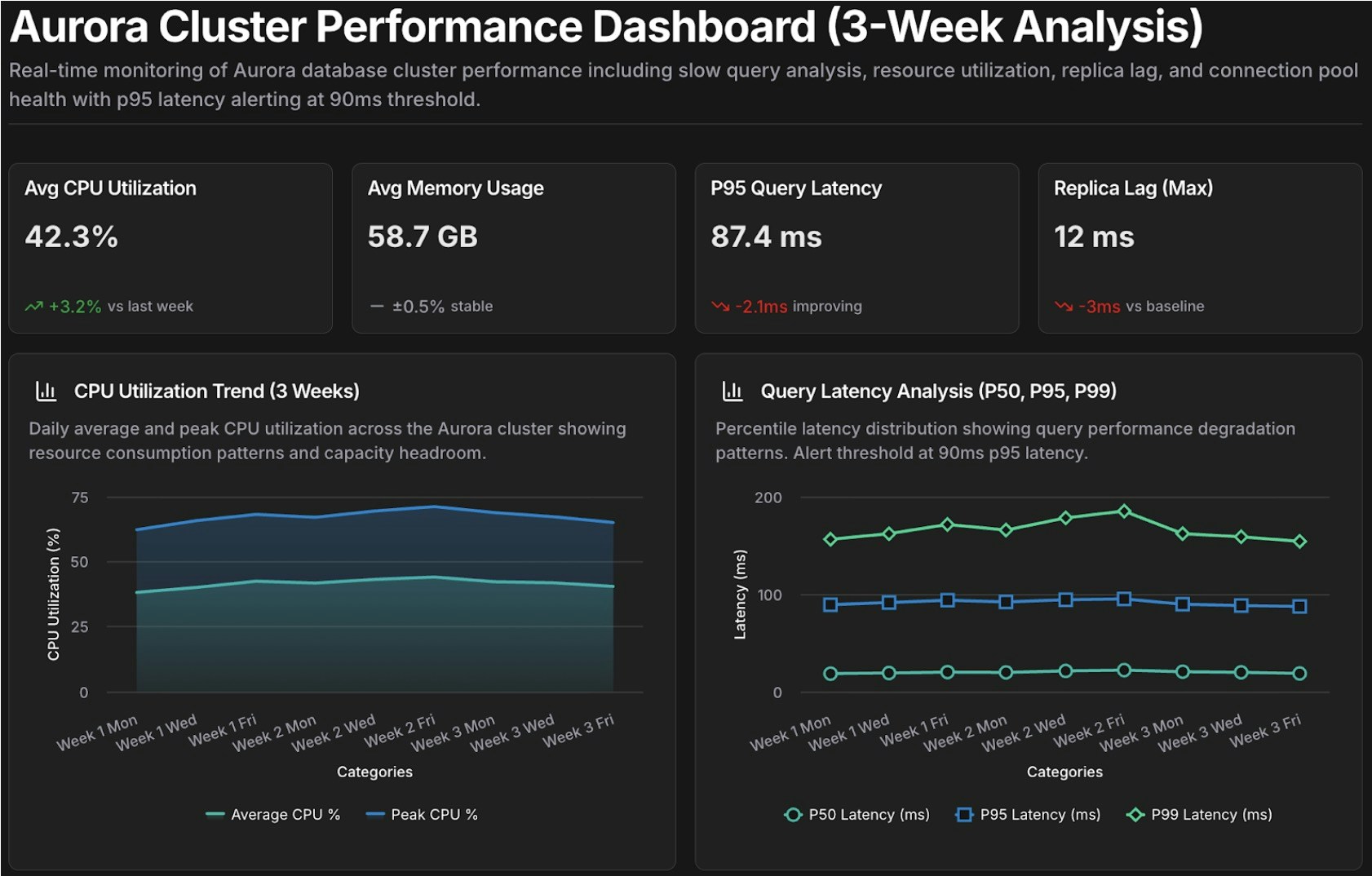
@tony #dashboard Create a performance dashboard for Aurora cluster {cluster_id} covering {time_period}.

Include:
- Slow query analysis (queries exceeding {latency_threshold} ms)
- Resource utilization trends (CPU, memory, IOPS)
- Replica lag monitoring
- Connection pool health

Compare against baseline: {comparison_period}
Alert on: queries exceeding p95 latency of {latency_threshold} ms

Template: cost_anomaly_investigation
@alex #report Investigate the cost anomaly for {service_name} on {date}.

- Compare costs to the 7-day and 30-day averages
- Break down by cost component (compute, storage, I/O, data transfer)
- Identify the specific resources driving the increase and quantify the impact
- Recommend immediate actions to mitigate ongoing cost increases
```

예를 들어, `cluster_id=production-aurora-cluster`, `time_period="past 7 days"`, `comparison_period="previous 30 days"`, `latency_threshold=200`으로 `database_performance_review`를 실행합니다.
<Frame>
  <img src="https://mintcdn.com/cloudthinker/0IKJjKZJEIROke98/images/use-cases/actionable-dashboards/04-performance-review-template.jpg?fit=max&auto=format&n=0IKJjKZJEIROke98&q=85&s=d99f4fd1f4406daf2cfbbe70c18f5b1a" alt="Aurora 클러스터 분석을 위한 성능 리뷰 대시보드 템플릿" width="1682" height="1074" data-path="images/use-cases/actionable-dashboards/04-performance-review-template.jpg" />
</Frame>

<p style={{textAlign: 'center', fontSize: '0.9em', color: '#666', marginTop: '8px'}}>성능 리뷰 대시보드 템플릿</p>

## 다음 단계

<CardGroup cols={2}>
  <Card title="Cost Analytics" icon="chart-line" href="/ko/guide/cost-optimization/analytics">
    지출 추세, 예측, 비용 귀속 분석에 대해 더 깊이 알아보세요
  </Card>

  <Card title="Infrastructure Analytics" icon="server" href="/ko/guide/infrastructure/analytics">
    연결된 클라우드 전반의 성능, 비용, 신뢰성 신호를 연관 분석하세요
  </Card>

  <Card title="CloudThinker Language" icon="code" href="/ko/guide/language">
    효과적인 프롬프트를 구축하기 위한 전체 @agent #tool 구문을 마스터하세요
  </Card>

  <Card title="Tasks" icon="clock" href="/ko/guide/automation/tasks">
    대시보드와 리포트를 자동으로 재생성하도록 예약하세요
  </Card>
</CardGroup>
