> ## Documentation Index
> Fetch the complete documentation index at: https://docs.cloudthinker.io/llms.txt
> Use this file to discover all available pages before exploring further.
# Capabilities
> 에이전트가 허용하는 모든 도구 태그와 각각이 생성하는 출력을 확인하세요 — 대시보드, 보고서, 추천 사항, 알림.
도구 태그는 에이전트에게 어떤 종류의 출력을 생성할지 알려줍니다 — 대시보드, 보고서, 알림 등. 에이전트 멘션 바로 뒤에 태그를 추가하고 지시사항을 작성하세요.
## 문법
```text theme={null}
@agent #tool instruction
```
| 부분 | 역할 |
| ------------- | -------------------------------------------------------------------- |
| `@agent` | 요청을 특정 에이전트로 라우팅합니다: `@alex`, `@oliver`, `@tony`, `@kai`, 또는 `@anna` |
| `#tool` | 출력 형식 설정, 멘션 바로 뒤에 배치 |
| `instruction` | 범위와 제약 조건을 포함하여 원하는 내용 설명 |
태그 조합을 포함한 전체 문법은 [CloudThinker Language](/ko/guide/language)를 참고하세요.
## 도구 태그
| 태그 | 출력 |
| ------------ | ---------------------------------------------------- |
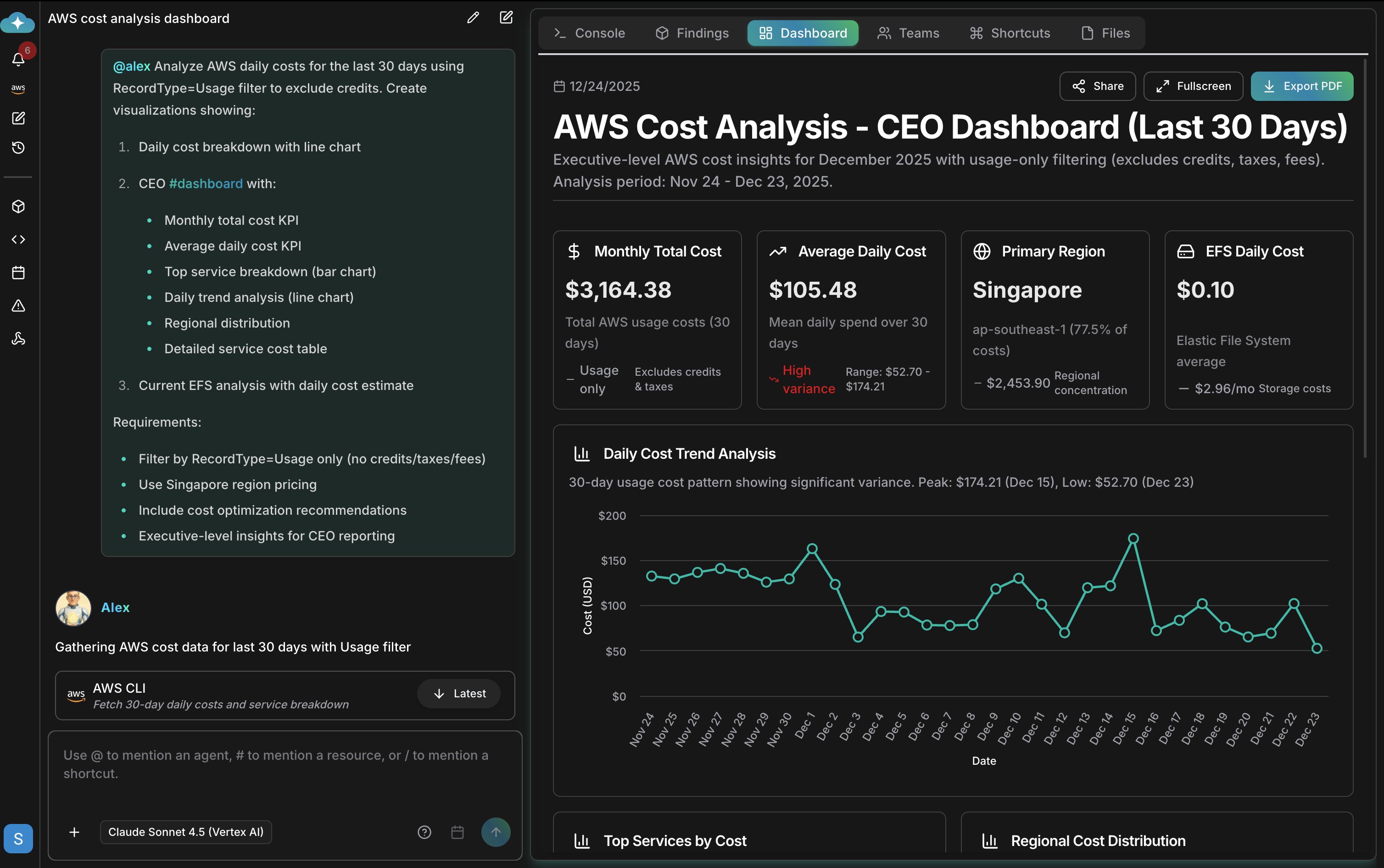
| `#dashboard` | 실시간 메트릭, 필터 가능한 뷰, 전체 화면 모드, PDF 내보내기가 있는 인터랙티브 대시보드 |
| `#report` | 경영진 요약, 상세 발견 항목, 우선순위별 추천 사항이 있는 분석 문서 |
| `#recommend` | 영향도 순으로 우선순위가 매겨지고 노력 추정치와 구현 단계가 포함된 실행 가능한 추천 사항 |
| `#alert` | 정의한 조건에서 트리거되는 모니터링 알림 |
| `#chart` | 독립형 데이터 시각화 |
| `#kb` | 조직 지식 베이스의 검색 결과 |
## 대시보드
`#dashboard`는 필터링, 전체 화면 보기, PDF 내보내기가 가능한 라이브 메트릭이 포함된 인터랙티브 아티팩트를 생성합니다. 대시보드의 저장, 공유, 관리 방법은 [Artifacts](/ko/guide/artifacts/overview)를 참고하세요.
 ## 예시
`#report`로 분석 문서를 생성하세요:
```text theme={null}
@oliver #report SOC 2 compliance assessment
@anna #report quarterly infrastructure review
```
`#recommend`로 우선순위별 행동 방안을 받으세요:
```text theme={null}
@tony #recommend index optimizations for the orders table
@alex #recommend cost savings opportunities prioritized by impact
```
`#alert`와 `#chart`로 모니터링과 시각화를 설정하세요:
```text theme={null}
@kai #alert when node CPU exceeds 80% for 5 minutes
@alex #chart spending by service over the last 6 months
```
출력 형태를 조절하는 상세 지시사항을 추가하세요:
```text theme={null}
@alex #dashboard AWS costs for the last 30 days
- Filter by production accounts only
- Show daily cost breakdown
- Include cost optimization recommendations
```
## 관련 항목
전체 `@agent #tool instruction` 문법 레퍼런스와 프롬프트 패턴
이 도구 태그를 사용하는 사전 구축된 운영 작업 실행
출력을 자동으로 실행하도록 스케줄링 — 일일 보고서, 주간 감사
각 에이전트가 전문으로 하는 출력 확인
## 예시
`#report`로 분석 문서를 생성하세요:
```text theme={null}
@oliver #report SOC 2 compliance assessment
@anna #report quarterly infrastructure review
```
`#recommend`로 우선순위별 행동 방안을 받으세요:
```text theme={null}
@tony #recommend index optimizations for the orders table
@alex #recommend cost savings opportunities prioritized by impact
```
`#alert`와 `#chart`로 모니터링과 시각화를 설정하세요:
```text theme={null}
@kai #alert when node CPU exceeds 80% for 5 minutes
@alex #chart spending by service over the last 6 months
```
출력 형태를 조절하는 상세 지시사항을 추가하세요:
```text theme={null}
@alex #dashboard AWS costs for the last 30 days
- Filter by production accounts only
- Show daily cost breakdown
- Include cost optimization recommendations
```
## 관련 항목
전체 `@agent #tool instruction` 문법 레퍼런스와 프롬프트 패턴
이 도구 태그를 사용하는 사전 구축된 운영 작업 실행
출력을 자동으로 실행하도록 스케줄링 — 일일 보고서, 주간 감사
각 에이전트가 전문으로 하는 출력 확인