> ## Documentation Index
> Fetch the complete documentation index at: https://docs.cloudthinker.io/llms.txt
> Use this file to discover all available pages before exploring further.
# Headless Chat
> 스크립트에서 Anna에게 프롬프트 하나를 보내고 stdout으로 답변을 받은 뒤, 긴 실행은 나중에 또는 CI에서 회수하세요
`cloudthinker chat -p`는 Anna에게 프롬프트를 보내고 답변을 기다립니다. stdout에는 Anna의 답변만 나오므로 그대로 파이프에 넣을 수 있습니다.
## 프롬프트 보내기
```bash theme={null}
cloudthinker chat -p "Name the three biggest cost drivers in a typical AWS account, one line each."
```
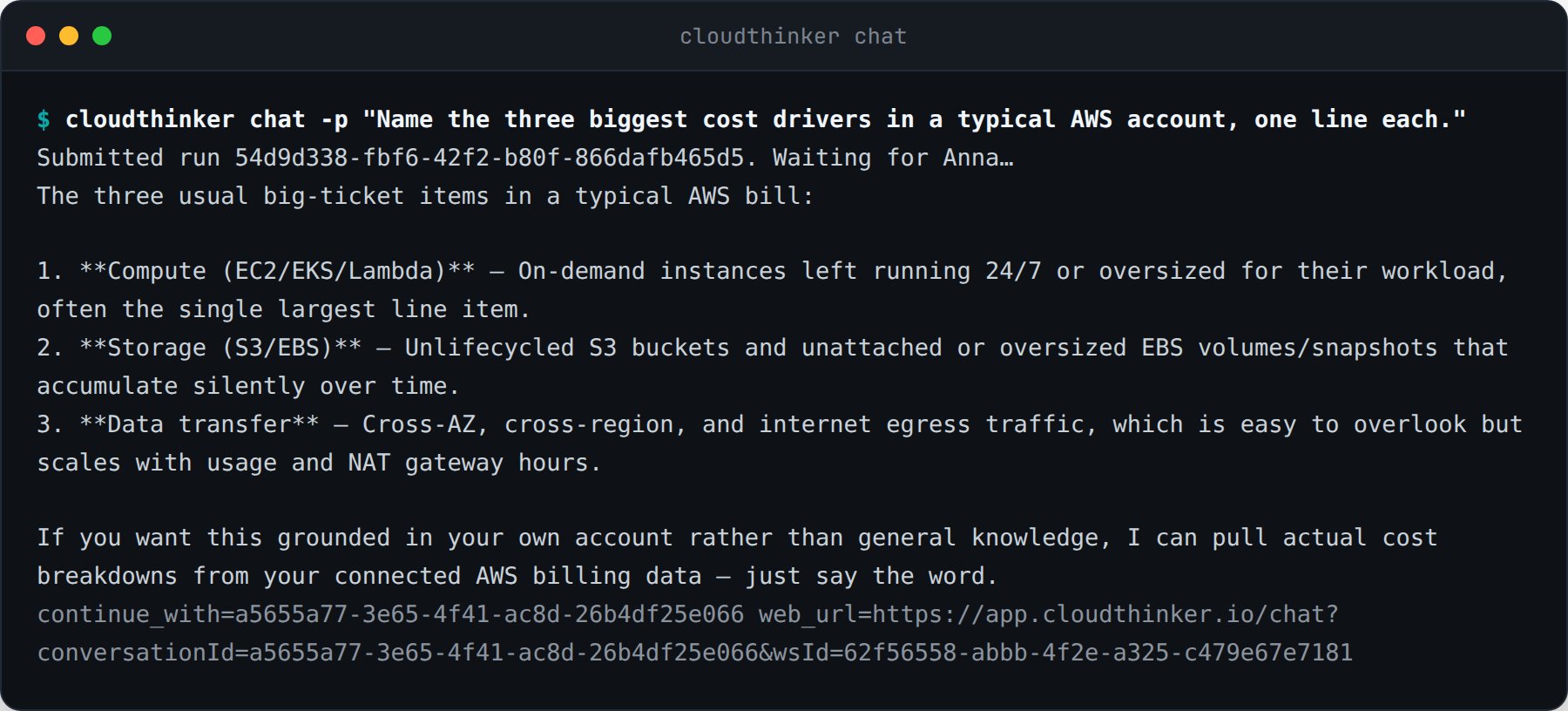 진행 상황, 실행 ID, 이어 하기 힌트는 stderr로 갑니다. 이 분리 덕분에 명령을 파이프할 수 있습니다.
```bash theme={null}
cloudthinker chat -p "Summarize yesterday's incidents" > summary.md
cloudthinker chat -p "List unused EBS volumes" | grep vol-
```
## 대화 이어 하기
종료된 실행은 모두 `continue_with=`를 stderr에 출력합니다. 그 ID나 실행 ID를 넘기면 같은 스레드를 이어갑니다.
```bash theme={null}
cloudthinker chat -p "Draft the rollout plan"
cloudthinker chat -p "Remove the risky step" --continue 0f9e364e-9c34-406e-be7d-52a143fede85
```
같은 대화는 힌트 옆에 출력되는 `web_url`로 웹 앱에서도 볼 수 있습니다.
## 먼저 제출하고 나중에 회수
긴 조사를 위해 터미널을 붙잡고 있을 필요는 없습니다. `--no-wait`는 실행이 큐에 들어가는 즉시 반환합니다.
```bash theme={null}
cloudthinker chat -p "Which S3 buckets have no lifecycle policy?" --no-wait --json
```
진행 상황, 실행 ID, 이어 하기 힌트는 stderr로 갑니다. 이 분리 덕분에 명령을 파이프할 수 있습니다.
```bash theme={null}
cloudthinker chat -p "Summarize yesterday's incidents" > summary.md
cloudthinker chat -p "List unused EBS volumes" | grep vol-
```
## 대화 이어 하기
종료된 실행은 모두 `continue_with=`를 stderr에 출력합니다. 그 ID나 실행 ID를 넘기면 같은 스레드를 이어갑니다.
```bash theme={null}
cloudthinker chat -p "Draft the rollout plan"
cloudthinker chat -p "Remove the risky step" --continue 0f9e364e-9c34-406e-be7d-52a143fede85
```
같은 대화는 힌트 옆에 출력되는 `web_url`로 웹 앱에서도 볼 수 있습니다.
## 먼저 제출하고 나중에 회수
긴 조사를 위해 터미널을 붙잡고 있을 필요는 없습니다. `--no-wait`는 실행이 큐에 들어가는 즉시 반환합니다.
```bash theme={null}
cloudthinker chat -p "Which S3 buckets have no lifecycle policy?" --no-wait --json
```
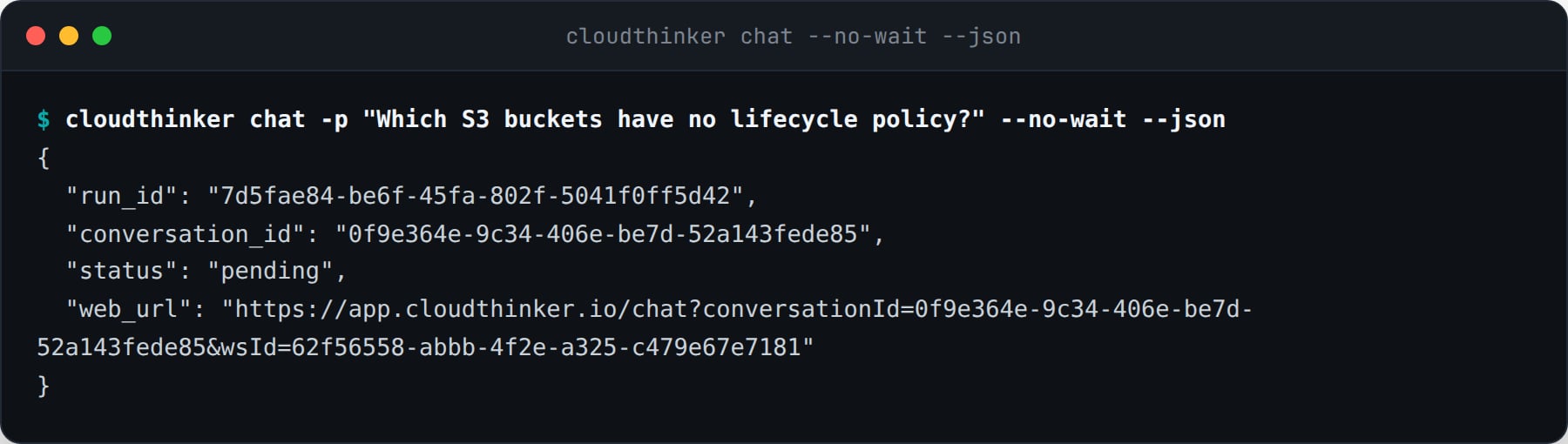 답변은 나중에 어느 컴퓨터에서든 회수할 수 있습니다.
```bash theme={null}
cloudthinker chat status 7d5fae84-be6f-45fa-802f-5041f0ff5d42 --wait
cloudthinker chat ls --limit 10
cloudthinker chat ls --conversation 0f9e364e-9c34-406e-be7d-52a143fede85 --json
```
클라이언트 쪽 시간 초과는 실행을 취소하지 않습니다. `--timeout`은 CLI가 기다리는 시간만 제한하며, 실행은 서버에서 계속되고 CLI는 이어받을 `chat status` 명령을 출력합니다.
## 기계가 읽는 출력
`--json`은 평문 답변 대신 봉투 하나를 stdout에 씁니다.
| 필드 | 의미 |
| ----------------- | ---------------------------------------------------------------- |
| `run_id` | `chat status`로 조회할 실행 |
| `conversation_id` | `--continue`에 넘길 스레드 |
| `status` | `pending`, `running`, `succeeded`, `failed`, `approval required` |
| `answer` | Anna의 최종 답변. 실행이 끝나기 전에는 `null` |
| `web_url` | 웹 앱의 동일한 대화 |
```bash theme={null}
cloudthinker chat -p "Check the error budget" --json | jq -r '.answer'
```
## 종료 코드
파이프라인은 텍스트를 파싱하지 않고 결과에 따라 분기할 수 있습니다.
| 코드 | 의미 |
| -- | --------------------------- |
| 0 | 실행이 끝났고 답변이 출력됨 |
| 1 | 실행 실패, 또는 존재하지 않는 실행 ID |
| 2 | 잘못된 사용, 또는 워크스페이스 정책에 의한 거부 |
| 3 | 로그인되지 않았거나 자격 증명 만료 |
| 4 | CLI가 대기를 중단함. 실행은 서버에서 계속됨 |
| 5 | 브라우저 승인 대기로 실행이 일시 중지됨 |
`chat status`와 `chat ls`는 읽기 작업입니다. 실행 자체의 상태와 무관하게, 조회에 성공하면 0으로 종료합니다.
## CI에서 사용하기
작업에 토큰을 주고, stdout은 답변용으로 비워 두고, 결과는 종료 코드로 판단하세요.
```bash theme={null}
export CLOUDTHINKER_TOKEN="$CLOUDTHINKER_CI_TOKEN"
if cloudthinker chat -p "Review last night's failed deployments" --timeout 900 > report.md; then
echo "report ready"
else
case $? in
4) echo "still running, collect it in the next job" ;;
5) echo "waiting for an approval in the browser" ;;
*) exit 1 ;;
esac
fi
```
## 관련 문서
파이프라인에 전용 자격 증명 주기
모든 명령, 플래그, 변수, 종료 코드
답변은 나중에 어느 컴퓨터에서든 회수할 수 있습니다.
```bash theme={null}
cloudthinker chat status 7d5fae84-be6f-45fa-802f-5041f0ff5d42 --wait
cloudthinker chat ls --limit 10
cloudthinker chat ls --conversation 0f9e364e-9c34-406e-be7d-52a143fede85 --json
```
클라이언트 쪽 시간 초과는 실행을 취소하지 않습니다. `--timeout`은 CLI가 기다리는 시간만 제한하며, 실행은 서버에서 계속되고 CLI는 이어받을 `chat status` 명령을 출력합니다.
## 기계가 읽는 출력
`--json`은 평문 답변 대신 봉투 하나를 stdout에 씁니다.
| 필드 | 의미 |
| ----------------- | ---------------------------------------------------------------- |
| `run_id` | `chat status`로 조회할 실행 |
| `conversation_id` | `--continue`에 넘길 스레드 |
| `status` | `pending`, `running`, `succeeded`, `failed`, `approval required` |
| `answer` | Anna의 최종 답변. 실행이 끝나기 전에는 `null` |
| `web_url` | 웹 앱의 동일한 대화 |
```bash theme={null}
cloudthinker chat -p "Check the error budget" --json | jq -r '.answer'
```
## 종료 코드
파이프라인은 텍스트를 파싱하지 않고 결과에 따라 분기할 수 있습니다.
| 코드 | 의미 |
| -- | --------------------------- |
| 0 | 실행이 끝났고 답변이 출력됨 |
| 1 | 실행 실패, 또는 존재하지 않는 실행 ID |
| 2 | 잘못된 사용, 또는 워크스페이스 정책에 의한 거부 |
| 3 | 로그인되지 않았거나 자격 증명 만료 |
| 4 | CLI가 대기를 중단함. 실행은 서버에서 계속됨 |
| 5 | 브라우저 승인 대기로 실행이 일시 중지됨 |
`chat status`와 `chat ls`는 읽기 작업입니다. 실행 자체의 상태와 무관하게, 조회에 성공하면 0으로 종료합니다.
## CI에서 사용하기
작업에 토큰을 주고, stdout은 답변용으로 비워 두고, 결과는 종료 코드로 판단하세요.
```bash theme={null}
export CLOUDTHINKER_TOKEN="$CLOUDTHINKER_CI_TOKEN"
if cloudthinker chat -p "Review last night's failed deployments" --timeout 900 > report.md; then
echo "report ready"
else
case $? in
4) echo "still running, collect it in the next job" ;;
5) echo "waiting for an approval in the browser" ;;
*) exit 1 ;;
esac
fi
```
## 관련 문서
파이프라인에 전용 자격 증명 주기
모든 명령, 플래그, 변수, 종료 코드