> ## Documentation Index
> Fetch the complete documentation index at: https://docs.cloudthinker.io/llms.txt
> Use this file to discover all available pages before exploring further.

# Artifacts

> Tạo báo cáo toàn diện, xây dựng dashboard tùy chỉnh và xuất dữ liệu để phân tích

Artifacts là các dashboard, báo cáo và biểu đồ mà CloudThinker agent tạo ra từ dữ liệu cloud đã kết nối của bạn. Mô tả thông tin bạn cần bằng ngôn ngữ thông thường, và agent sẽ xây dựng hình ảnh trực quan được hỗ trợ bởi dữ liệu trong vài phút.

Xây dựng báo cáo cloud thủ công đồng nghĩa với việc phải kéo dữ liệu từ các công cụ chi phí, bảo mật và giám sát, sau đó định dạng và tóm tắt — nhiều giờ công việc của chuyên gia và nhanh chóng lỗi thời. Các công cụ `#dashboard`, `#report` và `#chart` của CloudThinker tạo ra kết quả tương tự từ một prompt duy nhất, kết hợp dữ liệu từ tất cả [kết nối](/vi/guide/connections/overview) của bạn.

## Cách hoạt động

1. **Hỏi** — gửi prompt bằng cú pháp [CloudThinker Language](/vi/guide/language): `@agent #tool hướng dẫn`.
2. **Thu thập** — agent truy vấn dữ liệu trực tiếp từ các kết nối của bạn: Cost Explorer, CloudWatch, cơ sở dữ liệu và nhiều hơn nữa.
3. **Tạo** — agent tổng hợp artifact tương tác với biểu đồ, bảng và tóm tắt bằng văn bản.
4. **Chia sẻ hoặc tự động hóa** — xuất artifact, hoặc lên lịch như [tác vụ định kỳ](/vi/guide/automation/tasks) để nó tự tạo lại theo chu kỳ của bạn.

<Frame>
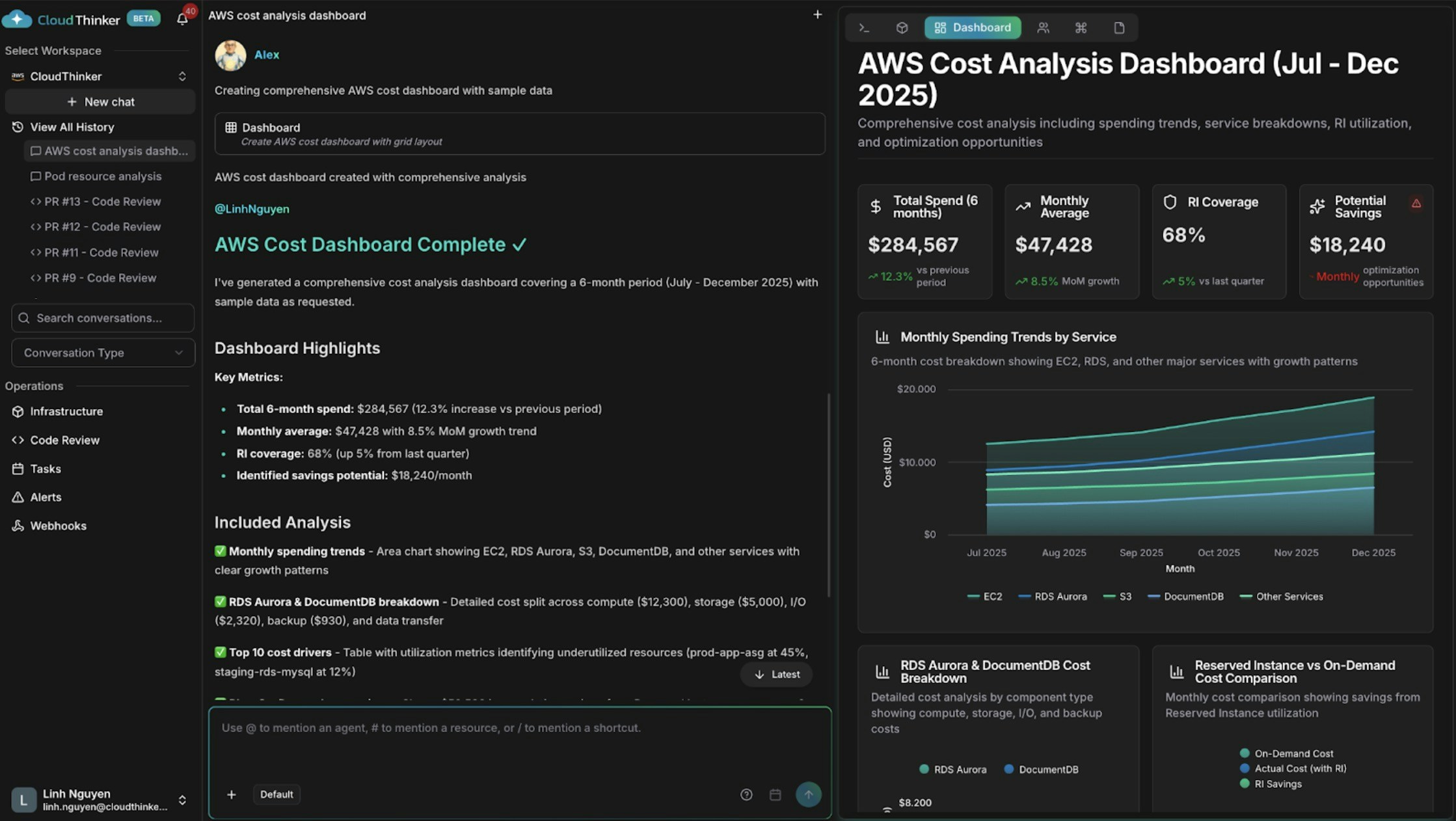
  <img src="https://mintcdn.com/cloudthinker/0IKJjKZJEIROke98/images/use-cases/actionable-dashboards/01-aws-cost-dashboard.jpg?fit=max&auto=format&n=0IKJjKZJEIROke98&q=85&s=4ac5b1a42bb6b60a8095714d3da51b39" alt="Dashboard chi phí AWS với xu hướng chi tiêu và các yếu tố chi phí" width="2238" height="1262" data-path="images/use-cases/actionable-dashboards/01-aws-cost-dashboard.jpg" />
</Frame>

<p style={{textAlign: 'center', fontSize: '0.9em', color: '#666', marginTop: '8px'}}>Dashboard chi phí AWS với xu hướng chi tiêu và các yếu tố chi phí</p>

## Bạn có thể làm gì

| Khả năng                       | Mô tả                                                                                  | Tìm hiểu thêm                                                  |
| ------------------------------ | -------------------------------------------------------------------------------------- | -------------------------------------------------------------- |
| Xây dựng dashboard chi phí     | Alex vẽ biểu đồ xu hướng chi tiêu, phân tích theo service, bất thường và dự báo        | [Cost analytics](/vi/guide/cost-optimization/analytics)        |
| Tương quan tín hiệu hạ tầng    | Anna kết hợp dữ liệu sức khỏe, hiệu năng và chi phí từ nhiều cloud trong một giao diện | [Infrastructure analytics](/vi/guide/infrastructure/analytics) |
| Báo cáo tình trạng bảo mật     | Oliver tóm tắt trạng thái tuân thủ, phát hiện đang mở và tiến trình khắc phục          | [Oliver](/vi/guide/agents/oliver)                              |
| Trực quan hóa phụ thuộc        | Khám phá mối quan hệ tài nguyên và phạm vi ảnh hưởng trên bản đồ trực tiếp             | [Topology](/vi/guide/infrastructure/topology)                  |
| Lên lịch báo cáo định kỳ       | Tự động tạo lại và phân phối dashboard hoặc báo cáo                                    | [Tasks](/vi/guide/automation/tasks)                            |
| Đẩy kết quả sang hệ thống khác | Gửi sự kiện artifact đến các công cụ bên ngoài                                         | [Webhooks](/vi/guide/webhooks/overview)                        |

## Khái niệm chính

| Tag công cụ  | Tạo ra                                                    | Phù hợp nhất cho                                  |
| ------------ | --------------------------------------------------------- | ------------------------------------------------- |
| `#dashboard` | Dashboard tương tác nhiều widget                          | Theo dõi liên tục nhiều số liệu liên quan         |
| `#report`    | Báo cáo tường thuật với dữ liệu, phát hiện và khuyến nghị | Cập nhật cho stakeholder, kiểm tra và đánh giá    |
| `#chart`     | Hình ảnh trực quan tập trung duy nhất                     | Theo dõi một số liệu hoặc xu hướng theo thời gian |

## Ví dụ prompt

Bắt đầu với yêu cầu một dòng — agent chọn các giá trị mặc định hợp lý cho phạm vi và khoảng thời gian:

```text theme={null}
@alex #dashboard AWS spending by service for the last 30 days
@oliver #report quarterly security assessment across all accounts
@kai #dashboard cluster resource utilization
```

### Dashboard phân tích chi phí

Thêm cấu trúc vào hướng dẫn khi bạn cần phân tích cụ thể:

```text theme={null}
@alex #dashboard Generate a comprehensive AWS cost dashboard for [start_date] to [end_date].

Include:
- Monthly spending trends by service with month-over-month growth rates
- Top 10 cost drivers and their utilization patterns
- Reserved Instance vs On-Demand cost comparison
- Cost anomalies and optimization opportunities with estimated savings

Segment by: [cost allocation tags such as environment, team, or application]
```

### Dashboard đa lĩnh vực

Yêu cầu Anna tương quan dữ liệu nằm ở các hệ thống khác nhau:

```text theme={null}
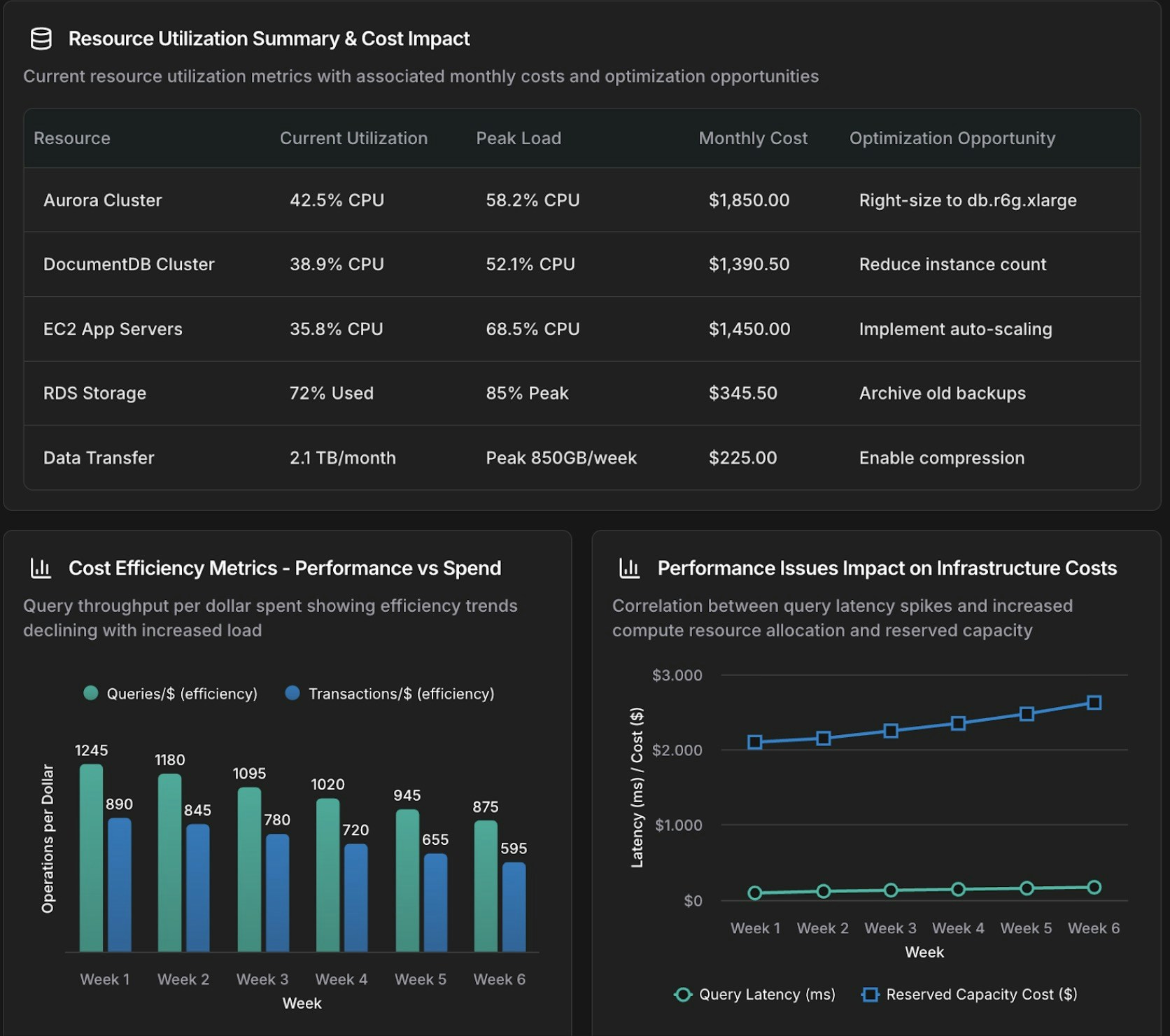
@anna #dashboard Create an operational dashboard correlating database performance with infrastructure costs for [time_period].

Analyze:
- Aurora and DocumentDB query performance metrics
- Resource utilization and spending patterns
- Correlation between database load and compute and storage costs

Context: [recent changes, migrations, or specific concerns]
```
<Frame>
  <img src="https://mintcdn.com/cloudthinker/0IKJjKZJEIROke98/images/use-cases/actionable-dashboards/02-database-infrastructure-dashboard.jpg?fit=max&auto=format&n=0IKJjKZJEIROke98&q=85&s=948166dc5e93d68dce7ae76ce7ab9061" alt="Dashboard tương quan cơ sở dữ liệu và hạ tầng hiển thị số liệu hiệu năng và chi phí" width="1672" height="1480" data-path="images/use-cases/actionable-dashboards/02-database-infrastructure-dashboard.jpg" />
</Frame>

<p style={{textAlign: 'center', fontSize: '0.9em', color: '#666', marginTop: '8px'}}>Dashboard tương quan cơ sở dữ liệu và hạ tầng</p>

### Biểu đồ tập trung

Dùng `#chart` cho một hình ảnh trực quan duy nhất thay vì toàn bộ dashboard:

```text theme={null}
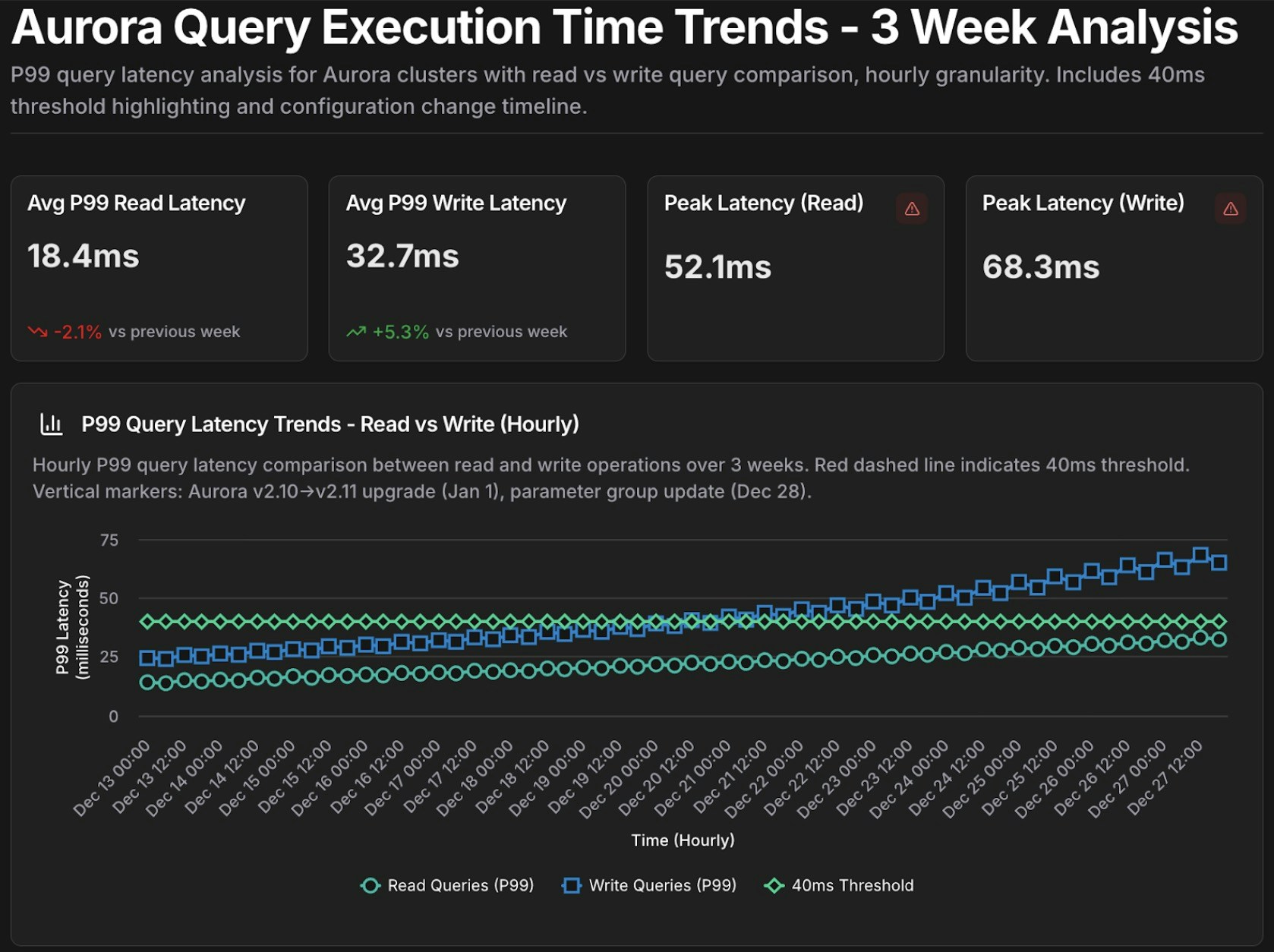
@tony #chart Show query execution time trends for Aurora cluster [cluster-identifier] over the past [time_period].

- Metrics: p50, p95, p99 query latency
- Separate lines for read queries vs write queries
- Highlight queries exceeding [threshold] ms
```
<Frame>
  <img src="https://mintcdn.com/cloudthinker/0IKJjKZJEIROke98/images/use-cases/actionable-dashboards/03-aurora-query-performance-chart.jpg?fit=max&auto=format&n=0IKJjKZJEIROke98&q=85&s=7eda15a3292201adb072763cae9f3997" alt="Biểu đồ chuỗi thời gian hiệu năng truy vấn Aurora với số liệu độ trễ p50, p95, p99" width="1678" height="1254" data-path="images/use-cases/actionable-dashboards/03-aurora-query-performance-chart.jpg" />
</Frame>

<p style={{textAlign: 'center', fontSize: '0.9em', color: '#666', marginTop: '8px'}}>Biểu đồ chuỗi thời gian hiệu năng truy vấn Aurora</p>

## Template có thể tái sử dụng

Lưu các prompt được tham số hóa dưới dạng template cho các cuộc điều tra định kỳ, sau đó điền vào `{biến}` trong mỗi lần chạy:

```text theme={null}
Template: database_performance_review
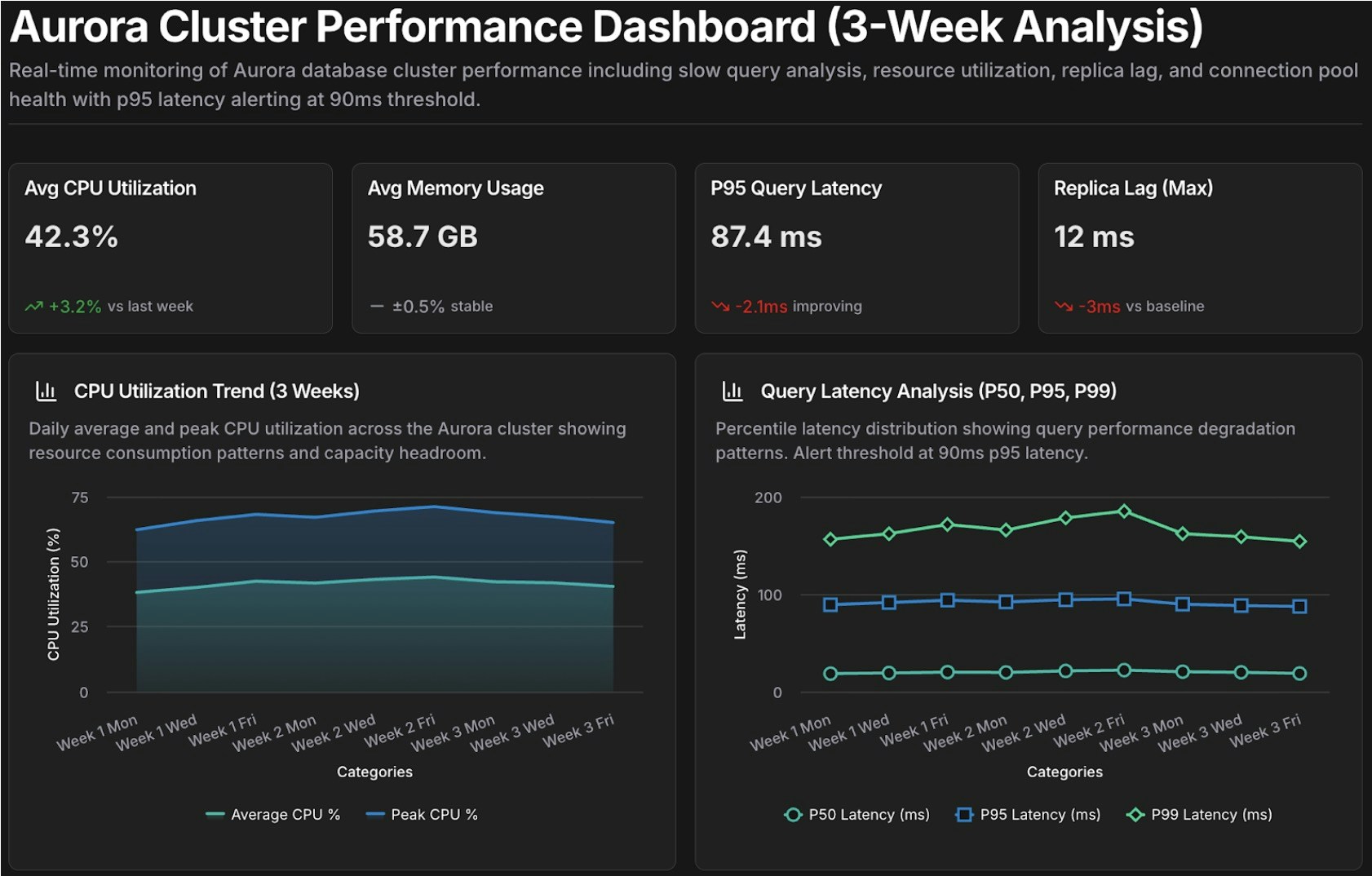
@tony #dashboard Create a performance dashboard for Aurora cluster {cluster_id} covering {time_period}.

Include:
- Slow query analysis (queries exceeding {latency_threshold} ms)
- Resource utilization trends (CPU, memory, IOPS)
- Replica lag monitoring
- Connection pool health

Compare against baseline: {comparison_period}
Alert on: queries exceeding p95 latency of {latency_threshold} ms

Template: cost_anomaly_investigation
@alex #report Investigate the cost anomaly for {service_name} on {date}.

- Compare costs to the 7-day and 30-day averages
- Break down by cost component (compute, storage, I/O, data transfer)
- Identify the specific resources driving the increase and quantify the impact
- Recommend immediate actions to mitigate ongoing cost increases
```

Ví dụ, chạy `database_performance_review` với `cluster_id=production-aurora-cluster`, `time_period="past 7 days"`, `comparison_period="previous 30 days"` và `latency_threshold=200`.
<Frame>
  <img src="https://mintcdn.com/cloudthinker/0IKJjKZJEIROke98/images/use-cases/actionable-dashboards/04-performance-review-template.jpg?fit=max&auto=format&n=0IKJjKZJEIROke98&q=85&s=d99f4fd1f4406daf2cfbbe70c18f5b1a" alt="Template dashboard đánh giá hiệu năng cho phân tích Aurora cluster" width="1682" height="1074" data-path="images/use-cases/actionable-dashboards/04-performance-review-template.jpg" />
</Frame>

<p style={{textAlign: 'center', fontSize: '0.9em', color: '#666', marginTop: '8px'}}>Template dashboard đánh giá hiệu năng</p>

## Bước tiếp theo

<CardGroup cols={2}>
  <Card title="Cost Analytics" icon="chart-line" href="/vi/guide/cost-optimization/analytics">
    Tìm hiểu sâu hơn về xu hướng chi tiêu, dự báo và phân tích phân bổ chi phí
  </Card>

  <Card title="Infrastructure Analytics" icon="server" href="/vi/guide/infrastructure/analytics">
    Tương quan tín hiệu hiệu năng, chi phí và độ tin cậy từ các cloud đã kết nối
  </Card>

  <Card title="CloudThinker Language" icon="code" href="/vi/guide/language">
    Nắm vững cú pháp @agent #tool để xây dựng prompt hiệu quả
  </Card>

  <Card title="Tasks" icon="clock" href="/vi/guide/automation/tasks">
    Lên lịch để dashboard và báo cáo tự động tạo lại
  </Card>
</CardGroup>
