> ## Documentation Index
> Fetch the complete documentation index at: https://docs.cloudthinker.io/llms.txt
> Use this file to discover all available pages before exploring further.
# Giám sát Sức khỏe Kubernetes
> Dùng Kai để giám sát sức khỏe cụm EKS, phát hiện lãng phí tài nguyên, và nhận khuyến nghị HPA trước khi sự cố xảy ra trên môi trường production.
Kai liên tục giám sát cụm Amazon EKS của bạn, phát hiện pod được cấp phát thừa, node chưa được tận dụng, và thiếu chính sách autoscaling trước khi chúng gây ra sự cố nghiêm trọng.
## Tình huống
Một nhóm platform đang vận hành cụm EKS production trải dài nhiều namespace. Cảnh báo CPU xuất hiện ngắt quãng nhưng điều tra chậm chạp — kỹ sư phải chạy thủ công các lệnh `kubectl` qua hàng trăm pod để tương quan log, metrics, và event.
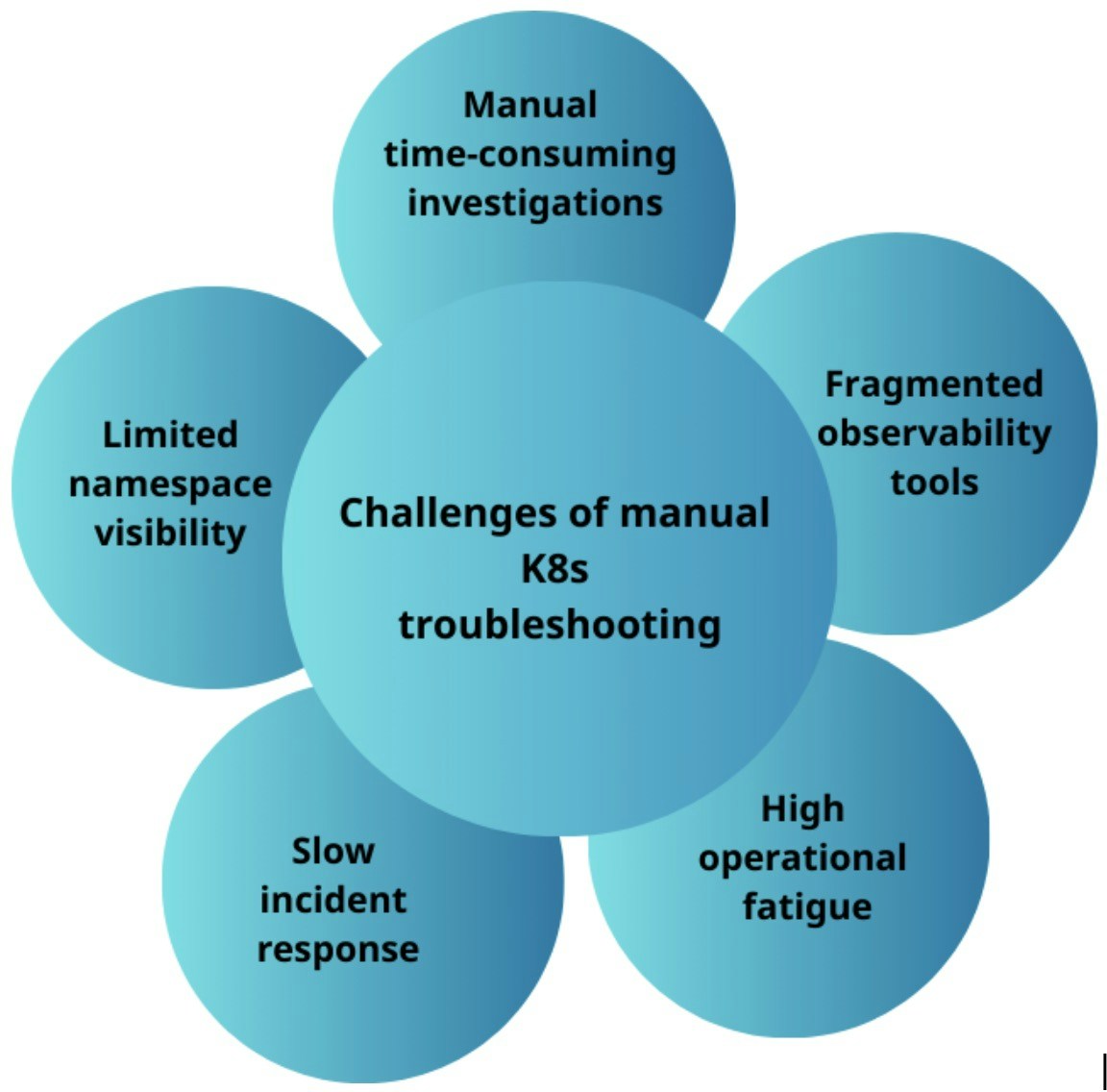
Thách thức khi xử lý sự cố Kubernetes thủ công
Nhóm yêu cầu Kai đánh giá toàn diện cụm, xác định lãng phí tài nguyên, và khuyến nghị chính sách autoscaling cho những nơi còn thiếu.
## Hướng dẫn từng bước
### Kết nối Kai với cụm của bạn
Làm theo [hướng dẫn kết nối Kubernetes](/vi/guide/connections/kubernetes) để cấp cho Kai quyền truy cập cụm EKS của bạn. Khi kết nối hiển thị trạng thái **Connected**, Kai có thể truy vấn cụm trực tiếp.
### Phân tích mức sử dụng tài nguyên pod
```text theme={null}
@kai #report analyze pod resource utilization in production namespace
```
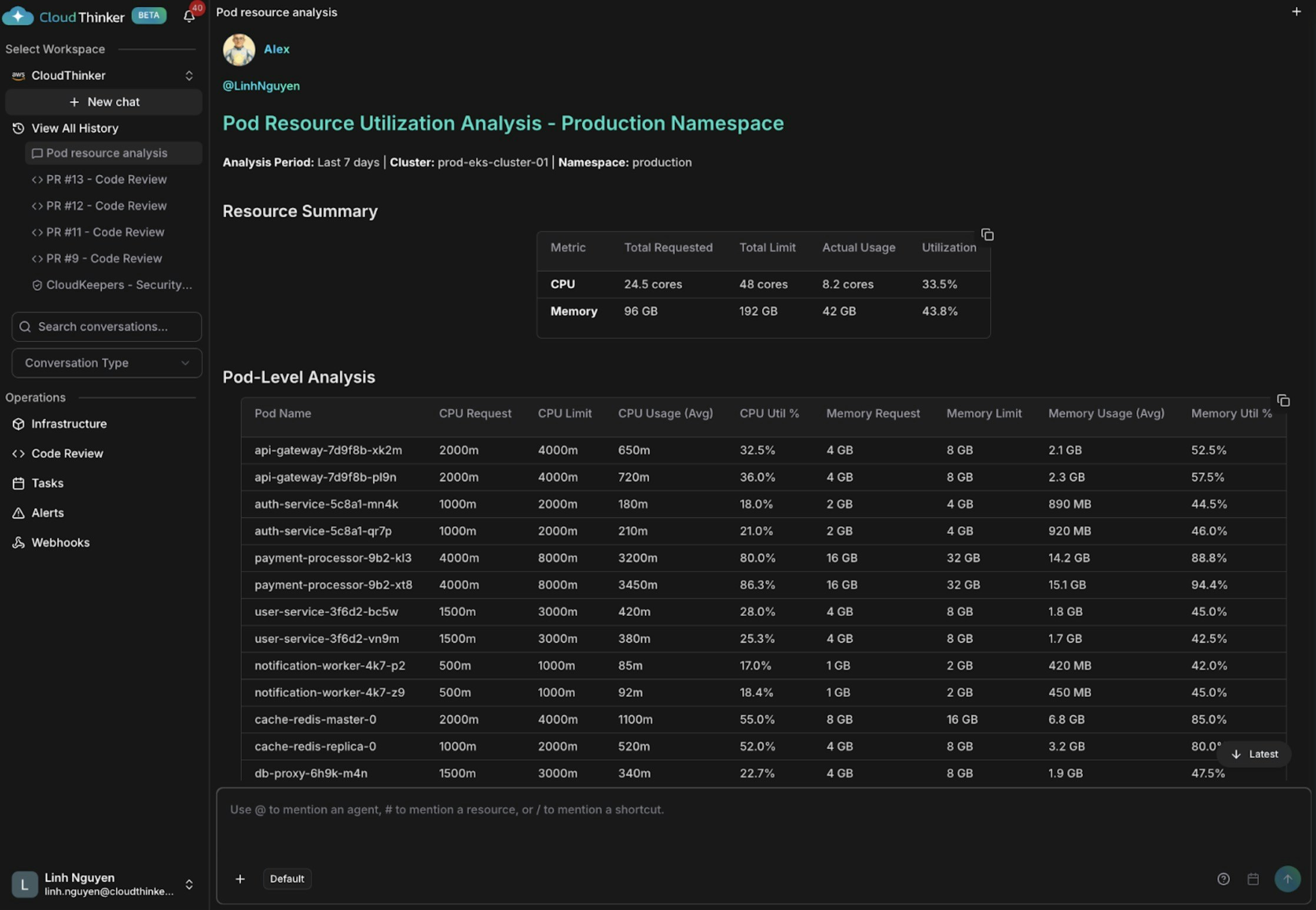
Phân tích mức sử dụng tài nguyên pod
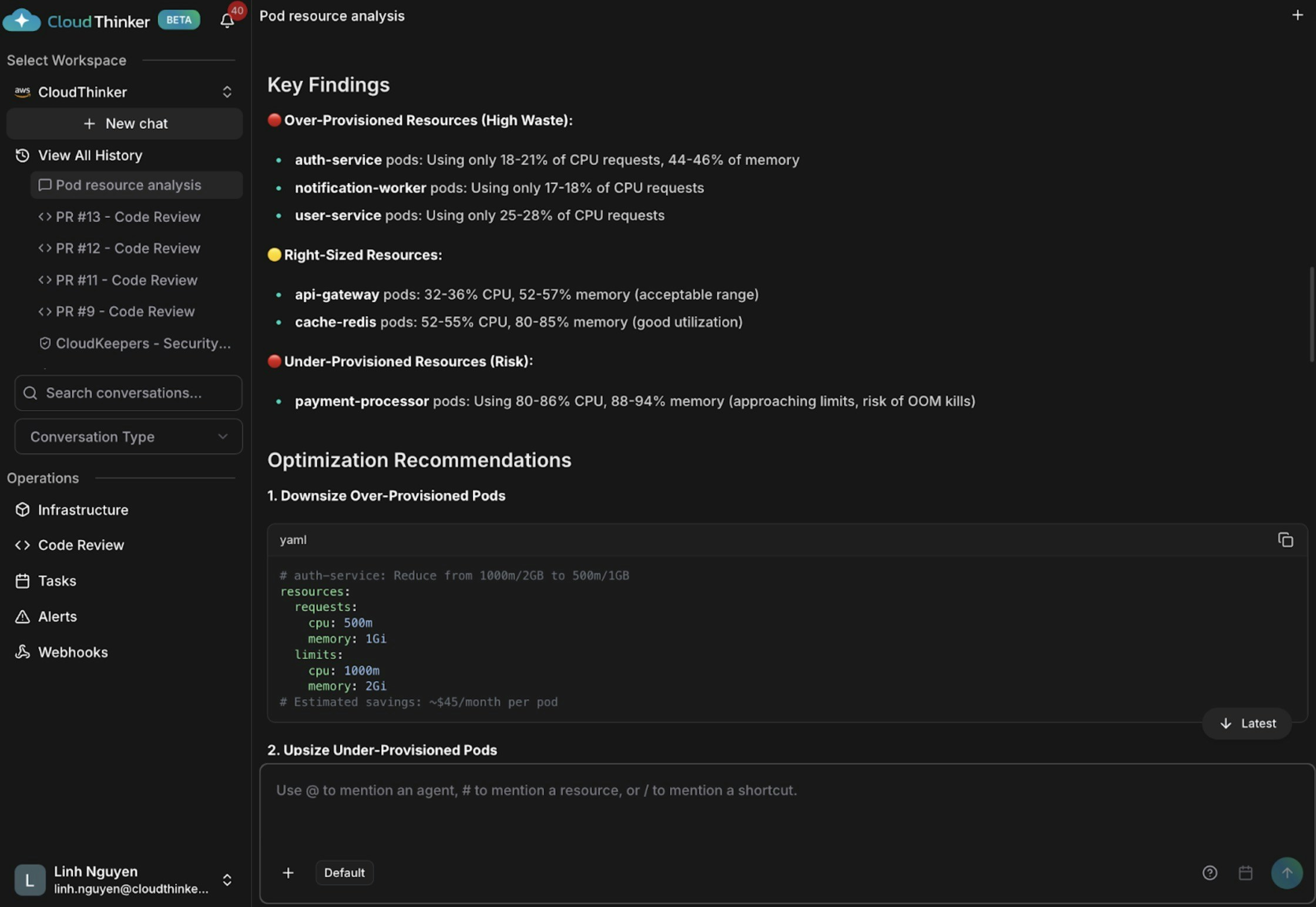
Trực quan hóa phân tích pod kèm khuyến nghị hiệu năng
Kai phát hiện ba vấn đề: auth-service và notification-worker được cấp phát thừa (CPU 18–21%), api-gateway và cache-redis có kích thước phù hợp, và payment-processor đang thiếu tài nguyên nguy hiểm ở mức CPU 80–86% và bộ nhớ 88–94% — có nguy cơ cao bị OOM kill và gián đoạn dịch vụ.
### Xác định node chưa được tận dụng
```text theme={null}
@kai #chart identify nodes with <30% CPU utilization
```
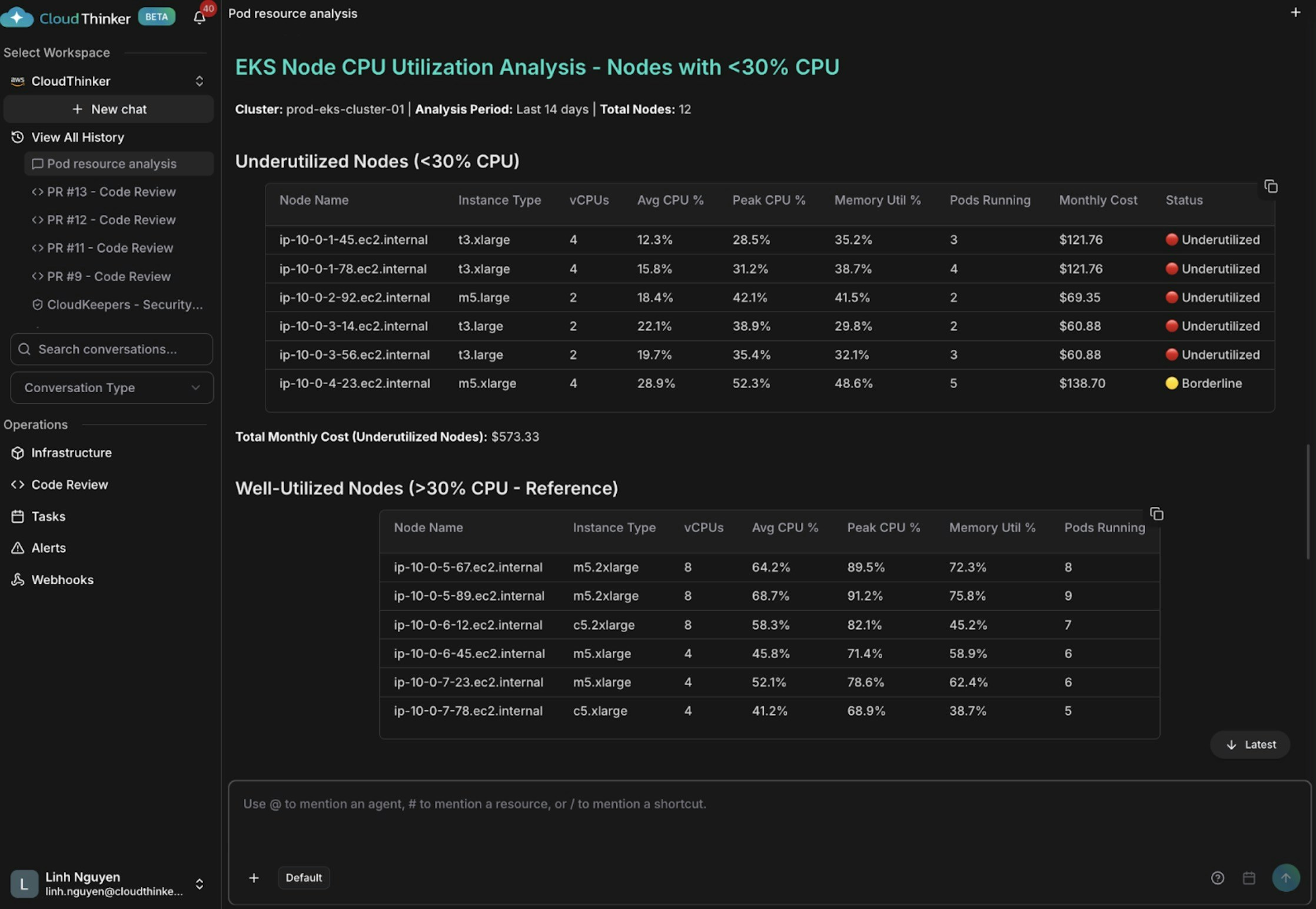
Phân tích mức sử dụng CPU node cho thấy instance chưa được tận dụng
Kai tìm thấy năm node có mức CPU trung bình dưới 30% (một số chỉ 12–15%), lãng phí khoảng \$573 mỗi tháng. Các instance t3.xlarge quá lớn chạy workload nhẹ — kết hợp với lịch trình pod kém — khiến một số node chỉ có 2–3 pod trong khi các node khác mang 8–9 pod.
### Nhận khuyến nghị HPA
```text theme={null}
@kai #recommend HPA policies for web deployments
```
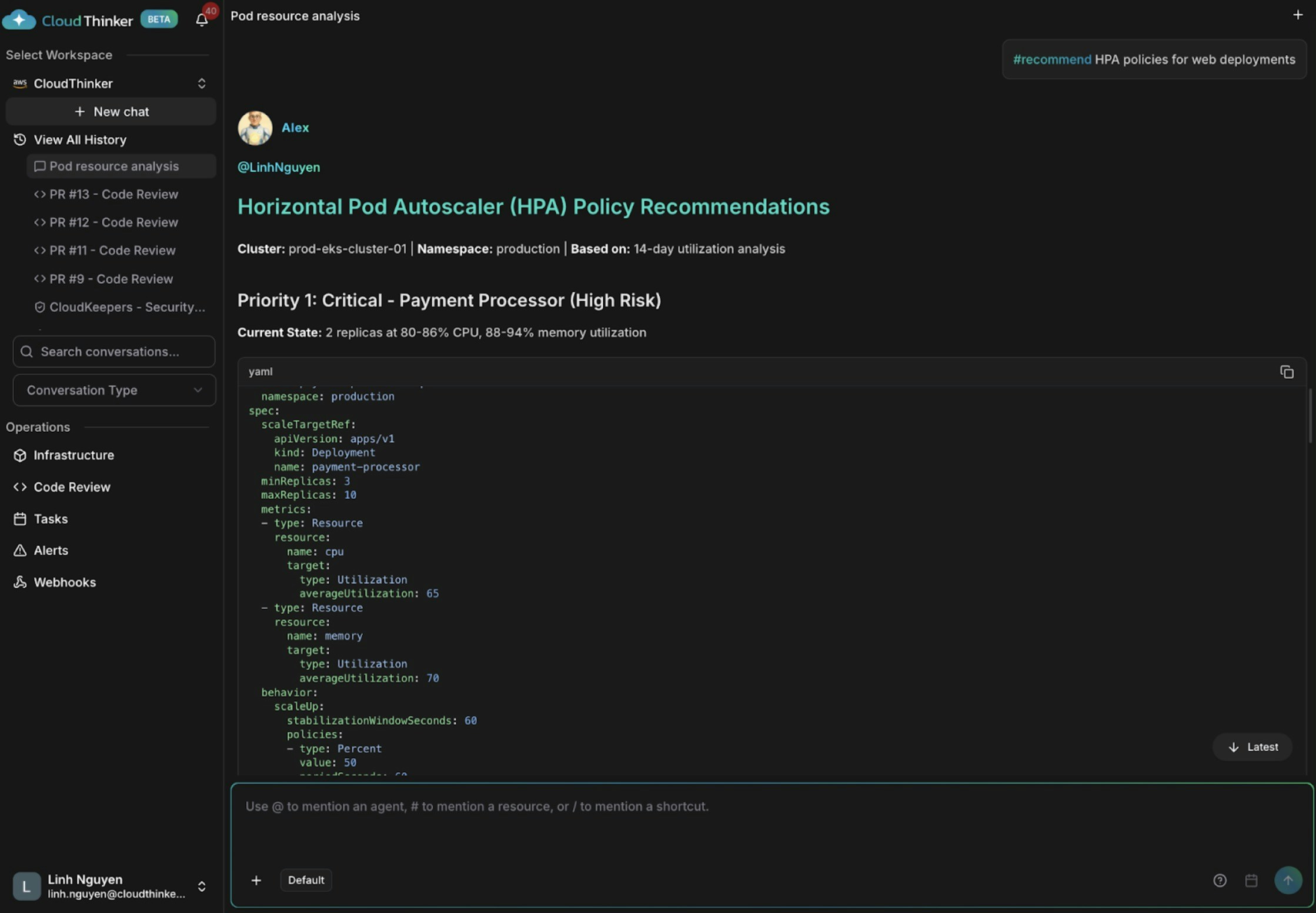
Khuyến nghị chính sách HPA cho auto-scaling
Kai đánh dấu payment-processor là có rủi ro nghiêm trọng — chỉ có 2 replica ở mức CPU 80–86%, không có autoscaling. Kai khuyến nghị thêm HPA cho api-gateway để xử lý spike lưu lượng, và loại bỏ capacity dư thừa khỏi user-service và auth-service.
## Điều gì tạo nên hiệu quả
* **[Kai](/vi/guide/agents/kai)** truy vấn trực tiếp cluster API, thay thế các phiên `kubectl` thủ công và chuyển đổi công cụ.
* **Tương quan đa lớp** liên kết mức sử dụng pod, dung lượng node, và mẫu lịch trình trong một lượt phân tích duy nhất.
* **[`#report`](/vi/guide/language) và [`#chart`](/vi/guide/language)** tạo đầu ra có cấu trúc để Kai suy luận trước khi trình bày phát hiện.
* **[`#recommend`](/vi/guide/language)** tạo ra các thay đổi chính sách HPA có thể thực thi thay vì chỉ dump metrics thô.
* **[CloudKeepers](/vi/guide/infrastructure/cloudkeepers)** có thể chạy phân tích này theo lịch để phát hiện vấn đề trước khi kỹ sư trực bị gọi.
## Tự mình thử
Toàn bộ khả năng của Kai, agent Kỹ sư Kubernetes
Hướng dẫn từng bước kết nối CloudThinker với cụm EKS của bạn
Vẽ sơ đồ phụ thuộc dịch vụ Kubernetes để phân tích nguyên nhân gốc rễ nhanh hơn
Chạy kiểm tra sức khỏe liên tục trên workload Kubernetes của bạn một cách tự động