

Using this page with CloudThinker. Paste this page’s URL into a chat and try:
- “Explain the Learn section of this page to me like I am new to cloud.”
- “Quiz me on the labels verified, inferred and assumed.”
- “Help me outline my Day 01 report following the three blocks on this page.”
Rules of the room
- 150 minutes. Learn 35, Practice 95 with a 10-minute break, Share 20.
- The AWS demo account is read-only. The agent can inspect. It cannot change anything.
- You never enter credentials. You pick the demo environment and click Use demo. Nothing to fill in.
- The agent recommends. People decide. No fix is applied today, in the demo or anywhere else.
- Redact. Account IDs, ARNs and customer data come out of the report before it is shared or shown on screen.
- One report file per team. Submitted before Share starts.
Learn · 35 minutes
Five ideas. Each one is a rule you will use in the lab.1. An agent is a model plus an environment
An agent has a goal, context, a model, tools and an environment. The model picks the next action. The environment is where that action lands. The loop is simple: act, observe the result, act again, check, then stop.
A better model makes better choices. It cannot do anything you did not give it.
This definition is a workshop teaching frame, not a quote from any vendor document.
2. Cloud has no single workspace boundary
The same agent with the same skill plays by different rules for being wrong.
The visibility row is the one people miss. In the cloud, silence from the agent is not the same as nothing being there. It may simply not have permission to look.
Cloud platforms now ship controls for this. Amazon Bedrock AgentCore, for example, runs each session in its own isolated environment, checks every tool call against a policy before it runs, and traces every step. Those controls move the rules outside the agent. They do not remove your job of setting them.
3. Auto mode needs a human in the loop
Some coding agents offer an auto mode: instead of asking you before each action, a second model reviews the action and blocks the dangerous ones. It works well, and it assumes you are there.- When you are prompting, the reviewer has something to check against. You stated the goal. You can say “do not touch production” and matching actions are blocked.
- When nobody is prompting, for example an incident starts the run at 3am, no goal and no boundary were stated. The reviewer has only its default rules. When it pauses to ask a person, nobody is there to answer.
Auto mode can replace your approval. It cannot replace your intent.
4. One tool call passes through many layers
Between the agent deciding to act and the cloud resource changing, a single call passes through several layers. Each layer can say no. Each layer is blind to something. Only the last two live in the account.
The sandbox protects your laptop. Only IAM protects your account.
5. Every cloud claim needs source, scope and time
Ask three questions about every line the agent gives you:
Then give every line one label:
A finding is only as strong as its weakest step. One unchecked step in the middle makes the whole finding inferred, not verified. If you cannot show the source, the honest answer is “not enough evidence”. That is a valid result.
Practice · 95 minutes
The task: what would you optimize in this AWS account? One team, one read-only agent, one report.Invite your team
One team, one workspace. Whoever registered adds the rest, so everyone sees the same demo connection and works on one report.1
Open Chat Settings and go to Members
Open Chat Settings — the gear icon in the chat prompt box, immediately to the right of the + button — and select Members under Workspace.
2
Add each teammate
Click Add Member and pick your teammate. Each row shows their Organization Role and their Workspace Role, which can differ.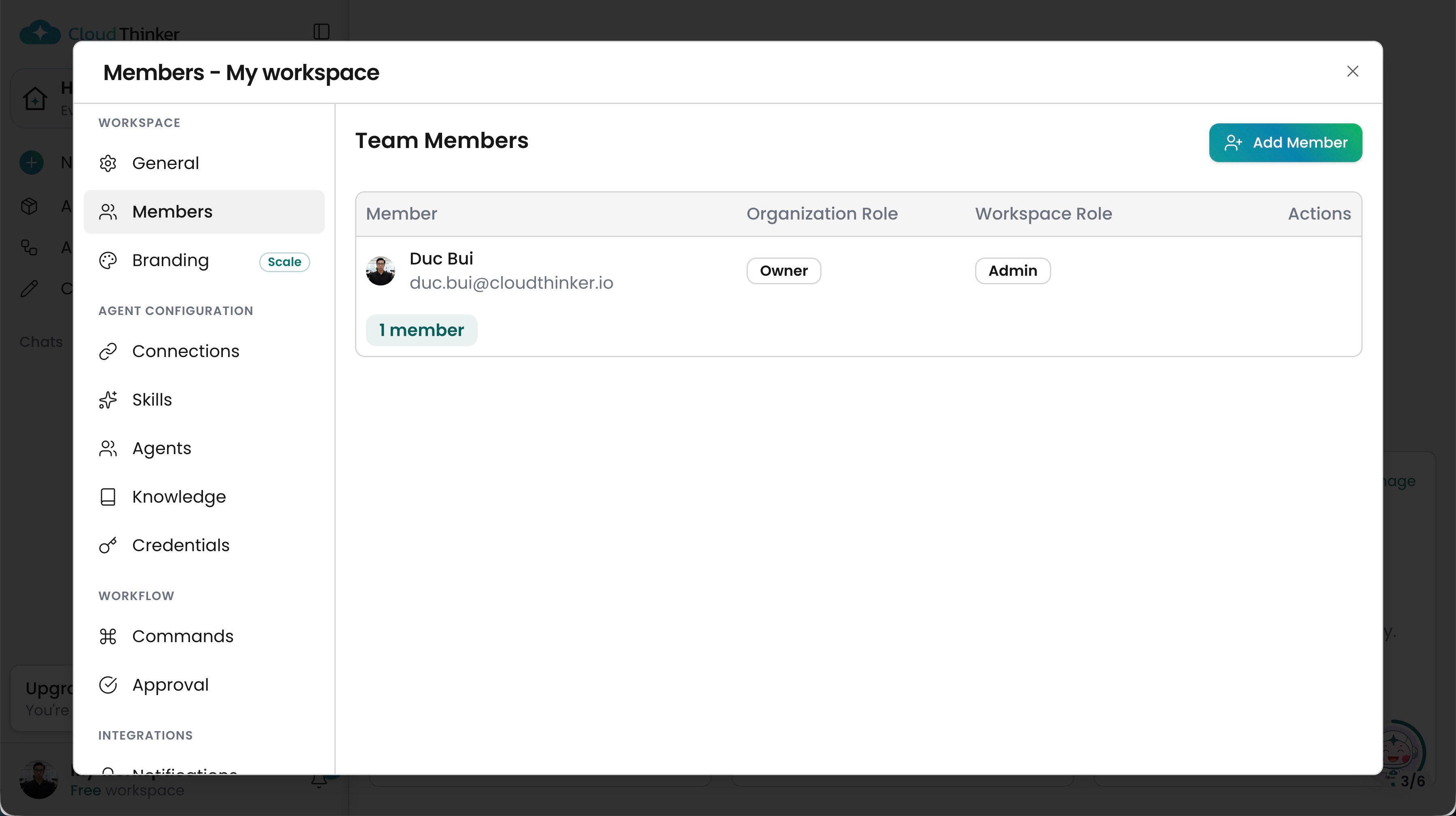
Chat Settings · Members, with Add Member at the top right
Teammates have to be in your organization before they can be added to a workspace. If someone is missing from the list, invite them first from Admin Settings · Organization at app.cloudthinker.io/admin-settings/organization. Roles in full: Workspace Members.
Connect to the demo environment
1
Sign in and open the demo environment
Sign in at app.cloudthinker.io. In the left sidebar, click Try a demo environment. It is described as “a read-only cloud we run”.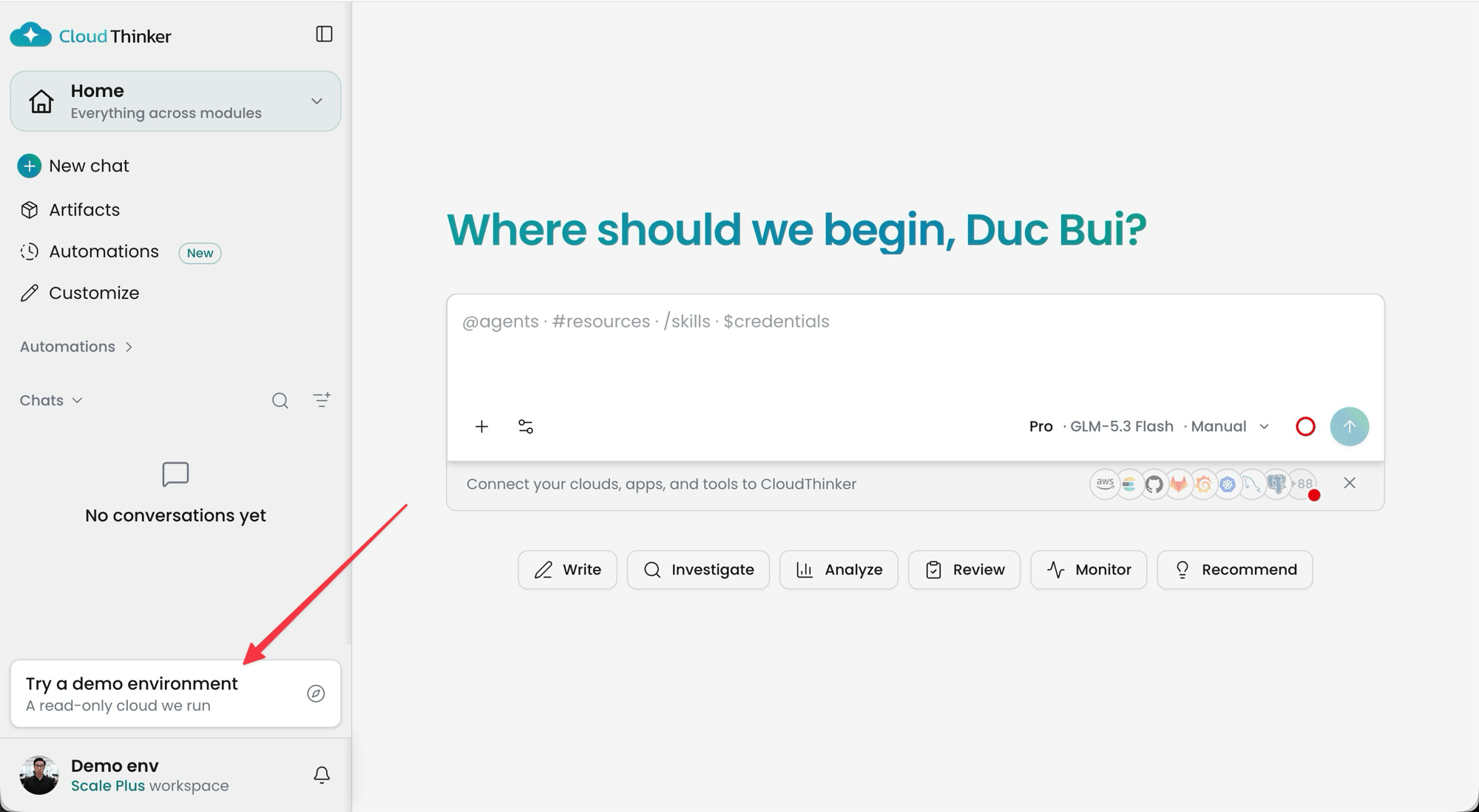
2
Open Connections and pick Amazon Web Services
The Connections panel for the demo environment shows the connections you can try with demo data. Click Amazon Web Services.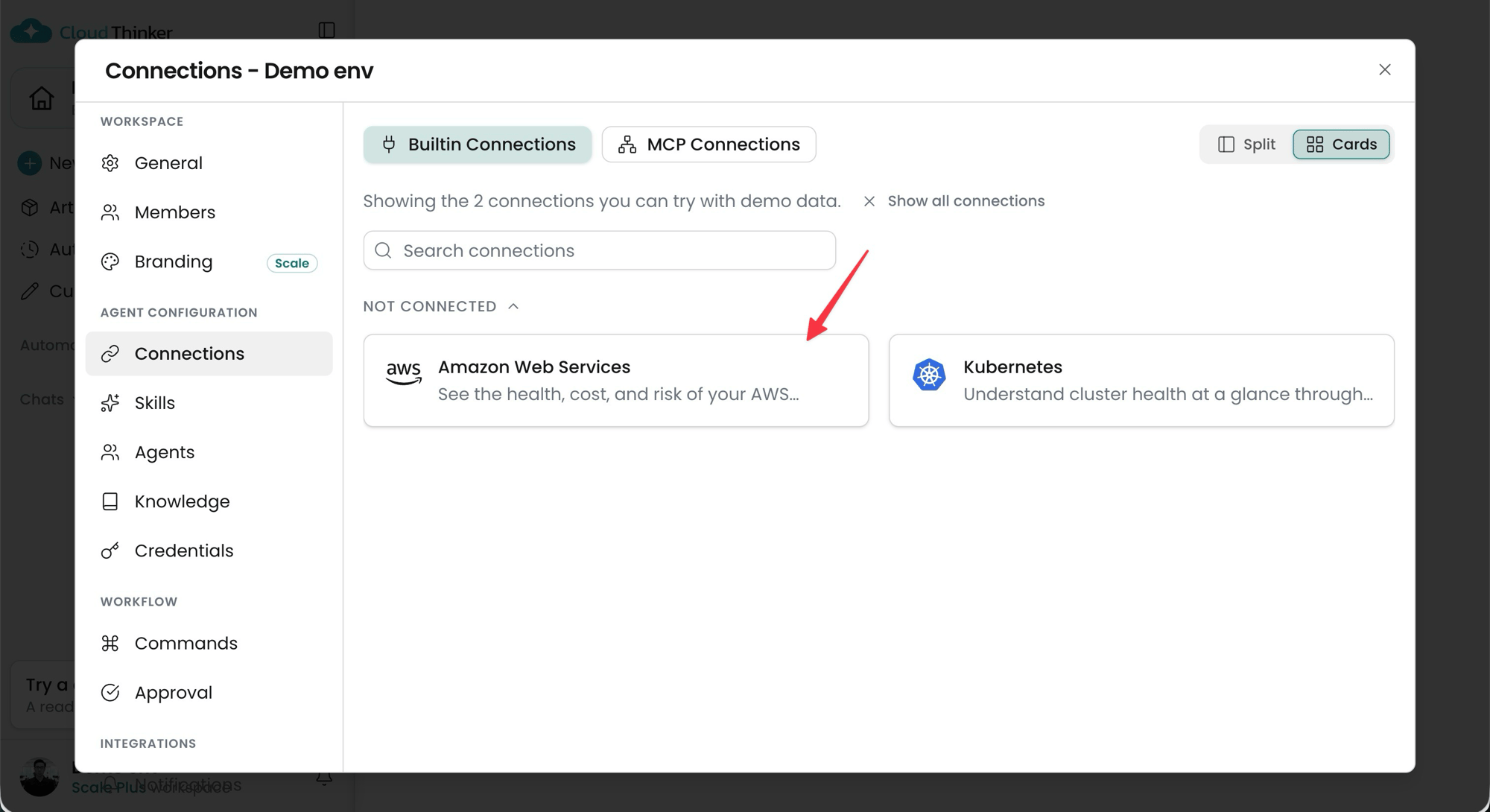
3
Click Use demo
At the top of the Connect Amazon Web Services dialog, a banner offers the read-only demo. Click Use demo. Ignore the Role-Based and Access Keys forms below it. They are for connecting your own account, and today you do not need them.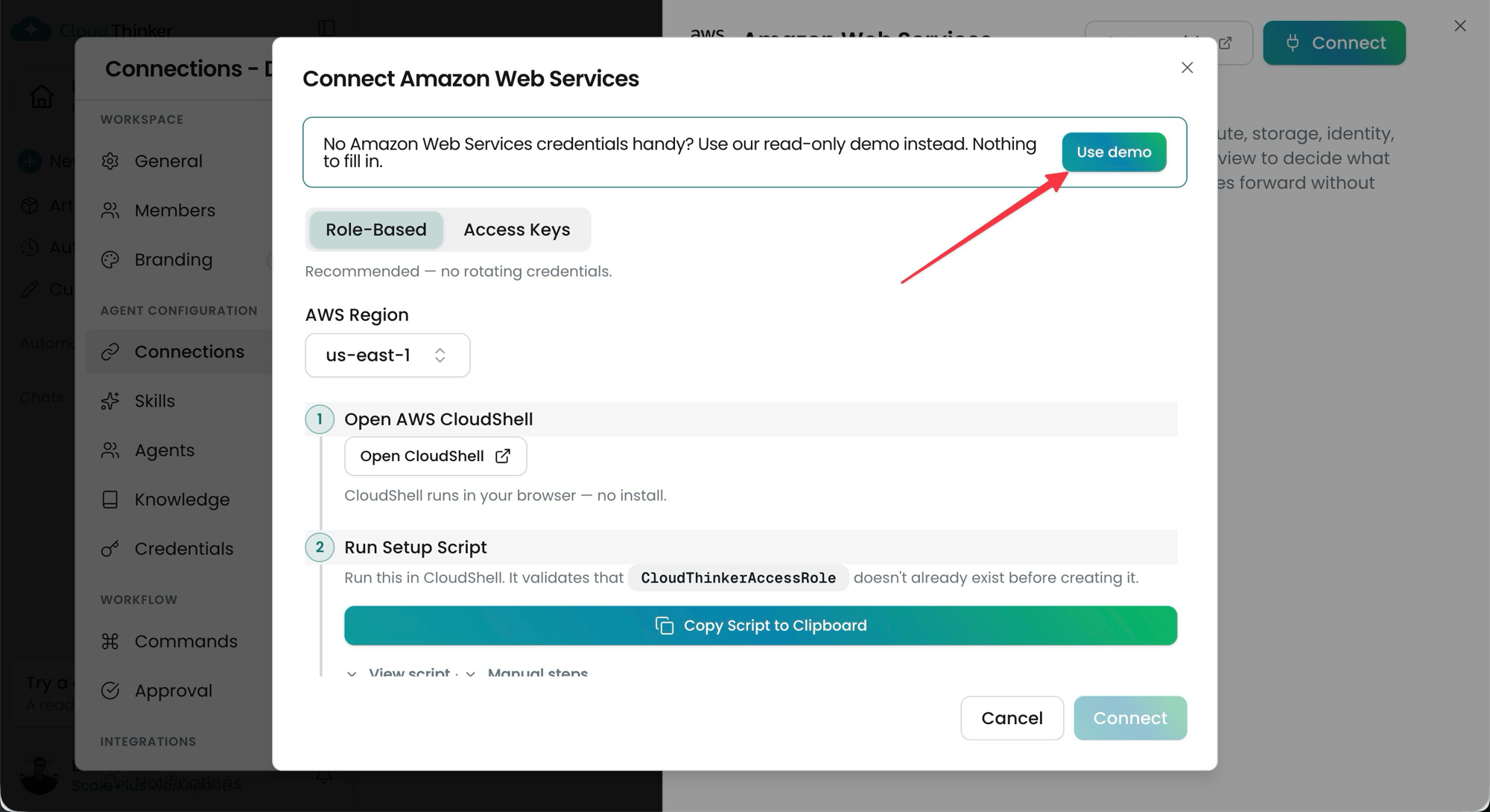
What to ask the agent
Most teams start by asking for a list. Push for evidence instead: which resource, which region, when. Starting points:Stuck?
- Registration or Connect is not working. Pair with a neighbouring team and keep going. Do not spend the block debugging one laptop.
- The agent answers with generic best practices. Ask it for the specific resource, region and call behind each line.
- The agent says it cannot read something. Good. Write it down as blocked. That is part of your scope statement.
Your output is one report
PDF, doc or markdown. There is no template. Finding out what a good optimization report looks like is part of the task, so look it up. Three blocks are the minimum.
A short report with strong evidence beats a long list of best practices. A dropped finding is a good result. A blocked check is a good result if it is written down. Only an unsupported claim kept as true is a bad result.
One file per team, submitted before Share starts. Redact account IDs, ARNs and any customer data first.
Share · 20 minutes
The organisers read the submitted reports during the last part of the lab and pick the best ones, normally three. A team that ran the task on its own real account gets extra credit. Each chosen team presents for five minutes, from the report file and the raw agent output. No slides.
Then the room compares the outputs: same account, different scopes, different findings. For each one, the room votes on what the evidence supports:
Observe · Recommend · Request approval · Stop