The Problem
Code review is the last line of defense before production — and it’s overburdened. Senior engineers spend 2–4 hours per day reviewing PRs instead of building. Review quality degrades under pressure: reviewers miss subtle security vulnerabilities, overlook edge cases, and skip thorough analysis when queues are long. Security issues that slip through code review become expensive: the average cost of a security breach is $4.4M, while the cost of fixing a bug in code review is a fraction of fixing it in production. What manual review misses:- SQL injection and XSS vulnerabilities hidden in multi-file changes
- Hardcoded secrets and credentials committed accidentally
- Business logic bugs that require understanding multiple files at once
- Race conditions and concurrency issues across async code paths
How Existing Tools Compare
| Tool | What It Does | What’s Missing |
|---|---|---|
| GitHub Copilot | Code completion and basic suggestions | Suggestion-mode, not a reviewer; no security analysis; no PR-level context |
| SonarQube / SonarCloud | Static analysis for quality and security | Rules-based, high false positive rate, no understanding of intent; requires maintenance |
| Snyk Code / DeepCode | Security-focused static analysis | Security only, not code quality; no architectural understanding |
| CodeClimate | Code quality metrics and maintainability scoring | Metrics and trends, not actionable review feedback per PR |
| Reviewpad / Danger | Automation rules for PR workflows | Process automation, not code analysis |
What Makes This Different
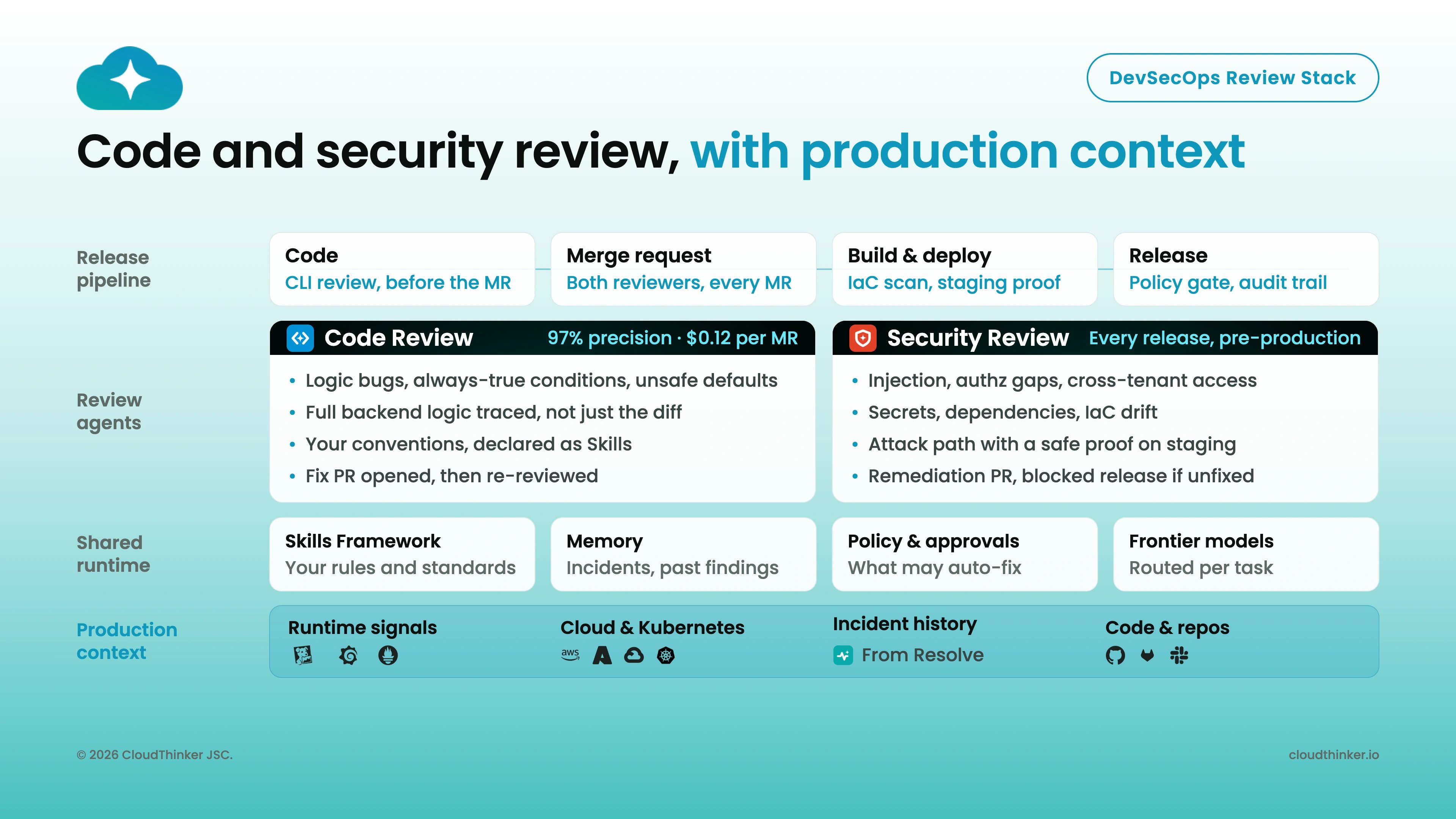
- 96% accuracy on real-world PR detection benchmarks
- Context-aware: understands the purpose of the change, not just syntax patterns
- Cloud-aware: knows when code touches infrastructure (IAM, S3 permissions, database queries) and flags cloud-specific risks
- In-line comments: feedback appears directly on GitHub/GitLab — no new tool to log into
- Security + quality in one pass: bugs, vulnerabilities, best-practice violations, and anti-patterns in a single review
What You Get
Bug Detection
Logic errors, null pointer exceptions, off-by-one errors, and edge cases missed during development
Security Analysis
SQL injection, XSS, SSRF, hardcoded secrets, insecure dependencies, and cloud-specific IAM risks
Code Quality
Anti-patterns, code smells, missing test coverage, and maintainability issues flagged per PR
In-Line Comments
Findings posted directly on GitHub or GitLab — reviewers see AI feedback in the same interface they already use
How Code Review Works
PR Created
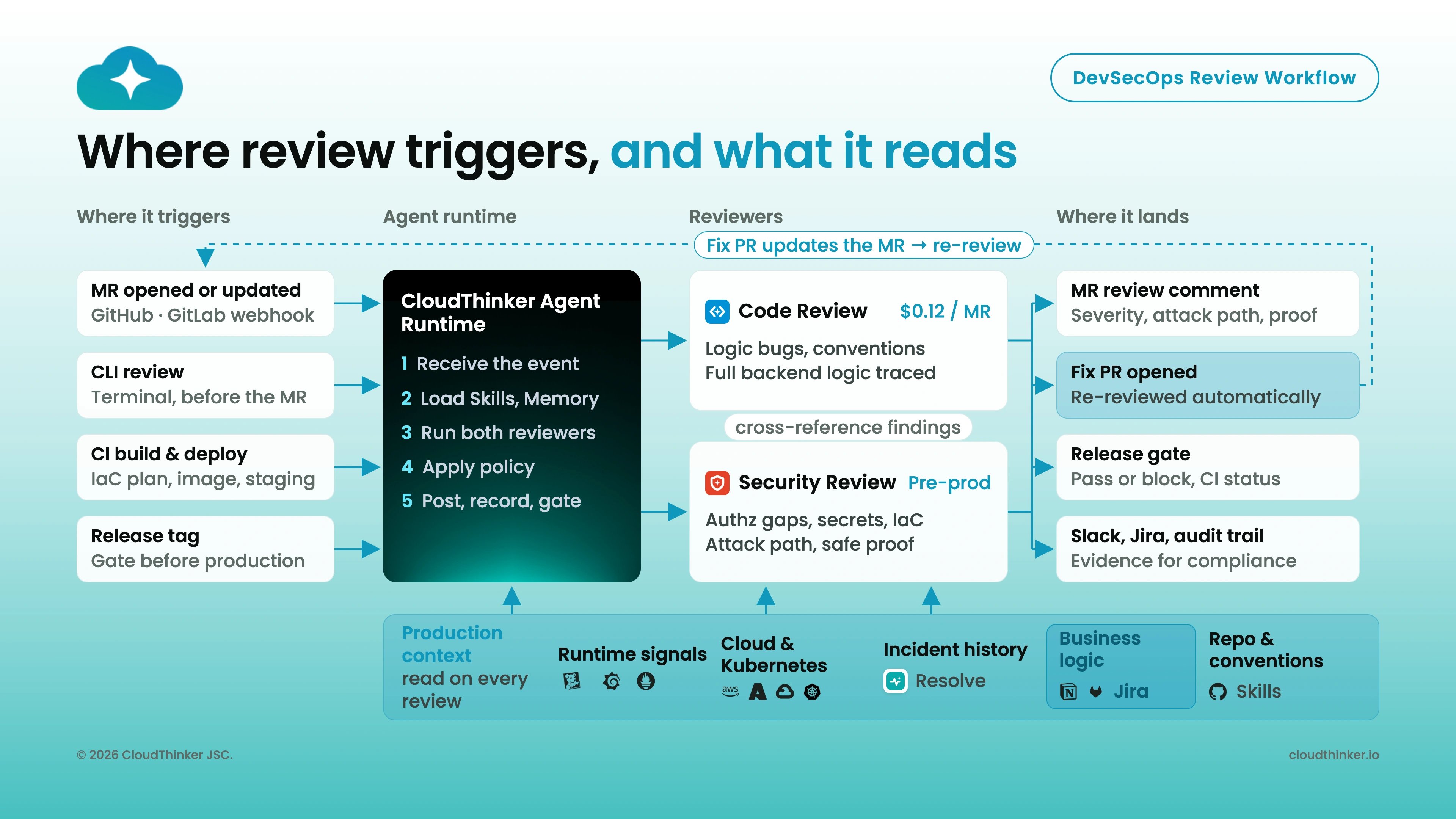
A developer opens a Pull Request on a connected GitHub or GitLab repository. CloudThinker detects it automatically.
Context Gathering
Oliver (Security) reads the full diff, linked Jira tickets, and relevant Confluence documentation to understand the intent of the change.
Multi-Domain Analysis
The review runs in parallel across security, quality, and cloud-infrastructure dimensions — catching issues that single-focus tools miss.
Findings Posted
In-line comments appear on the PR with specific line references, severity ratings, and exact remediation guidance.
Tracked
Critical findings auto-create Jira tickets (when Atlassian is connected). All findings are tracked in the Leaderboard for team visibility.
What’s Next
Setup Guide
Connect your GitHub or GitLab repositories in under 5 minutes
Leaderboard
Track team review activity and measure code quality improvements over time
Atlassian Integration
Auto-create Jira tickets for critical findings and pull Confluence context into reviews
Oliver — Security Agent
Learn more about Oliver’s security scanning and compliance capabilities