

Why Cost Health
- One number per account. The score, its stage, and its trend tell you whether cost practice is getting better.
- Every point has evidence. Each check lists the resources and spend lines that pass or fail, so you can verify the score yourself.
- Fixes come ranked. What raises your score lists the changes worth the most points first.
- Unchecked spend never looks clean. Spend CloudThinker couldn’t check lowers coverage instead of raising the score.
Open Cost Health
In the sidebar, select Optimize → Cost Health, then pick the cloud account next to the page title. The Cost Health card on Overview links to the same page.The five capabilities
The capabilities and their checks follow the FinOps Framework. Each check has a weight, and the weights in a capability add up to 100.
Checks about spend lines and commitments weigh each row by its last 30 days of spend. Checks about resources, anomalies, or the account count each row once.
How the score is set
CloudThinker measures and the scoring rules score. CloudThinker gives each resource or spend line a verdict, and the score comes from those verdicts with fixed rules. CloudThinker never picks the number itself.- Coverage. CloudThinker counts how much of the in-scope spend it could check. Below 50% coverage, a capability shows Not measured and gets no score.
- Checks. Each check scores the passing share of its measured rows. The capability score is the weighted average of its checks.
- Stage. The score maps to a FinOps maturity stage. The page shows a plain label next to it.
The top of the page shows the overall score, its stage, and % of spend measured. It also shows the change since the last score with the capabilities that moved it, for example Rate optimization 49 → 61. A first score reads First score, and the sparkline shows the last 30 days.
What raises your score
What raises your score lists the fixes worth the most points, three at a time. Select Show n more moves for the rest. Each card shows:- The points the overall score would gain if you fix that gap, worked out from the same rows. Gains may overlap, so two fixes together can be worth less than their sum.
- The capability and how its score would change, for example Rate optimization 0 → 40.
- The monthly spend involved, labelled by kind.
- Review finding when a finding already covers the gap, or Ask CloudThinker to plan the fix in a conversation.
Optimize never adds money across kinds, because a committable dollar and an untagged dollar mean different things.
Read a capability
Below the moves, one card per capability shows its score, its stage, and a short summary. Select a card to open its detail. Each check tile shows the points it earned out of its weight and one of four states:
Select a tile to filter the evidence to that check. The evidence table has four tabs, 25 rows a page:
Open a row to see its subject, the reason for its verdict, and its source. Ask CloudThinker why on the capability, or Ask CloudThinker on a row, opens a conversation about it. Open finding goes to the finding that covers it. The capability, check, tab, and page stay in the URL, so you can share the exact view.
Before the first measurement
The first full scan measures the account. Until then, the page shows the provider’s own score, when the provider has one.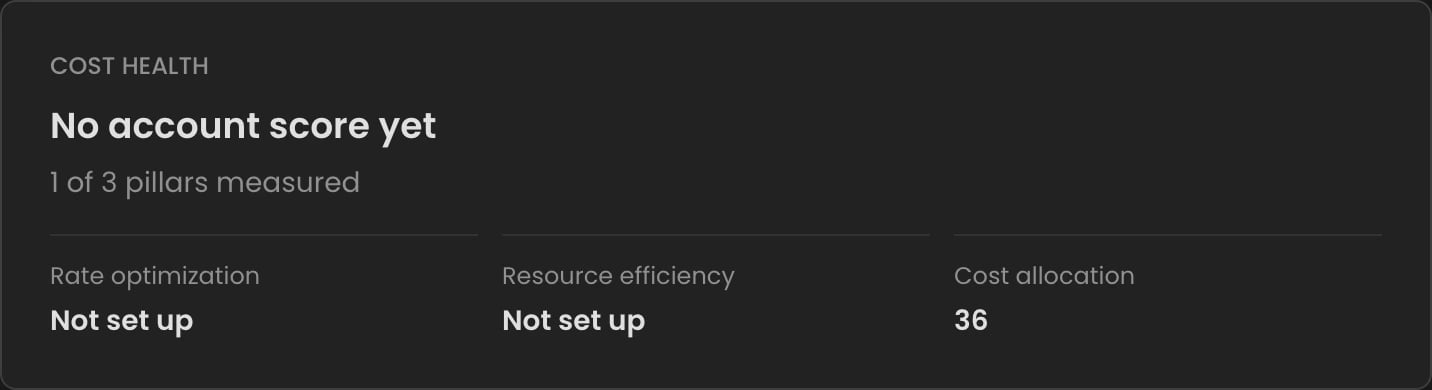
Before CloudThinker measures an AWS account: the provider score, with one of three pillars measured
A score that isn’t ready never shows as zero.
Download and share
Select Download PDF in the page header to save Cost Health for the selected account as a PDF. Any workspace member can download it. To send Cost Health on a schedule, use Optimize reports.FAQ
Why did my score drop when nothing changed?
Why did my score drop when nothing changed?
The score is measured again each day. New spend, a new resource, or an expiring commitment can fail a check. The change line under the score names the capabilities that moved.
Why is a capability Not measured on a large account?
Why is a capability Not measured on a large account?
CloudThinker checks the largest spend first, inside a time budget per run. When less than half of a capability’s spend is checked, it gets no score. The next daily run starts where the last one stopped.
Does fixing a gap raise the score at once?
Does fixing a gap raise the score at once?
No. The score changes after the next daily run measures the account again.
Related
Optimize findings
Work the savings findings that close Cost Health gaps
Optimize settings
Fix the billing source or a paused refresh behind a missing score