Register a staging app, verify its domain, add a test user, then run your first Safe pentest and read the findings it proves.
In about 10 minutes of setup, plus however long your DNS change takes to appear, you register a staging app, prove you own its domain, give Cyber a test login, limit the run to the paths you choose, and start a Safe pentest. When the run finishes you open a finding and read the request and response that prove it.
A staging or test deployment of a web app or API that you’re authorized to test. Don’t use production for your first run.
Access to the DNS records for that app’s domain, so you can add a TXT record.
Workspace admin rights, or an admin who can verify the domain for you. Other users see Ask a workspace admin to verify instead of the DNS proof. The admin verifies it from Cyber → Settings, or by opening this app’s Target ownership card.
Optional: a dedicated test account in the app (username and password). Without one, Cyber tests only what a logged-out visitor can reach.
Click Cyber in the sidebar. On a new workspace you see Nothing to test yet. Click Register an App. If you already have apps, click New app under Apps in the Cyber sidebar.
2
Enter the target
On Target, fill in:
Field
Example
App name
Shop staging
Application URL
https://staging.shop.example.com
What to test
Web application for a browser app, API for an API. Pick one.
Click Continue. Target and framework can’t be changed after setup, so check them now.
Set up a pentest: name the app, enter its URL, and choose Web application or API
3
Verify the domain
Under Target ownership, click Create DNS proof. Copy the DNS record name and TXT value, and add them as a TXT record at your DNS provider. For https://staging.shop.example.com the record looks like this:
If your provider appends the zone name automatically, leave that suffix off the name. Then click Check again. A verified domain also covers its subdomains, so an admin who verifies example.com in Cyber → Settings covers staging.shop.example.com too.Success state:Target ownership shows Verified. DNS changes can take a few minutes to appear; recheck the name and value before you retry.
Fill in who this user is, so Cyber knows what it should and shouldn’t see:
Field
Example
Identity label
customer-a
Identity description
Standard customer who owns test orders
Persona or role
Customer
Tenant
Tenant A
Set Authentication method to Password, then enter Username or email, Password, and Login URL (optional) if the sign-in page isn’t easy to find from the home page. For the example shop, set it to https://staging.shop.example.com/login. Click Save login.Success state: the user appears in the list and the counter reads 1 added. Saved credentials are masked.Saving doesn’t sign in, so a saved password isn’t proof that it works. The run signs in when it starts, and if that sign-in fails the run ends as Failed instead of testing as a logged-out visitor. A Login URL must be on the same origin as the app. For a login that needs MFA or sits on a separate identity provider domain, use a Session token instead: see Add test users.
3
Skip what you don't have
Repository and API docs are optional. Skip them for this run and click Continue. Checks that needed them are listed as limited in the next step, not marked as passed.
Add a second test user from a different role or tenant. With two users, Cyber can test whether one can read the other’s data.
On Start, read the Pentest summary. Coverage status shows Ready or Ready with limitations. Click Show limited checks to see what this run can’t test and why.
2
Pick Safe
Under Testing intensity, select Safe. Its tests send only read requests (GET, HEAD, OPTIONS), so intentional writes and deletes are off for the whole run. A read can still change data if your app changes state on GET (see the intensity table). Signing in your password test user is a separate step, so it can still submit the login form at Safe. The intensity you pick here is saved as the app’s Default intensity, so the run dialog preselects it later.The UI marks Aggressive as Recommended. It adds POST, PUT and PATCH to test forms and flows, so it can create and edit test data. Save it for your second run, once you’ve checked the scope. Leave Full and Deep dive for later: they send destructive requests, including DELETE. All four are compared in Run a pentest.
3
Click Run later
Setup has no scope step, so Start pentest here would test the whole target. Click Run later instead.Success state: the saved app opens with no run.
In the app header, click Settings. Under Scope, click Manage scope.
2
Add include and exclude paths
Add the paths this first run may test under Include paths, and anything that must stay off-limits under Exclude paths. For the example shop:
List
Rules
Include paths
/login, /shop/**, /api/products/**
Exclude paths
/admin/**, /api/payments/**
** matches any depth, and a path that matches both lists is excluded. Your test user’s Login URL must match an include rule, or the sign-in fails with Login could not stay within its safety boundary and the run ends as Failed. That’s why /login is in the example. Click Save scope. Pattern rules are in Set scope and context.Success state: you see Scope saved, and the Scope summary counts your include and exclude rules instead of reading Full target.
In the app header, click Run pentest. Check that Safe is selected under the testing intensity cards.
2
Launch
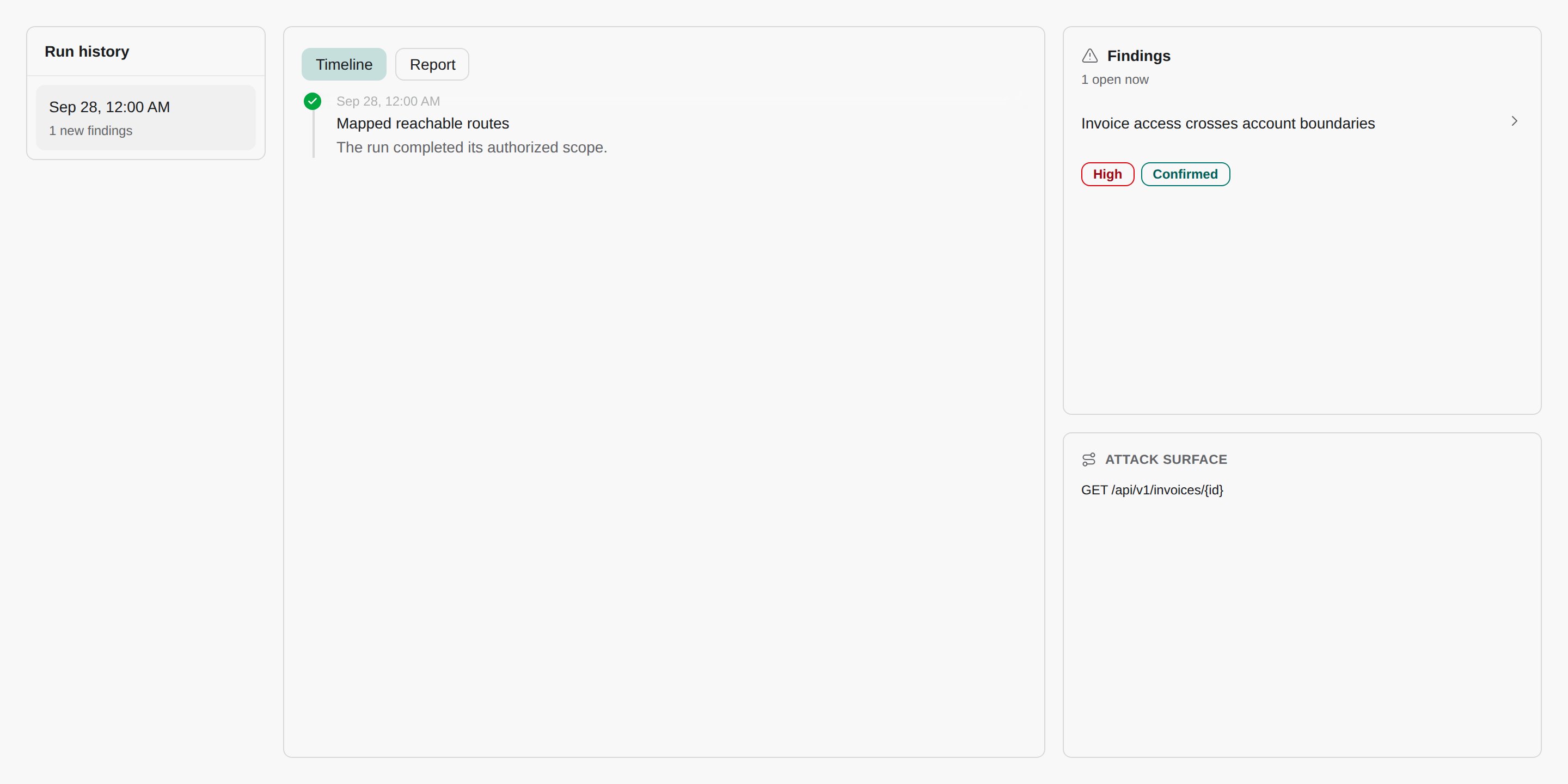
Click Run Safe pentest.Success state: the app’s run workbench opens and the run shows Running, with a live timeline of what Cyber is testing.
You can leave the page. The run continues for up to three hours and uses credits (see Usage). There’s no notification when it finishes, so check back on the app’s Runs tab. If your password test user can’t sign in, the run ends as Failed, so check the Runs tab for that too. Only a Session token that fails its check as the run starts also sends a Pentest run blocked notification. To cancel, click Stop run. A stopped run can’t be resumed, but findings already saved remain.
When the run shows Success, open the app’s Findings tab. The Confirmed tab is selected by default: these are attacks that reproduced.
2
Open a finding
Click a finding. The detail page shows severity, the OWASP category, the impact, how to fix it, and the evidence: the exact Request and Response that prove the issue.
3
Decide what to do
For a real issue, choose Create PR with agent to have CloudThinker draft a fix, or track it on the board. The fix chat uses the repositories attached to the app. This quickstart skipped that, so attach one first: see Connect a Git provider. For a non-issue, dismiss it with a reason. Findings under Needs verification are leads Cyber couldn’t prove yet.
A run with no confirmed findings doesn’t mean the app is secure. Check the limited checks from the Start step: anything Cyber couldn’t reach wasn’t tested.
Compare the TXT record you published with the DNS record name and TXT value shown. A common cause is a provider that appends the zone name, so the domain appears twice in the record name. Remove the duplicate, wait a few minutes, and click Check again.
The run ends as Failed right after it starts
The test user couldn’t sign in. Saving a password doesn’t test it, so the first check happens when the run starts, and a failed sign-in stops the run instead of testing as a logged-out visitor. Update the password or Login URL in the app’s Settings under Test identities, and run again. For MFA or a login on another domain, use a Session token.
The login page has a CAPTCHA
Configure CAPTCHA options on the test user before the run. See Handle CAPTCHA logins.
{"docsConfig":{"theme":"mint","$schema":"https://mintlify.com/docs.json","name":"CloudThinker","colors":{"primary":"#0c93c0","light":"#2897c1","dark":"#0c93c0"},"logo":{"light":"https://mintcdn.com/cloudthinker/-4m9DUjwzDxHfABz/logo/light.svg?fit=max\u0026auto=format\u0026n=-4m9DUjwzDxHfABz\u0026q=85\u0026s=a56a571509d1cd246f5b0e68db015e5f","dark":"https://mintcdn.com/cloudthinker/-4m9DUjwzDxHfABz/logo/dark.svg?fit=max\u0026auto=format\u0026n=-4m9DUjwzDxHfABz\u0026q=85\u0026s=4252f33496bbaa527e5408338963a31e"},"favicon":"https://mintcdn.com/cloudthinker/PoYnb4baZ54aMMQW/favicon.ico?fit=max\u0026auto=format\u0026n=PoYnb4baZ54aMMQW\u0026q=85\u0026s=6570e99ed2a763d9632c8f933fe9c164","background":{"color":{"light":"#eef0f3","dark":"#000000"}},"navbar":{"links":[{"href":"https://discord.com/invite/sRBWRWtaNR","label":"Community"},{"href":"https://cloudthinker.io/blogs","label":"Blog"},{"href":"https://cloudthinker.io/contact","label":"Contact us"}],"primary":{"type":"button","label":"Open app","href":"https://app.cloudthinker.io"}},"footer":{"socials":{"x":"https://x.com/cloudthinkerio?s=21","linkedin":"https://www.linkedin.com/company/cloud-thinker","github":"https://github.com/cloudthinker-ai","discord":"https://discord.com/invite/sRBWRWtaNR","youtube":"https://www.youtube.com/@cloudthinkerai"}},"seo":{"indexing":"navigable"},"fonts":{"family":"Poppins"},"contextual":{"options":["copy","view","chatgpt","claude"],"display":"header"},"metadata":{"timestamp":false},"styling":{"latex":true},"navigation":{"languages":[{"language":"en","href":""},{"language":"vi","href":""},{"language":"ja","href":""},{"language":"ko","href":""}]}},"deployment":{"deploymentMetadataValue":{"subdomain":"cloudthinker","hasAudioNarration":false,"actualSubdomain":"cloudthinker","customDomains":["docs.cloudthinker.io"],"gitSource":{"type":"github","owner":"nhat-tranvan","repo":"docs","deployBranch":"main","contentDirectory":"","isPrivate":false,"mountPath":"","label":""},"chroma":{"liveDeploymentHistoryId":"6adc97ae50e173ef2b635382","collectionId":"650886af-e070-4acf-932c-2411f5f8761a","schemaVersion":"v3","latestBuiltDeploymentHistoryId":"6adc97ae50e173ef2b635382"},"feedback":{"thumbs":true,"edits":true,"issues":true,"agentFeedback":true},"entitlements":{},"buildId":"6adddcaa087fb564296de741","clientVersion":"0.0.3965","searchFilterCounts":[{"language":"default","tag":"Platform","count":67},{"language":"vi","tag":"Nền tảng","count":64},{"language":"en","tag":"Platform","count":63},{"language":"ja","tag":"プラットフォーム","count":63},{"language":"ko","tag":"플랫폼","count":63},{"language":"default","tag":"Connections","count":52},{"language":"vi","tag":"Kết nối","count":49},{"language":"en","tag":"Connections","count":48},{"language":"ja","tag":"接続","count":48},{"language":"ko","tag":"연결","count":48},{"language":"en","tag":"Products","count":29},{"language":"ja","tag":"プロダクト","count":29},{"language":"ko","tag":"제품","count":29},{"language":"vi","tag":"Sản phẩm","count":29},{"language":"default","tag":"Resources","count":26},{"language":"default","tag":"Products","count":24},{"language":"default","tag":"Learn","count":18},{"language":"default","tag":"Agentic Infrastructure Operations - Engineer Edition","count":18},{"language":"default","tag":"Get started","count":13},{"language":"en","tag":"Get started","count":13},{"language":"en","tag":"Resources","count":13},{"language":"ja","tag":"はじめに","count":13},{"language":"ja","tag":"リソース","count":13},{"language":"ko","tag":"시작하기","count":13},{"language":"ko","tag":"리소스","count":13},{"language":"vi","tag":"Bắt đầu","count":13},{"language":"vi","tag":"Tài nguyên","count":13},{"language":"en","tag":"Learn","count":12},{"language":"en","tag":"Agentic Infrastructure Operations - Leadership Edition","count":12},{"language":"ja","tag":"Observability \u0026 Monitoring","count":12},{"language":"ja","tag":"学ぶ","count":12},{"language":"ja","tag":"Agentic Infrastructure Operations - Leadership Edition","count":12},{"language":"ko","tag":"Observability \u0026 Monitoring","count":12},{"language":"ko","tag":"배우기","count":12},{"language":"ko","tag":"Agentic Infrastructure Operations - Leadership Edition","count":12},{"language":"vi","tag":"Observability \u0026 Monitoring","count":12},{"language":"vi","tag":"Học","count":12},{"language":"vi","tag":"Agentic Infrastructure Operations - Leadership Edition","count":12},{"language":"en","tag":"Monitoring","count":11},{"language":"en","tag":"Resolve","count":11},{"language":"ja","tag":"Resolve","count":11},{"language":"ko","tag":"Resolve","count":11},{"language":"vi","tag":"Resolve","count":11},{"language":"default","tag":"Resolve","count":9},{"language":"vi","tag":"Databases","count":9},{"language":"ja","tag":"Databases","count":8},{"language":"ko","tag":"Databases","count":8},{"language":"en","tag":"Work where you are","count":7},{"language":"default","tag":"Review","count":6},{"language":"default","tag":"Set up","count":6}]},"assistantConfig":{},"hasChatPermissions":false,"hasWebMcpPermissions":false,"toggles":[{"name":"kill-isr","enabled":true,"variant":{"name":"disabled","enabled":false,"feature_enabled":true},"impressionData":false},{"name":"agent-mintlify-slack","enabled":true,"variant":{"name":"disabled","enabled":false,"feature_enabled":true},"impressionData":false},{"name":"editor-v7-file-tree","enabled":true,"variant":{"name":"disabled","enabled":false,"feature_enabled":true},"impressionData":false},{"name":"agent-integrations-settings","enabled":true,"variant":{"name":"disabled","enabled":false,"feature_enabled":true},"impressionData":false},{"name":"automations-pr-grouping","enabled":true,"variant":{"name":"disabled","enabled":false,"feature_enabled":true},"impressionData":false},{"name":"custom-prefix","enabled":true,"variant":{"name":"disabled","enabled":false,"feature_enabled":true},"impressionData":false},{"name":"analytics-v7","enabled":true,"variant":{"name":"disabled","enabled":false,"feature_enabled":true},"impressionData":false},{"name":"user-flows-analytics","enabled":true,"variant":{"name":"disabled","enabled":false,"feature_enabled":true},"impressionData":false},{"name":"no-publish-flow","enabled":true,"variant":{"name":"disabled","enabled":false,"feature_enabled":true},"impressionData":false},{"name":"workos-onboarding","enabled":true,"variant":{"name":"disabled","enabled":false,"feature_enabled":true},"impressionData":false},{"name":"llms-txt-v2","enabled":true,"variant":{"name":"disabled","enabled":false,"feature_enabled":true},"impressionData":false},{"name":"pause-universal-search-reconcile","enabled":true,"variant":{"name":"disabled","enabled":false,"feature_enabled":true},"impressionData":false},{"name":"snapshot-serving-live","enabled":true,"variant":{"name":"disabled","enabled":false,"feature_enabled":true},"impressionData":false},{"name":"stripTemperatureMiddleware","enabled":true,"variant":{"name":"disabled","enabled":false,"feature_enabled":true},"impressionData":false},{"name":"per-site-search-delta","enabled":true,"variant":{"name":"disabled","enabled":false,"feature_enabled":true},"impressionData":false},{"name":"support-platform-pylon-zendesk","enabled":true,"variant":{"name":"disabled","enabled":false,"feature_enabled":true},"impressionData":false},{"name":"snapshot-serving","enabled":true,"variant":{"name":"disabled","enabled":false,"feature_enabled":true},"impressionData":false},{"name":"instant-rollback","enabled":true,"variant":{"name":"disabled","enabled":false,"feature_enabled":true},"impressionData":false},{"name":"granular-notifications-server","enabled":true,"variant":{"name":"disabled","enabled":false,"feature_enabled":true},"impressionData":false},{"name":"granular-notifications","enabled":true,"variant":{"name":"disabled","enabled":false,"feature_enabled":true},"impressionData":false},{"name":"editor-private-page-search","enabled":true,"variant":{"name":"disabled","enabled":false,"feature_enabled":true},"impressionData":false},{"name":"automations-fable","enabled":true,"variant":{"name":"disabled","enabled":false,"feature_enabled":true},"impressionData":false},{"name":"fixed-ai-action-pricing","enabled":true,"variant":{"name":"disabled","enabled":false,"feature_enabled":true},"impressionData":false},{"name":"automation-resolve-merge-conflict","enabled":true,"variant":{"name":"disabled","enabled":false,"feature_enabled":true},"impressionData":false},{"name":"scoped-publishing","enabled":true,"variant":{"name":"disabled","enabled":false,"feature_enabled":true},"impressionData":false},{"name":"mintql","enabled":true,"variant":{"name":"disabled","enabled":false,"feature_enabled":true},"impressionData":false},{"name":"page-level-analytics","enabled":true,"variant":{"name":"disabled","enabled":false,"feature_enabled":true},"impressionData":false},{"name":"editor-version-history-v2","enabled":true,"variant":{"name":"disabled","enabled":false,"feature_enabled":true},"impressionData":false},{"name":"editor-nav-generations","enabled":true,"variant":{"name":"disabled","enabled":false,"feature_enabled":true},"impressionData":false},{"name":"billing-page-v2","enabled":true,"variant":{"name":"disabled","enabled":false,"feature_enabled":true},"impressionData":false},{"name":"workspace-projects","enabled":true,"variant":{"name":"disabled","enabled":false,"feature_enabled":true},"impressionData":false},{"name":"assistant-v5","enabled":true,"variant":{"name":"disabled","enabled":false,"feature_enabled":true},"impressionData":false},{"name":"byok-sep-25","enabled":true,"variant":{"name":"disabled","enabled":false,"feature_enabled":true},"impressionData":false},{"name":"fork-pr-previews","enabled":true,"variant":{"name":"disabled","enabled":false,"feature_enabled":true},"impressionData":false},{"name":"revalidation-jwt","enabled":true,"variant":{"name":"disabled","enabled":false,"feature_enabled":true},"impressionData":false},{"name":"vite-origin","enabled":true,"variant":{"name":"disabled","enabled":false,"feature_enabled":true},"impressionData":false},{"name":"editor-agent-model-picker","enabled":true,"variant":{"name":"disabled","enabled":false,"feature_enabled":true},"impressionData":false},{"name":"billing-updated-9-15","enabled":true,"variant":{"name":"disabled","enabled":false,"feature_enabled":true},"impressionData":false},{"name":"hobby-abuse-scan","enabled":true,"variant":{"name":"disabled","enabled":false,"feature_enabled":true},"impressionData":false},{"name":"dashboard-inbox","enabled":true,"variant":{"name":"disabled","enabled":false,"feature_enabled":true},"impressionData":false}],"isAtlas":false,"googleFontsInlined":true},"customCss":[{"filePath":"style.css","content":".ct-landing a,a.ct-featured{text-decoration:none!important}a.ct-featured{display:block;margin:1.25rem 0 1rem;padding:1.75rem 1.75rem 1.5rem;border:1px solid rgba(12,147,192,.45)!important;border-radius:16px;background:radial-gradient(120% 160% at 0 0,rgba(12,147,192,.14),transparent 55%),#fff;box-shadow:0 12px 32px -16px rgba(12,147,192,.45);transition:border-color .15s ease,transform .15s ease,box-shadow .15s ease}a.ct-featured:hover{border-color:#0c93c0!important;transform:translateY(-1px);box-shadow:0 16px 40px -16px rgba(12,147,192,.6)}.dark a.ct-featured{border-color:rgba(40,151,193,.45)!important;background:radial-gradient(120% 160% at 0 0,rgba(40,151,193,.16),transparent 55%),#05070a;box-shadow:0 12px 32px -16px rgba(40,151,193,.35)}.dark a.ct-featured:hover{border-color:#2897c1!important}.ct-featured-head{display:flex;align-items:center;gap:.75rem;margin-bottom:.875rem}.ct-featured-icon{display:inline-flex;align-items:center;justify-content:center;width:2.25rem;height:2.25rem;border-radius:999px;background:rgba(12,147,192,.12);color:#0a7aa0}.dark .ct-featured-icon{background:rgba(40,151,193,.14);color:#5bb8e0}.ct-eyebrow{font-size:.75rem;font-weight:600;letter-spacing:.14em;text-transform:uppercase;color:#0a7aa0}.dark .ct-eyebrow{color:#5bb8e0}.ct-hero h1,.ct-title{font-weight:600;color:#0b1a2b}.ct-title{font-size:1.375rem;line-height:1.3}.dark .ct-card .ct-card-head span,.dark .ct-card h3,.dark .ct-hero h1,.dark .ct-section>h2,.dark .ct-step h3,.dark .ct-title{color:#f5f5f7}.ct-body{margin:.5rem 0 0!important;font-weight:400!important;font-size:1rem;max-width:46rem;color:#5b6577;line-height:1.6}.dark .ct-body,.dark .ct-hero .ct-promise,.dark .ct-hero p.ct-lead,.dark .ct-section>p.ct-section-lead{color:#a1a1a6}.ct-cta{display:inline-block;margin-top:1rem;font-weight:600;color:#0a7aa0}.dark .ct-cta{color:#5bb8e0}.ct-illustration{margin:1.5rem 0}.ct-illustration img{max-width:720px;margin:0 auto}.ct-iso-scene{margin:1.5rem 0 2rem;border:1px solid rgba(12,147,192,.18);border-radius:16px;background:#fff;overflow:hidden}.dark .ct-iso-scene{border-color:rgba(40,151,193,.22);background:#000}.ct-illustration img,.ct-iso-scene .ct-iso-svg{display:block;width:100%;height:auto}.ct-landing{max-width:1120px;margin:0 auto;padding:3rem 1.5rem 5rem}.ct-landing a{border-bottom-width:0}.ct-kicker{font-size:.8125rem;font-weight:600;letter-spacing:.08em;text-transform:uppercase;color:#0c93c0}.dark .ct-card .ct-tagline,.dark .ct-hero .ct-promise strong,.dark .ct-kicker{color:#2897c1}.ct-hero{text-align:center;padding:1.5rem 0 1rem}.ct-hero h1{margin:.75rem 0 0;font-size:clamp(2.25rem,5vw,3.75rem);line-height:1.05;letter-spacing:-.03em;-webkit-text-fill-color:currentColor;background:0 0}.ct-hero .ct-promise{margin:1rem auto 0;font-size:clamp(1.125rem,2.2vw,1.5rem);color:#5b6577}.ct-hero .ct-promise strong,.ct-section>h2{color:#0c93c0;font-weight:600}.ct-hero p.ct-lead{max-width:44rem;margin:1rem auto 0;font-size:1.0625rem;line-height:1.65;color:#5b6577}.ct-actions{display:flex;flex-wrap:wrap;gap:.75rem;justify-content:center;margin-top:1.75rem}.ct-btn{display:inline-flex;align-items:center;gap:.5rem;padding:.7rem 1.25rem;border-radius:999px;font-weight:600;font-size:.95rem;transition:transform .15s ease,background .15s ease}.ct-btn:hover{transform:translateY(-1px)}.ct-btn-primary{background:#0c93c0;color:#fff!important}.ct-btn-primary:hover{background:#0a7aa0}.ct-btn-ghost{border:1px solid rgba(12,147,192,.35)!important;color:#0b1a2b!important}.dark .ct-btn-ghost{color:#f5f5f7!important;border-color:rgba(40,151,193,.4)!important}.ct-landing .ct-iso-scene{margin-top:2.5rem}.ct-section{margin-top:4.5rem}.ct-section>h2{margin:.4rem 0 0;font-size:1.75rem;letter-spacing:-.02em;color:#0b1a2b;-webkit-text-fill-color:currentColor;background:0 0}.ct-section>p.ct-section-lead{margin:.5rem 0 0;color:#5b6577;max-width:46rem}.ct-steps{display:grid;grid-template-columns:repeat(4,minmax(0,1fr));gap:1rem;margin-top:1.5rem}.ct-step{display:block;padding:1.25rem;border-radius:14px;border:1px solid rgba(12,147,192,.18)!important;background:#fff;transition:border-color .15s ease,transform .15s ease}.dark .ct-step{background:#05070a;border-color:rgba(40,151,193,.22)!important}.ct-step:hover{border-color:#0c93c0!important;transform:translateY(-1px)}.ct-step-num{display:inline-flex;width:1.75rem;height:1.75rem;border-radius:999px;align-items:center;justify-content:center;font-size:.85rem;font-weight:700;color:#fff;background:#0c93c0}.ct-card h3,.ct-step h3{margin:.75rem 0 .25rem;font-size:1.05rem}.ct-card p,.ct-step p{margin:0;font-size:.925rem;line-height:1.55;color:#5b6577}.dark .ct-card p,.dark .ct-landing td,.dark .ct-step p{color:#a1a1a6}.ct-grid{display:grid;gap:1rem;margin-top:1.5rem}.ct-grid-3{grid-template-columns:repeat(3,minmax(0,1fr))}.ct-grid-5{grid-template-columns:repeat(5,minmax(0,1fr))}.ct-card{display:flex;flex-direction:column;padding:1.25rem;border-radius:14px;border:1px solid rgba(12,147,192,.18);background:#fff}.dark .ct-card{background:#05070a;border-color:rgba(40,151,193,.22)}.ct-card .ct-card-head{display:flex;align-items:center;gap:.6rem}.ct-card .ct-card-head span,.ct-card h3,.ct-step h3{font-weight:600;color:#0b1a2b}.ct-card .ct-tagline{margin-top:.75rem;font-size:1.05rem;font-weight:600;line-height:1.35;color:#0c93c0}.ct-card .ct-links{margin-top:auto;padding-top:1rem;display:flex;gap:1rem;font-size:.9rem;font-weight:600}.ct-card .ct-links a{color:#0c93c0!important}.dark .ct-card .ct-links a,.dark .ct-card-head .ct-arrow,.dark .ct-landing td a{color:#2897c1!important}a.ct-card{transition:border-color .15s ease,transform .15s ease}a.ct-card:hover{border-color:#0c93c0!important;transform:translateY(-1px)}.ct-strip{display:flex;flex-wrap:wrap;gap:.6rem;margin-top:1.25rem}.ct-strip a{display:inline-flex;align-items:center;gap:.45rem;padding:.55rem .95rem;border-radius:999px;border:1px solid rgba(12,147,192,.25)!important;font-size:.9rem;font-weight:500;color:#0b1a2b!important}.dark .ct-strip a{color:#f5f5f7!important;border-color:rgba(40,151,193,.3)!important}.ct-strip a:hover{border-color:#0c93c0!important}@media (max-width:900px){.ct-grid-3,.ct-grid-5,.ct-steps{grid-template-columns:repeat(2,minmax(0,1fr))}}@media (max-width:560px){.ct-landing{padding:2rem 1rem 4rem}.ct-grid-3,.ct-grid-5,.ct-steps{grid-template-columns:minmax(0,1fr)}}.ct-landing table{width:100%;margin-top:1.25rem;border-collapse:collapse;font-size:.925rem}.ct-landing th{text-align:left;font-weight:600;padding:.7rem .9rem;border-bottom:1px solid rgba(12,147,192,.3)}.ct-landing td{vertical-align:top;padding:.8rem .9rem;border-bottom:1px solid rgba(12,147,192,.12);color:#5b6577;line-height:1.55}.ct-landing td:first-child{font-weight:600;color:#0b1a2b;width:22%}.dark .ct-landing td:first-child{color:#f5f5f7}.ct-landing td a{color:#0c93c0!important;font-weight:600}.ct-product{padding:1.1rem 1.2rem}.ct-product .ct-tagline{margin-top:.55rem;font-size:1rem}.ct-product p{margin-top:.3rem}.ct-card-head .ct-arrow{margin-left:auto;font-weight:500!important;color:#0c93c0!important;transition:transform .15s ease}a.ct-product:hover .ct-arrow{transform:translateX(3px)}html:not(.dark) .ct-card,html:not(.dark) .ct-iso-scene,html:not(.dark) .ct-step{background:#f6f7f9}html:not(.dark) .ct-iso-scene{border-color:rgba(12,147,192,.12)}html:not(.dark) #content-area,html:not(.dark) .prose,html:not(.dark) body{color:#2b3240}html:not(.dark) .prose :where(h1, h2, h3, h4, strong){color:#1c2230}html:not(.dark) .ct-card .ct-card-head span,html:not(.dark) .ct-card h3,html:not(.dark) .ct-hero h1,html:not(.dark) .ct-section>h2,html:not(.dark) .ct-step h3{color:#1c2230}"}],"page":{"pagePath":"guide/security/cyber-quickstart","slug":"/guide/security/cyber-quickstart","pageMetadata":{"title":"Cyber Quickstart","description":"Register a staging app, verify its domain, add a test user, then run your first Safe pentest and read the findings it proves.","tag":"Beta","icon":"rocket","href":"/guide/security/cyber-quickstart"},"description":{"compiledSource":"\"use strict\";\nconst {jsx: _jsx} = arguments[0];\nconst {useMDXComponents: _provideComponents} = arguments[0];\nfunction _createMdxContent(props) {\n const _components = {\n p: \"p\",\n ..._provideComponents(),\n ...props.components\n };\n return _jsx(_components.p, {\n children: \"Register a staging app, verify its domain, add a test user, then run your first Safe pentest and read the findings it proves.\"\n });\n}\nfunction MDXContent(props = {}) {\n const {wrapper: MDXLayout} = {\n ..._provideComponents(),\n ...props.components\n };\n return MDXLayout ? _jsx(MDXLayout, {\n ...props,\n children: _jsx(_createMdxContent, {\n ...props\n })\n }) : _createMdxContent(props);\n}\nreturn {\n default: MDXContent\n};\n","frontmatter":{},"scope":{}},"pageType":"default","mdx":{"mdxSource":{"compiledSource":"\"use strict\";const{Fragment:_Fragment,jsx:_jsx,jsxs:_jsxs}=arguments[0];const{useMDXComponents:_provideComponents}=arguments[0];function _createMdxContent(props){const _components={a:`a`,code:`code`,li:`li`,p:`p`,strong:`strong`,tbody:`tbody`,td:`td`,th:`th`,thead:`thead`,tr:`tr`,ul:`ul`,..._provideComponents(),...props.components},{Accordion,AccordionGroup,Card,CardGroup,Frame,Heading,OptimizedImage,Step,Steps,Table,Tip}=_components;if(!Accordion)_missingMdxReference(`Accordion`,true);if(!AccordionGroup)_missingMdxReference(`AccordionGroup`,true);if(!Card)_missingMdxReference(`Card`,true);if(!CardGroup)_missingMdxReference(`CardGroup`,true);if(!Frame)_missingMdxReference(`Frame`,true);if(!Heading)_missingMdxReference(`Heading`,true);if(!OptimizedImage)_missingMdxReference(`OptimizedImage`,true);if(!Step)_missingMdxReference(`Step`,true);if(!Steps)_missingMdxReference(`Steps`,true);if(!Table)_missingMdxReference(`Table`,true);if(!Tip)_missingMdxReference(`Tip`,true);return _jsxs(_Fragment,{children:[_jsx(_components.p,{children:`In about 10 minutes of setup, plus however long your DNS change takes to appear, you register a staging app, prove you own its domain, give Cyber a test login, limit the run to the paths you choose, and start a Safe pentest. When the run finishes you open a finding and read the request and response that prove it.`}),`\n`,_jsx(Heading,{level:`2`,id:`prerequisites`,children:`Prerequisites`}),`\n`,_jsxs(_components.ul,{children:[`\n`,_jsx(_components.li,{children:`A staging or test deployment of a web app or API that you’re authorized to test. Don’t use production for your first run.`}),`\n`,_jsx(_components.li,{children:`Access to the DNS records for that app’s domain, so you can add a TXT record.`}),`\n`,_jsxs(_components.li,{children:[`Workspace admin rights, or an admin who can verify the domain for you. Other users see `,_jsx(_components.strong,{children:`Ask a workspace admin to verify`}),` instead of the DNS proof. The admin verifies it from `,_jsx(_components.strong,{children:`Cyber → Settings`}),`, or by opening this app’s `,_jsx(_components.strong,{children:`Target ownership`}),` card.`]}),`\n`,_jsx(_components.li,{children:`Optional: a dedicated test account in the app (username and password). Without one, Cyber tests only what a logged-out visitor can reach.`}),`\n`]}),`\n`,_jsx(Heading,{level:`2`,id:`register-the-app`,children:`Register the app`}),`\n`,_jsxs(Steps,{children:[_jsx(Step,{title:`Open Cyber`,children:_jsxs(_components.p,{children:[`Click `,_jsx(_components.strong,{children:`Cyber`}),` in the sidebar. On a new workspace you see `,_jsx(_components.strong,{children:`Nothing to test yet`}),`. Click `,_jsx(_components.strong,{children:`Register an App`}),`. If you already have apps, click `,_jsx(_components.strong,{children:`New app`}),` under `,_jsx(_components.strong,{children:`Apps`}),` in the Cyber sidebar.`]})}),_jsxs(Step,{title:`Enter the target`,children:[_jsxs(_components.p,{children:[`On `,_jsx(_components.strong,{children:`Target`}),`, fill in:`]}),_jsxs(Table,{children:[_jsx(_components.thead,{children:_jsxs(_components.tr,{children:[_jsx(_components.th,{children:`Field`}),_jsx(_components.th,{children:`Example`})]})}),_jsxs(_components.tbody,{children:[_jsxs(_components.tr,{children:[_jsx(_components.td,{children:_jsx(_components.strong,{children:`App name`})}),_jsx(_components.td,{children:_jsx(_components.code,{children:`Shop staging`})})]}),_jsxs(_components.tr,{children:[_jsx(_components.td,{children:_jsx(_components.strong,{children:`Application URL`})}),_jsx(_components.td,{children:_jsx(_components.code,{children:`https://staging.shop.example.com`})})]}),_jsxs(_components.tr,{children:[_jsx(_components.td,{children:_jsx(_components.strong,{children:`What to test`})}),_jsxs(_components.td,{children:[_jsx(_components.strong,{children:`Web application`}),` for a browser app, `,_jsx(_components.strong,{children:`API`}),` for an API. Pick one.`]})]})]})]}),_jsxs(_components.p,{children:[`Click `,_jsx(_components.strong,{children:`Continue`}),`. Target and framework can’t be changed after setup, so check them now.`]}),_jsx(Frame,{caption:`Set up a pentest: name the app, enter its URL, and choose Web application or API`,children:_jsx(OptimizedImage,{src:`https://mintcdn.com/cloudthinker/7N5Axt6gSxkmeWiW/images/v2/cyber-new-app.webp?fit=max\u0026auto=format\u0026n=7N5Axt6gSxkmeWiW\u0026q=85\u0026s=4bac477f4ca7a82c8f1d25742540b0c4`,alt:`The Set up a pentest step with App name, Application URL, and the Web application or API choice.`,\"data-og-width\":`2176`,width:`2176`,\"data-og-height\":`1800`,height:`1800`,\"data-path\":`images/v2/cyber-new-app.webp`,\"data-optimize\":`true`,\"data-opv\":`3`,srcset:`https://mintcdn.com/cloudthinker/7N5Axt6gSxkmeWiW/images/v2/cyber-new-app.webp?w=280\u0026fit=max\u0026auto=format\u0026n=7N5Axt6gSxkmeWiW\u0026q=85\u0026s=b03e3908bced72b2a8d6645563b49f14 280w, https://mintcdn.com/cloudthinker/7N5Axt6gSxkmeWiW/images/v2/cyber-new-app.webp?w=560\u0026fit=max\u0026auto=format\u0026n=7N5Axt6gSxkmeWiW\u0026q=85\u0026s=ba1af6e99da06208518e4624461355d1 560w, https://mintcdn.com/cloudthinker/7N5Axt6gSxkmeWiW/images/v2/cyber-new-app.webp?w=840\u0026fit=max\u0026auto=format\u0026n=7N5Axt6gSxkmeWiW\u0026q=85\u0026s=7f8b61703aaa5bc7f5d3d5d84eb97e20 840w, https://mintcdn.com/cloudthinker/7N5Axt6gSxkmeWiW/images/v2/cyber-new-app.webp?w=1100\u0026fit=max\u0026auto=format\u0026n=7N5Axt6gSxkmeWiW\u0026q=85\u0026s=70b7f4f154540d82c79f793063382eed 1100w, https://mintcdn.com/cloudthinker/7N5Axt6gSxkmeWiW/images/v2/cyber-new-app.webp?w=1650\u0026fit=max\u0026auto=format\u0026n=7N5Axt6gSxkmeWiW\u0026q=85\u0026s=713961da2bdb7045f7f6fcbf5db348a5 1650w, https://mintcdn.com/cloudthinker/7N5Axt6gSxkmeWiW/images/v2/cyber-new-app.webp?w=2500\u0026fit=max\u0026auto=format\u0026n=7N5Axt6gSxkmeWiW\u0026q=85\u0026s=d7b34e6550948e852c61cbeb30266091 2500w`})})]}),_jsxs(Step,{title:`Verify the domain`,children:[_jsxs(_components.p,{children:[`Under `,_jsx(_components.strong,{children:`Target ownership`}),`, click `,_jsx(_components.strong,{children:`Create DNS proof`}),`. Copy the `,_jsx(_components.strong,{children:`DNS record name`}),` and `,_jsx(_components.strong,{children:`TXT value`}),`, and add them as a TXT record at your DNS provider. For `,_jsx(_components.code,{children:`https://staging.shop.example.com`}),` the record looks like this:`]}),_jsxs(Table,{children:[_jsx(_components.thead,{children:_jsxs(_components.tr,{children:[_jsx(_components.th,{children:`Type`}),_jsx(_components.th,{children:`Name`}),_jsx(_components.th,{children:`Value`})]})}),_jsx(_components.tbody,{children:_jsxs(_components.tr,{children:[_jsx(_components.td,{children:`TXT`}),_jsx(_components.td,{children:_jsx(_components.code,{children:`_cloudthinker-appsec-\u003crandom>.staging.shop.example.com`})}),_jsx(_components.td,{children:_jsx(_components.code,{children:`cloudthinker-appsec-domain-verification=\u003ctoken>`})})]})})]}),_jsxs(_components.p,{children:[`If your provider appends the zone name automatically, leave that suffix off the name. Then click `,_jsx(_components.strong,{children:`Check again`}),`. A verified domain also covers its subdomains, so an admin who verifies `,_jsx(_components.code,{children:`example.com`}),` in `,_jsx(_components.strong,{children:`Cyber → Settings`}),` covers `,_jsx(_components.code,{children:`staging.shop.example.com`}),` too.`]}),_jsxs(_components.p,{children:[_jsx(_components.strong,{children:`Success state:`}),` `,_jsx(_components.strong,{children:`Target ownership`}),` shows `,_jsx(_components.strong,{children:`Verified`}),`. DNS changes can take a few minutes to appear; recheck the name and value before you retry.`]})]})]}),`\n`,_jsx(Heading,{level:`2`,id:`add-a-test-user-optional`,children:`Add a test user (optional)`}),`\n`,_jsxs(_components.p,{children:[`No test account? Click `,_jsx(_components.strong,{children:`Continue`}),` on `,_jsx(_components.strong,{children:`Access`}),` and skip to `,_jsx(_components.a,{href:`#choose-an-intensity-and-save`,children:`Choose an intensity and save`}),`.`]}),`\n`,_jsxs(Steps,{children:[_jsx(Step,{title:`Open the test user form`,children:_jsxs(_components.p,{children:[`On `,_jsx(_components.strong,{children:`Access`}),`, click `,_jsx(_components.strong,{children:`Add test user`}),`.`]})}),_jsxs(Step,{title:`Describe the account`,children:[_jsx(_components.p,{children:`Fill in who this user is, so Cyber knows what it should and shouldn’t see:`}),_jsxs(Table,{children:[_jsx(_components.thead,{children:_jsxs(_components.tr,{children:[_jsx(_components.th,{children:`Field`}),_jsx(_components.th,{children:`Example`})]})}),_jsxs(_components.tbody,{children:[_jsxs(_components.tr,{children:[_jsx(_components.td,{children:_jsx(_components.strong,{children:`Identity label`})}),_jsx(_components.td,{children:_jsx(_components.code,{children:`customer-a`})})]}),_jsxs(_components.tr,{children:[_jsx(_components.td,{children:_jsx(_components.strong,{children:`Identity description`})}),_jsx(_components.td,{children:_jsx(_components.code,{children:`Standard customer who owns test orders`})})]}),_jsxs(_components.tr,{children:[_jsx(_components.td,{children:_jsx(_components.strong,{children:`Persona or role`})}),_jsx(_components.td,{children:_jsx(_components.code,{children:`Customer`})})]}),_jsxs(_components.tr,{children:[_jsx(_components.td,{children:_jsx(_components.strong,{children:`Tenant`})}),_jsx(_components.td,{children:_jsx(_components.code,{children:`Tenant A`})})]})]})]}),_jsxs(_components.p,{children:[`Set `,_jsx(_components.strong,{children:`Authentication method`}),` to `,_jsx(_components.strong,{children:`Password`}),`, then enter `,_jsx(_components.strong,{children:`Username or email`}),`, `,_jsx(_components.strong,{children:`Password`}),`, and `,_jsx(_components.strong,{children:`Login URL (optional)`}),` if the sign-in page isn’t easy to find from the home page. For the example shop, set it to `,_jsx(_components.code,{children:`https://staging.shop.example.com/login`}),`. Click `,_jsx(_components.strong,{children:`Save login`}),`.`]}),_jsxs(_components.p,{children:[_jsx(_components.strong,{children:`Success state:`}),` the user appears in the list and the counter reads `,_jsx(_components.strong,{children:`1 added`}),`. Saved credentials are masked.`]}),_jsxs(_components.p,{children:[`Saving doesn’t sign in, so a saved password isn’t proof that it works. The run signs in when it starts, and if that sign-in fails the run ends as `,_jsx(_components.strong,{children:`Failed`}),` instead of testing as a logged-out visitor. A `,_jsx(_components.strong,{children:`Login URL`}),` must be on the same origin as the app. For a login that needs MFA or sits on a separate identity provider domain, use a `,_jsx(_components.strong,{children:`Session token`}),` instead: see `,_jsx(_components.a,{href:`/guide/security/pentest#add-test-users`,children:`Add test users`}),`.`]})]}),_jsx(Step,{title:`Skip what you don't have`,children:_jsxs(_components.p,{children:[`Repository and API docs are optional. Skip them for this run and click `,_jsx(_components.strong,{children:`Continue`}),`. Checks that needed them are listed as limited in the next step, not marked as passed.`]})})]}),`\n`,_jsx(Tip,{children:_jsx(_components.p,{children:`Add a second test user from a different role or tenant. With two users, Cyber can test whether one can read the other’s data.`})}),`\n`,_jsx(Heading,{level:`2`,id:`choose-an-intensity-and-save`,children:`Choose an intensity and save`}),`\n`,_jsxs(Steps,{children:[_jsx(Step,{title:`Review the summary`,children:_jsxs(_components.p,{children:[`On `,_jsx(_components.strong,{children:`Start`}),`, read the `,_jsx(_components.strong,{children:`Pentest summary`}),`. `,_jsx(_components.strong,{children:`Coverage status`}),` shows `,_jsx(_components.strong,{children:`Ready`}),` or `,_jsx(_components.strong,{children:`Ready with limitations`}),`. Click `,_jsx(_components.strong,{children:`Show limited checks`}),` to see what this run can’t test and why.`]})}),_jsxs(Step,{title:`Pick Safe`,children:[_jsxs(_components.p,{children:[`Under `,_jsx(_components.strong,{children:`Testing intensity`}),`, select `,_jsx(_components.strong,{children:`Safe`}),`. Its tests send only read requests (`,_jsx(_components.code,{children:`GET`}),`, `,_jsx(_components.code,{children:`HEAD`}),`, `,_jsx(_components.code,{children:`OPTIONS`}),`), so intentional writes and deletes are off for the whole run. A read can still change data if your app changes state on `,_jsx(_components.code,{children:`GET`}),` (see the `,_jsx(_components.a,{href:`/guide/security/pentest#choose-access-and-intensity`,children:`intensity table`}),`). Signing in your password test user is a separate step, so it can still submit the login form at Safe. The intensity you pick here is saved as the app’s `,_jsx(_components.strong,{children:`Default intensity`}),`, so the run dialog preselects it later.`]}),_jsxs(_components.p,{children:[`The UI marks `,_jsx(_components.strong,{children:`Aggressive`}),` as `,_jsx(_components.strong,{children:`Recommended`}),`. It adds `,_jsx(_components.code,{children:`POST`}),`, `,_jsx(_components.code,{children:`PUT`}),` and `,_jsx(_components.code,{children:`PATCH`}),` to test forms and flows, so it can create and edit test data. Save it for your second run, once you’ve checked the scope. Leave `,_jsx(_components.strong,{children:`Full`}),` and `,_jsx(_components.strong,{children:`Deep dive`}),` for later: they send destructive requests, including `,_jsx(_components.code,{children:`DELETE`}),`. All four are compared in `,_jsx(_components.a,{href:`/guide/security/pentest#choose-access-and-intensity`,children:`Run a pentest`}),`.`]})]}),_jsxs(Step,{title:`Click Run later`,children:[_jsxs(_components.p,{children:[`Setup has no scope step, so `,_jsx(_components.strong,{children:`Start pentest`}),` here would test the whole target. Click `,_jsx(_components.strong,{children:`Run later`}),` instead.`]}),_jsxs(_components.p,{children:[_jsx(_components.strong,{children:`Success state:`}),` the saved app opens with no run.`]})]})]}),`\n`,_jsx(Heading,{level:`2`,id:`set-the-scope`,children:`Set the scope`}),`\n`,_jsxs(Steps,{children:[_jsx(Step,{title:`Open Manage scope`,children:_jsxs(_components.p,{children:[`In the app header, click `,_jsx(_components.strong,{children:`Settings`}),`. Under `,_jsx(_components.strong,{children:`Scope`}),`, click `,_jsx(_components.strong,{children:`Manage scope`}),`.`]})}),_jsxs(Step,{title:`Add include and exclude paths`,children:[_jsxs(_components.p,{children:[`Add the paths this first run may test under `,_jsx(_components.strong,{children:`Include paths`}),`, and anything that must stay off-limits under `,_jsx(_components.strong,{children:`Exclude paths`}),`. For the example shop:`]}),_jsxs(Table,{children:[_jsx(_components.thead,{children:_jsxs(_components.tr,{children:[_jsx(_components.th,{children:`List`}),_jsx(_components.th,{children:`Rules`})]})}),_jsxs(_components.tbody,{children:[_jsxs(_components.tr,{children:[_jsx(_components.td,{children:_jsx(_components.strong,{children:`Include paths`})}),_jsxs(_components.td,{children:[_jsx(_components.code,{children:`/login`}),`, `,_jsx(_components.code,{children:`/shop/**`}),`, `,_jsx(_components.code,{children:`/api/products/**`})]})]}),_jsxs(_components.tr,{children:[_jsx(_components.td,{children:_jsx(_components.strong,{children:`Exclude paths`})}),_jsxs(_components.td,{children:[_jsx(_components.code,{children:`/admin/**`}),`, `,_jsx(_components.code,{children:`/api/payments/**`})]})]})]})]}),_jsxs(_components.p,{children:[_jsx(_components.code,{children:`**`}),` matches any depth, and a path that matches both lists is excluded. Your test user’s `,_jsx(_components.strong,{children:`Login URL`}),` must match an include rule, or the sign-in fails with `,_jsx(_components.strong,{children:`Login could not stay within its safety boundary`}),` and the run ends as `,_jsx(_components.strong,{children:`Failed`}),`. That’s why `,_jsx(_components.code,{children:`/login`}),` is in the example. Click `,_jsx(_components.strong,{children:`Save scope`}),`. Pattern rules are in `,_jsx(_components.a,{href:`/guide/security/pentest#set-scope-and-context`,children:`Set scope and context`}),`.`]}),_jsxs(_components.p,{children:[_jsx(_components.strong,{children:`Success state:`}),` you see `,_jsx(_components.strong,{children:`Scope saved`}),`, and the `,_jsx(_components.strong,{children:`Scope`}),` summary counts your include and exclude rules instead of reading `,_jsx(_components.strong,{children:`Full target`}),`.`]})]})]}),`\n`,_jsx(Heading,{level:`2`,id:`start-the-pentest`,children:`Start the pentest`}),`\n`,_jsxs(Steps,{children:[_jsx(Step,{title:`Open the run dialog`,children:_jsxs(_components.p,{children:[`In the app header, click `,_jsx(_components.strong,{children:`Run pentest`}),`. Check that `,_jsx(_components.strong,{children:`Safe`}),` is selected under the testing intensity cards.`]})}),_jsxs(Step,{title:`Launch`,children:[_jsxs(_components.p,{children:[`Click `,_jsx(_components.strong,{children:`Run Safe pentest`}),`.`]}),_jsxs(_components.p,{children:[_jsx(_components.strong,{children:`Success state:`}),` the app’s run workbench opens and the run shows `,_jsx(_components.strong,{children:`Running`}),`, with a live timeline of what Cyber is testing.`]})]})]}),`\n`,_jsx(Frame,{children:_jsx(OptimizedImage,{src:`https://mintcdn.com/cloudthinker/_u5eRuTpYujlERGZ/images/security/cyber/08-run-workbench.png?fit=max\u0026auto=format\u0026n=_u5eRuTpYujlERGZ\u0026q=85\u0026s=f6006424c4888f08190fe3e16f2e3de2`,alt:`Run history, live timeline, findings, and discovered attack surface.`,\"data-og-width\":`2880`,width:`2880`,\"data-og-height\":`1440`,height:`1440`,\"data-path\":`images/security/cyber/08-run-workbench.png`,\"data-optimize\":`true`,\"data-opv\":`3`,srcset:`https://mintcdn.com/cloudthinker/_u5eRuTpYujlERGZ/images/security/cyber/08-run-workbench.png?w=280\u0026fit=max\u0026auto=format\u0026n=_u5eRuTpYujlERGZ\u0026q=85\u0026s=466b579e10247ee0b39b2f04e6f3e875 280w, https://mintcdn.com/cloudthinker/_u5eRuTpYujlERGZ/images/security/cyber/08-run-workbench.png?w=560\u0026fit=max\u0026auto=format\u0026n=_u5eRuTpYujlERGZ\u0026q=85\u0026s=93e1d093aa08122b52226bb02b3f0128 560w, https://mintcdn.com/cloudthinker/_u5eRuTpYujlERGZ/images/security/cyber/08-run-workbench.png?w=840\u0026fit=max\u0026auto=format\u0026n=_u5eRuTpYujlERGZ\u0026q=85\u0026s=c889a1273cf2e739878c80b475963bbe 840w, https://mintcdn.com/cloudthinker/_u5eRuTpYujlERGZ/images/security/cyber/08-run-workbench.png?w=1100\u0026fit=max\u0026auto=format\u0026n=_u5eRuTpYujlERGZ\u0026q=85\u0026s=9bea8f39ae9e9a5b00a09022b70ce0a2 1100w, https://mintcdn.com/cloudthinker/_u5eRuTpYujlERGZ/images/security/cyber/08-run-workbench.png?w=1650\u0026fit=max\u0026auto=format\u0026n=_u5eRuTpYujlERGZ\u0026q=85\u0026s=084f5d1e307c53f41cb3a785c85f150c 1650w, https://mintcdn.com/cloudthinker/_u5eRuTpYujlERGZ/images/security/cyber/08-run-workbench.png?w=2500\u0026fit=max\u0026auto=format\u0026n=_u5eRuTpYujlERGZ\u0026q=85\u0026s=e79ecb18c83c7cffd0d971db45c5c8f1 2500w`})}),`\n`,_jsxs(_components.p,{children:[`You can leave the page. The run continues for up to three hours and uses credits (see `,_jsx(_components.a,{href:`/guide/billing/usage`,children:`Usage`}),`). There’s no notification when it finishes, so check back on the app’s `,_jsx(_components.strong,{children:`Runs`}),` tab. If your password test user can’t sign in, the run ends as `,_jsx(_components.strong,{children:`Failed`}),`, so check the `,_jsx(_components.strong,{children:`Runs`}),` tab for that too. Only a `,_jsx(_components.strong,{children:`Session token`}),` that fails its check as the run starts also sends a `,_jsx(_components.strong,{children:`Pentest run blocked`}),` notification. To cancel, click `,_jsx(_components.strong,{children:`Stop run`}),`. A stopped run can’t be resumed, but findings already saved remain.`]}),`\n`,_jsx(Heading,{level:`2`,id:`read-the-findings`,children:`Read the findings`}),`\n`,_jsxs(Steps,{children:[_jsx(Step,{title:`Open Findings`,children:_jsxs(_components.p,{children:[`When the run shows `,_jsx(_components.strong,{children:`Success`}),`, open the app’s `,_jsx(_components.strong,{children:`Findings`}),` tab. The `,_jsx(_components.strong,{children:`Confirmed`}),` tab is selected by default: these are attacks that reproduced.`]})}),_jsx(Step,{title:`Open a finding`,children:_jsxs(_components.p,{children:[`Click a finding. The detail page shows severity, the OWASP category, the impact, how to fix it, and the evidence: the exact `,_jsx(_components.strong,{children:`Request`}),` and `,_jsx(_components.strong,{children:`Response`}),` that prove the issue.`]})}),_jsx(Step,{title:`Decide what to do`,children:_jsxs(_components.p,{children:[`For a real issue, choose `,_jsx(_components.strong,{children:`Create PR with agent`}),` to have CloudThinker draft a fix, or track it on the board. The fix chat uses the repositories attached to the app. This quickstart skipped that, so attach one first: see `,_jsx(_components.a,{href:`/guide/connections/github`,children:`Connect a Git provider`}),`. For a non-issue, dismiss it with a reason. Findings under `,_jsx(_components.strong,{children:`Needs verification`}),` are leads Cyber couldn’t prove yet.`]})})]}),`\n`,_jsxs(_components.p,{children:[`A run with no confirmed findings doesn’t mean the app is secure. Check the limited checks from the `,_jsx(_components.strong,{children:`Start`}),` step: anything Cyber couldn’t reach wasn’t tested.`]}),`\n`,_jsx(Heading,{level:`2`,id:`troubleshooting`,children:`Troubleshooting`}),`\n`,_jsxs(_components.p,{children:[`For every Cyber problem in one place, see `,_jsx(_components.a,{href:`/guide/security/cyber-troubleshooting`,children:`Cyber troubleshooting`}),`.`]}),`\n`,_jsxs(AccordionGroup,{children:[_jsx(Accordion,{title:`Target ownership stays at Needs proof`,id:`target-ownership-stays-at-needs-proof`,children:_jsxs(_components.p,{children:[`Compare the TXT record you published with the `,_jsx(_components.strong,{children:`DNS record name`}),` and `,_jsx(_components.strong,{children:`TXT value`}),` shown. A common cause is a provider that appends the zone name, so the domain appears twice in the record name. Remove the duplicate, wait a few minutes, and click `,_jsx(_components.strong,{children:`Check again`}),`.`]})}),_jsx(Accordion,{title:`The run ends as Failed right after it starts`,id:`the-run-ends-as-failed-right-after-it-starts`,children:_jsxs(_components.p,{children:[`The test user couldn’t sign in. Saving a password doesn’t test it, so the first check happens when the run starts, and a failed sign-in stops the run instead of testing as a logged-out visitor. Update the password or `,_jsx(_components.strong,{children:`Login URL`}),` in the app’s `,_jsx(_components.strong,{children:`Settings`}),` under `,_jsx(_components.strong,{children:`Test identities`}),`, and run again. For MFA or a login on another domain, use a `,_jsx(_components.strong,{children:`Session token`}),`.`]})}),_jsx(Accordion,{title:`The login page has a CAPTCHA`,id:`the-login-page-has-a-captcha`,children:_jsxs(_components.p,{children:[`Configure CAPTCHA options on the test user before the run. See `,_jsx(_components.a,{href:`/guide/security/captcha`,children:`Handle CAPTCHA logins`}),`.`]})})]}),`\n`,_jsx(Heading,{level:`2`,id:`next-steps`,children:`Next steps`}),`\n`,_jsxs(_components.p,{children:[_jsx(_components.strong,{children:`Walkthrough:`}),` follow one proven finding from a scoped staging pentest to a verified fix in `,_jsx(_components.a,{href:`/guide/use-cases/cyber-pentest-staging`,children:`Pentest a staging app with Cyber`}),`.`]}),`\n`,_jsxs(CardGroup,{cols:2,children:[_jsx(Card,{title:`Cyber troubleshooting`,icon:`wrench`,href:`/guide/security/cyber-troubleshooting`,children:_jsx(_components.p,{children:`Every Cyber problem in one place, with cause, check and fix`})}),_jsx(Card,{title:`Triage findings`,icon:`list-check`,href:`/guide/security/cyber-findings`,children:_jsx(_components.p,{children:`Work through proof, fixes, and retests`})}),_jsx(Card,{title:`Run a pentest`,icon:`crosshairs`,href:`/guide/security/pentest`,children:_jsx(_components.p,{children:`Add scope rules, more access, and a schedule`})})]})]})}function MDXContent(props={}){const{wrapper:MDXLayout}={..._provideComponents(),...props.components};return MDXLayout?_jsx(MDXLayout,{...props,children:_jsx(_createMdxContent,{...props})}):_createMdxContent(props)}return{default:MDXContent};function _missingMdxReference(id,component){throw new Error(`Expected `+(component?`component`:`object`)+\" `\"+id+\"` to be defined: you likely forgot to import, pass, or provide it.\")}","frontmatter":{},"scope":{"config":{},"pageMetadata":{"title":"Cyber Quickstart","description":"Register a staging app, verify its domain, add a test user, then run your first Safe pentest and read the findings it proves.","tag":"Beta","icon":"rocket","href":"/guide/security/cyber-quickstart"}}},"mdxSourceWithNoJs":null},"mdxExtracts":{"tableOfContents":[{"title":"Prerequisites","slug":"prerequisites","depth":2,"children":[]},{"title":"Register the app","slug":"register-the-app","depth":2,"children":[]},{"title":"Add a test user (optional)","slug":"add-a-test-user-optional","depth":2,"children":[]},{"title":"Choose an intensity and save","slug":"choose-an-intensity-and-save","depth":2,"children":[]},{"title":"Set the scope","slug":"set-the-scope","depth":2,"children":[]},{"title":"Start the pentest","slug":"start-the-pentest","depth":2,"children":[]},{"title":"Read the findings","slug":"read-the-findings","depth":2,"children":[]},{"title":"Troubleshooting","slug":"troubleshooting","depth":2,"children":[]},{"title":"Next steps","slug":"next-steps","depth":2,"children":[]}],"codeExamples":{}},"jsLinks":[],"subdomain":"cloudthinker","siteName":"CloudThinker","title":"Cyber Quickstart - CloudThinker","navMaps":{"firstHrefInVersion":{},"firstHrefInLanguage":{"en":{"href":"/guide/security/cyber-quickstart","matchLevel":0},"vi":{"href":"/guide/security/cyber-quickstart","matchLevel":0},"ja":{"href":"/guide/security/cyber-quickstart","matchLevel":0},"ko":{"href":"/guide/security/cyber-quickstart","matchLevel":0}}},"lastModified":"2026-10-25T10:41:43.835Z","originalFileLocation":"guide/security/cyber-quickstart.mdx","locale":"en"},"headHtml":"\u003cscript data-mint-head>(function(){var d=document.documentElement,p=null;if(!p){try{p=localStorage.getItem(\"isDarkMode\")}catch(e){}if(p==='true')p='dark';else if(p==='false')p='light';if(p!=='light'\u0026\u0026p!=='dark'\u0026\u0026p!=='system')p=\"system\"}var r=p==='system'?(matchMedia(\"(prefers-color-scheme: dark)\").matches?'dark':'light'):p;d.classList.remove(r==='dark'?'light':'dark');d.classList.add(r);d.setAttribute(\"data-theme-preference\",p)})();\u003c/script>\u003cmeta data-mint-head name=\"description\" content=\"Register a staging app, verify its domain, add a test user, then run your first Safe pentest and read the findings it proves.\">\u003cmeta data-mint-head name=\"application-name\" content=\"CloudThinker\">\u003cmeta data-mint-head name=\"generator\" content=\"Mintlify\">\u003clink data-mint-head rel=\"icon\" type=\"image/png\" sizes=\"192x192\" href=\"/mintlify-assets/_mintlify/favicons/cloudthinker/2UjfrgdSjUW0wAzv/_generated/favicon/android-chrome-192x192.png\" media=\"(prefers-color-scheme: light)\">\u003clink data-mint-head rel=\"apple-touch-icon\" type=\"image/png\" sizes=\"180x180\" href=\"/mintlify-assets/_mintlify/favicons/cloudthinker/2UjfrgdSjUW0wAzv/_generated/favicon/apple-touch-icon.png\">\u003clink data-mint-head rel=\"icon\" type=\"image/png\" sizes=\"16x16\" href=\"/mintlify-assets/_mintlify/favicons/cloudthinker/2UjfrgdSjUW0wAzv/_generated/favicon/favicon-16x16.png\" media=\"(prefers-color-scheme: light)\">\u003clink data-mint-head rel=\"icon\" type=\"image/png\" sizes=\"32x32\" href=\"/mintlify-assets/_mintlify/favicons/cloudthinker/2UjfrgdSjUW0wAzv/_generated/favicon/favicon-32x32.png\" media=\"(prefers-color-scheme: light)\">\u003clink data-mint-head rel=\"shortcut icon\" type=\"image/x-icon\" href=\"/mintlify-assets/_mintlify/favicons/cloudthinker/2UjfrgdSjUW0wAzv/_generated/favicon/favicon.ico\" media=\"(prefers-color-scheme: light)\">\u003clink data-mint-head rel=\"icon\" type=\"image/png\" sizes=\"192x192\" href=\"/mintlify-assets/_mintlify/favicons/cloudthinker/2UjfrgdSjUW0wAzv/_generated/favicon-dark/android-chrome-192x192.png\" media=\"(prefers-color-scheme: dark)\">\u003clink data-mint-head rel=\"icon\" type=\"image/png\" sizes=\"16x16\" href=\"/mintlify-assets/_mintlify/favicons/cloudthinker/2UjfrgdSjUW0wAzv/_generated/favicon-dark/favicon-16x16.png\" media=\"(prefers-color-scheme: dark)\">\u003clink data-mint-head rel=\"icon\" type=\"image/png\" sizes=\"32x32\" href=\"/mintlify-assets/_mintlify/favicons/cloudthinker/2UjfrgdSjUW0wAzv/_generated/favicon-dark/favicon-32x32.png\" media=\"(prefers-color-scheme: dark)\">\u003clink data-mint-head rel=\"shortcut icon\" type=\"image/x-icon\" href=\"/mintlify-assets/_mintlify/favicons/cloudthinker/2UjfrgdSjUW0wAzv/_generated/favicon-dark/favicon.ico\" media=\"(prefers-color-scheme: dark)\">\u003cmeta data-mint-head property=\"og:title\" content=\"Cyber Quickstart - CloudThinker\">\u003cmeta data-mint-head property=\"og:description\" content=\"Register a staging app, verify its domain, add a test user, then run your first Safe pentest and read the findings it proves.\">\u003cmeta data-mint-head property=\"og:site_name\" content=\"CloudThinker\">\u003cmeta data-mint-head property=\"og:url\" content=\"https://docs.cloudthinker.io/guide/security/cyber-quickstart\">\u003cmeta data-mint-head property=\"og:type\" content=\"website\">\u003cmeta data-mint-head property=\"og:image\" content=\"https://cloudthinker.mintlify.app/_mintlify/api/og/v2?division=Get+started\u0026amp;title=Cyber+Quickstart\u0026amp;description=Register+a+staging+app%2C+verify+its+domain%2C+add+a+test+user%2C+then+run+your+first+Safe+pentest+and+read+the+findings+it+proves.\u0026amp;theme=a662466b4ca99701c5f8fbf0\u0026amp;signature=88001672fd51b1a105a58b825809f4eb958e84626c597e9be291f0bb24776fc6\">\u003cmeta data-mint-head property=\"og:image:width\" content=\"1200\">\u003cmeta data-mint-head property=\"og:image:height\" content=\"630\">\u003cmeta data-mint-head name=\"twitter:card\" content=\"summary_large_image\">\u003cmeta data-mint-head name=\"twitter:title\" content=\"Cyber Quickstart - CloudThinker\">\u003cmeta data-mint-head name=\"twitter:description\" content=\"Register a staging app, verify its domain, add a test user, then run your first Safe pentest and read the findings it proves.\">\u003cmeta data-mint-head name=\"twitter:image\" content=\"https://cloudthinker.mintlify.app/_mintlify/api/og/v2?division=Get+started\u0026amp;title=Cyber+Quickstart\u0026amp;description=Register+a+staging+app%2C+verify+its+domain%2C+add+a+test+user%2C+then+run+your+first+Safe+pentest+and+read+the+findings+it+proves.\u0026amp;theme=a662466b4ca99701c5f8fbf0\u0026amp;signature=88001672fd51b1a105a58b825809f4eb958e84626c597e9be291f0bb24776fc6\">\u003cmeta data-mint-head name=\"twitter:image:width\" content=\"1200\">\u003cmeta data-mint-head name=\"twitter:image:height\" content=\"630\">\u003cmeta data-mint-head name=\"msapplication-config\" content=\"/mintlify-assets/_mintlify/favicons/cloudthinker/2UjfrgdSjUW0wAzv/_generated/favicon/browserconfig.xml\">\u003cmeta data-mint-head name=\"apple-mobile-web-app-title\" content=\"CloudThinker\">\u003cmeta data-mint-head name=\"msapplication-TileColor\" content=\"#0c93c0\">\u003clink data-mint-head rel=\"canonical\" href=\"https://docs.cloudthinker.io/guide/security/cyber-quickstart\">\u003clink data-mint-head rel=\"alternate\" type=\"application/xml\" href=\"/sitemap.xml\">\u003clink data-mint-head rel=\"alternate\" type=\"text/markdown\" href=\"/guide/security/cyber-quickstart.md\">\u003cscript data-mint-head type=\"application/ld+json\">{\"@context\":\"https://schema.org\",\"@graph\":[{\"@type\":\"Organization\",\"@id\":\"https://docs.cloudthinker.io/#organization\",\"name\":\"CloudThinker\",\"url\":\"https://docs.cloudthinker.io\",\"logo\":{\"@type\":\"ImageObject\",\"url\":\"https://mintcdn.com/cloudthinker/-4m9DUjwzDxHfABz/logo/light.svg?fit=max\u0026auto=format\u0026n=-4m9DUjwzDxHfABz\u0026q=85\u0026s=a56a571509d1cd246f5b0e68db015e5f\"}},{\"@type\":\"WebSite\",\"@id\":\"https://docs.cloudthinker.io#website\",\"name\":\"CloudThinker\",\"url\":\"https://docs.cloudthinker.io\",\"publisher\":{\"@id\":\"https://docs.cloudthinker.io/#organization\"}},{\"@type\":\"WebPage\",\"@id\":\"https://docs.cloudthinker.io/guide/security/cyber-quickstart#webpage\",\"url\":\"https://docs.cloudthinker.io/guide/security/cyber-quickstart\",\"name\":\"Cyber Quickstart\",\"description\":\"Register a staging app, verify its domain, add a test user, then run your first Safe pentest and read the findings it proves.\",\"dateModified\":\"2026-10-25T10:41:43.835Z\",\"isPartOf\":{\"@id\":\"https://docs.cloudthinker.io#website\"},\"breadcrumb\":{\"@id\":\"https://docs.cloudthinker.io/guide/security/cyber-quickstart#breadcrumb\"}},{\"@type\":\"BreadcrumbList\",\"@id\":\"https://docs.cloudthinker.io/guide/security/cyber-quickstart#breadcrumb\",\"itemListElement\":[{\"@type\":\"ListItem\",\"position\":1,\"name\":\"Get started\",\"item\":\"https://docs.cloudthinker.io/guide/security/cyber-overview\"},{\"@type\":\"ListItem\",\"position\":2,\"name\":\"Cyber Quickstart\",\"item\":\"https://docs.cloudthinker.io/guide/security/cyber-quickstart\"}]},{\"@type\":[\"Article\",\"TechArticle\"],\"@id\":\"https://docs.cloudthinker.io/guide/security/cyber-quickstart#article\",\"headline\":\"Cyber Quickstart\",\"name\":\"Cyber Quickstart\",\"description\":\"Register a staging app, verify its domain, add a test user, then run your first Safe pentest and read the findings it proves.\",\"url\":\"https://docs.cloudthinker.io/guide/security/cyber-quickstart\",\"mainEntityOfPage\":{\"@id\":\"https://docs.cloudthinker.io/guide/security/cyber-quickstart#webpage\"},\"dateModified\":\"2026-10-25T10:41:43.835Z\",\"publisher\":{\"@id\":\"https://docs.cloudthinker.io/#organization\"},\"isPartOf\":{\"@id\":\"https://docs.cloudthinker.io#website\"}}]}\u003c/script>\u003cscript data-mint-head type=\"application/ld+json\">{\"@context\":\"https://schema.org\",\"@type\":\"WebSite\",\"name\":\"CloudThinker\",\"creator\":{\"@type\":\"Organization\",\"name\":\"Mintlify\",\"url\":\"https://mintlify.com\"}}\u003c/script>","siteName":"CloudThinker","nav":{"global":null,"languages":[{"language":"en","tabs":[{"tab":"Get started","pages":[{"title":"Get started","href":""}]},{"tab":"Products","anchors":[{"anchor":"Resolve","icon":"triangle-exclamation","pages":[{"title":"Resolve","href":"/guide/incident/overview"}]},{"anchor":"Review","icon":"code-pull-request","pages":[{"title":"Review","href":"/guide/code-review/overview"}]},{"anchor":"Cyber","icon":"shield-halved","groups":[{"group":"Get started","pages":[{"title":"Cyber","description":"Attack your own web apps and APIs, audit the source code behind them, and prove every finding with evidence before you fix it.","tag":"Beta","icon":"shield-halved","href":"/guide/security/cyber-overview"},{"title":"Cyber Quickstart","tag":"Beta","icon":"rocket","href":"/guide/security/cyber-quickstart"}]},{"group":"Run tests","pages":[{"title":"Run a Pentest","description":"Set up a pentest target, verify its domain, add test users and scope, then run it now or on a schedule and track the results.","tag":"Beta","icon":"crosshairs","href":"/guide/security/pentest"},{"title":"Deep Dive Pentest","tag":"Beta","icon":"crosshairs","href":"/guide/security/pentest-deep-dive"},{"title":"Handle CAPTCHA Logins","tag":"Beta","icon":"key","href":"/guide/security/captcha"},{"title":"Run a Code Audit","tag":"Beta","icon":"code","href":"/guide/security/code-audit"}]},{"group":"Results","pages":[{"title":"Triage Security Findings","tag":"Beta","icon":"list-check","href":"/guide/security/cyber-findings"},{"title":"Create Cyber Reports","tag":"Beta","icon":"file-lines","href":"/guide/security/cyber-reports"},{"title":"Monitor Library Vulnerabilities","tag":"Beta","icon":"cubes","href":"/guide/security/cyber-libraries"}]},{"group":"Help","pages":[{"title":"Cyber Troubleshooting","tag":"Beta","icon":"life-ring","href":"/guide/security/cyber-troubleshooting"}]}]},{"anchor":"Optimize","icon":"chart-line","pages":[{"title":"Optimize","href":"/guide/cost-optimization/overview"}]},{"anchor":"Automation","icon":"clock","pages":[{"title":"Automation","href":"/guide/automation/quickstart"}]}]},{"tab":"Platform","pages":[{"title":"Platform","href":"/guide/connections/overview"}]},{"tab":"Enterprise","pages":[{"title":"Enterprise","href":"/guide/security/overview"}]},{"tab":"Developers","pages":[{"title":"Developers","href":"/guide/api/overview"}]},{"tab":"Resources","pages":[{"title":"Resources","href":"/learn/aio/introduction"}]},{"tab":"Changelog","pages":[{"title":"Changelog","href":"/changelog"}]},{"tab":"Pricing","href":"https://cloudthinker.io/pricing"}]},{"language":"vi","tabs":[{"tab":"Bắt đầu","pages":[{"title":"Bắt đầu","href":""}]},{"tab":"Sản phẩm","anchors":[{"anchor":"Resolve","icon":"triangle-exclamation","pages":[{"title":"Resolve","href":"/vi/guide/incident/overview"}]},{"anchor":"Review","icon":"code-pull-request","pages":[{"title":"Review","href":"/vi/guide/code-review/overview"}]},{"anchor":"Cyber","icon":"shield-halved","groups":[{"group":"Bắt đầu","pages":[{"title":"Cyber","description":"Attack your own web apps and APIs, audit the source code behind them, and prove every finding with evidence before you fix it.","tag":"Beta","icon":"shield-halved","href":"/guide/security/cyber-overview"},{"title":"Cyber Quickstart","tag":"Beta","icon":"rocket","href":"/guide/security/cyber-quickstart"}]},{"group":"Chạy kiểm thử","pages":[{"title":"Chạy Pentest","description":"Thiết lập ứng dụng, xác minh tên miền, thêm quyền truy cập thử nghiệm và chạy hoặc lên lịch kiểm thử bảo mật.","tag":"Beta","icon":"crosshairs","href":"/vi/guide/security/pentest"},{"title":"Deep Dive Pentest","tag":"Beta","icon":"crosshairs","href":"/guide/security/pentest-deep-dive"},{"title":"Xử lý CAPTCHA khi đăng nhập","tag":"Beta","icon":"key","href":"/vi/guide/security/captcha"},{"title":"Chạy Code Audit","tag":"Beta","icon":"code","href":"/vi/guide/security/code-audit"}]},{"group":"Kết quả","pages":[{"title":"Triage Security Findings","tag":"Beta","icon":"list-check","href":"/guide/security/cyber-findings"},{"title":"Tạo Báo Cáo Cyber","tag":"Beta","icon":"file-lines","href":"/vi/guide/security/cyber-reports"},{"title":"Theo Dõi Lỗ Hổng Thư Viện","tag":"Beta","icon":"cubes","href":"/vi/guide/security/cyber-libraries"}]},{"group":"Trợ giúp","pages":[{"title":"Cyber Troubleshooting","tag":"Beta","icon":"life-ring","href":"/guide/security/cyber-troubleshooting"}]}]},{"anchor":"Optimize","icon":"chart-line","pages":[{"title":"Optimize","href":"/vi/guide/cost-optimization/overview"}]},{"anchor":"Automation","icon":"clock","pages":[{"title":"Automation","href":"/guide/automation/quickstart"}]}]},{"tab":"Nền tảng","pages":[{"title":"Nền tảng","href":"/vi/guide/connections/overview"}]},{"tab":"Doanh nghiệp","pages":[{"title":"Doanh nghiệp","href":"/vi/guide/security/overview"}]},{"tab":"Nhà phát triển","pages":[{"title":"Nhà phát triển","href":"/vi/guide/api/overview"}]},{"tab":"Tài nguyên","pages":[{"title":"Tài nguyên","href":"/vi/learn/aio/introduction"}]},{"tab":"Nhật ký thay đổi","pages":[{"title":"Nhật ký thay đổi","href":"/changelog"}]},{"tab":"Bảng giá","href":"https://cloudthinker.io/pricing"}]},{"language":"ja","tabs":[{"tab":"はじめに","pages":[{"title":"はじめに","href":""}]},{"tab":"プロダクト","anchors":[{"anchor":"Resolve","icon":"triangle-exclamation","pages":[{"title":"Resolve","href":"/ja/guide/incident/overview"}]},{"anchor":"Review","icon":"code-pull-request","pages":[{"title":"Review","href":"/ja/guide/code-review/overview"}]},{"anchor":"Cyber","icon":"shield-halved","groups":[{"group":"はじめに","pages":[{"title":"Cyber","description":"Attack your own web apps and APIs, audit the source code behind them, and prove every finding with evidence before you fix it.","tag":"Beta","icon":"shield-halved","href":"/guide/security/cyber-overview"},{"title":"Cyber Quickstart","tag":"Beta","icon":"rocket","href":"/guide/security/cyber-quickstart"}]},{"group":"テストの実行","pages":[{"title":"ペンテストを実行する","description":"アプリの対象と範囲を設定し、ドメインを確認してテスト用アクセスを追加し、ペンテストを実行または予約します。","tag":"Beta","icon":"crosshairs","href":"/ja/guide/security/pentest"},{"title":"Deep Dive Pentest","tag":"Beta","icon":"crosshairs","href":"/guide/security/pentest-deep-dive"},{"title":"CAPTCHA ログインを設定する","tag":"Beta","icon":"key","href":"/ja/guide/security/captcha"},{"title":"Code Audit を実行する","tag":"Beta","icon":"code","href":"/ja/guide/security/code-audit"}]},{"group":"結果","pages":[{"title":"Triage Security Findings","tag":"Beta","icon":"list-check","href":"/guide/security/cyber-findings"},{"title":"Cyber レポートを作成する","tag":"Beta","icon":"file-lines","href":"/ja/guide/security/cyber-reports"},{"title":"ライブラリの脆弱性を監視する","tag":"Beta","icon":"cubes","href":"/ja/guide/security/cyber-libraries"}]},{"group":"ヘルプ","pages":[{"title":"Cyber Troubleshooting","tag":"Beta","icon":"life-ring","href":"/guide/security/cyber-troubleshooting"}]}]},{"anchor":"Optimize","icon":"chart-line","pages":[{"title":"Optimize","href":"/ja/guide/cost-optimization/overview"}]},{"anchor":"Automation","icon":"clock","pages":[{"title":"Automation","href":"/guide/automation/quickstart"}]}]},{"tab":"プラットフォーム","pages":[{"title":"プラットフォーム","href":"/ja/guide/connections/overview"}]},{"tab":"エンタープライズ","pages":[{"title":"エンタープライズ","href":"/ja/guide/security/overview"}]},{"tab":"開発者","pages":[{"title":"開発者","href":"/ja/guide/api/overview"}]},{"tab":"リソース","pages":[{"title":"リソース","href":"/ja/learn/aio/introduction"}]},{"tab":"変更履歴","pages":[{"title":"変更履歴","href":"/changelog"}]},{"tab":"料金","href":"https://cloudthinker.io/pricing"}]},{"language":"ko","tabs":[{"tab":"시작하기","pages":[{"title":"시작하기","href":""}]},{"tab":"제품","anchors":[{"anchor":"Resolve","icon":"triangle-exclamation","pages":[{"title":"Resolve","href":"/ko/guide/incident/overview"}]},{"anchor":"Review","icon":"code-pull-request","pages":[{"title":"Review","href":"/ko/guide/code-review/overview"}]},{"anchor":"Cyber","icon":"shield-halved","groups":[{"group":"시작하기","pages":[{"title":"Cyber","description":"Attack your own web apps and APIs, audit the source code behind them, and prove every finding with evidence before you fix it.","tag":"Beta","icon":"shield-halved","href":"/guide/security/cyber-overview"},{"title":"Cyber Quickstart","tag":"Beta","icon":"rocket","href":"/guide/security/cyber-quickstart"}]},{"group":"테스트 실행","pages":[{"title":"펜테스트 실행","description":"앱 대상과 범위를 설정하고 도메인을 확인한 뒤 테스트 액세스를 추가해 보안 테스트를 실행하거나 예약합니다.","tag":"Beta","icon":"crosshairs","href":"/ko/guide/security/pentest"},{"title":"Deep Dive Pentest","tag":"Beta","icon":"crosshairs","href":"/guide/security/pentest-deep-dive"},{"title":"CAPTCHA 로그인 설정","tag":"Beta","icon":"key","href":"/ko/guide/security/captcha"},{"title":"Code Audit 실행","tag":"Beta","icon":"code","href":"/ko/guide/security/code-audit"}]},{"group":"결과","pages":[{"title":"Triage Security Findings","tag":"Beta","icon":"list-check","href":"/guide/security/cyber-findings"},{"title":"Cyber 보고서 만들기","tag":"Beta","icon":"file-lines","href":"/ko/guide/security/cyber-reports"},{"title":"라이브러리 취약점 모니터링","tag":"Beta","icon":"cubes","href":"/ko/guide/security/cyber-libraries"}]},{"group":"도움말","pages":[{"title":"Cyber Troubleshooting","tag":"Beta","icon":"life-ring","href":"/guide/security/cyber-troubleshooting"}]}]},{"anchor":"Optimize","icon":"chart-line","pages":[{"title":"Optimize","href":"/ko/guide/cost-optimization/overview"}]},{"anchor":"Automation","icon":"clock","pages":[{"title":"Automation","href":"/guide/automation/quickstart"}]}]},{"tab":"플랫폼","pages":[{"title":"플랫폼","href":"/ko/guide/connections/overview"}]},{"tab":"엔터프라이즈","pages":[{"title":"엔터프라이즈","href":"/ko/guide/security/overview"}]},{"tab":"개발자","pages":[{"title":"개발자","href":"/ko/guide/api/overview"}]},{"tab":"리소스","pages":[{"title":"리소스","href":"/ko/learn/aio/introduction"}]},{"tab":"변경 로그","pages":[{"title":"변경 로그","href":"/changelog"}]},{"tab":"요금","href":"https://cloudthinker.io/pricing"}]}]},"title":"Cyber Quickstart - CloudThinker","buildId":"dpl_849ArpqvBiCczQiT1Y1stNGpbqHT","deploymentId":"dpl_849ArpqvBiCczQiT1Y1stNGpbqHT","dynamics":["07c022d89b","a74be98ba7"],"chunks":["Frame-Cz91mEGH.js","DynamicMarkdown-a8hUKrw6.js","zoom-image-lightbox-CaUwvYH3.js","lightbox-handle-r17bVUz3.js"]}