Đăng ký một ứng dụng staging, xác minh tên miền, thêm người dùng thử nghiệm, rồi chạy pentest Safe đầu tiên và đọc các phát hiện mà pentest chứng minh được.
Với khoảng 10 phút thiết lập, cộng thời gian để thay đổi DNS có hiệu lực, bạn sẽ đăng ký một ứng dụng staging, chứng minh bạn sở hữu tên miền của ứng dụng, cung cấp cho Cyber một tài khoản đăng nhập thử nghiệm, giới hạn lượt chạy trong các đường dẫn bạn chọn, và bắt đầu một pentest Safe. Khi lượt chạy kết thúc, bạn mở một phát hiện và đọc request và response chứng minh phát hiện đó.
Bản triển khai staging hoặc test của ứng dụng web hoặc API mà bạn được phép kiểm thử. Đừng dùng production cho lượt chạy đầu tiên.
Quyền truy cập bản ghi DNS cho tên miền của ứng dụng đó, để bạn có thể thêm bản ghi TXT.
Quyền admin workspace, hoặc một admin có thể xác minh tên miền giúp bạn. Người dùng khác sẽ thấy Ask a workspace admin to verify thay vì bằng chứng DNS. Admin xác minh từ Cyber → Settings, hoặc bằng cách mở thẻ Target ownership của ứng dụng này.
Tùy chọn: một tài khoản thử nghiệm riêng trong ứng dụng (tên đăng nhập và mật khẩu). Không có tài khoản này, Cyber chỉ kiểm thử những gì khách chưa đăng nhập có thể truy cập.
Nhấn Cyber trong thanh bên. Trên workspace mới, bạn sẽ thấy Nothing to test yet. Nhấn Register an App. Nếu đã có ứng dụng, nhấn New app trong Apps ở thanh bên của Cyber.
2
Nhập mục tiêu
Ở Target, điền:
Trường
Ví dụ
App name
Shop staging
Application URL
https://staging.shop.example.com
What to test
Web application cho ứng dụng trình duyệt, API cho API. Chọn một.
Nhấn Continue. Mục tiêu và framework không thể thay đổi sau khi thiết lập, vì vậy hãy kiểm tra ngay bây giờ.
Thiết lập pentest: đặt tên ứng dụng, nhập URL và chọn Web application hoặc API
3
Xác minh tên miền
Trong Target ownership, nhấn Create DNS proof. Sao chép DNS record name và TXT value, rồi thêm chúng dưới dạng bản ghi TXT tại nhà cung cấp DNS. Với https://staging.shop.example.com, bản ghi trông như sau:
Nếu nhà cung cấp tự động thêm tên zone, hãy bỏ hậu tố đó khỏi tên. Sau đó nhấn Check again. Tên miền đã xác minh cũng bao phủ các subdomain, nên admin xác minh example.com trong Cyber → Settings cũng bao phủ staging.shop.example.com.Trạng thái thành công:Target ownership hiển thị Verified. Thay đổi DNS có thể mất vài phút để có hiệu lực; hãy kiểm tra lại tên và giá trị trước khi thử lại.
Không có tài khoản thử nghiệm? Nhấn Continue ở Access và chuyển đến Chọn cường độ và lưu.
1
Mở biểu mẫu người dùng thử nghiệm
Ở Access, nhấn Add test user.
2
Mô tả tài khoản
Điền thông tin người dùng này là ai, để Cyber biết họ nên và không nên thấy gì:
Trường
Ví dụ
Identity label
customer-a
Identity description
Standard customer who owns test orders
Persona or role
Customer
Tenant
Tenant A
Đặt Authentication method là Password, rồi nhập Username or email, Password, và Login URL (optional) nếu trang đăng nhập không dễ tìm từ trang chủ. Với cửa hàng ví dụ, đặt là https://staging.shop.example.com/login. Nhấn Save login.Trạng thái thành công: người dùng xuất hiện trong danh sách và bộ đếm hiển thị 1 added. Thông tin xác thực đã lưu được che.Lưu không đồng nghĩa với đăng nhập, nên mật khẩu đã lưu chưa chứng tỏ là dùng được. Lượt chạy đăng nhập khi bắt đầu, và nếu đăng nhập thất bại thì lượt chạy kết thúc ở trạng thái Failed thay vì kiểm thử như khách chưa đăng nhập. Login URL phải cùng origin với ứng dụng. Với đăng nhập cần MFA hoặc nằm trên tên miền identity provider riêng, hãy dùng Session token: xem Thêm người dùng thử nghiệm.
3
Bỏ qua những gì bạn không có
Repository và tài liệu API là tùy chọn. Bỏ qua chúng cho lượt chạy này và nhấn Continue. Các kiểm tra cần đến chúng được liệt kê là bị giới hạn ở bước tiếp theo, không được đánh dấu là đạt.
Thêm người dùng thử nghiệm thứ hai từ một vai trò hoặc tenant khác. Với hai người dùng, Cyber có thể kiểm thử xem người này có đọc được dữ liệu của người kia hay không.
Ở Start, đọc Pentest summary. Coverage status hiển thị Ready hoặc Ready with limitations. Nhấn Show limited checks để xem lượt chạy này không thể kiểm thử gì và tại sao.
2
Chọn Safe
Trong Testing intensity, chọn Safe. Các bài kiểm thử ở mức Safe chỉ gửi request đọc (GET, HEAD, OPTIONS), nên thao tác ghi và xóa có chủ đích bị tắt trong toàn bộ lượt chạy. Request đọc vẫn có thể thay đổi dữ liệu nếu ứng dụng của bạn thay đổi trạng thái khi nhận GET (xem bảng cường độ). Đăng nhập người dùng thử nghiệm bằng mật khẩu là một bước riêng, nên bước này vẫn có thể gửi biểu mẫu đăng nhập ở mức Safe. Cường độ bạn chọn ở đây được lưu thành Default intensity của ứng dụng, nên hộp thoại chạy sẽ chọn sẵn mức này về sau.Giao diện đánh dấu Aggressive là Recommended. Mức này thêm POST, PUT và PATCH để kiểm thử biểu mẫu và luồng, nên có thể tạo và chỉnh sửa dữ liệu thử nghiệm. Hãy để dành mức này cho lượt chạy thứ hai, sau khi bạn đã kiểm tra phạm vi. Để Full và Deep dive cho sau: chúng gửi request phá hủy, bao gồm DELETE. Cả bốn mức được so sánh trong Chạy pentest.
3
Nhấn Run later
Thiết lập không có bước phạm vi, nên Start pentest ở đây sẽ kiểm thử toàn bộ mục tiêu. Thay vào đó, hãy nhấn Run later.Trạng thái thành công: ứng dụng đã lưu mở ra mà chưa có lượt chạy nào.
Trong phần đầu của ứng dụng, nhấn Settings. Trong Scope, nhấn Manage scope.
2
Thêm đường dẫn include và exclude
Thêm các đường dẫn mà lượt chạy đầu tiên này được phép kiểm thử vào Include paths, và mọi thứ phải nằm ngoài giới hạn vào Exclude paths. Với cửa hàng ví dụ:
Danh sách
Quy tắc
Include paths
/login, /shop/**, /api/products/**
Exclude paths
/admin/**, /api/payments/**
** khớp với mọi độ sâu, và đường dẫn khớp cả hai danh sách sẽ bị loại trừ. Login URL của người dùng thử nghiệm phải khớp một rule include, nếu không đăng nhập sẽ thất bại với Login could not stay within its safety boundary và lượt chạy kết thúc ở trạng thái Failed. Đó là lý do /login có trong ví dụ. Nhấn Save scope. Quy tắc về pattern có trong Đặt phạm vi và ngữ cảnh.Trạng thái thành công: bạn thấy Scope saved, và phần tóm tắt Scope đếm số rule include và exclude thay vì hiển thị Full target.
Trong phần đầu của ứng dụng, nhấn Run pentest. Kiểm tra rằng Safe được chọn trong các thẻ cường độ kiểm thử.
2
Khởi chạy
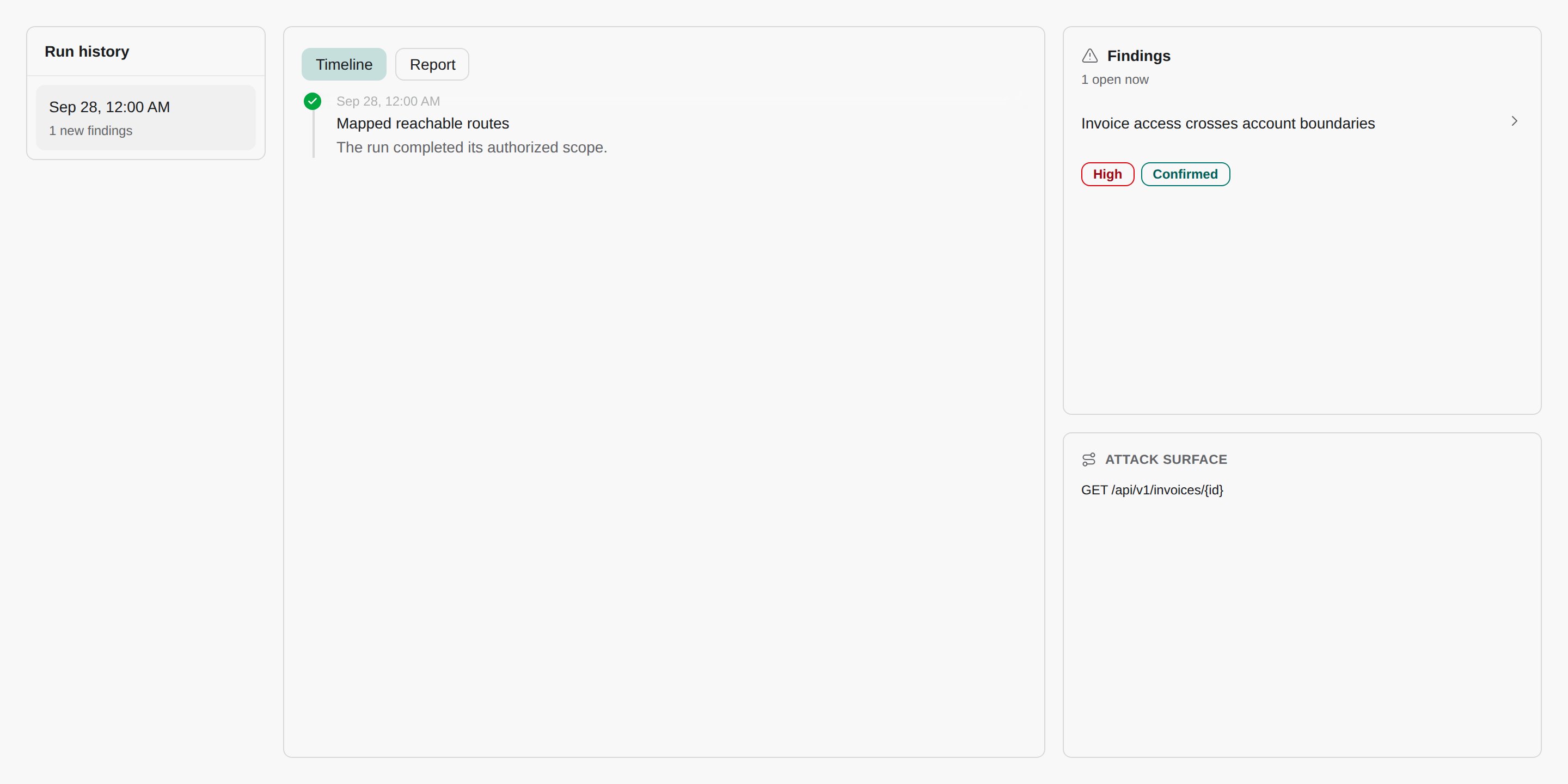
Nhấn Run Safe pentest.Trạng thái thành công: khu vực làm việc của lượt chạy mở ra và lượt chạy hiển thị Running, với timeline trực tiếp về những gì Cyber đang kiểm thử.
Bạn có thể rời khỏi trang. Lượt chạy tiếp tục tối đa ba giờ và tiêu tốn credit (xem Usage). Không có thông báo khi kết thúc, vì vậy hãy quay lại tab Runs của ứng dụng để kiểm tra. Nếu người dùng thử nghiệm bằng mật khẩu không đăng nhập được, lượt chạy kết thúc ở trạng thái Failed, nên cũng hãy kiểm tra tab Runs cho trường hợp đó. Chỉ khi một Session token thất bại ở bước kiểm tra lúc lượt chạy bắt đầu thì mới có thêm thông báo Pentest run blocked. Để hủy, nhấn Stop run. Lượt chạy đã dừng không thể tiếp tục, nhưng các phát hiện đã lưu vẫn còn.
Khi lượt chạy hiển thị Success, mở tab Findings của ứng dụng. Tab Confirmed được chọn theo mặc định: đây là các cuộc tấn công đã tái hiện được.
2
Mở một phát hiện
Nhấn vào một phát hiện. Trang chi tiết hiển thị mức độ nghiêm trọng, danh mục OWASP, tác động, cách khắc phục và bằng chứng: chính xác Request và Response chứng minh vấn đề.
3
Quyết định cần làm gì
Với vấn đề thực sự, chọn Create PR with agent để CloudThinker soạn bản sửa, hoặc theo dõi trên bảng. Chat sửa lỗi dùng các repository được gắn với ứng dụng. Hướng dẫn nhanh này đã bỏ qua bước đó, vì vậy hãy gắn một repository trước: xem Kết nối Git provider. Với vấn đề không thực sự là lỗi, hãy bỏ qua kèm lý do. Các phát hiện trong Needs verification là manh mối mà Cyber chưa chứng minh được.
Lượt chạy không có phát hiện được xác nhận không có nghĩa là ứng dụng an toàn. Hãy kiểm tra các kiểm tra bị giới hạn từ bước Start: bất cứ thứ gì Cyber không truy cập được đều chưa được kiểm thử.
So sánh bản ghi TXT bạn đã công bố với DNS record name và TXT value được hiển thị. Nguyên nhân phổ biến là nhà cung cấp tự thêm tên zone, khiến tên miền xuất hiện hai lần trong tên bản ghi. Xóa phần trùng lặp, chờ vài phút và nhấn Check again.
Lượt chạy kết thúc ở Failed ngay sau khi bắt đầu
Người dùng thử nghiệm không đăng nhập được. Lưu mật khẩu không kiểm tra mật khẩu đó, nên lần kiểm tra đầu tiên diễn ra khi lượt chạy bắt đầu, và đăng nhập thất bại sẽ dừng lượt chạy thay vì kiểm thử như khách chưa đăng nhập. Cập nhật mật khẩu hoặc Login URL trong Settings của ứng dụng tại Test identities, và chạy lại. Với MFA hoặc đăng nhập trên tên miền khác, hãy dùng Session token.
Hướng dẫn chi tiết: theo một phát hiện đã được chứng minh từ một pentest staging có giới hạn phạm vi đến bản sửa đã xác minh trong Pentest ứng dụng staging với Cyber.
Khắc phục sự cố Cyber
Mọi vấn đề của Cyber ở một nơi, kèm nguyên nhân, cách kiểm tra và cách sửa
Phân loại phát hiện
Xử lý bằng chứng, bản sửa và kiểm thử lại
Chạy pentest
Thêm rule phạm vi, nhiều quyền truy cập hơn và lịch chạy
{"docsConfig":{"theme":"mint","$schema":"https://mintlify.com/docs.json","name":"CloudThinker","colors":{"primary":"#0c93c0","light":"#2897c1","dark":"#0c93c0"},"logo":{"light":"https://mintcdn.com/cloudthinker/-4m9DUjwzDxHfABz/logo/light.svg?fit=max\u0026auto=format\u0026n=-4m9DUjwzDxHfABz\u0026q=85\u0026s=a56a571509d1cd246f5b0e68db015e5f","dark":"https://mintcdn.com/cloudthinker/-4m9DUjwzDxHfABz/logo/dark.svg?fit=max\u0026auto=format\u0026n=-4m9DUjwzDxHfABz\u0026q=85\u0026s=4252f33496bbaa527e5408338963a31e"},"favicon":"https://mintcdn.com/cloudthinker/PoYnb4baZ54aMMQW/favicon.ico?fit=max\u0026auto=format\u0026n=PoYnb4baZ54aMMQW\u0026q=85\u0026s=6570e99ed2a763d9632c8f933fe9c164","background":{"color":{"light":"#eef0f3","dark":"#000000"}},"navbar":{"links":[{"href":"https://discord.com/invite/sRBWRWtaNR","label":"Community"},{"href":"https://cloudthinker.io/blogs","label":"Blog"},{"href":"https://cloudthinker.io/contact","label":"Contact us"}],"primary":{"type":"button","label":"Open app","href":"https://app.cloudthinker.io"}},"footer":{"socials":{"x":"https://x.com/cloudthinkerio?s=21","linkedin":"https://www.linkedin.com/company/cloud-thinker","github":"https://github.com/cloudthinker-ai","discord":"https://discord.com/invite/sRBWRWtaNR","youtube":"https://www.youtube.com/@cloudthinkerai"}},"seo":{"indexing":"navigable"},"fonts":{"family":"Poppins"},"contextual":{"options":["copy","view","chatgpt","claude"],"display":"header"},"metadata":{"timestamp":false},"styling":{"latex":true},"navigation":{"languages":[{"language":"en","href":""},{"language":"vi","href":"vi"},{"language":"ja","href":"ja"},{"language":"ko","href":"ko"}]}},"deployment":{"deploymentMetadataValue":{"subdomain":"cloudthinker","hasAudioNarration":false,"actualSubdomain":"cloudthinker","customDomains":["docs.cloudthinker.io"],"gitSource":{"type":"github","owner":"nhat-tranvan","repo":"docs","deployBranch":"main","contentDirectory":"","isPrivate":false,"mountPath":"","label":""},"chroma":{"liveDeploymentHistoryId":"6ae15a4fd86e510dddaf7235","collectionId":"4bee09ef-014a-46f1-a560-f2d4cfb62382","schemaVersion":"v3","latestBuiltDeploymentHistoryId":"6ae15a4fd86e510dddaf7235"},"feedback":{"thumbs":true,"edits":true,"issues":true,"agentFeedback":true},"entitlements":{},"buildId":"6ae15a4fd86e510dddaf7235","clientVersion":"0.0.3990","searchFilterCounts":[{"language":"vi","tag":"Nền tảng","count":131},{"language":"vi","tag":"Kết nối","count":101},{"language":"default","tag":"Platform","count":67},{"language":"en","tag":"Platform","count":63},{"language":"ja","tag":"プラットフォーム","count":63},{"language":"ko","tag":"플랫폼","count":63},{"language":"vi","tag":"Sản phẩm","count":55},{"language":"default","tag":"Connections","count":52},{"language":"en","tag":"Connections","count":49},{"language":"ja","tag":"接続","count":48},{"language":"ko","tag":"연결","count":48},{"language":"vi","tag":"Tài nguyên","count":39},{"language":"vi","tag":"Học","count":30},{"language":"en","tag":"Products","count":29},{"language":"ja","tag":"プロダクト","count":29},{"language":"ko","tag":"제품","count":29},{"language":"default","tag":"Products","count":26},{"language":"default","tag":"Resources","count":26},{"language":"vi","tag":"Bắt đầu","count":26},{"language":"vi","tag":"Observability \u0026 Monitoring","count":24},{"language":"vi","tag":"Resolve","count":20},{"language":"default","tag":"Learn","count":18},{"language":"default","tag":"Agentic Infrastructure Operations - Engineer Edition","count":18},{"language":"vi","tag":"Agentic Infrastructure Operations - Engineer Edition","count":18},{"language":"vi","tag":"Databases","count":16},{"language":"en","tag":"Get started","count":15},{"language":"ja","tag":"はじめに","count":15},{"language":"ko","tag":"시작하기","count":15},{"language":"en","tag":"Resources","count":13},{"language":"ja","tag":"リソース","count":13},{"language":"ko","tag":"리소스","count":13},{"language":"en","tag":"Monitoring","count":12},{"language":"en","tag":"Learn","count":12},{"language":"en","tag":"Agentic Infrastructure Operations - Leadership Edition","count":12},{"language":"ja","tag":"Observability \u0026 Monitoring","count":12},{"language":"ja","tag":"学ぶ","count":12},{"language":"ja","tag":"Agentic Infrastructure Operations - Leadership Edition","count":12},{"language":"ko","tag":"Observability \u0026 Monitoring","count":12},{"language":"ko","tag":"배우기","count":12},{"language":"ko","tag":"Agentic Infrastructure Operations - Leadership Edition","count":12},{"language":"default","tag":"Get started","count":11},{"language":"en","tag":"Resolve","count":11},{"language":"ja","tag":"Resolve","count":11},{"language":"ko","tag":"Resolve","count":11},{"language":"default","tag":"Resolve","count":9},{"language":"en","tag":"Enterprise","count":9},{"language":"ja","tag":"Databases","count":8},{"language":"ko","tag":"Databases","count":8},{"language":"default","tag":"Review","count":6},{"language":"default","tag":"Set up","count":6}]},"assistantConfig":{},"basePath":"","hasChatPermissions":false,"hasWebMcpPermissions":false,"toggles":[{"name":"kill-isr","enabled":true,"variant":{"name":"disabled","enabled":false,"feature_enabled":true},"impressionData":false},{"name":"agent-mintlify-slack","enabled":true,"variant":{"name":"disabled","enabled":false,"feature_enabled":true},"impressionData":false},{"name":"editor-v7-file-tree","enabled":true,"variant":{"name":"disabled","enabled":false,"feature_enabled":true},"impressionData":false},{"name":"agent-integrations-settings","enabled":true,"variant":{"name":"disabled","enabled":false,"feature_enabled":true},"impressionData":false},{"name":"automations-pr-grouping","enabled":true,"variant":{"name":"disabled","enabled":false,"feature_enabled":true},"impressionData":false},{"name":"custom-prefix","enabled":true,"variant":{"name":"disabled","enabled":false,"feature_enabled":true},"impressionData":false},{"name":"analytics-v7","enabled":true,"variant":{"name":"disabled","enabled":false,"feature_enabled":true},"impressionData":false},{"name":"user-flows-analytics","enabled":true,"variant":{"name":"disabled","enabled":false,"feature_enabled":true},"impressionData":false},{"name":"no-publish-flow","enabled":true,"variant":{"name":"disabled","enabled":false,"feature_enabled":true},"impressionData":false},{"name":"workos-onboarding","enabled":true,"variant":{"name":"disabled","enabled":false,"feature_enabled":true},"impressionData":false},{"name":"llms-txt-v2","enabled":true,"variant":{"name":"disabled","enabled":false,"feature_enabled":true},"impressionData":false},{"name":"pause-universal-search-reconcile","enabled":true,"variant":{"name":"disabled","enabled":false,"feature_enabled":true},"impressionData":false},{"name":"snapshot-serving-live","enabled":true,"variant":{"name":"disabled","enabled":false,"feature_enabled":true},"impressionData":false},{"name":"stripTemperatureMiddleware","enabled":true,"variant":{"name":"disabled","enabled":false,"feature_enabled":true},"impressionData":false},{"name":"per-site-search-delta","enabled":true,"variant":{"name":"disabled","enabled":false,"feature_enabled":true},"impressionData":false},{"name":"support-platform-pylon-zendesk","enabled":true,"variant":{"name":"disabled","enabled":false,"feature_enabled":true},"impressionData":false},{"name":"snapshot-serving","enabled":true,"variant":{"name":"disabled","enabled":false,"feature_enabled":true},"impressionData":false},{"name":"instant-rollback","enabled":true,"variant":{"name":"disabled","enabled":false,"feature_enabled":true},"impressionData":false},{"name":"granular-notifications-server","enabled":true,"variant":{"name":"disabled","enabled":false,"feature_enabled":true},"impressionData":false},{"name":"granular-notifications","enabled":true,"variant":{"name":"disabled","enabled":false,"feature_enabled":true},"impressionData":false},{"name":"editor-private-page-search","enabled":true,"variant":{"name":"disabled","enabled":false,"feature_enabled":true},"impressionData":false},{"name":"automations-fable","enabled":true,"variant":{"name":"disabled","enabled":false,"feature_enabled":true},"impressionData":false},{"name":"fixed-ai-action-pricing","enabled":true,"variant":{"name":"disabled","enabled":false,"feature_enabled":true},"impressionData":false},{"name":"automation-resolve-merge-conflict","enabled":true,"variant":{"name":"disabled","enabled":false,"feature_enabled":true},"impressionData":false},{"name":"scoped-publishing","enabled":true,"variant":{"name":"disabled","enabled":false,"feature_enabled":true},"impressionData":false},{"name":"mintql","enabled":true,"variant":{"name":"disabled","enabled":false,"feature_enabled":true},"impressionData":false},{"name":"page-level-analytics","enabled":true,"variant":{"name":"disabled","enabled":false,"feature_enabled":true},"impressionData":false},{"name":"editor-version-history-v2","enabled":true,"variant":{"name":"disabled","enabled":false,"feature_enabled":true},"impressionData":false},{"name":"editor-nav-generations","enabled":true,"variant":{"name":"disabled","enabled":false,"feature_enabled":true},"impressionData":false},{"name":"billing-page-v2","enabled":true,"variant":{"name":"disabled","enabled":false,"feature_enabled":true},"impressionData":false},{"name":"workspace-projects","enabled":true,"variant":{"name":"disabled","enabled":false,"feature_enabled":true},"impressionData":false},{"name":"assistant-v5","enabled":true,"variant":{"name":"disabled","enabled":false,"feature_enabled":true},"impressionData":false},{"name":"byok-sep-25","enabled":true,"variant":{"name":"disabled","enabled":false,"feature_enabled":true},"impressionData":false},{"name":"fork-pr-previews","enabled":true,"variant":{"name":"disabled","enabled":false,"feature_enabled":true},"impressionData":false},{"name":"revalidation-jwt","enabled":true,"variant":{"name":"disabled","enabled":false,"feature_enabled":true},"impressionData":false},{"name":"vite-origin","enabled":true,"variant":{"name":"disabled","enabled":false,"feature_enabled":true},"impressionData":false},{"name":"editor-agent-model-picker","enabled":true,"variant":{"name":"disabled","enabled":false,"feature_enabled":true},"impressionData":false},{"name":"billing-updated-9-15","enabled":true,"variant":{"name":"disabled","enabled":false,"feature_enabled":true},"impressionData":false},{"name":"workos-sso-scim","enabled":true,"variant":{"name":"disabled","enabled":false,"feature_enabled":true},"impressionData":false},{"name":"hobby-abuse-scan","enabled":true,"variant":{"name":"disabled","enabled":false,"feature_enabled":true},"impressionData":false},{"name":"dashboard-inbox","enabled":true,"variant":{"name":"disabled","enabled":false,"feature_enabled":true},"impressionData":false},{"name":"workos-signup","enabled":true,"variant":{"name":"disabled","enabled":false,"feature_enabled":true},"impressionData":false},{"name":"workos-enabled","enabled":true,"variant":{"name":"disabled","enabled":false,"feature_enabled":true},"impressionData":false}],"isAtlas":false,"googleFontsInlined":true},"customCss":[{"filePath":"style.css","content":".ct-landing a,a.ct-featured{text-decoration:none!important}a.ct-featured{display:block;margin:1.25rem 0 1rem;padding:1.75rem 1.75rem 1.5rem;border:1px solid rgba(12,147,192,.45)!important;border-radius:16px;background:radial-gradient(120% 160% at 0 0,rgba(12,147,192,.14),transparent 55%),#fff;box-shadow:0 12px 32px -16px rgba(12,147,192,.45);transition:border-color .15s ease,transform .15s ease,box-shadow .15s ease}a.ct-featured:hover{border-color:#0c93c0!important;transform:translateY(-1px);box-shadow:0 16px 40px -16px rgba(12,147,192,.6)}.dark a.ct-featured{border-color:rgba(40,151,193,.45)!important;background:radial-gradient(120% 160% at 0 0,rgba(40,151,193,.16),transparent 55%),#05070a;box-shadow:0 12px 32px -16px rgba(40,151,193,.35)}.dark a.ct-featured:hover{border-color:#2897c1!important}.ct-featured-head{display:flex;align-items:center;gap:.75rem;margin-bottom:.875rem}.ct-featured-icon{display:inline-flex;align-items:center;justify-content:center;width:2.25rem;height:2.25rem;border-radius:999px;background:rgba(12,147,192,.12);color:#0a7aa0}.dark .ct-featured-icon{background:rgba(40,151,193,.14);color:#5bb8e0}.ct-eyebrow{font-size:.75rem;font-weight:600;letter-spacing:.14em;text-transform:uppercase;color:#0a7aa0}.dark .ct-eyebrow{color:#5bb8e0}.ct-hero h1,.ct-title{font-weight:600;color:#0b1a2b}.ct-title{font-size:1.375rem;line-height:1.3}.dark .ct-card .ct-card-head span,.dark .ct-card h3,.dark .ct-hero h1,.dark .ct-section>h2,.dark .ct-step h3,.dark .ct-title{color:#f5f5f7}.ct-body{margin:.5rem 0 0!important;font-weight:400!important;font-size:1rem;max-width:46rem;color:#5b6577;line-height:1.6}.dark .ct-body,.dark .ct-hero .ct-promise,.dark .ct-hero p.ct-lead,.dark .ct-section>p.ct-section-lead{color:#a1a1a6}.ct-cta{display:inline-block;margin-top:1rem;font-weight:600;color:#0a7aa0}.dark .ct-cta{color:#5bb8e0}.ct-illustration{margin:1.5rem 0}.ct-illustration img{max-width:720px;margin:0 auto}.ct-iso-scene{margin:1.5rem 0 2rem;border:1px solid rgba(12,147,192,.18);border-radius:16px;background:#fff;overflow:hidden}.dark .ct-iso-scene{border-color:rgba(40,151,193,.22);background:#000}.ct-illustration img,.ct-iso-scene .ct-iso-svg{display:block;width:100%;height:auto}.ct-landing{max-width:1120px;margin:0 auto;padding:3rem 1.5rem 5rem}.ct-landing a{border-bottom-width:0}.ct-kicker{font-size:.8125rem;font-weight:600;letter-spacing:.08em;text-transform:uppercase;color:#0c93c0}.dark .ct-card .ct-tagline,.dark .ct-hero .ct-promise strong,.dark .ct-kicker{color:#2897c1}.ct-hero{text-align:center;padding:1.5rem 0 1rem}.ct-hero h1{margin:.75rem 0 0;font-size:clamp(2.25rem,5vw,3.75rem);line-height:1.05;letter-spacing:-.03em;-webkit-text-fill-color:currentColor;background:0 0}.ct-hero .ct-promise{margin:1rem auto 0;font-size:clamp(1.125rem,2.2vw,1.5rem);color:#5b6577}.ct-hero .ct-promise strong,.ct-section>h2{color:#0c93c0;font-weight:600}.ct-hero p.ct-lead{max-width:44rem;margin:1rem auto 0;font-size:1.0625rem;line-height:1.65;color:#5b6577}.ct-actions{display:flex;flex-wrap:wrap;gap:.75rem;justify-content:center;margin-top:1.75rem}.ct-btn{display:inline-flex;align-items:center;gap:.5rem;padding:.7rem 1.25rem;border-radius:999px;font-weight:600;font-size:.95rem;transition:transform .15s ease,background .15s ease}.ct-btn:hover{transform:translateY(-1px)}.ct-btn-primary{background:#0c93c0;color:#fff!important}.ct-btn-primary:hover{background:#0a7aa0}.ct-btn-ghost{border:1px solid rgba(12,147,192,.35)!important;color:#0b1a2b!important}.dark .ct-btn-ghost{color:#f5f5f7!important;border-color:rgba(40,151,193,.4)!important}.ct-landing .ct-iso-scene{margin-top:2.5rem}.ct-section{margin-top:4.5rem}.ct-section>h2{margin:.4rem 0 0;font-size:1.75rem;letter-spacing:-.02em;color:#0b1a2b;-webkit-text-fill-color:currentColor;background:0 0}.ct-section>p.ct-section-lead{margin:.5rem 0 0;color:#5b6577;max-width:46rem}.ct-steps{display:grid;grid-template-columns:repeat(4,minmax(0,1fr));gap:1rem;margin-top:1.5rem}.ct-step{display:block;padding:1.25rem;border-radius:14px;border:1px solid rgba(12,147,192,.18)!important;background:#fff;transition:border-color .15s ease,transform .15s ease}.dark .ct-step{background:#05070a;border-color:rgba(40,151,193,.22)!important}.ct-step:hover{border-color:#0c93c0!important;transform:translateY(-1px)}.ct-step-num{display:inline-flex;width:1.75rem;height:1.75rem;border-radius:999px;align-items:center;justify-content:center;font-size:.85rem;font-weight:700;color:#fff;background:#0c93c0}.ct-card h3,.ct-step h3{margin:.75rem 0 .25rem;font-size:1.05rem}.ct-card p,.ct-step p{margin:0;font-size:.925rem;line-height:1.55;color:#5b6577}.dark .ct-card p,.dark .ct-landing td,.dark .ct-step p{color:#a1a1a6}.ct-grid{display:grid;gap:1rem;margin-top:1.5rem}.ct-grid-3{grid-template-columns:repeat(3,minmax(0,1fr))}.ct-grid-5{grid-template-columns:repeat(5,minmax(0,1fr))}.ct-card{display:flex;flex-direction:column;padding:1.25rem;border-radius:14px;border:1px solid rgba(12,147,192,.18);background:#fff}.dark .ct-card{background:#05070a;border-color:rgba(40,151,193,.22)}.ct-card .ct-card-head{display:flex;align-items:center;gap:.6rem}.ct-card .ct-card-head span,.ct-card h3,.ct-step h3{font-weight:600;color:#0b1a2b}.ct-card .ct-tagline{margin-top:.75rem;font-size:1.05rem;font-weight:600;line-height:1.35;color:#0c93c0}.ct-card .ct-links{margin-top:auto;padding-top:1rem;display:flex;gap:1rem;font-size:.9rem;font-weight:600}.ct-card .ct-links a{color:#0c93c0!important}.dark .ct-card .ct-links a,.dark .ct-card-head .ct-arrow,.dark .ct-landing td a{color:#2897c1!important}a.ct-card{transition:border-color .15s ease,transform .15s ease}a.ct-card:hover{border-color:#0c93c0!important;transform:translateY(-1px)}.ct-strip{display:flex;flex-wrap:wrap;gap:.6rem;margin-top:1.25rem}.ct-strip a{display:inline-flex;align-items:center;gap:.45rem;padding:.55rem .95rem;border-radius:999px;border:1px solid rgba(12,147,192,.25)!important;font-size:.9rem;font-weight:500;color:#0b1a2b!important}.dark .ct-strip a{color:#f5f5f7!important;border-color:rgba(40,151,193,.3)!important}.ct-strip a:hover{border-color:#0c93c0!important}@media (max-width:900px){.ct-grid-3,.ct-grid-5,.ct-steps{grid-template-columns:repeat(2,minmax(0,1fr))}}@media (max-width:560px){.ct-landing{padding:2rem 1rem 4rem}.ct-grid-3,.ct-grid-5,.ct-steps{grid-template-columns:minmax(0,1fr)}}.ct-landing table{width:100%;margin-top:1.25rem;border-collapse:collapse;font-size:.925rem}.ct-landing th{text-align:left;font-weight:600;padding:.7rem .9rem;border-bottom:1px solid rgba(12,147,192,.3)}.ct-landing td{vertical-align:top;padding:.8rem .9rem;border-bottom:1px solid rgba(12,147,192,.12);color:#5b6577;line-height:1.55}.ct-landing td:first-child{font-weight:600;color:#0b1a2b;width:22%}.dark .ct-landing td:first-child{color:#f5f5f7}.ct-landing td a{color:#0c93c0!important;font-weight:600}.ct-product{padding:1.1rem 1.2rem}.ct-product .ct-tagline{margin-top:.55rem;font-size:1rem}.ct-product p{margin-top:.3rem}.ct-card-head .ct-arrow{margin-left:auto;font-weight:500!important;color:#0c93c0!important;transition:transform .15s ease}a.ct-product:hover .ct-arrow{transform:translateX(3px)}html:not(.dark) .ct-card,html:not(.dark) .ct-iso-scene,html:not(.dark) .ct-step{background:#f6f7f9}html:not(.dark) .ct-iso-scene{border-color:rgba(12,147,192,.12)}html:not(.dark) #content-area,html:not(.dark) .prose,html:not(.dark) body{color:#2b3240}html:not(.dark) .prose :where(h1, h2, h3, h4, strong){color:#1c2230}html:not(.dark) .ct-card .ct-card-head span,html:not(.dark) .ct-card h3,html:not(.dark) .ct-hero h1,html:not(.dark) .ct-section>h2,html:not(.dark) .ct-step h3{color:#1c2230}"}],"page":{"pagePath":"vi/guide/security/cyber-quickstart","slug":"/vi/guide/security/cyber-quickstart","pageMetadata":{"title":"Bắt đầu nhanh với Cyber","description":"Đăng ký một ứng dụng staging, xác minh tên miền, thêm người dùng thử nghiệm, rồi chạy pentest Safe đầu tiên và đọc các phát hiện mà pentest chứng minh được.","icon":"rocket","href":"/vi/guide/security/cyber-quickstart"},"description":{"compiledSource":"\"use strict\";\nconst {jsx: _jsx} = arguments[0];\nconst {useMDXComponents: _provideComponents} = arguments[0];\nfunction _createMdxContent(props) {\n const _components = {\n p: \"p\",\n ..._provideComponents(),\n ...props.components\n };\n return _jsx(_components.p, {\n children: \"Đăng ký một ứng dụng staging, xác minh tên miền, thêm người dùng thử nghiệm, rồi chạy pentest Safe đầu tiên và đọc các phát hiện mà pentest chứng minh được.\"\n });\n}\nfunction MDXContent(props = {}) {\n const {wrapper: MDXLayout} = {\n ..._provideComponents(),\n ...props.components\n };\n return MDXLayout ? _jsx(MDXLayout, {\n ...props,\n children: _jsx(_createMdxContent, {\n ...props\n })\n }) : _createMdxContent(props);\n}\nreturn {\n default: MDXContent\n};\n","frontmatter":{},"scope":{}},"pageType":"default","mdx":{"mdxSource":{"compiledSource":"\"use strict\";const{Fragment:_Fragment,jsx:_jsx,jsxs:_jsxs}=arguments[0];const{useMDXComponents:_provideComponents}=arguments[0];function _createMdxContent(props){const _components={a:`a`,code:`code`,li:`li`,p:`p`,strong:`strong`,tbody:`tbody`,td:`td`,th:`th`,thead:`thead`,tr:`tr`,ul:`ul`,..._provideComponents(),...props.components},{Accordion,AccordionGroup,Card,CardGroup,Frame,Heading,OptimizedImage,Step,Steps,Table,Tip}=_components;if(!Accordion)_missingMdxReference(`Accordion`,true);if(!AccordionGroup)_missingMdxReference(`AccordionGroup`,true);if(!Card)_missingMdxReference(`Card`,true);if(!CardGroup)_missingMdxReference(`CardGroup`,true);if(!Frame)_missingMdxReference(`Frame`,true);if(!Heading)_missingMdxReference(`Heading`,true);if(!OptimizedImage)_missingMdxReference(`OptimizedImage`,true);if(!Step)_missingMdxReference(`Step`,true);if(!Steps)_missingMdxReference(`Steps`,true);if(!Table)_missingMdxReference(`Table`,true);if(!Tip)_missingMdxReference(`Tip`,true);return _jsxs(_Fragment,{children:[_jsx(_components.p,{children:`Với khoảng 10 phút thiết lập, cộng thời gian để thay đổi DNS có hiệu lực, bạn sẽ đăng ký một ứng dụng staging, chứng minh bạn sở hữu tên miền của ứng dụng, cung cấp cho Cyber một tài khoản đăng nhập thử nghiệm, giới hạn lượt chạy trong các đường dẫn bạn chọn, và bắt đầu một pentest Safe. Khi lượt chạy kết thúc, bạn mở một phát hiện và đọc request và response chứng minh phát hiện đó.`}),`\n`,_jsx(Heading,{level:`2`,id:`điều-kiện-tiên-quyết`,children:`Điều kiện tiên quyết`}),`\n`,_jsxs(_components.ul,{children:[`\n`,_jsx(_components.li,{children:`Bản triển khai staging hoặc test của ứng dụng web hoặc API mà bạn được phép kiểm thử. Đừng dùng production cho lượt chạy đầu tiên.`}),`\n`,_jsx(_components.li,{children:`Quyền truy cập bản ghi DNS cho tên miền của ứng dụng đó, để bạn có thể thêm bản ghi TXT.`}),`\n`,_jsxs(_components.li,{children:[`Quyền admin workspace, hoặc một admin có thể xác minh tên miền giúp bạn. Người dùng khác sẽ thấy `,_jsx(_components.strong,{children:`Ask a workspace admin to verify`}),` thay vì bằng chứng DNS. Admin xác minh từ `,_jsx(_components.strong,{children:`Cyber → Settings`}),`, hoặc bằng cách mở thẻ `,_jsx(_components.strong,{children:`Target ownership`}),` của ứng dụng này.`]}),`\n`,_jsx(_components.li,{children:`Tùy chọn: một tài khoản thử nghiệm riêng trong ứng dụng (tên đăng nhập và mật khẩu). Không có tài khoản này, Cyber chỉ kiểm thử những gì khách chưa đăng nhập có thể truy cập.`}),`\n`]}),`\n`,_jsx(Heading,{level:`2`,id:`đăng-ký-ứng-dụng`,children:`Đăng ký ứng dụng`}),`\n`,_jsxs(Steps,{children:[_jsx(Step,{title:`Mở Cyber`,children:_jsxs(_components.p,{children:[`Nhấn `,_jsx(_components.strong,{children:`Cyber`}),` trong thanh bên. Trên workspace mới, bạn sẽ thấy `,_jsx(_components.strong,{children:`Nothing to test yet`}),`. Nhấn `,_jsx(_components.strong,{children:`Register an App`}),`. Nếu đã có ứng dụng, nhấn `,_jsx(_components.strong,{children:`New app`}),` trong `,_jsx(_components.strong,{children:`Apps`}),` ở thanh bên của Cyber.`]})}),_jsxs(Step,{title:`Nhập mục tiêu`,children:[_jsxs(_components.p,{children:[`Ở `,_jsx(_components.strong,{children:`Target`}),`, điền:`]}),_jsxs(Table,{children:[_jsx(_components.thead,{children:_jsxs(_components.tr,{children:[_jsx(_components.th,{children:`Trường`}),_jsx(_components.th,{children:`Ví dụ`})]})}),_jsxs(_components.tbody,{children:[_jsxs(_components.tr,{children:[_jsx(_components.td,{children:_jsx(_components.strong,{children:`App name`})}),_jsx(_components.td,{children:_jsx(_components.code,{children:`Shop staging`})})]}),_jsxs(_components.tr,{children:[_jsx(_components.td,{children:_jsx(_components.strong,{children:`Application URL`})}),_jsx(_components.td,{children:_jsx(_components.code,{children:`https://staging.shop.example.com`})})]}),_jsxs(_components.tr,{children:[_jsx(_components.td,{children:_jsx(_components.strong,{children:`What to test`})}),_jsxs(_components.td,{children:[_jsx(_components.strong,{children:`Web application`}),` cho ứng dụng trình duyệt, `,_jsx(_components.strong,{children:`API`}),` cho API. Chọn một.`]})]})]})]}),_jsxs(_components.p,{children:[`Nhấn `,_jsx(_components.strong,{children:`Continue`}),`. Mục tiêu và framework không thể thay đổi sau khi thiết lập, vì vậy hãy kiểm tra ngay bây giờ.`]}),_jsx(Frame,{caption:`Thiết lập pentest: đặt tên ứng dụng, nhập URL và chọn Web application hoặc API`,children:_jsx(OptimizedImage,{src:`https://mintcdn.com/cloudthinker/7N5Axt6gSxkmeWiW/images/v2/cyber-new-app.webp?fit=max\u0026auto=format\u0026n=7N5Axt6gSxkmeWiW\u0026q=85\u0026s=4bac477f4ca7a82c8f1d25742540b0c4`,alt:`Bước Set up a pentest với App name, Application URL và lựa chọn Web application hoặc API.`,\"data-og-width\":`2176`,width:`2176`,\"data-og-height\":`1800`,height:`1800`,\"data-path\":`images/v2/cyber-new-app.webp`,\"data-optimize\":`true`,\"data-opv\":`3`,srcset:`https://mintcdn.com/cloudthinker/7N5Axt6gSxkmeWiW/images/v2/cyber-new-app.webp?w=280\u0026fit=max\u0026auto=format\u0026n=7N5Axt6gSxkmeWiW\u0026q=85\u0026s=b03e3908bced72b2a8d6645563b49f14 280w, https://mintcdn.com/cloudthinker/7N5Axt6gSxkmeWiW/images/v2/cyber-new-app.webp?w=560\u0026fit=max\u0026auto=format\u0026n=7N5Axt6gSxkmeWiW\u0026q=85\u0026s=ba1af6e99da06208518e4624461355d1 560w, https://mintcdn.com/cloudthinker/7N5Axt6gSxkmeWiW/images/v2/cyber-new-app.webp?w=840\u0026fit=max\u0026auto=format\u0026n=7N5Axt6gSxkmeWiW\u0026q=85\u0026s=7f8b61703aaa5bc7f5d3d5d84eb97e20 840w, https://mintcdn.com/cloudthinker/7N5Axt6gSxkmeWiW/images/v2/cyber-new-app.webp?w=1100\u0026fit=max\u0026auto=format\u0026n=7N5Axt6gSxkmeWiW\u0026q=85\u0026s=70b7f4f154540d82c79f793063382eed 1100w, https://mintcdn.com/cloudthinker/7N5Axt6gSxkmeWiW/images/v2/cyber-new-app.webp?w=1650\u0026fit=max\u0026auto=format\u0026n=7N5Axt6gSxkmeWiW\u0026q=85\u0026s=713961da2bdb7045f7f6fcbf5db348a5 1650w, https://mintcdn.com/cloudthinker/7N5Axt6gSxkmeWiW/images/v2/cyber-new-app.webp?w=2500\u0026fit=max\u0026auto=format\u0026n=7N5Axt6gSxkmeWiW\u0026q=85\u0026s=d7b34e6550948e852c61cbeb30266091 2500w`})})]}),_jsxs(Step,{title:`Xác minh tên miền`,children:[_jsxs(_components.p,{children:[`Trong `,_jsx(_components.strong,{children:`Target ownership`}),`, nhấn `,_jsx(_components.strong,{children:`Create DNS proof`}),`. Sao chép `,_jsx(_components.strong,{children:`DNS record name`}),` và `,_jsx(_components.strong,{children:`TXT value`}),`, rồi thêm chúng dưới dạng bản ghi TXT tại nhà cung cấp DNS. Với `,_jsx(_components.code,{children:`https://staging.shop.example.com`}),`, bản ghi trông như sau:`]}),_jsxs(Table,{children:[_jsx(_components.thead,{children:_jsxs(_components.tr,{children:[_jsx(_components.th,{children:`Loại`}),_jsx(_components.th,{children:`Tên`}),_jsx(_components.th,{children:`Giá trị`})]})}),_jsx(_components.tbody,{children:_jsxs(_components.tr,{children:[_jsx(_components.td,{children:`TXT`}),_jsx(_components.td,{children:_jsx(_components.code,{children:`_cloudthinker-appsec-\u003crandom>.staging.shop.example.com`})}),_jsx(_components.td,{children:_jsx(_components.code,{children:`cloudthinker-appsec-domain-verification=\u003ctoken>`})})]})})]}),_jsxs(_components.p,{children:[`Nếu nhà cung cấp tự động thêm tên zone, hãy bỏ hậu tố đó khỏi tên. Sau đó nhấn `,_jsx(_components.strong,{children:`Check again`}),`. Tên miền đã xác minh cũng bao phủ các subdomain, nên admin xác minh `,_jsx(_components.code,{children:`example.com`}),` trong `,_jsx(_components.strong,{children:`Cyber → Settings`}),` cũng bao phủ `,_jsx(_components.code,{children:`staging.shop.example.com`}),`.`]}),_jsxs(_components.p,{children:[_jsx(_components.strong,{children:`Trạng thái thành công:`}),` `,_jsx(_components.strong,{children:`Target ownership`}),` hiển thị `,_jsx(_components.strong,{children:`Verified`}),`. Thay đổi DNS có thể mất vài phút để có hiệu lực; hãy kiểm tra lại tên và giá trị trước khi thử lại.`]})]})]}),`\n`,_jsx(Heading,{level:`2`,id:`thêm-người-dùng-thử-nghiệm-tùy-chọn`,children:`Thêm người dùng thử nghiệm (tùy chọn)`}),`\n`,_jsxs(_components.p,{children:[`Không có tài khoản thử nghiệm? Nhấn `,_jsx(_components.strong,{children:`Continue`}),` ở `,_jsx(_components.strong,{children:`Access`}),` và chuyển đến `,_jsx(_components.a,{href:`#ch%E1%BB%8Dn-c%C6%B0%E1%BB%9Dng-%C4%91%E1%BB%99-v%C3%A0-l%C6%B0u`,children:`Chọn cường độ và lưu`}),`.`]}),`\n`,_jsxs(Steps,{children:[_jsx(Step,{title:`Mở biểu mẫu người dùng thử nghiệm`,children:_jsxs(_components.p,{children:[`Ở `,_jsx(_components.strong,{children:`Access`}),`, nhấn `,_jsx(_components.strong,{children:`Add test user`}),`.`]})}),_jsxs(Step,{title:`Mô tả tài khoản`,children:[_jsx(_components.p,{children:`Điền thông tin người dùng này là ai, để Cyber biết họ nên và không nên thấy gì:`}),_jsxs(Table,{children:[_jsx(_components.thead,{children:_jsxs(_components.tr,{children:[_jsx(_components.th,{children:`Trường`}),_jsx(_components.th,{children:`Ví dụ`})]})}),_jsxs(_components.tbody,{children:[_jsxs(_components.tr,{children:[_jsx(_components.td,{children:_jsx(_components.strong,{children:`Identity label`})}),_jsx(_components.td,{children:_jsx(_components.code,{children:`customer-a`})})]}),_jsxs(_components.tr,{children:[_jsx(_components.td,{children:_jsx(_components.strong,{children:`Identity description`})}),_jsx(_components.td,{children:_jsx(_components.code,{children:`Standard customer who owns test orders`})})]}),_jsxs(_components.tr,{children:[_jsx(_components.td,{children:_jsx(_components.strong,{children:`Persona or role`})}),_jsx(_components.td,{children:_jsx(_components.code,{children:`Customer`})})]}),_jsxs(_components.tr,{children:[_jsx(_components.td,{children:_jsx(_components.strong,{children:`Tenant`})}),_jsx(_components.td,{children:_jsx(_components.code,{children:`Tenant A`})})]})]})]}),_jsxs(_components.p,{children:[`Đặt `,_jsx(_components.strong,{children:`Authentication method`}),` là `,_jsx(_components.strong,{children:`Password`}),`, rồi nhập `,_jsx(_components.strong,{children:`Username or email`}),`, `,_jsx(_components.strong,{children:`Password`}),`, và `,_jsx(_components.strong,{children:`Login URL (optional)`}),` nếu trang đăng nhập không dễ tìm từ trang chủ. Với cửa hàng ví dụ, đặt là `,_jsx(_components.code,{children:`https://staging.shop.example.com/login`}),`. Nhấn `,_jsx(_components.strong,{children:`Save login`}),`.`]}),_jsxs(_components.p,{children:[_jsx(_components.strong,{children:`Trạng thái thành công:`}),` người dùng xuất hiện trong danh sách và bộ đếm hiển thị `,_jsx(_components.strong,{children:`1 added`}),`. Thông tin xác thực đã lưu được che.`]}),_jsxs(_components.p,{children:[`Lưu không đồng nghĩa với đăng nhập, nên mật khẩu đã lưu chưa chứng tỏ là dùng được. Lượt chạy đăng nhập khi bắt đầu, và nếu đăng nhập thất bại thì lượt chạy kết thúc ở trạng thái `,_jsx(_components.strong,{children:`Failed`}),` thay vì kiểm thử như khách chưa đăng nhập. `,_jsx(_components.strong,{children:`Login URL`}),` phải cùng origin với ứng dụng. Với đăng nhập cần MFA hoặc nằm trên tên miền identity provider riêng, hãy dùng `,_jsx(_components.strong,{children:`Session token`}),`: xem `,_jsx(_components.a,{href:`/vi/guide/security/pentest#th%C3%AAm-ng%C6%B0%E1%BB%9Di-d%C3%B9ng-th%E1%BB%AD-nghi%E1%BB%87m`,children:`Thêm người dùng thử nghiệm`}),`.`]})]}),_jsx(Step,{title:`Bỏ qua những gì bạn không có`,children:_jsxs(_components.p,{children:[`Repository và tài liệu API là tùy chọn. Bỏ qua chúng cho lượt chạy này và nhấn `,_jsx(_components.strong,{children:`Continue`}),`. Các kiểm tra cần đến chúng được liệt kê là bị giới hạn ở bước tiếp theo, không được đánh dấu là đạt.`]})})]}),`\n`,_jsx(Tip,{children:_jsx(_components.p,{children:`Thêm người dùng thử nghiệm thứ hai từ một vai trò hoặc tenant khác. Với hai người dùng, Cyber có thể kiểm thử xem người này có đọc được dữ liệu của người kia hay không.`})}),`\n`,_jsx(Heading,{level:`2`,id:`chọn-cường-độ-và-lưu`,children:`Chọn cường độ và lưu`}),`\n`,_jsxs(Steps,{children:[_jsx(Step,{title:`Xem lại phần tóm tắt`,children:_jsxs(_components.p,{children:[`Ở `,_jsx(_components.strong,{children:`Start`}),`, đọc `,_jsx(_components.strong,{children:`Pentest summary`}),`. `,_jsx(_components.strong,{children:`Coverage status`}),` hiển thị `,_jsx(_components.strong,{children:`Ready`}),` hoặc `,_jsx(_components.strong,{children:`Ready with limitations`}),`. Nhấn `,_jsx(_components.strong,{children:`Show limited checks`}),` để xem lượt chạy này không thể kiểm thử gì và tại sao.`]})}),_jsxs(Step,{title:`Chọn Safe`,children:[_jsxs(_components.p,{children:[`Trong `,_jsx(_components.strong,{children:`Testing intensity`}),`, chọn `,_jsx(_components.strong,{children:`Safe`}),`. Các bài kiểm thử ở mức Safe chỉ gửi request đọc (`,_jsx(_components.code,{children:`GET`}),`, `,_jsx(_components.code,{children:`HEAD`}),`, `,_jsx(_components.code,{children:`OPTIONS`}),`), nên thao tác ghi và xóa có chủ đích bị tắt trong toàn bộ lượt chạy. Request đọc vẫn có thể thay đổi dữ liệu nếu ứng dụng của bạn thay đổi trạng thái khi nhận `,_jsx(_components.code,{children:`GET`}),` (xem `,_jsx(_components.a,{href:`/vi/guide/security/pentest#ch%E1%BB%8Dn-m%E1%BB%A9c-truy-c%E1%BA%ADp-v%C3%A0-c%C6%B0%E1%BB%9Dng-%C4%91%E1%BB%99`,children:`bảng cường độ`}),`). Đăng nhập người dùng thử nghiệm bằng mật khẩu là một bước riêng, nên bước này vẫn có thể gửi biểu mẫu đăng nhập ở mức Safe. Cường độ bạn chọn ở đây được lưu thành `,_jsx(_components.strong,{children:`Default intensity`}),` của ứng dụng, nên hộp thoại chạy sẽ chọn sẵn mức này về sau.`]}),_jsxs(_components.p,{children:[`Giao diện đánh dấu `,_jsx(_components.strong,{children:`Aggressive`}),` là `,_jsx(_components.strong,{children:`Recommended`}),`. Mức này thêm `,_jsx(_components.code,{children:`POST`}),`, `,_jsx(_components.code,{children:`PUT`}),` và `,_jsx(_components.code,{children:`PATCH`}),` để kiểm thử biểu mẫu và luồng, nên có thể tạo và chỉnh sửa dữ liệu thử nghiệm. Hãy để dành mức này cho lượt chạy thứ hai, sau khi bạn đã kiểm tra phạm vi. Để `,_jsx(_components.strong,{children:`Full`}),` và `,_jsx(_components.strong,{children:`Deep dive`}),` cho sau: chúng gửi request phá hủy, bao gồm `,_jsx(_components.code,{children:`DELETE`}),`. Cả bốn mức được so sánh trong `,_jsx(_components.a,{href:`/vi/guide/security/pentest#ch%E1%BB%8Dn-m%E1%BB%A9c-truy-c%E1%BA%ADp-v%C3%A0-c%C6%B0%E1%BB%9Dng-%C4%91%E1%BB%99`,children:`Chạy pentest`}),`.`]})]}),_jsxs(Step,{title:`Nhấn Run later`,children:[_jsxs(_components.p,{children:[`Thiết lập không có bước phạm vi, nên `,_jsx(_components.strong,{children:`Start pentest`}),` ở đây sẽ kiểm thử toàn bộ mục tiêu. Thay vào đó, hãy nhấn `,_jsx(_components.strong,{children:`Run later`}),`.`]}),_jsxs(_components.p,{children:[_jsx(_components.strong,{children:`Trạng thái thành công:`}),` ứng dụng đã lưu mở ra mà chưa có lượt chạy nào.`]})]})]}),`\n`,_jsx(Heading,{level:`2`,id:`đặt-phạm-vi`,children:`Đặt phạm vi`}),`\n`,_jsxs(Steps,{children:[_jsx(Step,{title:`Mở Manage scope`,children:_jsxs(_components.p,{children:[`Trong phần đầu của ứng dụng, nhấn `,_jsx(_components.strong,{children:`Settings`}),`. Trong `,_jsx(_components.strong,{children:`Scope`}),`, nhấn `,_jsx(_components.strong,{children:`Manage scope`}),`.`]})}),_jsxs(Step,{title:`Thêm đường dẫn include và exclude`,children:[_jsxs(_components.p,{children:[`Thêm các đường dẫn mà lượt chạy đầu tiên này được phép kiểm thử vào `,_jsx(_components.strong,{children:`Include paths`}),`, và mọi thứ phải nằm ngoài giới hạn vào `,_jsx(_components.strong,{children:`Exclude paths`}),`. Với cửa hàng ví dụ:`]}),_jsxs(Table,{children:[_jsx(_components.thead,{children:_jsxs(_components.tr,{children:[_jsx(_components.th,{children:`Danh sách`}),_jsx(_components.th,{children:`Quy tắc`})]})}),_jsxs(_components.tbody,{children:[_jsxs(_components.tr,{children:[_jsx(_components.td,{children:_jsx(_components.strong,{children:`Include paths`})}),_jsxs(_components.td,{children:[_jsx(_components.code,{children:`/login`}),`, `,_jsx(_components.code,{children:`/shop/**`}),`, `,_jsx(_components.code,{children:`/api/products/**`})]})]}),_jsxs(_components.tr,{children:[_jsx(_components.td,{children:_jsx(_components.strong,{children:`Exclude paths`})}),_jsxs(_components.td,{children:[_jsx(_components.code,{children:`/admin/**`}),`, `,_jsx(_components.code,{children:`/api/payments/**`})]})]})]})]}),_jsxs(_components.p,{children:[_jsx(_components.code,{children:`**`}),` khớp với mọi độ sâu, và đường dẫn khớp cả hai danh sách sẽ bị loại trừ. `,_jsx(_components.strong,{children:`Login URL`}),` của người dùng thử nghiệm phải khớp một rule include, nếu không đăng nhập sẽ thất bại với `,_jsx(_components.strong,{children:`Login could not stay within its safety boundary`}),` và lượt chạy kết thúc ở trạng thái `,_jsx(_components.strong,{children:`Failed`}),`. Đó là lý do `,_jsx(_components.code,{children:`/login`}),` có trong ví dụ. Nhấn `,_jsx(_components.strong,{children:`Save scope`}),`. Quy tắc về pattern có trong `,_jsx(_components.a,{href:`/vi/guide/security/pentest#thi%E1%BA%BFt-l%E1%BA%ADp-ph%E1%BA%A1m-vi-v%C3%A0-ng%E1%BB%AF-c%E1%BA%A3nh`,children:`Đặt phạm vi và ngữ cảnh`}),`.`]}),_jsxs(_components.p,{children:[_jsx(_components.strong,{children:`Trạng thái thành công:`}),` bạn thấy `,_jsx(_components.strong,{children:`Scope saved`}),`, và phần tóm tắt `,_jsx(_components.strong,{children:`Scope`}),` đếm số rule include và exclude thay vì hiển thị `,_jsx(_components.strong,{children:`Full target`}),`.`]})]})]}),`\n`,_jsx(Heading,{level:`2`,id:`bắt-đầu-pentest`,children:`Bắt đầu pentest`}),`\n`,_jsxs(Steps,{children:[_jsx(Step,{title:`Mở hộp thoại chạy`,children:_jsxs(_components.p,{children:[`Trong phần đầu của ứng dụng, nhấn `,_jsx(_components.strong,{children:`Run pentest`}),`. Kiểm tra rằng `,_jsx(_components.strong,{children:`Safe`}),` được chọn trong các thẻ cường độ kiểm thử.`]})}),_jsxs(Step,{title:`Khởi chạy`,children:[_jsxs(_components.p,{children:[`Nhấn `,_jsx(_components.strong,{children:`Run Safe pentest`}),`.`]}),_jsxs(_components.p,{children:[_jsx(_components.strong,{children:`Trạng thái thành công:`}),` khu vực làm việc của lượt chạy mở ra và lượt chạy hiển thị `,_jsx(_components.strong,{children:`Running`}),`, với timeline trực tiếp về những gì Cyber đang kiểm thử.`]})]})]}),`\n`,_jsx(Frame,{children:_jsx(OptimizedImage,{src:`https://mintcdn.com/cloudthinker/_u5eRuTpYujlERGZ/images/security/cyber/08-run-workbench.png?fit=max\u0026auto=format\u0026n=_u5eRuTpYujlERGZ\u0026q=85\u0026s=f6006424c4888f08190fe3e16f2e3de2`,alt:`Lịch sử lượt chạy, timeline trực tiếp, phát hiện và bề mặt tấn công đã phát hiện.`,\"data-og-width\":`2880`,width:`2880`,\"data-og-height\":`1440`,height:`1440`,\"data-path\":`images/security/cyber/08-run-workbench.png`,\"data-optimize\":`true`,\"data-opv\":`3`,srcset:`https://mintcdn.com/cloudthinker/_u5eRuTpYujlERGZ/images/security/cyber/08-run-workbench.png?w=280\u0026fit=max\u0026auto=format\u0026n=_u5eRuTpYujlERGZ\u0026q=85\u0026s=466b579e10247ee0b39b2f04e6f3e875 280w, https://mintcdn.com/cloudthinker/_u5eRuTpYujlERGZ/images/security/cyber/08-run-workbench.png?w=560\u0026fit=max\u0026auto=format\u0026n=_u5eRuTpYujlERGZ\u0026q=85\u0026s=93e1d093aa08122b52226bb02b3f0128 560w, https://mintcdn.com/cloudthinker/_u5eRuTpYujlERGZ/images/security/cyber/08-run-workbench.png?w=840\u0026fit=max\u0026auto=format\u0026n=_u5eRuTpYujlERGZ\u0026q=85\u0026s=c889a1273cf2e739878c80b475963bbe 840w, https://mintcdn.com/cloudthinker/_u5eRuTpYujlERGZ/images/security/cyber/08-run-workbench.png?w=1100\u0026fit=max\u0026auto=format\u0026n=_u5eRuTpYujlERGZ\u0026q=85\u0026s=9bea8f39ae9e9a5b00a09022b70ce0a2 1100w, https://mintcdn.com/cloudthinker/_u5eRuTpYujlERGZ/images/security/cyber/08-run-workbench.png?w=1650\u0026fit=max\u0026auto=format\u0026n=_u5eRuTpYujlERGZ\u0026q=85\u0026s=084f5d1e307c53f41cb3a785c85f150c 1650w, https://mintcdn.com/cloudthinker/_u5eRuTpYujlERGZ/images/security/cyber/08-run-workbench.png?w=2500\u0026fit=max\u0026auto=format\u0026n=_u5eRuTpYujlERGZ\u0026q=85\u0026s=e79ecb18c83c7cffd0d971db45c5c8f1 2500w`})}),`\n`,_jsxs(_components.p,{children:[`Bạn có thể rời khỏi trang. Lượt chạy tiếp tục tối đa ba giờ và tiêu tốn credit (xem `,_jsx(_components.a,{href:`/vi/guide/billing/usage`,children:`Usage`}),`). Không có thông báo khi kết thúc, vì vậy hãy quay lại tab `,_jsx(_components.strong,{children:`Runs`}),` của ứng dụng để kiểm tra. Nếu người dùng thử nghiệm bằng mật khẩu không đăng nhập được, lượt chạy kết thúc ở trạng thái `,_jsx(_components.strong,{children:`Failed`}),`, nên cũng hãy kiểm tra tab `,_jsx(_components.strong,{children:`Runs`}),` cho trường hợp đó. Chỉ khi một `,_jsx(_components.strong,{children:`Session token`}),` thất bại ở bước kiểm tra lúc lượt chạy bắt đầu thì mới có thêm thông báo `,_jsx(_components.strong,{children:`Pentest run blocked`}),`. Để hủy, nhấn `,_jsx(_components.strong,{children:`Stop run`}),`. Lượt chạy đã dừng không thể tiếp tục, nhưng các phát hiện đã lưu vẫn còn.`]}),`\n`,_jsx(Heading,{level:`2`,id:`đọc-các-phát-hiện`,children:`Đọc các phát hiện`}),`\n`,_jsxs(Steps,{children:[_jsx(Step,{title:`Mở Findings`,children:_jsxs(_components.p,{children:[`Khi lượt chạy hiển thị `,_jsx(_components.strong,{children:`Success`}),`, mở tab `,_jsx(_components.strong,{children:`Findings`}),` của ứng dụng. Tab `,_jsx(_components.strong,{children:`Confirmed`}),` được chọn theo mặc định: đây là các cuộc tấn công đã tái hiện được.`]})}),_jsx(Step,{title:`Mở một phát hiện`,children:_jsxs(_components.p,{children:[`Nhấn vào một phát hiện. Trang chi tiết hiển thị mức độ nghiêm trọng, danh mục OWASP, tác động, cách khắc phục và bằng chứng: chính xác `,_jsx(_components.strong,{children:`Request`}),` và `,_jsx(_components.strong,{children:`Response`}),` chứng minh vấn đề.`]})}),_jsx(Step,{title:`Quyết định cần làm gì`,children:_jsxs(_components.p,{children:[`Với vấn đề thực sự, chọn `,_jsx(_components.strong,{children:`Create PR with agent`}),` để CloudThinker soạn bản sửa, hoặc theo dõi trên bảng. Chat sửa lỗi dùng các repository được gắn với ứng dụng. Hướng dẫn nhanh này đã bỏ qua bước đó, vì vậy hãy gắn một repository trước: xem `,_jsx(_components.a,{href:`/vi/guide/connections/github`,children:`Kết nối Git provider`}),`. Với vấn đề không thực sự là lỗi, hãy bỏ qua kèm lý do. Các phát hiện trong `,_jsx(_components.strong,{children:`Needs verification`}),` là manh mối mà Cyber chưa chứng minh được.`]})})]}),`\n`,_jsxs(_components.p,{children:[`Lượt chạy không có phát hiện được xác nhận không có nghĩa là ứng dụng an toàn. Hãy kiểm tra các kiểm tra bị giới hạn từ bước `,_jsx(_components.strong,{children:`Start`}),`: bất cứ thứ gì Cyber không truy cập được đều chưa được kiểm thử.`]}),`\n`,_jsx(Heading,{level:`2`,id:`khắc-phục-sự-cố`,children:`Khắc phục sự cố`}),`\n`,_jsxs(_components.p,{children:[`Để xem mọi vấn đề của Cyber ở một nơi, xem `,_jsx(_components.a,{href:`/vi/guide/security/cyber-troubleshooting`,children:`Khắc phục sự cố Cyber`}),`.`]}),`\n`,_jsxs(AccordionGroup,{children:[_jsx(Accordion,{title:`Target ownership vẫn ở Needs proof`,id:`target-ownership-van-o-needs-proof`,children:_jsxs(_components.p,{children:[`So sánh bản ghi TXT bạn đã công bố với `,_jsx(_components.strong,{children:`DNS record name`}),` và `,_jsx(_components.strong,{children:`TXT value`}),` được hiển thị. Nguyên nhân phổ biến là nhà cung cấp tự thêm tên zone, khiến tên miền xuất hiện hai lần trong tên bản ghi. Xóa phần trùng lặp, chờ vài phút và nhấn `,_jsx(_components.strong,{children:`Check again`}),`.`]})}),_jsx(Accordion,{title:`Lượt chạy kết thúc ở Failed ngay sau khi bắt đầu`,id:`luot-chay-ket-thuc-o-failed-ngay-sau-khi-bat-dau`,children:_jsxs(_components.p,{children:[`Người dùng thử nghiệm không đăng nhập được. Lưu mật khẩu không kiểm tra mật khẩu đó, nên lần kiểm tra đầu tiên diễn ra khi lượt chạy bắt đầu, và đăng nhập thất bại sẽ dừng lượt chạy thay vì kiểm thử như khách chưa đăng nhập. Cập nhật mật khẩu hoặc `,_jsx(_components.strong,{children:`Login URL`}),` trong `,_jsx(_components.strong,{children:`Settings`}),` của ứng dụng tại `,_jsx(_components.strong,{children:`Test identities`}),`, và chạy lại. Với MFA hoặc đăng nhập trên tên miền khác, hãy dùng `,_jsx(_components.strong,{children:`Session token`}),`.`]})}),_jsx(Accordion,{title:`Trang đăng nhập có CAPTCHA`,id:`trang-dang-nhap-co-captcha`,children:_jsxs(_components.p,{children:[`Cấu hình tùy chọn CAPTCHA trên người dùng thử nghiệm trước khi chạy. Xem `,_jsx(_components.a,{href:`/vi/guide/security/captcha`,children:`Xử lý đăng nhập có CAPTCHA`}),`.`]})})]}),`\n`,_jsx(Heading,{level:`2`,id:`bước-tiếp-theo`,children:`Bước tiếp theo`}),`\n`,_jsxs(_components.p,{children:[_jsx(_components.strong,{children:`Hướng dẫn chi tiết:`}),` theo một phát hiện đã được chứng minh từ một pentest staging có giới hạn phạm vi đến bản sửa đã xác minh trong `,_jsx(_components.a,{href:`/vi/guide/use-cases/cyber-pentest-staging`,children:`Pentest ứng dụng staging với Cyber`}),`.`]}),`\n`,_jsxs(CardGroup,{cols:2,children:[_jsx(Card,{title:`Khắc phục sự cố Cyber`,icon:`wrench`,href:`/vi/guide/security/cyber-troubleshooting`,children:_jsx(_components.p,{children:`Mọi vấn đề của Cyber ở một nơi, kèm nguyên nhân, cách kiểm tra và cách sửa`})}),_jsx(Card,{title:`Phân loại phát hiện`,icon:`list-check`,href:`/vi/guide/security/cyber-findings`,children:_jsx(_components.p,{children:`Xử lý bằng chứng, bản sửa và kiểm thử lại`})}),_jsx(Card,{title:`Chạy pentest`,icon:`crosshairs`,href:`/vi/guide/security/pentest`,children:_jsx(_components.p,{children:`Thêm rule phạm vi, nhiều quyền truy cập hơn và lịch chạy`})})]})]})}function MDXContent(props={}){const{wrapper:MDXLayout}={..._provideComponents(),...props.components};return MDXLayout?_jsx(MDXLayout,{...props,children:_jsx(_createMdxContent,{...props})}):_createMdxContent(props)}return{default:MDXContent};function _missingMdxReference(id,component){throw new Error(`Expected `+(component?`component`:`object`)+\" `\"+id+\"` to be defined: you likely forgot to import, pass, or provide it.\")}","frontmatter":{},"scope":{"config":{},"pageMetadata":{"title":"Bắt đầu nhanh với Cyber","description":"Đăng ký một ứng dụng staging, xác minh tên miền, thêm người dùng thử nghiệm, rồi chạy pentest Safe đầu tiên và đọc các phát hiện mà pentest chứng minh được.","icon":"rocket","href":"/vi/guide/security/cyber-quickstart"}}},"mdxSourceWithNoJs":null},"mdxExtracts":{"tableOfContents":[{"title":"Điều kiện tiên quyết","slug":"điều-kiện-tiên-quyết","depth":2,"children":[]},{"title":"Đăng ký ứng dụng","slug":"đăng-ký-ứng-dụng","depth":2,"children":[]},{"title":"Thêm người dùng thử nghiệm (tùy chọn)","slug":"thêm-người-dùng-thử-nghiệm-tùy-chọn","depth":2,"children":[]},{"title":"Chọn cường độ và lưu","slug":"chọn-cường-độ-và-lưu","depth":2,"children":[]},{"title":"Đặt phạm vi","slug":"đặt-phạm-vi","depth":2,"children":[]},{"title":"Bắt đầu pentest","slug":"bắt-đầu-pentest","depth":2,"children":[]},{"title":"Đọc các phát hiện","slug":"đọc-các-phát-hiện","depth":2,"children":[]},{"title":"Khắc phục sự cố","slug":"khắc-phục-sự-cố","depth":2,"children":[]},{"title":"Bước tiếp theo","slug":"bước-tiếp-theo","depth":2,"children":[]}],"codeExamples":{}},"jsLinks":[],"subdomain":"cloudthinker","siteName":"CloudThinker","title":"Bắt đầu nhanh với Cyber - CloudThinker","navMaps":{"firstHrefInVersion":{},"firstHrefInLanguage":{"en":{"href":"/guide/security/cyber-quickstart","matchLevel":1},"vi":{"href":"/vi/guide/security/cyber-quickstart","matchLevel":0},"ja":{"href":"/guide/security/cyber-quickstart","matchLevel":1},"ko":{"href":"/guide/security/cyber-quickstart","matchLevel":1}}},"lastModified":"2026-10-28T02:14:40.361Z","originalFileLocation":"vi/guide/security/cyber-quickstart.mdx","locale":"vi"},"headHtml":"\u003cscript data-mint-head>(function(){var d=document.documentElement,p=null;if(!p){try{p=localStorage.getItem(\"isDarkMode\")}catch(e){}if(p==='true')p='dark';else if(p==='false')p='light';if(p!=='light'\u0026\u0026p!=='dark'\u0026\u0026p!=='system')p=\"system\"}var r=p==='system'?(matchMedia(\"(prefers-color-scheme: dark)\").matches?'dark':'light'):p;d.classList.remove(r==='dark'?'light':'dark');d.classList.add(r);d.setAttribute(\"data-theme-preference\",p)})();\u003c/script>\u003cmeta data-mint-head name=\"description\" content=\"Đăng ký một ứng dụng staging, xác minh tên miền, thêm người dùng thử nghiệm, rồi chạy pentest Safe đầu tiên và đọc các phát hiện mà pentest chứng minh được.\">\u003cmeta data-mint-head name=\"application-name\" content=\"CloudThinker\">\u003cmeta data-mint-head name=\"generator\" content=\"Mintlify\">\u003clink data-mint-head rel=\"icon\" type=\"image/png\" sizes=\"192x192\" href=\"/mintlify-assets/_mintlify/favicons/cloudthinker/2UjfrgdSjUW0wAzv/_generated/favicon/android-chrome-192x192.png\" media=\"(prefers-color-scheme: light)\">\u003clink data-mint-head rel=\"apple-touch-icon\" type=\"image/png\" sizes=\"180x180\" href=\"/mintlify-assets/_mintlify/favicons/cloudthinker/2UjfrgdSjUW0wAzv/_generated/favicon/apple-touch-icon.png\">\u003clink data-mint-head rel=\"icon\" type=\"image/png\" sizes=\"16x16\" href=\"/mintlify-assets/_mintlify/favicons/cloudthinker/2UjfrgdSjUW0wAzv/_generated/favicon/favicon-16x16.png\" media=\"(prefers-color-scheme: light)\">\u003clink data-mint-head rel=\"icon\" type=\"image/png\" sizes=\"32x32\" href=\"/mintlify-assets/_mintlify/favicons/cloudthinker/2UjfrgdSjUW0wAzv/_generated/favicon/favicon-32x32.png\" media=\"(prefers-color-scheme: light)\">\u003clink data-mint-head rel=\"shortcut icon\" type=\"image/x-icon\" href=\"/mintlify-assets/_mintlify/favicons/cloudthinker/2UjfrgdSjUW0wAzv/_generated/favicon/favicon.ico\" media=\"(prefers-color-scheme: light)\">\u003clink data-mint-head rel=\"icon\" type=\"image/png\" sizes=\"192x192\" href=\"/mintlify-assets/_mintlify/favicons/cloudthinker/2UjfrgdSjUW0wAzv/_generated/favicon-dark/android-chrome-192x192.png\" media=\"(prefers-color-scheme: dark)\">\u003clink data-mint-head rel=\"icon\" type=\"image/png\" sizes=\"16x16\" href=\"/mintlify-assets/_mintlify/favicons/cloudthinker/2UjfrgdSjUW0wAzv/_generated/favicon-dark/favicon-16x16.png\" media=\"(prefers-color-scheme: dark)\">\u003clink data-mint-head rel=\"icon\" type=\"image/png\" sizes=\"32x32\" href=\"/mintlify-assets/_mintlify/favicons/cloudthinker/2UjfrgdSjUW0wAzv/_generated/favicon-dark/favicon-32x32.png\" media=\"(prefers-color-scheme: dark)\">\u003clink data-mint-head rel=\"shortcut icon\" type=\"image/x-icon\" href=\"/mintlify-assets/_mintlify/favicons/cloudthinker/2UjfrgdSjUW0wAzv/_generated/favicon-dark/favicon.ico\" media=\"(prefers-color-scheme: dark)\">\u003cmeta data-mint-head property=\"og:title\" content=\"Bắt đầu nhanh với Cyber - CloudThinker\">\u003cmeta data-mint-head property=\"og:description\" content=\"Đăng ký một ứng dụng staging, xác minh tên miền, thêm người dùng thử nghiệm, rồi chạy pentest Safe đầu tiên và đọc các phát hiện mà pentest chứng minh được.\">\u003cmeta data-mint-head property=\"og:site_name\" content=\"CloudThinker\">\u003cmeta data-mint-head property=\"og:url\" content=\"https://docs.cloudthinker.io/vi/guide/security/cyber-quickstart\">\u003cmeta data-mint-head property=\"og:type\" content=\"website\">\u003cmeta data-mint-head property=\"og:image\" content=\"https://cloudthinker.mintlify.app/_mintlify/api/og/v2?division=B%E1%BA%AFt+%C4%91%E1%BA%A7u\u0026amp;title=B%E1%BA%AFt+%C4%91%E1%BA%A7u+nhanh+v%E1%BB%9Bi+Cyber\u0026amp;description=%C4%90%C4%83ng+k%C3%BD+m%E1%BB%99t+%E1%BB%A9ng+d%E1%BB%A5ng+staging%2C+x%C3%A1c+minh+t%C3%AAn+mi%E1%BB%81n%2C+th%C3%AAm+ng%C6%B0%E1%BB%9Di+d%C3%B9ng+th%E1%BB%AD+nghi%E1%BB%87m%2C+r%E1%BB%93i+ch%E1%BA%A1y+pentest+Safe+%C4%91%E1%BA%A7u+ti%C3%AAn+v%C3%A0+%C4%91%E1%BB%8Dc+c%C3%A1c+ph%C3%A1t+hi%E1%BB%87n+m%C3%A0+pentest+ch%E1%BB%A9ng+minh+%C4%91%C6%B0%E1%BB%A3c.\u0026amp;theme=a662466b4ca99701c5f8fbf0\u0026amp;signature=6c4e3d4ae70475add6c1320d78588872c0e623d2a006ecc1dd22c07e1dd3968d\">\u003cmeta data-mint-head property=\"og:image:width\" content=\"1200\">\u003cmeta data-mint-head property=\"og:image:height\" content=\"630\">\u003cmeta data-mint-head name=\"twitter:card\" content=\"summary_large_image\">\u003cmeta data-mint-head name=\"twitter:title\" content=\"Bắt đầu nhanh với Cyber - CloudThinker\">\u003cmeta data-mint-head name=\"twitter:description\" content=\"Đăng ký một ứng dụng staging, xác minh tên miền, thêm người dùng thử nghiệm, rồi chạy pentest Safe đầu tiên và đọc các phát hiện mà pentest chứng minh được.\">\u003cmeta data-mint-head name=\"twitter:image\" content=\"https://cloudthinker.mintlify.app/_mintlify/api/og/v2?division=B%E1%BA%AFt+%C4%91%E1%BA%A7u\u0026amp;title=B%E1%BA%AFt+%C4%91%E1%BA%A7u+nhanh+v%E1%BB%9Bi+Cyber\u0026amp;description=%C4%90%C4%83ng+k%C3%BD+m%E1%BB%99t+%E1%BB%A9ng+d%E1%BB%A5ng+staging%2C+x%C3%A1c+minh+t%C3%AAn+mi%E1%BB%81n%2C+th%C3%AAm+ng%C6%B0%E1%BB%9Di+d%C3%B9ng+th%E1%BB%AD+nghi%E1%BB%87m%2C+r%E1%BB%93i+ch%E1%BA%A1y+pentest+Safe+%C4%91%E1%BA%A7u+ti%C3%AAn+v%C3%A0+%C4%91%E1%BB%8Dc+c%C3%A1c+ph%C3%A1t+hi%E1%BB%87n+m%C3%A0+pentest+ch%E1%BB%A9ng+minh+%C4%91%C6%B0%E1%BB%A3c.\u0026amp;theme=a662466b4ca99701c5f8fbf0\u0026amp;signature=6c4e3d4ae70475add6c1320d78588872c0e623d2a006ecc1dd22c07e1dd3968d\">\u003cmeta data-mint-head name=\"twitter:image:width\" content=\"1200\">\u003cmeta data-mint-head name=\"twitter:image:height\" content=\"630\">\u003cmeta data-mint-head name=\"msapplication-config\" content=\"/mintlify-assets/_mintlify/favicons/cloudthinker/2UjfrgdSjUW0wAzv/_generated/favicon/browserconfig.xml\">\u003cmeta data-mint-head name=\"apple-mobile-web-app-title\" content=\"CloudThinker\">\u003cmeta data-mint-head name=\"msapplication-TileColor\" content=\"#0c93c0\">\u003clink data-mint-head rel=\"canonical\" href=\"https://docs.cloudthinker.io/vi/guide/security/cyber-quickstart\">\u003clink data-mint-head rel=\"alternate\" type=\"application/xml\" href=\"/sitemap.xml\">\u003clink data-mint-head rel=\"alternate\" type=\"text/markdown\" href=\"/vi/guide/security/cyber-quickstart.md\">\u003clink data-mint-head rel=\"alternate\" hreflang=\"vi\" href=\"https://docs.cloudthinker.io/vi/guide/security/cyber-quickstart\">\u003clink data-mint-head rel=\"alternate\" hreflang=\"en\" href=\"https://docs.cloudthinker.io/guide/security/cyber-quickstart\">\u003clink data-mint-head rel=\"alternate\" hreflang=\"ja\" href=\"https://docs.cloudthinker.io/guide/security/cyber-quickstart\">\u003clink data-mint-head rel=\"alternate\" hreflang=\"ko\" href=\"https://docs.cloudthinker.io/guide/security/cyber-quickstart\">\u003clink data-mint-head rel=\"alternate\" hreflang=\"x-default\" href=\"https://docs.cloudthinker.io/guide/security/cyber-quickstart\">\u003cscript data-mint-head type=\"application/ld+json\">{\"@context\":\"https://schema.org\",\"@graph\":[{\"@type\":\"Organization\",\"@id\":\"https://docs.cloudthinker.io/#organization\",\"name\":\"CloudThinker\",\"url\":\"https://docs.cloudthinker.io\",\"logo\":{\"@type\":\"ImageObject\",\"url\":\"https://mintcdn.com/cloudthinker/-4m9DUjwzDxHfABz/logo/light.svg?fit=max\u0026auto=format\u0026n=-4m9DUjwzDxHfABz\u0026q=85\u0026s=a56a571509d1cd246f5b0e68db015e5f\"}},{\"@type\":\"WebSite\",\"@id\":\"https://docs.cloudthinker.io#website\",\"name\":\"CloudThinker\",\"url\":\"https://docs.cloudthinker.io\",\"publisher\":{\"@id\":\"https://docs.cloudthinker.io/#organization\"}},{\"@type\":\"WebPage\",\"@id\":\"https://docs.cloudthinker.io/vi/guide/security/cyber-quickstart#webpage\",\"url\":\"https://docs.cloudthinker.io/vi/guide/security/cyber-quickstart\",\"name\":\"Bắt đầu nhanh với Cyber\",\"description\":\"Đăng ký một ứng dụng staging, xác minh tên miền, thêm người dùng thử nghiệm, rồi chạy pentest Safe đầu tiên và đọc các phát hiện mà pentest chứng minh được.\",\"dateModified\":\"2026-10-28T02:14:40.361Z\",\"isPartOf\":{\"@id\":\"https://docs.cloudthinker.io#website\"},\"breadcrumb\":{\"@id\":\"https://docs.cloudthinker.io/vi/guide/security/cyber-quickstart#breadcrumb\"}},{\"@type\":\"BreadcrumbList\",\"@id\":\"https://docs.cloudthinker.io/vi/guide/security/cyber-quickstart#breadcrumb\",\"itemListElement\":[{\"@type\":\"ListItem\",\"position\":1,\"name\":\"Bắt đầu\",\"item\":\"https://docs.cloudthinker.io/vi/guide/security/cyber-overview\"},{\"@type\":\"ListItem\",\"position\":2,\"name\":\"Bắt đầu nhanh với Cyber\",\"item\":\"https://docs.cloudthinker.io/vi/guide/security/cyber-quickstart\"}]},{\"@type\":[\"Article\",\"TechArticle\"],\"@id\":\"https://docs.cloudthinker.io/vi/guide/security/cyber-quickstart#article\",\"headline\":\"Bắt đầu nhanh với Cyber\",\"name\":\"Bắt đầu nhanh với Cyber\",\"description\":\"Đăng ký một ứng dụng staging, xác minh tên miền, thêm người dùng thử nghiệm, rồi chạy pentest Safe đầu tiên và đọc các phát hiện mà pentest chứng minh được.\",\"url\":\"https://docs.cloudthinker.io/vi/guide/security/cyber-quickstart\",\"mainEntityOfPage\":{\"@id\":\"https://docs.cloudthinker.io/vi/guide/security/cyber-quickstart#webpage\"},\"dateModified\":\"2026-10-28T02:14:40.361Z\",\"publisher\":{\"@id\":\"https://docs.cloudthinker.io/#organization\"},\"isPartOf\":{\"@id\":\"https://docs.cloudthinker.io#website\"}}]}\u003c/script>\u003cscript data-mint-head type=\"application/ld+json\">{\"@context\":\"https://schema.org\",\"@type\":\"WebSite\",\"name\":\"CloudThinker\",\"creator\":{\"@type\":\"Organization\",\"name\":\"Mintlify\",\"url\":\"https://mintlify.com\"}}\u003c/script>","siteName":"CloudThinker","nav":{"global":null,"languages":[{"language":"en","pages":[{"title":"en","href":"/guide/security/cyber-quickstart"}]},{"language":"vi","tabs":[{"tab":"Bắt đầu","pages":[{"title":"Bắt đầu","href":"/vi"}]},{"tab":"Sản phẩm","anchors":[{"anchor":"Resolve","icon":"triangle-exclamation","pages":[{"title":"Resolve","href":"/vi/guide/incident/overview"}]},{"anchor":"Review","icon":"code-pull-request","pages":[{"title":"Review","href":"/vi/guide/code-review/overview"}]},{"anchor":"Cyber (Beta)","icon":"shield-halved","groups":[{"group":"Bắt đầu","pages":[{"title":"Cyber","description":"Kiểm thử bảo mật ứng dụng web và API do chính bạn sở hữu và phát triển: pentest ứng dụng đang chạy, kiểm tra mã nguồn đằng sau, và chứng minh mọi phát hiện bằng bằng chứng trước khi sửa.","icon":"shield-halved","href":"/vi/guide/security/cyber-overview"},{"title":"Bắt đầu nhanh với Cyber","icon":"rocket","href":"/vi/guide/security/cyber-quickstart"}]},{"group":"Chạy kiểm thử","pages":[{"title":"Chạy Pentest","description":"Thiết lập mục tiêu pentest, xác minh tên miền, thêm người dùng thử nghiệm và phạm vi, rồi chạy ngay hoặc theo lịch và theo dõi kết quả.","icon":"crosshairs","href":"/vi/guide/security/pentest"},{"title":"Pentest Deep Dive","icon":"crosshairs","href":"/vi/guide/security/pentest-deep-dive"},{"title":"Xử lý đăng nhập có CAPTCHA","icon":"key","href":"/vi/guide/security/captcha"},{"title":"Chạy Code Audit","icon":"code","href":"/vi/guide/security/code-audit"}]},{"group":"Kết quả","pages":[{"title":"Phân loại phát hiện bảo mật","icon":"list-check","href":"/vi/guide/security/cyber-findings"},{"title":"Tạo báo cáo Cyber","icon":"file-lines","href":"/vi/guide/security/cyber-reports"},{"title":"Theo dõi lỗ hổng thư viện","icon":"cubes","href":"/vi/guide/security/cyber-libraries"}]},{"group":"Trợ giúp","pages":[{"title":"Khắc phục sự cố Cyber","icon":"life-ring","href":"/vi/guide/security/cyber-troubleshooting"}]}]},{"anchor":"Optimize","icon":"chart-line","pages":[{"title":"Optimize","href":"/vi/guide/cost-optimization/overview"}]},{"anchor":"Automation","icon":"clock","pages":[{"title":"Automation","href":"/vi/guide/automation/quickstart"}]}]},{"tab":"Nền tảng","pages":[{"title":"Nền tảng","href":"/vi/guide/connections/overview"}]},{"tab":"Doanh nghiệp","pages":[{"title":"Doanh nghiệp","href":"/vi/guide/security/overview"}]},{"tab":"Nhà phát triển","pages":[{"title":"Nhà phát triển","href":"/vi/guide/api/overview"}]},{"tab":"Tài nguyên","pages":[{"title":"Tài nguyên","href":"/vi/learn/aio/introduction"}]},{"tab":"Nhật ký thay đổi","pages":[{"title":"Nhật ký thay đổi","href":"/changelog"}]},{"tab":"Bảng giá","href":"https://cloudthinker.io/pricing"}]},{"language":"ja","pages":[{"title":"ja","href":"/guide/security/cyber-quickstart"}]},{"language":"ko","pages":[{"title":"ko","href":"/guide/security/cyber-quickstart"}]}]},"title":"Bắt đầu nhanh với Cyber - CloudThinker","buildId":"dpl_2oYXwqkEXirXBPk8wV1FtM5USFWi","deploymentId":"dpl_2oYXwqkEXirXBPk8wV1FtM5USFWi","dynamics":["07c022d89b","a74be98ba7"],"chunks":["Frame-BbYRHtLl.js","DynamicMarkdown-DN96a4Ur.js","zoom-image-lightbox-D7yRe3On.js","lightbox-handle-r17bVUz3.js"]}