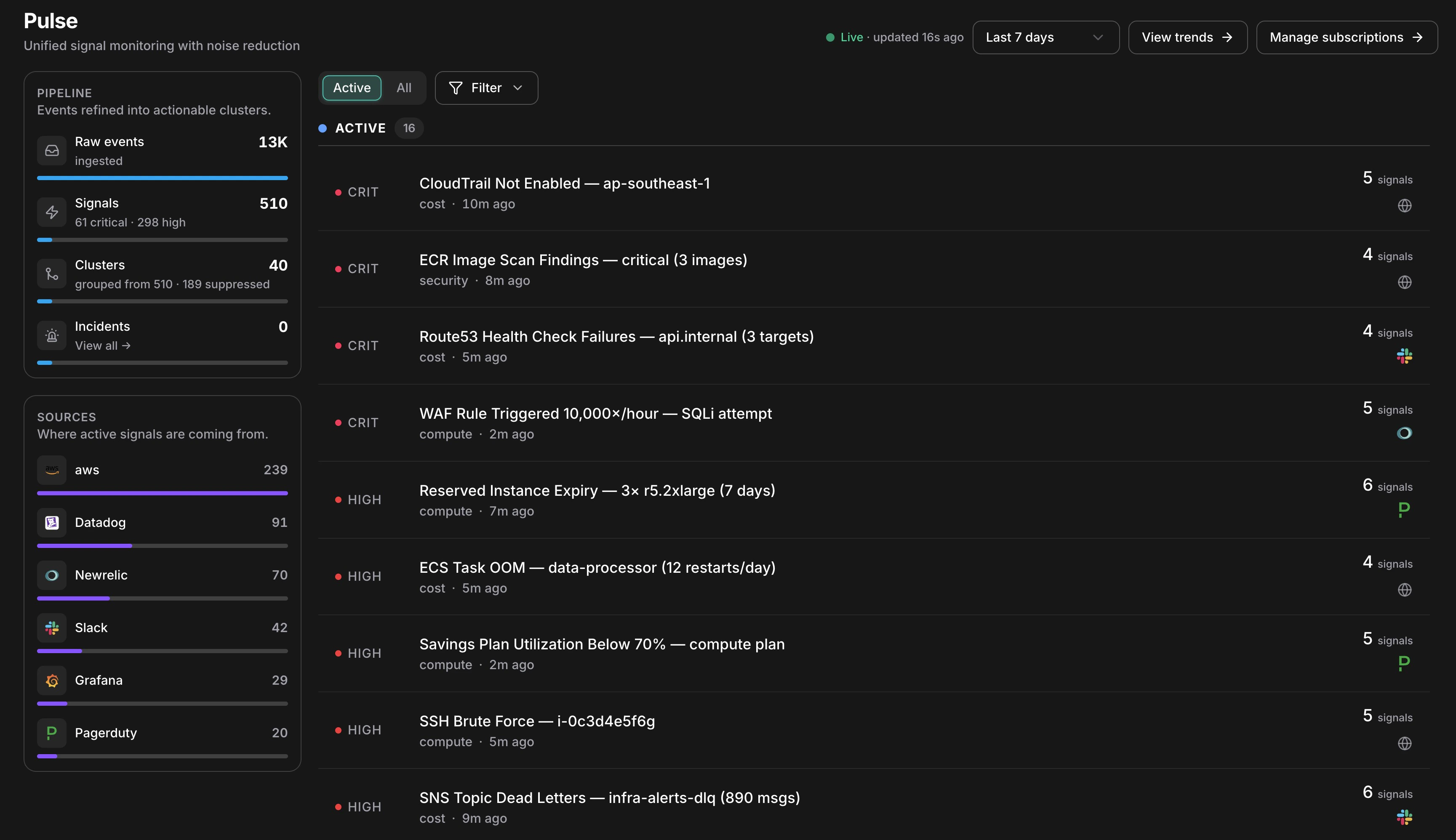
Most tools detect. Pulse decides what’s worth waking you for. Your monitoring stack is already catching anomalies — CloudTrail, GuardDuty, Datadog, Grafana, Slack alerts — but the flood of events it produces means engineers spend more time triaging noise than fixing real problems. Pulse sits in front of all of that. It ingests signals from every source, automatically cuts the noise, groups related events into clusters, and surfaces only what matters — ranked by severity, ready to escalate to an Incident in one click.Documentation Index
Fetch the complete documentation index at: https://docs.cloudthinker.io/llms.txt
Use this file to discover all available pages before exploring further.

Pulse reduces 13K raw events to 40 actionable clusters — live, in one view
How Existing Tools Compare
| Tool | What It Does | What’s Missing |
|---|---|---|
| PagerDuty / Opsgenie | Routes alerts to on-call engineers | Pages you for everything — noise included |
| Datadog Watchdog | Correlates related alerts | Correlation only — no suppression, no escalation |
| AWS Console | Shows CloudTrail, Health, Cost Anomaly, GuardDuty | Scattered across 6 separate tabs, no unified view |
| Slack / Teams | Chat alerts from bots and pipelines | Unstructured, no severity ranking, no action path |
| Pulse | Ingests all of the above, suppresses noise, correlates, and escalates | — |
How It Works
Every event that reaches Pulse goes through the same eight-stage pipeline before it becomes something you see.Ingest
An event arrives from any connected source — an AWS poller picks up a GuardDuty finding, a Slack message fires from your alerts channel, or a Datadog webhook posts an alert.
Normalize
A source-specific collector translates the raw event into a common Signal shape — extracting title, severity, category, resource ID, and timestamp regardless of where it came from.
Deduplicate
A SHA-256 fingerprint is computed from the signal’s source, type, resource, and timestamp minute. If an identical event already arrived within the last hour, the dedup count on the existing signal is incremented — no new row is created.
Suppress
The signal passes through seven suppression layers in priority order. If any layer fires, the signal is stored as suppressed and hidden from your feed. The pipeline stops here for noise.
Persist
The signal is written with its final suppressed status, severity, and extracted fields. Suppressed signals are retained for 90 days — toggle “Show suppressed” to review what was filtered.
Correlate
Within a 15-minute window, Pulse looks for signals sharing the same resource, service, or title pattern. Matching signals are grouped into a Cluster — nine EC2 alerts become one cluster with nine members.
Classify
An AI model assigns category, canonical severity, a one-line summary, and an actionability verdict — whether this warrants creating an Incident.
What the Pipeline Panel Shows
The left sidebar renders all four stages as a live funnel:| Stage | What the count means |
|---|---|
| Raw events | Every event ingested — before any filtering |
| Signals | De-duplicated, normalized events. The severity breakdown shows what’s active |
| Clusters | Correlated groups. “grouped from 510 · 189 suppressed” shows how much was silenced |
| Incidents | Clusters that were escalated — links directly to the Incidents list |
What Makes Pulse Different
Noise Reduction at the Source
Seven automatic suppression layers cut ~98% of raw events before anything reaches your feed.
Auto-Correlation into Clusters
Related signals are grouped automatically. Nine alerts about the same resource become one cluster to investigate.
AI Severity Classification
Every signal is classified by category, severity, and actionability — no manual triage.
One-Click Escalation
Any cluster escalates to a full Incident in one click, with automatic root cause analysis.
Next Steps
Clusters & Suppression
Understand how signals are grouped and how noise is filtered
Setup
Connect AWS, Slack, Teams, and third-party webhook sources
Analytics
Measure noise reduction, cluster MTTR, and signal conversion rates
Back to Deep Response Engine
See how Pulse feeds into Incidents, RCA, Runbooks, and Memory