

The Problem With Manual Operations Cadence
Most cloud teams aspire to run daily cost reviews, weekly security audits, and monthly executive reports — but in practice these happen inconsistently or not at all. When engineers have finite time, recurring operational hygiene loses to urgent feature work. The review that “should happen weekly” becomes quarterly, and insights that could prevent problems arrive too late. Traditional automation approaches require cron jobs with scripts, CloudWatch Events + Lambda, or CI/CD scheduled pipelines — all of which require maintenance, lack AI-powered analysis, and produce raw data rather than human-readable insights. Recurring Tasks let you schedule the same AI-powered analysis you’d run manually — as a fully automated operation that delivers results to your team on a consistent cadence, without engineering overhead.What Are Recurring Tasks
Daily Monitoring
Automated daily checks like cost anomaly detection, error log reviews, and resource health scans
Weekly Audits
Periodic reviews such as security audits, performance assessments, and compliance checks
Monthly Reports
End-of-period summaries including executive reports, trend analyses, and capacity planning
Custom Cadence
Flexible scheduling for any interval — every 6 hours, biweekly, quarterly, or any custom frequency
When to Use Recurring Tasks
Recurring tasks are ideal when you need consistent, repeatable cloud operations without manual intervention:- Daily cost monitoring — Catch spending anomalies before they escalate
- Weekly security audits — Maintain continuous compliance posture
- Monthly executive reports — Deliver infrastructure summaries to leadership on schedule
- Health checks — Monitor database performance, Kubernetes clusters, or application uptime at regular intervals
- Log analysis — Review error logs and alert on high-severity issues automatically
How to Schedule a Recurring Task
Write your task prompt
In the CloudThinker console, type your task in the input area. Use
@agent to target a specific agent and #tool to specify tools.Click the calendar icon
In the input toolbar, click the calendar icon (next to the send button) to open the scheduling options.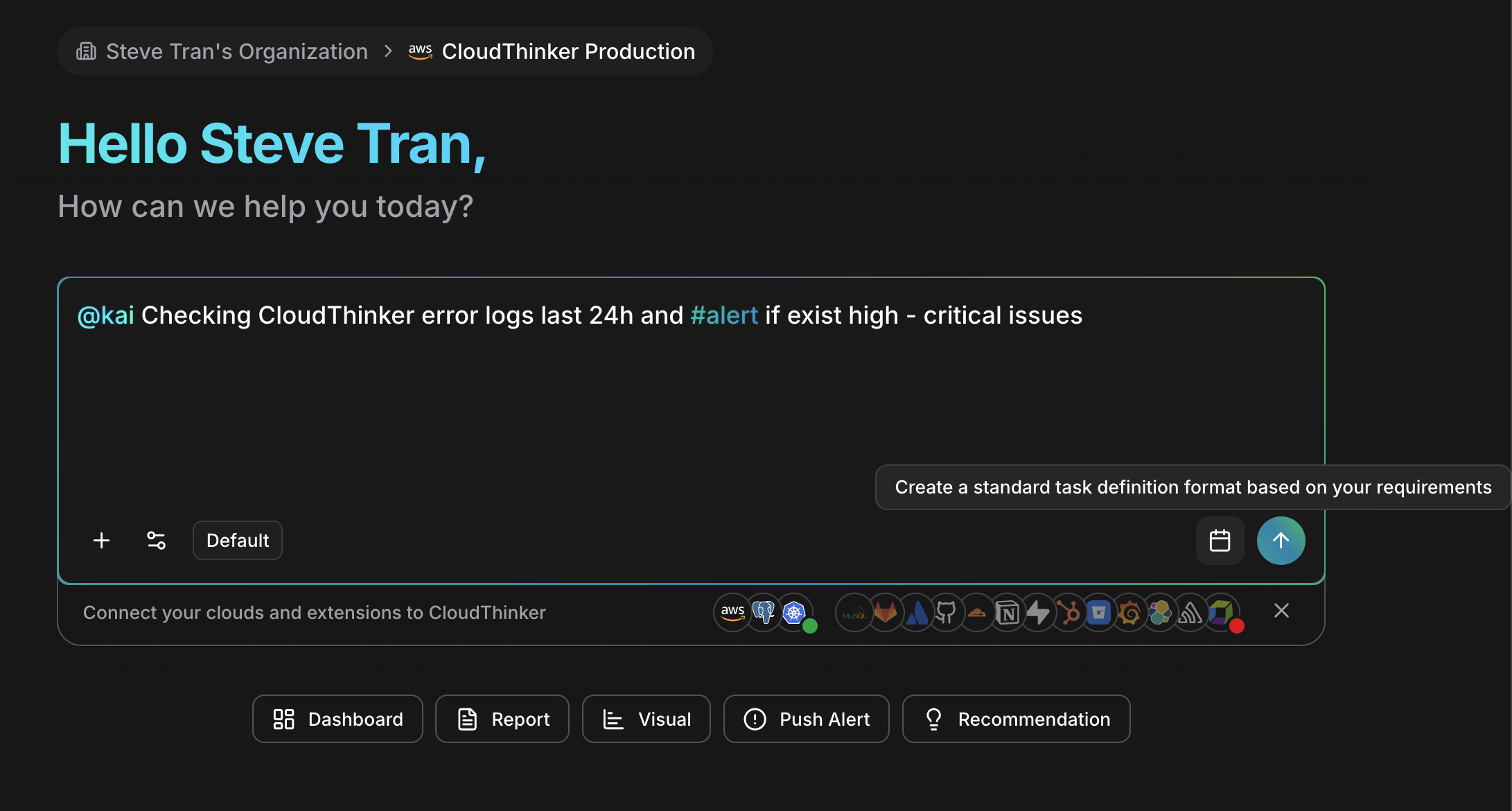
The calendar icon in the input toolbar opens the task scheduling panel
Configure the schedule
Set the recurring frequency for your task:
- Frequency — Daily, weekly, monthly, or custom interval
- Time — When the task should run (e.g., 9:00 AM)
- Day — For weekly tasks, select which day(s); for monthly, select which date
Example Tasks
Here are practical recurring task examples you can schedule:| Agent | Frequency | Example Prompt |
|---|---|---|
| @alex | Daily | Analyze EC2 spending trends and flag anomalies over $100 |
| @oliver | Weekly | Run a comprehensive security audit on all AWS accounts |
| @tony | Daily | Check database slow queries and report any taking over 5 seconds |
| @kai | Every 6 hours | Monitor Kubernetes pod health and #alert on CrashLoopBackOff |
| @anna | Monthly | Generate an executive infrastructure summary with cost, security, and performance highlights |
| @alex | Weekly | Review unused resources across all connected cloud accounts |
| @oliver | Monthly | Run SOC 2 compliance check and generate remediation report |
Managing Recurring Tasks
Once scheduled, you can manage your recurring tasks from the Tasks section in your workspace:- View — See all scheduled tasks with their next run time, frequency, and status
- Pause — Temporarily disable a task without deleting its configuration
- Edit — Update the prompt, schedule, or agent assignment
- Delete — Remove a task that is no longer needed
- View History — Review past executions, including output, duration, and any errors
Best Practices
Start with high-value, low-frequency tasks
Start with high-value, low-frequency tasks
Begin by scheduling weekly or monthly tasks that replace manual effort your team already does — like security audits or cost reports. Add daily tasks once you’re comfortable with the output.
Use specific, well-scoped prompts
Use specific, well-scoped prompts
Vague prompts produce vague results. Include scope (which accounts, regions, or resources), thresholds (flag items over $X), and desired output format (summary, table, dashboard).
Pair tasks with notifications
Pair tasks with notifications
Configure Notifications so task results reach the right people via email or Slack. This ensures outputs are acted on, not just generated.
Review task history regularly
Review task history regularly
Check execution history periodically to ensure tasks are completing successfully and producing useful output. Adjust prompts or schedules based on what you learn.
Related
Operations Hub
Browse 325+ pre-built operations you can schedule as recurring tasks
Notifications
Configure where task results are delivered
Configuration
Manage agent settings, tools, and instructions