

Documentation Index
Fetch the complete documentation index at: https://docs.cloudthinker.io/llms.txt
Use this file to discover all available pages before exploring further.
The role of integrated development workflows in engineering velocity
Modern development spans multiple systems: requirements in Jira, architecture in Confluence, code in GitHub/GitLab. Reviewing code without complete context causes engineers to miss critical issues only apparent when seeing how changes relate to Jira requirements, Confluence architecture patterns. Traditional workflows force manual jumping between systems, consuming time and creating information gaps. CloudThinker automatically gathers context from Jira tickets (requirements, acceptance criteria), Confluence documentation (code standards, definition of done). It runs comprehensive code reviews detecting bugs, security vulnerabilities, code smells, and missing test coverage, then posts findings directly to Jira, creating new tickets for critical issues or updating existing tickets with detailed comments, labels, severity classifications, pull request links, and actionable checklists. This closed-loop workflow converts discovered issues into tracked work items without manual ticket creation or context transfer.Challenges with traditional code review workflows
Isolated reviews: Reviewers see only code diffs without understanding linked Jira tickets, requirements, acceptance criteria, or whether implementation follows Confluence-documented architecture patterns and code standards Constant navigation: Must manually switch between GitHub/GitLab, Jira comment threads, Confluence documentation Cognitive overhead: Engineers lose 23 minutes of focus after each tool switch. Thorough reviews pulling context from Jira, Confluence can consume 2 hours in tool switching before analyzing code Information fragmentation: Reviewers make decisions on incomplete context because gathering comprehensive information is too time-consuming for every pull request, causing issues that slip through to testing or productionSolution: CloudThinker’s intelligent code review workflow
CloudThinker creates an intelligent bridge between development tools and project management systems. When developers create pull requests on connected repositories, CloudThinker automatically:- Gathers context: Links to Jira tickets (via ticket ID in branch name/PR title) and searches Confluence for code standards, architecture decisions, and runbooks
- Analyzes code: Runs comprehensive multi-agent review detecting bugs, security vulnerabilities, code smells, and missing test coverage
- Posts findings: Creates new Jira tickets for critical issues with detailed descriptions, severity levels, and PR links. For less critical findings, adds comments to existing tickets with labels and actionable checklists
Prerequisites
To enable CloudThinker code review with Jira integration:- GitHub/GitLab connection (see Code Review Setup)
- Atlassian connection to Jira and Confluence (see Atlassian Connection Guide) to enable context gathering and automatic ticket creation
CloudThinker Code Review with Jira Integration - Complete Workflow
Test scenario: Detect SQL Injection vulnerability and automatically create Jira ticketStep 1: Create Pull Request
Scenario:- Developer Sarah creates PR #789 to implement employee search functionality
- Branch name:
PROJ-456-employee-search(links to Jira ticket PROJ-456) - Code contains an SQL injection vulnerability
- Gathers context: Finds linked Jira ticket PROJ-456 with requirements and acceptance criteria
- Searches Confluence: Locates database security standards and SQL best practices documentation
- Analyzes code: Identifies SQL injection vulnerability in the database query
- Creates Jira ticket: Opens new security ticket with detailed findings, severity level, and PR link
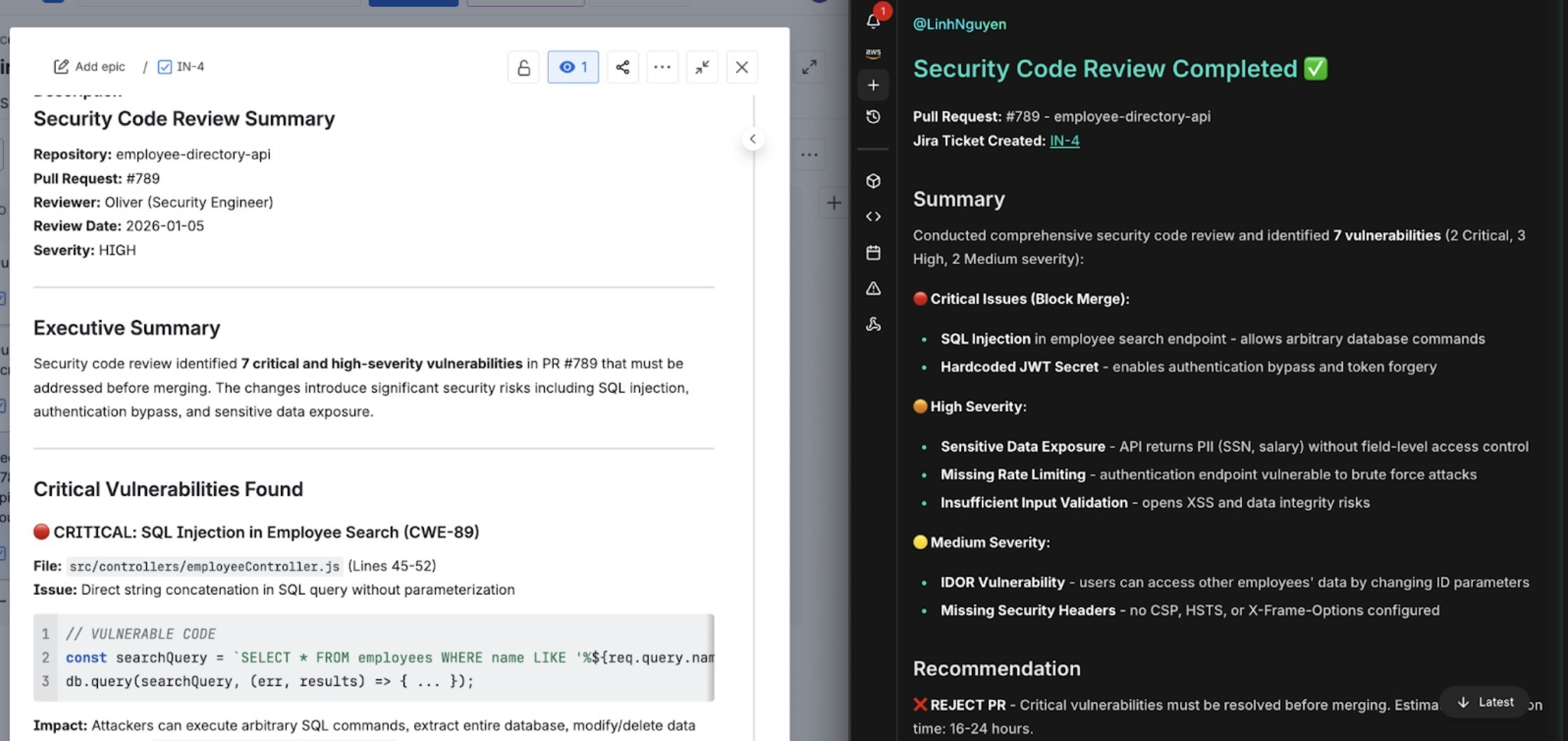
Automatic Jira ticket creation with vulnerability details and remediation steps
Step 2: Review Findings
Sarah reviews the findings in two places:- CloudThinker Dashboard: Sees comprehensive security analysis with impact assessment and recommended fixes
- GitHub PR: Views inline comments on the vulnerable code section with step-by-step remediation guidance
SEC-789) includes:
- Detailed description of the SQL injection risk
- Code snippet showing the vulnerability
- Link to the original PR #789
- Recommended fix with parameterized query example
- Security severity classification
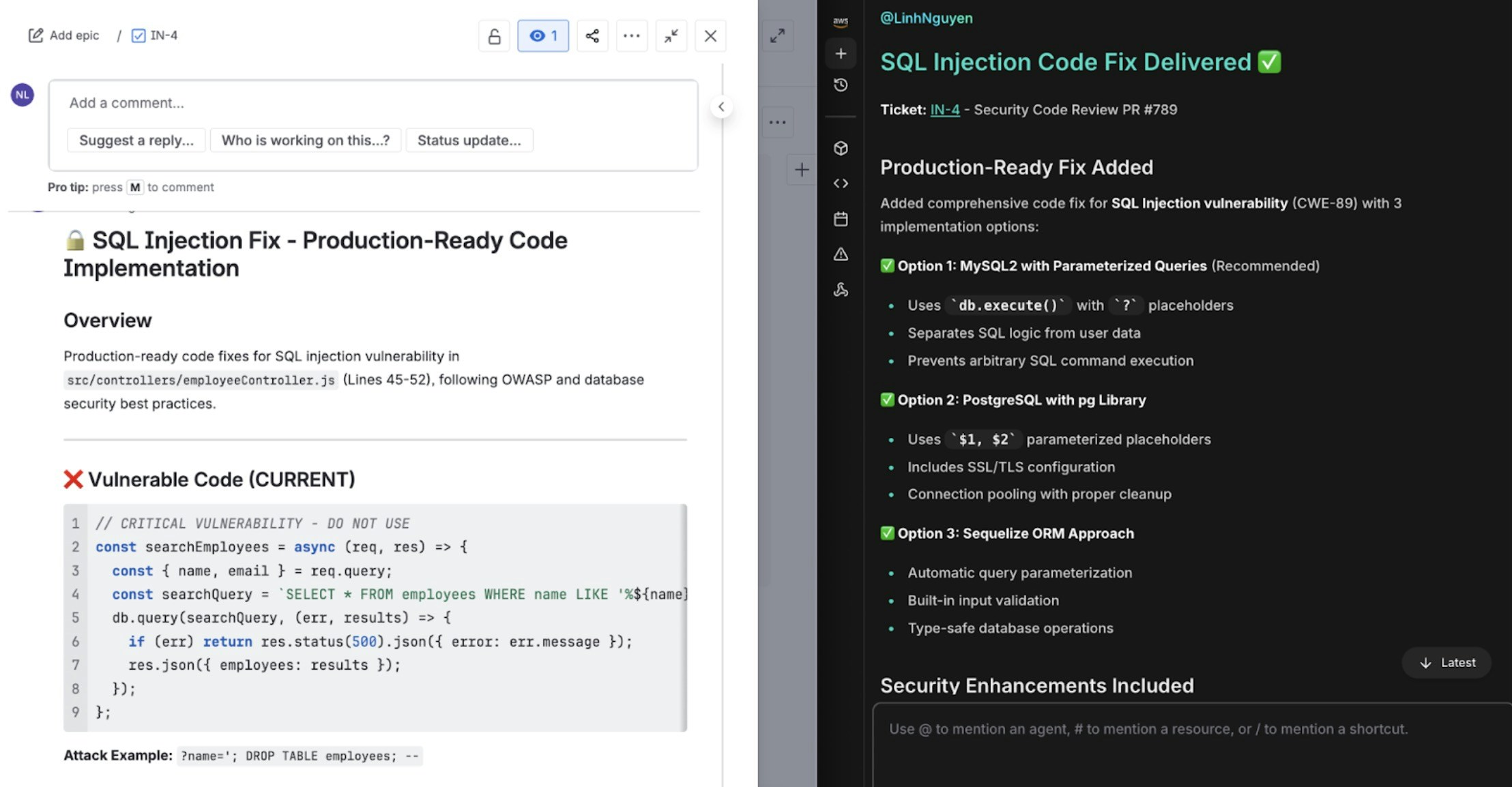
Findings visible in CloudThinker dashboard and PR comments with linked Jira ticket
Step 3: Address and Merge
Sarah implements the fix using the recommendation:- Updates the query to use parameterized statements instead of string concatenation
- Pushes the fix to the same PR #789
- CloudThinker runs the review again on the updated code
- Confirms the SQL injection is resolved
- Updates the Jira ticket (SEC-789) with resolution status and closes the ticket
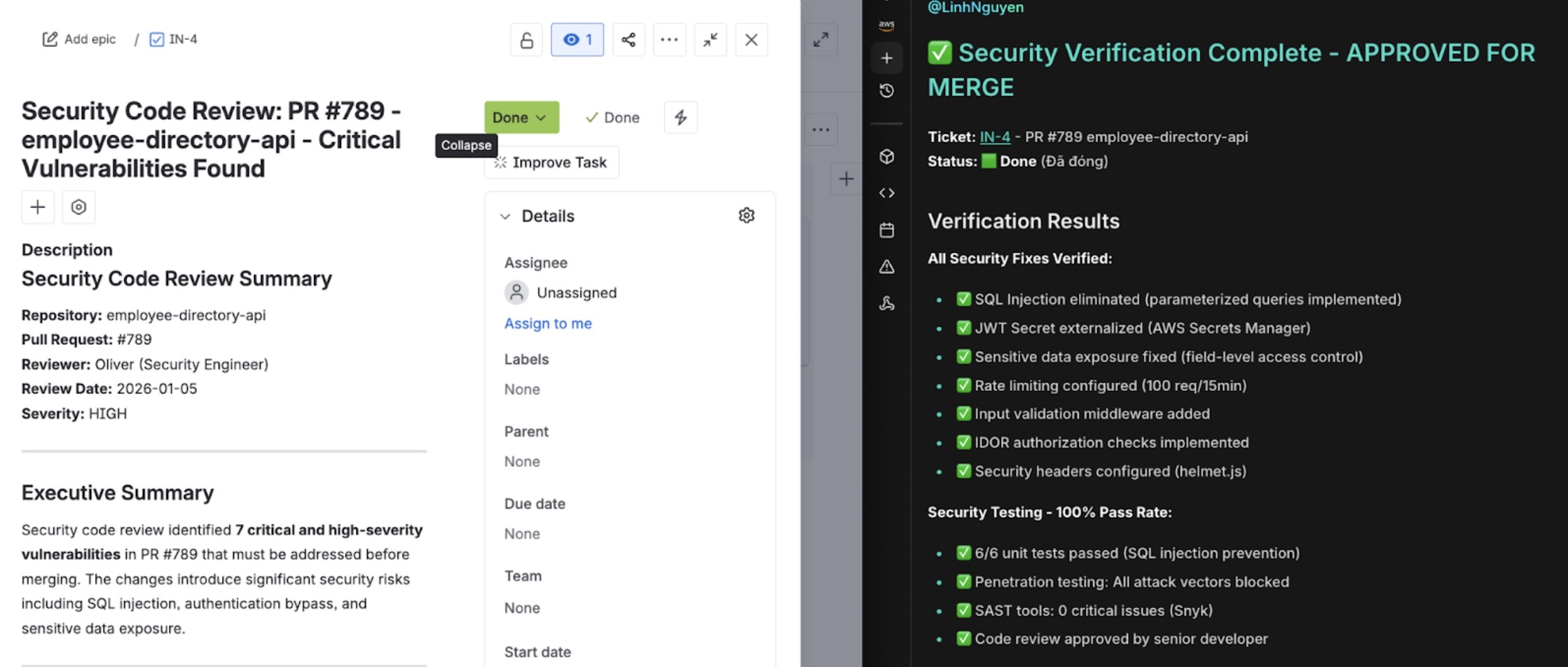
Jira ticket updated with fix verification and PR merge status
Comparison: CloudThinker versus traditional code review workflows
| Dimension | Traditional Code Review | CloudThinker Automated Review |
|---|---|---|
| Context Gathering | Manual navigation across Jira, Confluence requires 20+ minutes per review | Automatic context retrieval from all systems within seconds |
| Issue Detection | Limited by reviewer expertise and attention many issues missed | Comprehensive multi-agent analysis detecting bugs, security, code smell, missing tests |
| Event Validation | Manual Confluence inspection if team remembers to check often skipped | Automatic Confluence analysis validating event patterns and schemas |
| Result Tracking | Manual Jira ticket creation frequently skipped when busy | Automatic ticket creation or updates with full context and links |
| Review Consistency | Varies dramatically by reviewer and time pressure | Consistent analysis applying documented standards every time |
| Historical Learning | Depends on reviewer memory of past issues | Systematic analysis of historical tickets and patterns |
| Turnaround Time | 4-24 hours waiting for human reviewer availability | 3-10 minutes for comprehensive automated analysis |
| Compliance Documentation | Manual effort reconstructing review history for audits | Complete audit trail automatically captured in Jira |
What’s Next
Code Review Setup
Connect your GitHub or GitLab repositories to enable automated PR reviews

Atlassian Connection
Link Jira and Confluence for context-aware reviews and automatic ticket creation
Oliver Agent
Deep dive into Oliver’s security scanning and compliance capabilities
Code Review Leaderboard
Track team review activity and measure code quality improvements over time